nextcloud/android is a Kotlin project with 5.6k stars in the Mobile space. 📱 Nextcloud Android app
Snapshot summary built from the project's own GitHub metadata — there's no written TopGit review yet. The page will update automatically when a full review is published.
WHY NO REVIEW YET
TopGit writes full reviews for the most-starred, most-requested repositories. This page is a snapshot until then — see the READ ME tab for the original README in full.
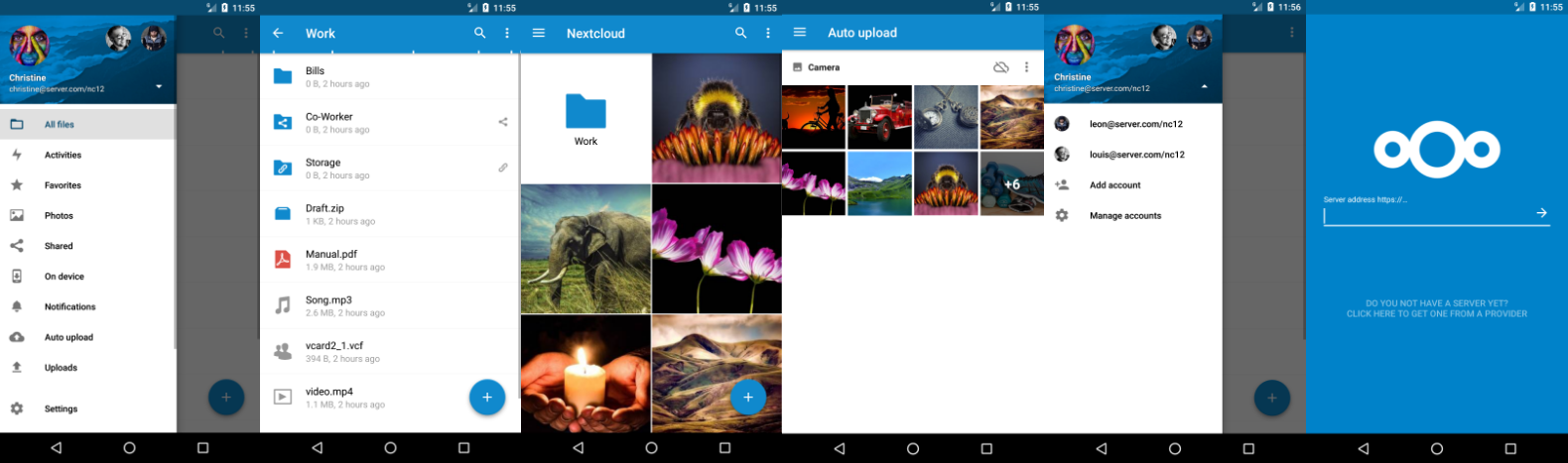
The Android client for Nextcloud. Easily work with your data on your Nextcloud.
Getting help :rescue_worker_helmet:
Note: The section Known Problems / FAQs below may already document your situation.
If you need assistance or want to ask a question about the Android app, you are welcome to ask for support in the Nextcloud Help Forum. If you have found a probable bug or have an enhancement idea, feel free to open a new Issue on GitHub.
If you're not sure if something is a bug or a configuration matter (with your client, server, proxy, etc.), the Nextcloud Help Forum is probably the best place to start so that you can get feedback (you can always return here, after getting feedback there, to report a suspected bug).
Keep in mind, that this repository only manages the Android app. If you find bugs or have problems with the server/backend, you should use the Nextcloud Help Forum to ask for help or report the bug to the Nextcloud server team!
How to contribute :rocket:
If you want to contribute to the Nextcloud Android client app, there are many ways to help whether or not you are a coder:
helping out other users on our forum at https://help.nextcloud.com
providing translations of the app on Transifex
reporting problems / suggesting enhancements by opening new issues
implementing proposed bug fixes and enhancement ideas by submitting PRs (associated with a corresponding issue preferably)
reviewing pull requests and providing feedback on code, implementation, and functionality
Add automated tests for existing functionality
installing and testing pull request builds, daily/dev builds, or RCs/release candidate builds
enhancing Admin, User, or Developer documentation
hitting hard on the latest stable release by testing fundamental features and evaluating the user experience
proactively getting familiar with how to gather debug logs from your devices (so that you are prepared to provide a detailed report if you encounter a problem with the app in the future)
Contribution Guidelines & License :scroll:
GPLv2. All contributions to this repository from June, 16 2016 on are considered to be licensed under the AGPLv3 or any later version.
Nextcloud doesn't require a CLA (Contributor License Agreement). The copyright belongs to all the individual contributors. Therefore we recommend that every contributor adds following line to the header of a file, if they changed it substantially:
Please read the Code of Conduct. This document offers some guidance to ensure Nextcloud participants can cooperate effectively in a positive and inspiring atmosphere, and to explain how together we can strengthen and support each other.
Please review the guidelines for contributing to this repository.
More information on how to contribute: https://nextcloud.com/contribute/
Start contributing :hammer_and_wrench:
Make sure you read SETUP.md and CONTRIBUTING.md before you start working on this project. But basically: fork this repository and contribute back using pull requests to the master branch.
Easy starting points are also reviewing pull requests and working on starter issues.
Logs
Getting debug info via logcat :mag:
With a linux computer:
enable USB-Debugging in your smartphones developer settings and connect it via USB
open command prompt/terminal
enter adb logcat --pid=$(adb shell pidof -s 'com.nextcloud.client') > logcatOutput.txt to save the output to this file
Note: You must have adb installed first!
On Windows:
download and install Minimal ADB and fastboot
enable USB-Debugging in your smartphones developer settings and connect it via USB
launch Minimal ADB and fastboot
enter adb shell pidof -s 'com.nextcloud.client' and use the output as <processID> in the following command:
adb logcat --pid=<processID> > "%USERPROFILE%\Downloads\logcatOutput.txt" (This will produce a logcatOutput.txt file in your downloads)
if the processID is 18841, an example command is: adb logcat --pid=18841 > "%USERPROFILE%\Downloads\logcatOutput.txt" (You might cancel the process after a while manually: it will not be exited automatically.)
For a PowerShell terminal, replace %USERPROFILE% with $env:USERPROFILE in the commands above.
On a device (with root) :wrench:
open terminal app (can be enabled in developer options)
get root access via "su"
enter logcat -d --pid $(pidof -s com.nextcloud.client) -f /sdcard/logcatOutput.txt
or
use CatLog or aLogcat
Note: Your device needs to be rooted for this approach!
Development version :hammer:
APK (direct download)
F-Droid
Known Problems and FAQs
Push notifications do not work on F-Droid editions
Push Notifications are not currently supported in the F-Droid builds due to dependencies on Google Play services.
Remarks :scroll:
Google Play and the Google Play logo are trademarks of Google Inc.
How does nextcloud/android compare to other Mobile projects?
nextcloud/android is tracked by TopGit in the Mobile category, with 5.6k GitHub stars and written in Kotlin. Browse the Mobile topic page on TopGit to compare it against similar projects by stars and activity.
Is nextcloud/android open source?
Yes — nextcloud/android ships under the GPL-2.0 license, which makes its source code freely readable (and, depending on license terms, forkable and reusable). Source: github.com/nextcloud/android.
What else is in the Mobile space?
nextcloud/android is tracked by TopGit under the Mobile category, alongside 9 GitHub-tagged topics. Trending and Topics pages list peer repositories of comparable stars and language.
What is nextcloud/android?
nextcloud/android (nextcloud/android) is a Kotlin project on GitHub. From the project's own README: 📱 Nextcloud Android app
Where do I read more about nextcloud/android?
This TopGit page is a snapshot — the READ ME tab shows the project's own README content (links stripped, images preserved). The GitHub repository at github.com/nextcloud/android is the definitive source.
Why is nextcloud/android categorized under Mobile?
TopGit places nextcloud/android in the Mobile category based on its GitHub topics and description (tagged: "android", "hacktoberfest", "java"). Categories are assigned from real repository metadata, not editorial guesswork.
Read full README in the tab above.
Still deciding about android?
One click hands the question to an AI along with this page — see what it says about android.
 /android