OpenGVLab/InternGPT — an AI tool — sits at 3.2k GitHub stars in the AI Tools space. InternGPT (iGPT) is an open source demo platform where you can easily showcase your AI models. Now it supports DragGAN, ChatGPT, ImageBind, multimodal chat like GPT-4, SAM, interactive image editing, etc. Try it at igpt.opengvlab.com (支持DragGAN、ChatGPT、ImageBind、SAM的在线Demo系统)
Snapshot summary built from the project's own GitHub metadata — there's no written TopGit review yet. The page will update automatically when a full review is published.
WHY NO REVIEW YET
TopGit writes full reviews for the most-starred, most-requested repositories. This page is a snapshot until then — see the READ ME tab for the original README in full.
The project is still under construction, we will continue to update it and welcome contributions/pull requests from the community.
|
|
🤖💬 InternGPT [Paper]
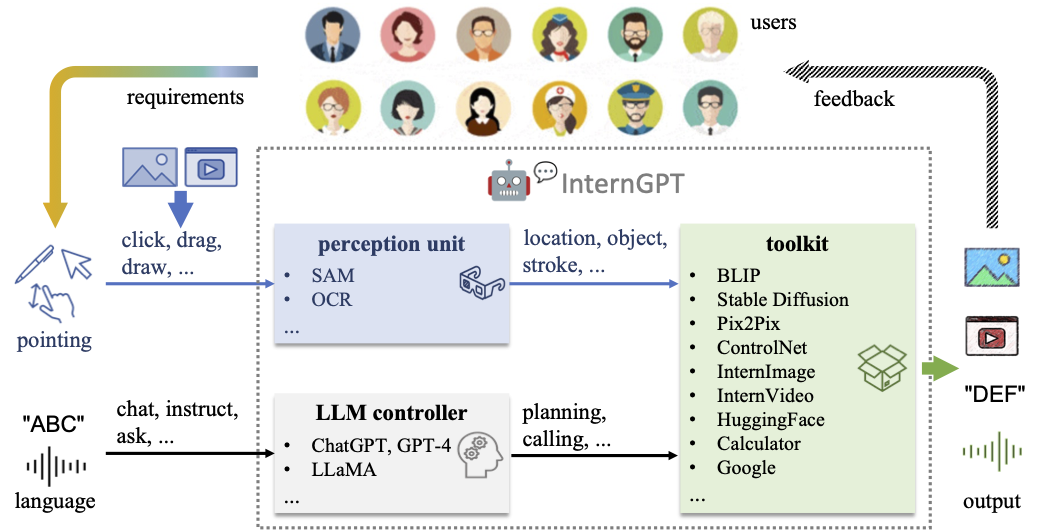
InternGPT(short for iGPT) / InternChat(short for iChat) is pointing-language-driven visual interactive system, allowing you to interact with ChatGPT by clicking, dragging and drawing using a pointing device. The name InternGPT stands for interaction, nonverbal, and ChatGPT. Different from existing interactive systems that rely on pure language, by incorporating pointing instructions, iGPT significantly improves the efficiency of communication between users and chatbots, as well as the accuracy of chatbots in vision-centric tasks, especially in complicated visual scenarios. Additionally, in iGPT, an auxiliary control mechanism is used to improve the control capability of LLM, and a large vision-language model termed Husky is fine-tuned for high-quality multi-modal dialogue (impressing ChatGPT-3.5-turbo with 93.89% GPT-4 Quality).
🤖💬 Online Demo
InternGPT is online (see https://igpt.opengvlab.com). Let's try it!
[NOTE] It is possible that you are waiting in a lengthy queue. You can clone our repo and run it with your private GPU.
(2023.06.19) We optimize the GPU memory usage when executing the tools. Please refer to Get Started.
(2023.06.19) We update the INSTALL.md which provides more detailed instructions for setting up environment.
(2023.05.31) It is with great regret that due to some emergency reasons, we have to suspend the online demo. If you want to experience all the features, please try them after deploying locally.
(2023.05.24) 🎉🎉🎉 We have supported the DragGAN! Please see the video demo for the usage. Let's try this awesome feauture: Demo. (我们现在支持了功能完全的DragGAN! 可以拖动、可以自定义图片,具体用法见video demo,复现的DragGAN代码在这里,在线demo在这里)
(2023.05.18) We have supported ImageBind. Please see the video demo for the usage.
(2023.05.15) The model_zoo including HuskyVQA has been released! Try it on your local machine!
(2023.05.15) Our code is also publicly available on Hugging Face! You can duplicate the repository and run it on your own GPUs.
🧭 User Manual
Update:
(2023.05.24) We now support DragGAN. You can try it as follows:
Click the button New Image;
Click the image where blue denotes the start point and red denotes the end point;
Notice that the number of blue points is the same as the number of red points. Then you can click the button Drag It;
After processing, you will receive an edited image and a video that visualizes the editing process.
(2023.05.18) We now support ImageBind. If you want to generate a new image conditioned on audio, you can upload an audio file in advance:
To generate a new image from a single audio file, you can send the message like: "generate a real image from this audio";
To generate a new image from audio and text, you can send the message like: "generate a real image from this audio and {your prompt}";
To generate a new image from audio and image, you need to upload an image and then send the message like: "generate a new image from above image and audio".
Main features:
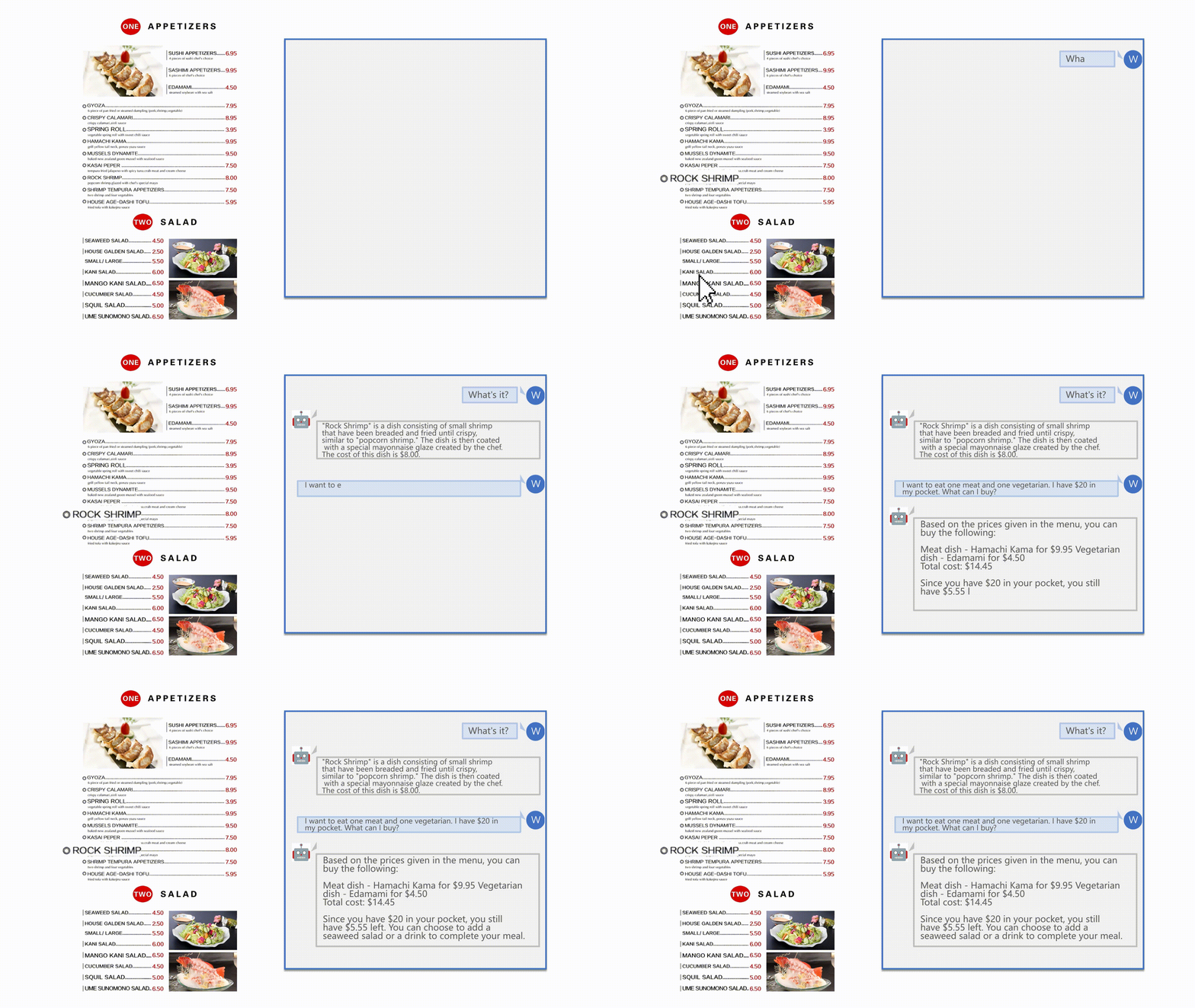
After uploading the image, you can have a multi-modal dialogue by sending messages like: "what is it in the image?" or "what is the background color of image?".
You also can interactively operate, edit or generate the image as follows:
You can click the image and press the button Pick to visualize the segmented region or press the button OCR to recognize the words at chosen position;
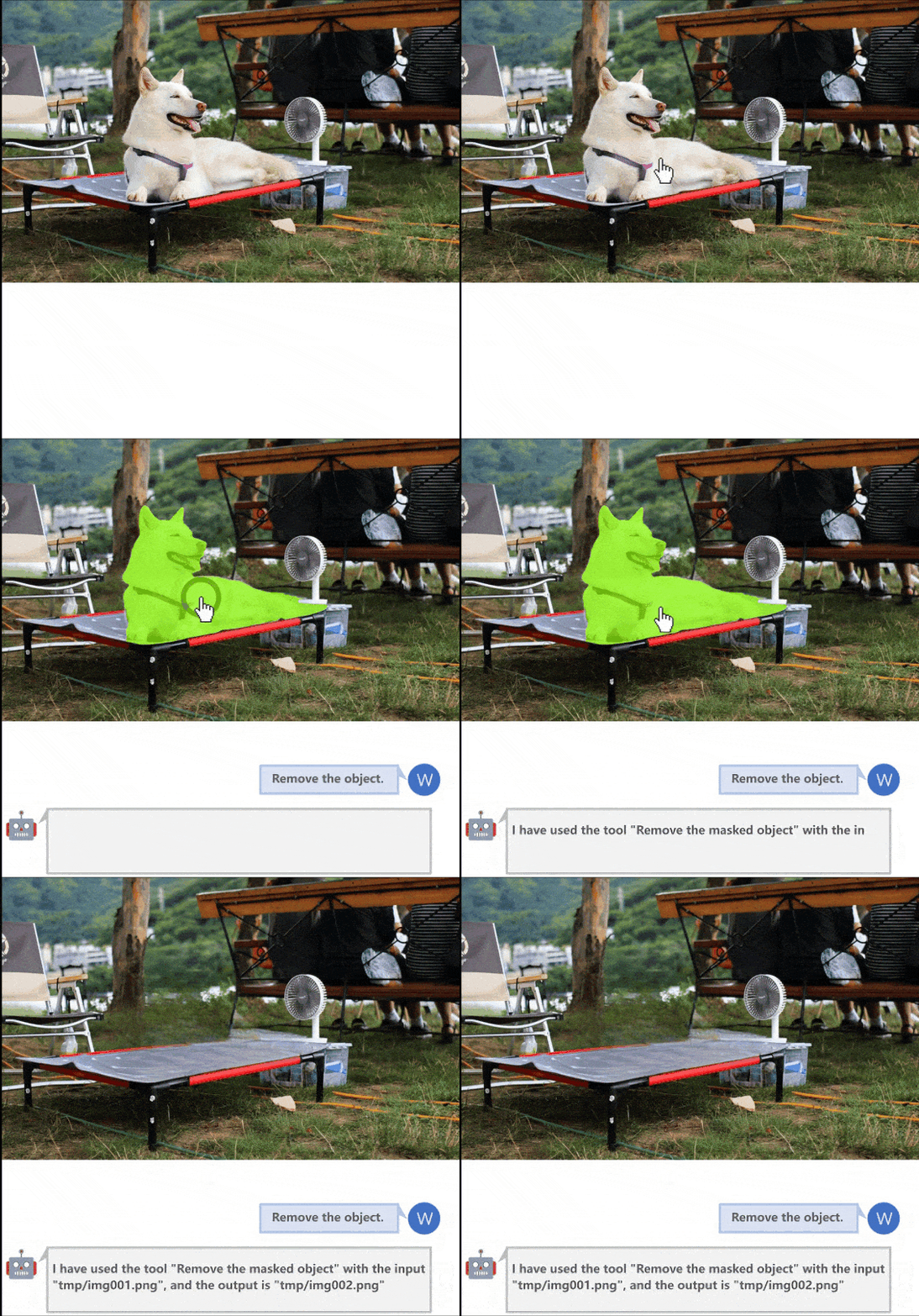
To remove the masked reigon in the image, you can send the message like: "remove the masked region";
To replace the masked reigon in the image, you can send the message like: "replace the masked region with {your prompt}";
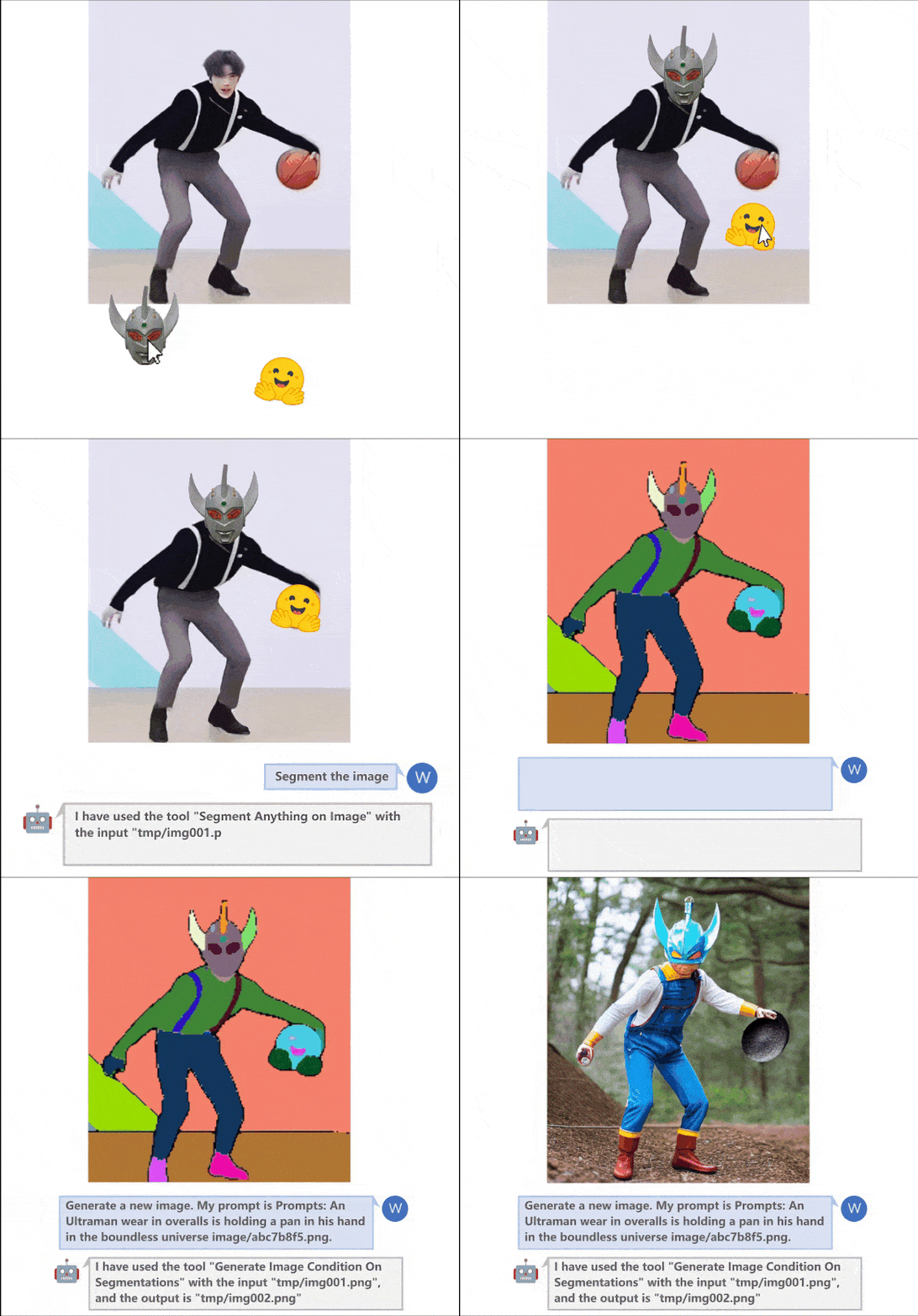
To generate a new image, you can send the message like: "generate a new image based on its segmentation describing {your prompt}"
To create a new image by your scribble, you should press button Whiteboard and draw in the board. After drawing, you need to press the button Save and send the message like: "generate a new image based on this scribble describing {your prompt}".
🗓️ Schedule
Support VisionLLM
Support Chinese
Support MOSS
More powerful foundation models based on InternImage and InternVideo
More accurate interactive experience
OpenMMLab toolkit
Web page & code generation
Support search engine
Low cost deployment
Support DragGAN
Support ImageBind
Response verification for agent
Prompt optimization
User manual and video demo
Support voice assistant
Support click interaction
Interactive image editing
Interactive image generation
Interactive visual question answering
Segment anything
Image inpainting
Image caption
Image matting
Optical character recognition
Action recognition
Video caption
Video dense caption
Video highlight interpretation
🏠 System Overview
🎁 Major Features
Remove the masked object
Interactive image editing
Image generation
Interactive visual question answer
Interactive image generation
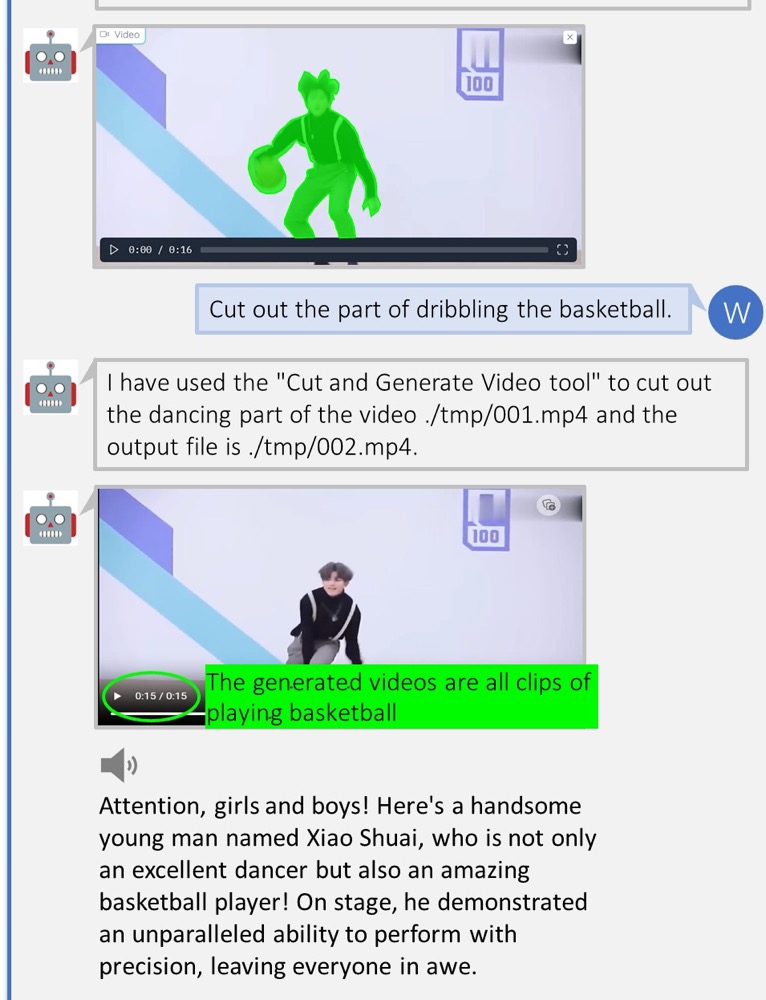
Video highlight interpretation
🛠️ Installation
See INSTALL.md
👨🏫 Get Started
Running the following shell can start a gradio service for our basic features:
In this situation, you can only use the functions of DragGAN, which frees you from some dependencies that you are not interested in.
🎫 License
This project is released under the Apache 2.0 license.
🖊️ Citation
If you find this project useful in your research, please consider cite:
@article{2023interngpt,
  title={InternGPT: Solving Vision-Centric Tasks by Interacting with ChatGPT Beyond Language},
  author={Liu, Zhaoyang and He, Yinan and Wang, Wenhai and Wang, Weiyun and Wang, Yi and Chen, Shoufa and Zhang, Qinglong and Lai, Zeqiang and Yang, Yang and Li, Qingyun and Yu, Jiashuo and others},
  journal={arXiv preprint arXiv:2305.05662},
  year={2023}
}
🤝 Acknowledgement
Thanks to the open source of the following projects:
Hugging Face
LangChain
TaskMatrix
SAM
Stable Diffusion
ControlNet
InstructPix2Pix
BLIP
Latent Diffusion Models
EasyOCR
ImageBind
DragGAN
Welcome to discuss with us and continuously improve the user experience of InternGPT.
If you want to join our WeChat group, please scan the following QR Code to add our assistant as a Wechat friend:
The most recent commit recorded on OpenGVLab/InternGPT was 2.3 years ago, based on the GitHub push timestamp. The repository has 231 forks — one of the better signals of community interest.
How does OpenGVLab/InternGPT compare to other AI Tools projects?
OpenGVLab/InternGPT is tracked by TopGit in the AI Tools category, with 3.2k GitHub stars and written in Python. Browse the AI Tools topic page on TopGit to compare it against similar projects by stars and activity.
How many stars does OpenGVLab/InternGPT have?
OpenGVLab/InternGPT has 3.2k GitHub stars — refresh the page for the live number, or check github.com/OpenGVLab/InternGPT. TopGit mirrors GitHub's count but does not claim minute-by-minute accuracy.
What is OpenGVLab/InternGPT?
OpenGVLab/InternGPT (OpenGVLab/InternGPT) is a Python project on GitHub. From the project's own README: InternGPT (iGPT) is an open source demo platform where you can easily showcase your AI models. Now it supports DragGAN, ChatGPT, ImageBind, multimodal chat like GPT-4, SAM, interactive image editing, etc. Try it at igpt.opengvlab.com (支持DragGAN、ChatGPT、ImageBind、SAM的在线Demo系统)
What language is OpenGVLab/InternGPT written in?
OpenGVLab/InternGPT is written primarily in Python. GitHub's language field is based on the largest share of bytes in the default branch.
What topics is OpenGVLab/InternGPT associated with?
Why is OpenGVLab/InternGPT categorized under AI Tools?
TopGit places OpenGVLab/InternGPT in the AI Tools category based on its GitHub topics and description (tagged: "chatgpt", "click", "draggan"). Categories are assigned from real repository metadata, not editorial guesswork.
Read full README in the tab above.
Still deciding about InternGPT?
One click hands the question to an AI along with this page — see what it says about InternGPT.

 /InternGPT


 |
 |