As a backend project, redox-os/orbtk has picked up 3.8k stars on GitHub (Rust). The Rust UI-Toolkit.
Snapshot summary built from the project's own GitHub metadata — there's no written TopGit review yet. The page will update automatically when a full review is published.
WHY NO REVIEW YET
TopGit writes full reviews for the most-starred, most-requested repositories. This page is a snapshot until then — see the READ ME tab for the original README in full.
It is with great sadness that I announce that OrbTk is sunsetting. In the many years since I first made OrbTk, the Rust GUI ecosystem has grown at an amazing rate. Toolkits with more features have developed, and which are more actively maintained. I first created this project to bootstrap UI development on Redox OS. Many of the applications on Redox use OrbTk. @FloVanGH stepped in to do large refactoring between the 0.2 and 0.3 release, which modernized the OrbTk API. @rzerres stepped in to add many features and maintain OrbTk since the 0.3 release.
I have since moved on to working with iced. @FloVanGH has taken a job working on slint. And @rzerres has expressed interest in using slint for their projects. Both iced and slint provide renderer agnostic toolkits that will be compatible with Redox OS, but they also support more features than OrbTk. So, I have decided, with agreement from @rzerres, that OrbTk is to stop being actively maintained, in favor of these other Rust native toolkits.
-- Jeremy Soller
Original README
The Orbital Widget Toolkit is a cross-platform (G)UI toolkit for building scalable user interfaces with the programming language Rust. It's based
on the Entity Component System Pattern and provides a functional Reactive-like API.
The main goals of OrbTk are speed, ease of use, and cross-platform compatibility.
Screenshots
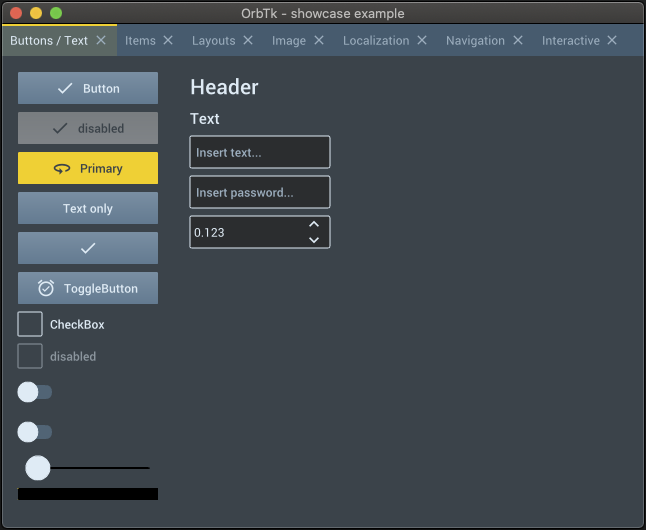
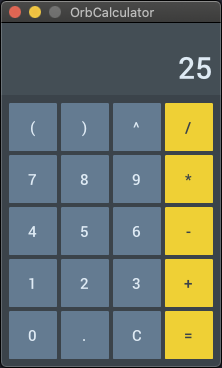
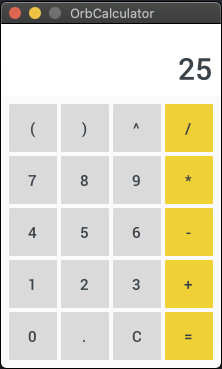
The next images are taken from example applications, that have been compiled for MacOS / OS-X.
The showcase example
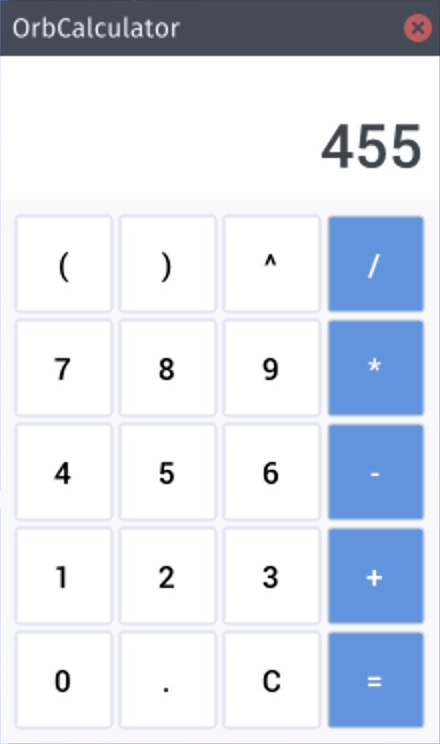
Themed calculator examples
Other screenshots have been rendered from examples code, that is stored
inside the orbtk crate.
Features:
Modern lightweight API
Cross platform
Modular crates
Based on Entity Component System library DCES
Flexible event system
Integrated widget library
Custom widgets
Custom theming engine
Dynamic theme switching
Integrated debugging tools
Localization
Platforms
Redox OS
Linux
macOS
Windows
openBSD (not tested, but should work)
Web (broken, will be fixed soon)
Android (wip, will be released soon)
iOS (wip, will be released soon)
Ubuntu Touch (on hold)
Planned features
Conformable use of async
More default widgets
Book
Animations
Split application in modules
3D context
More integrated debugging tools
Documentation
Build and open documentation
You can build and view the latest documentation by executing the following command:
cargo doc --no-deps --open
OrbTk book
The OrbTk book is written from a developers perspective. It aims to
introduce the basic concept, beside a bird's eye view of the toolkit
structure. An in depth discussion of the provided crates is followed
by example listings. This section collects example code with annotated
blocks. The annotations are targeting best practice usage of available
widgets, their interaction with other modules coupled with a
descriptive text where reasonable.
A precompiled version is available for online reading.
You are invited to checkout its repository at OrbTk book.
Please do not expect at finalized version. It is not complete at
all. The given statis is marked as work in progress (WIP). Any help to
improve the chapters and/or translations are quite welcome.
Usage
To include OrbTk as an external dependency into your project, add this
line to its Cargo.toml file:
...
[dependencies]
...
orbtk = "0.3.1-alpha4"
...
To use the latest development version of OrbTk as an external
dependency, add this line into its Cargo.toml file:
Widgets are the building blocks of user interfaces in OrbTk. They are
things like Buttons, TextBoxes, ListViews, Views (Screens) and
Grid(Layout)s. Each widget implements the Widget
trait
and is generated by the widget!
macro. A
widget consists of a name like Button and a list of its properties
like text: String, background: Brush or count: u32. After the
build method of a widget is called it's added to the Entity
Component System where it exists as an Entity (index) with
Components. The struct of a widget serves as a builder using the
builder
pattern.
Each widget has to implement the Template
trait.
The template defines the structure and the default values that the
widget will store in its properties. For example: You can define your
hand-crafted Button widget (lets call it MyButton). MyButton is
represented as a tree of three child widgets: A top level
Container widget that will hand over to its child, the StackPanel
widget, which in turn will hand over to its child, the TextBlock
widget.
The next code snippet prints out the source code of this basic Template trait:
impl Template for MyButton {
	fn template(self, id: Entity, ctx: &mut BuildContext) -> Self {
		 self.name("MyButton")
			.style("my_button_style")
			.background("#000000")
			.count(0)
			.text("Initial text")
			.child(Container::new()
					// Container references the same background as MyButton
					.background(id)
					.child(TextBlock::new()
							// TextBlock references the same text as MyButton
							.text(id)
							.build(ctx)
					)
					.build(ctx)
			)
	}
}
Widget State
Any changes that are triggered via user interaction or via events are
handled inside the state of a widget. If generated, they are processed
to manipulate the inner state. Each state must implement the State
trait.
The inner state of a widget is represented by the current values of
its properties.
Have a look at this code snippet to make up a state trait:
#[derive(Default, AsAny)]
struct MyState {
	...
}

impl State for MyState {
	fn update(&mut self, _: &mut Registry, ctx: &mut Context) {
		// update the widget
		...
	}
}

widget!(
	// Add MyState as state of MyWidget
	MyWidget<MyState> {
		...
	}
);
The update method requires a Context
parameter.
This structure provides access to the state's widget itself (the entity)
and its components (the properties). It also provides methods (the associated functions) to access
the children of the widget, this it is able to manipulate the widget tree.
Styling widgets and define themes
OrbTk provides a theme engine base on
RON. The engine provides the
following features:
Split theme in different files
Reference resources values in the theme files (colors, font stuff)
Derive styles
Dynamic theme switching
State styling (pressed | selected | focused | disabled)
But you are not requested to reference a theme engine. OrbTk
enables as well the declaraton of property values inside the source
code (inlined theming).
Localization
OrbTk supports the functionality to register an application wide
localization service. A localization service has to implement the
Localization
trait.
Example
pub struct MyLocalization {
	...
}

impl Localization for MyLocalization {
	/// Gets the current language by language key e.g. `en_US` or `de_DE`.
	fn language(&self) -> &String {
		...
	}

	/// Sets the current language by key e.g. `en_US` or `de_DE`.
	fn set_language(&mut self, key: &str) {
		...
	}

	/// Gets the translated text for the given key. If there is no given translation the `key` will be returned as result.
	fn text(&self, key: String) -> String {
		...
	}
}
It is possible to register a localization service for an
application. Simply make use of the
RonLocalization,
that can read localization dictionaries coded in the
RON format.
Example
let de_de = r#"
	Dictionary(
		words: {
			"hello": "Hallo",
			"world": "Welt",
		}
	)
	"#;

Application::new()
	.localization(
		RonLocalization::create()
			// sets the initial language
			.language("en_US")
			// adds an language dictionary to the localization service.
			.dictionary("de_DE", de_de)
			.build()
	)
	.window(|ctx| {
		Window::new()
			.title("OrbTk - showcase example")
			.position((100, 100))
			.size(600, 730)
			.resizable(true)
			.child(TextBlock::new().text("hello").build(ctx))
			.build(ctx)
	})
	.run();
Inside this example code the text property (value hello) is used
as the key. This key is matched to the correponding value inside the
dictionary of the corresponding localization service. If you haven't defined a
dictionary for the current language, OrbTk will simply take the value of the property itself.
You are free to start development without and any localization, but add it afterwards.
You may switch the language at runtime. Inside the state widget you simply consume the set_language method, that is accessible via the
Context
structure.
Run Examples
Build with sdl2 installation
If your target Operating-System is Linux, macOS or Windows, a
sdl2 installation is required. Please check the documentation that
is provieded for th rust-sdk2 crate.
Build with sdl2 from source
As an alternative, you may build OrbTk while bundling sdl2. To activate the bundled feature go ahead like this:
cargo run --example showcase --features bundled
Please asure, that you toolchain will provide a working C compiler (e.g. gcc, clang, or MS's compiler).
To target linux, you also need to provide cmake:
sudo apt install cmake
If you have trouble build the provided OrbTk examples or simply don't want to
use a C compiler, please check the backend section. It contains
alternatives.
All example source-code resides inside the examples subdirectory of the orbtk subcrate.
Compile, start and play around with the showcase example while executing the following command:
cargo run --example showcase --release
OrbTk has an integrated debug tools. It will oultline the bounds of
all managed widgets inside the widget tree. This will include
invisible ones. You may also want to print out the tree structure of your app.
This is activated, via feature flags like this:
cargo run --example showcase --release --features "debug, log"
Run Examples with cargo-node
To run the examples as a browser, electron or cordova app you have to install cargo-node:
cargo install -f cargo-node
cargo-node itself relies on npm version 6.9.0, which is included with Node.js version 10.16.3. You can download it
from its homepage.
Rust's cargo is also required. All cargo-node's dependencies are installed automatically.
Start examples
To start the showcase example as a node binary, executing one of the following commands:
Run as browser app:
cargo node run --target browser --example showcase
Run as electron app:
cargo node run --target electron --example showcase
Run as cordova app on android:
cargo node run --target android --example showcase
crates structure
orbtk: sub-crate, that provides all needed components to build an OrbTk cross platform UI.
orbtk_core: sub-crate, that provides the core components of Orbtk (widget basics, tree handling, theming)
orbtk_orbclient: sub-crate, that handles cross platform aware window and event management. It is based on OrbClient.
orbtk_tinyskia: Wrapper methods that consumes the tiny-skia2D rendering engine.
orbtk_widgets: sub-crate providing the standard OrbTk widget library and and theming support.
Inspirations
Flutter
React
Yew
Showcases
Plural Planner: Task app
Space Editor: 2D Tile Map Editor compatible with OrbGame
twin-commander: A twin-panel file manager specifically for the Redox OS
Contribution
If you want to help and improve OrbTk submit your feedback via the
issue tracker. All pull
requests are welcome and will be reviewed. You can also discuss with
other OrbTk developers via the Redox chat
interface. Please join the orbtk
channel.
Contribution check list
Please document for all your pub structs, traits and functions.
Please add suitable tests methods.
Use static &str for widget ids and new style definitions.
For widget development check ProgressBar or Slider as an example.
Add your changes inside CHANGELOG.md
Extend the example section to show consumption of your code.
Always run cargo fmt before uploading.
Please run cargo cippy before uploading.
Create the PR using our template.
License
Source-Code is licensed under MIT license (LICENSE).
The most recent commit recorded on redox-os/orbtk was 4.1 years ago, based on the GitHub push timestamp. The repository has 187 forks — one of the better signals of community interest.
How does redox-os/orbtk compare to other Backend projects?
redox-os/orbtk is tracked by TopGit in the Backend category, with 3.8k GitHub stars and written in Rust. Browse the Backend topic page on TopGit to compare it against similar projects by stars and activity.
How many stars does redox-os/orbtk have?
redox-os/orbtk has 3.8k GitHub stars — refresh the page for the live number, or check github.com/redox-os/orbtk. TopGit mirrors GitHub's count but does not claim minute-by-minute accuracy.
Is redox-os/orbtk open source?
Yes — redox-os/orbtk ships under the MIT license, which makes its source code freely readable (and, depending on license terms, forkable and reusable). Source: github.com/redox-os/orbtk.
What is redox-os/orbtk?
redox-os/orbtk (redox-os/orbtk) is a Rust project on GitHub. From the project's own README: The Rust UI-Toolkit.
Where do I read more about redox-os/orbtk?
This TopGit page is a snapshot — the READ ME tab shows the project's own README content (links stripped, images preserved). The GitHub repository at github.com/redox-os/orbtk is the definitive source.
Read full README in the tab above.
Still deciding about orbtk?
One click hands the question to an AI along with this page — see what it says about orbtk.

 /orbtk