As a frontend project, RicoSuter/NSwag has picked up 7.4k stars on GitHub (C#). The Swagger/OpenAPI toolchain for .NET, ASP.NET Core and TypeScript.
Snapshot summary built from the project's own GitHub metadata — there's no written TopGit review yet. The page will update automatically when a full review is published.
WHY NO REVIEW YET
TopGit writes full reviews for the most-starred, most-requested repositories. This page is a snapshot until then — see the READ ME tab for the original README in full.
:point_right: Announcing Apimundo: An API documentation system based on NSwag and NJsonSchema :point_left:
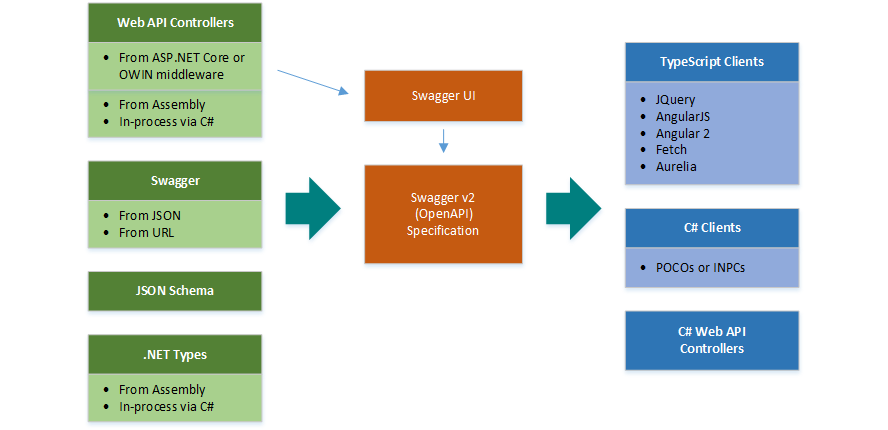
NSwag is a Swagger/OpenAPI 2.0 and 3.0 toolchain for .NET, .NET Core, Web API, ASP.NET Core, TypeScript (jQuery, AngularJS, Angular 2+, Aurelia, KnockoutJS and more) and other platforms, written in C#. The OpenAPI/Swagger specification uses JSON and JSON Schema to describe a RESTful web API. The NSwag project provides tools to generate OpenAPI specifications from existing ASP.NET Web API controllers and client code from these OpenAPI specifications.
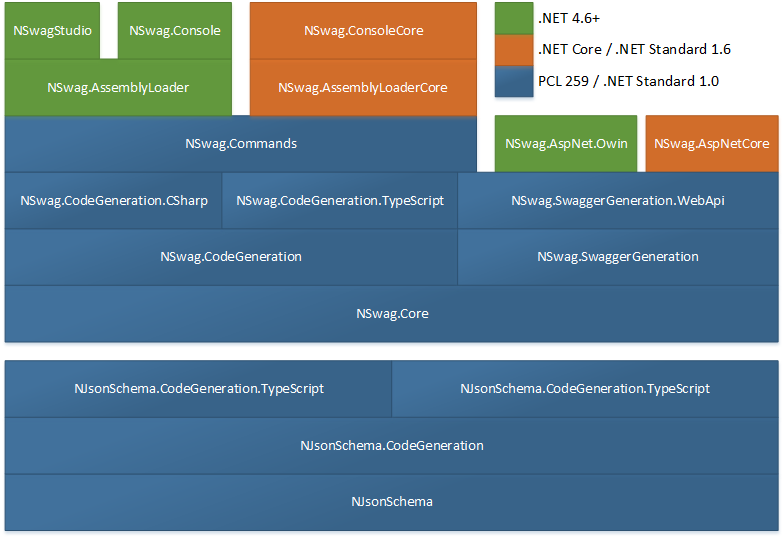
The project combines the functionality of Swashbuckle (OpenAPI/Swagger generation) and AutoRest (client generation) in one toolchain (these two libs are not needed). This way a lot of incompatibilites can be avoided and features which are not well described by the OpenAPI specification or JSON Schema are better supported (e.g. inheritance, enum and reference handling). The NSwag project heavily uses NJsonSchema for .NET for JSON Schema handling and C#/TypeScript class/interface generation.
The project is developed and maintained by Rico Suter and other contributors.
Features
Generate Swagger 2.0 and OpenAPI 3.0 specifications from C# ASP.NET (Core) controllers
Serve the specs via ASP.NET (Core) middleware, optionally with Swagger UI or ReDoc
Generate C# or TypeScript clients/proxies from these specs
Everything can be automated via CLI (distributed via NuGet tool or build target; or NPM)
CLI configured via JSON file or NSwagStudio Windows UI
Ways to use the toolchain
Simple to use Windows GUI, NSwagStudio
By using the OpenAPI or OpenAPI UI OWIN and ASP.NET Core Middlewares (also serves the Swagger UI) (recommended)
Via command line (Windows, Mac and Linux support through Mono or .NET Core console binary, also via NPM package)
In your C# code, via NuGet
In your MSBuild targets
With ServiceProjectReference tags in your .csproj (preview)
In your Azure V2 Functions (external project, might not use latest NSwag version)
Tutorials
Add NSwag to your ASP.NET Core app
Integrate the NSwag toolchain into your ASP.NET Web API project
Generate an Angular TypeScript client from an existing ASP.NET Web API web assembly
Video Tutorial: How to integrate NSwag into your ASP.NET Core Web API project (5 mins)
OpenAPI/Swagger Generators
ASP.NET Web API assembly to OpenAPI (supports .NET Core)
AspNetCoreOpenApiDocumentGenerator
WebApiOpenApiDocumentGenerator
Generates an OpenAPI specification for Web API controllers
WebApiToOpenApiCommand
Generates an OpenAPI specification for controllers in an external Web API assembly
Also supports loading of .NET Core assemblies
TypesToOpenApiCommand
Generates an OpenAPI specification containing only types from .NET assemblies
Code Generators
CSharp Client
CSharpClientGenerator
Generates C# clients from an OpenAPI specification
Generates POCOs or classes implementing INotifyPropertyChanged supporting DTOs
The generated clients can be used with full .NET, .NET Core, Xamarin and .NET Standard 1.4 in general
CSharp Controllers (contract first/schema first development)
CSharpControllerGenerator
Generates Web API Controllers based on an OpenAPI specification (ASP.NET Web API and ASP.NET Core)
TypeScript Client
TypeScriptClientGenerator
Generates TypeScript clients from an OpenAPI specification
Available templates/supported libraries:
JQuery with Callbacks, JQueryCallbacks
JQuery with promises JQueryPromises
AngularJS using $http, AngularJS
Angular (v2+) using the http service, Angular
window.fetch API and ES6 promises, Fetch (use this template in your React/Redux app)
Aurelia using the HttpClient from aurelia-fetch-client, Aurelia (based on the Fetch template)
The following code shows how to read an OpenAPI/Swagger specification and generate C# client classes to call the described web services:
var document = await OpenApiDocument.FromFileAsync("openapi.json");
var clientSettings = new CSharpClientGeneratorSettings
{
    ClassName = "MyClass",
    CSharpGeneratorSettings =
    {
        Namespace = "MyNamespace"
    }
};

var clientGenerator = new CSharpClientGenerator(document, clientSettings);
var code = clientGenerator.GenerateFile();
Check out the project Wiki for more information.
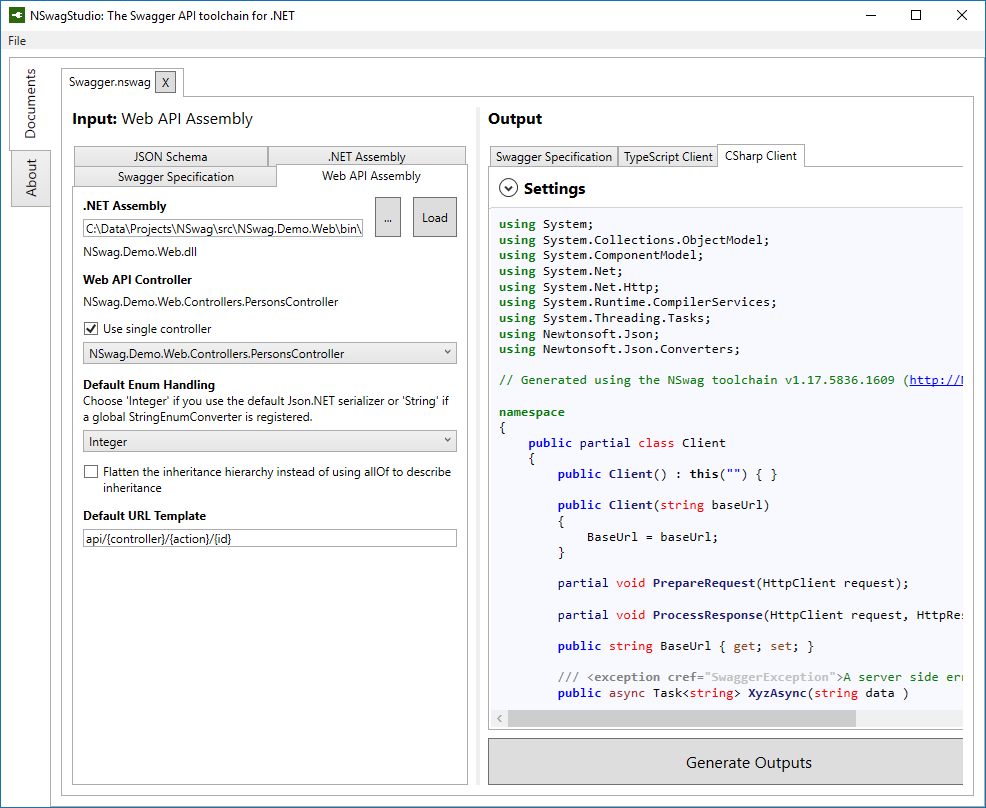
NSwagStudio
The generators can be used in a comfortable and simple Windows GUI called NSwagStudio:
Sponsors, support and consulting
Companies or individuals which paid a substantial amount for implementing, fixing issues, support or sponsoring are listed below. Thank you for supporting this project! You can also become a financial contributor:
Sponsor main contributor Rico Suter via GitHub
Sponsor project via Open Collective for NSwag
Please contact Rico Suter for paid consulting and support.
Contributors
This project exists thanks to all the people who contribute. [Contribute].
Sponsors
Support this project by becoming a sponsor. Your logo will show up here with a link to your website.
The most recent commit recorded on RicoSuter/NSwag was 4 months ago, based on the GitHub push timestamp. The repository has 1.4k forks — one of the better signals of community interest.
Is RicoSuter/NSwag open source?
Yes — RicoSuter/NSwag ships under the MIT license, which makes its source code freely readable (and, depending on license terms, forkable and reusable). Source: github.com/RicoSuter/NSwag.
What license does RicoSuter/NSwag use?
RicoSuter/NSwag is released under the MIT license. Always verify the LICENSE file directly on GitHub for the authoritative terms — license strings can be edited out of sync with a project's actual stance.
The project maintains a homepage at http://NSwag.org. The README tab on this page also usually contains screenshots and a quickstart.
Where do I read more about RicoSuter/NSwag?
This TopGit page is a snapshot — the READ ME tab shows the project's own README content (links stripped, images preserved). The GitHub repository at github.com/RicoSuter/NSwag is the definitive source.
Read full README in the tab above.
Curious whether NSwag is right for you?
Let ChatGPT, Claude, or Perplexity look into it — click below and see what AI actually says about NSwag.

 /NSwag