Là một dự án frontend, RicoSuter/NSwag đã đạt 7.4k sao trên GitHub, ngôn ngữ C#. The Swagger/OpenAPI toolchain for .NET, ASP.NET Core and TypeScript.
Tóm tắt dựng từ metadata GitHub của chính dự án — chưa có bài review TopGit. Trang sẽ tự động cập nhật khi bài review đầy đủ được xuất bản.
VÌ SAO CHƯA CÓ REVIEW
TopGit viết bài đầy đủ cho repo có nhiều sao nhất và được yêu cầu nhiều nhất. Trang này là snapshot trong thời gian chờ — xem README gốc ở tab READ ME.
:point_right: Announcing Apimundo: An API documentation system based on NSwag and NJsonSchema :point_left:
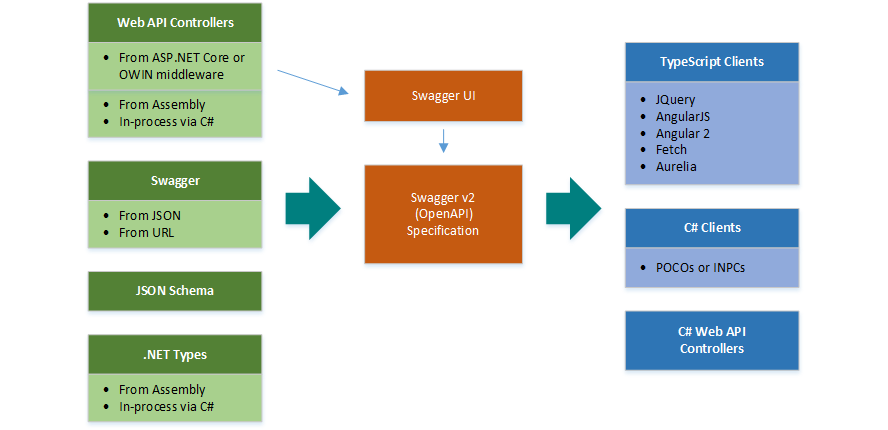
NSwag is a Swagger/OpenAPI 2.0 and 3.0 toolchain for .NET, .NET Core, Web API, ASP.NET Core, TypeScript (jQuery, AngularJS, Angular 2+, Aurelia, KnockoutJS and more) and other platforms, written in C#. The OpenAPI/Swagger specification uses JSON and JSON Schema to describe a RESTful web API. The NSwag project provides tools to generate OpenAPI specifications from existing ASP.NET Web API controllers and client code from these OpenAPI specifications.
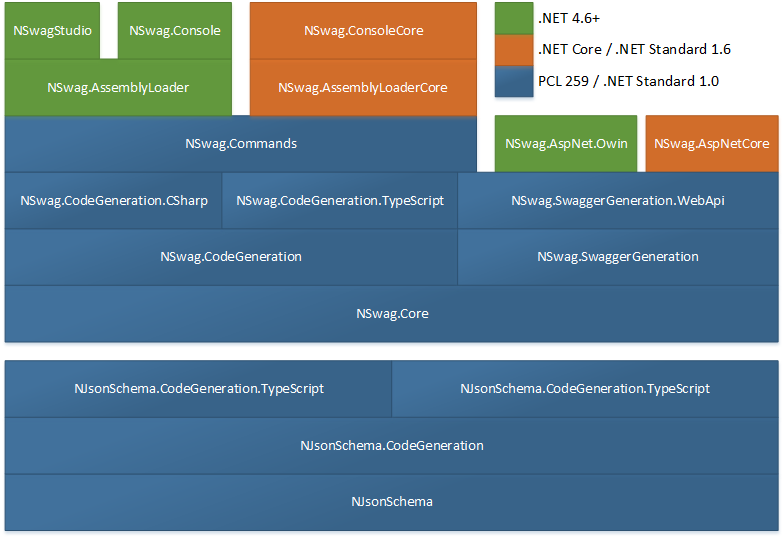
The project combines the functionality of Swashbuckle (OpenAPI/Swagger generation) and AutoRest (client generation) in one toolchain (these two libs are not needed). This way a lot of incompatibilites can be avoided and features which are not well described by the OpenAPI specification or JSON Schema are better supported (e.g. inheritance, enum and reference handling). The NSwag project heavily uses NJsonSchema for .NET for JSON Schema handling and C#/TypeScript class/interface generation.
The project is developed and maintained by Rico Suter and other contributors.
Features
Generate Swagger 2.0 and OpenAPI 3.0 specifications from C# ASP.NET (Core) controllers
Serve the specs via ASP.NET (Core) middleware, optionally with Swagger UI or ReDoc
Generate C# or TypeScript clients/proxies from these specs
Everything can be automated via CLI (distributed via NuGet tool or build target; or NPM)
CLI configured via JSON file or NSwagStudio Windows UI
Ways to use the toolchain
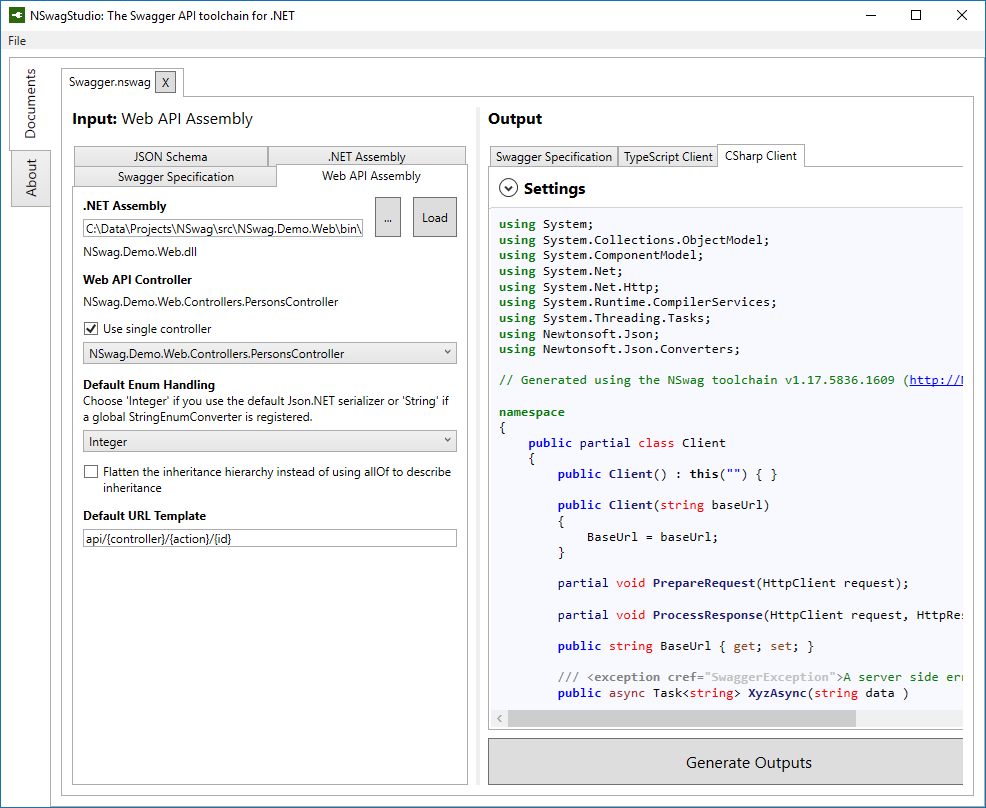
Simple to use Windows GUI, NSwagStudio
By using the OpenAPI or OpenAPI UI OWIN and ASP.NET Core Middlewares (also serves the Swagger UI) (recommended)
Via command line (Windows, Mac and Linux support through Mono or .NET Core console binary, also via NPM package)
In your C# code, via NuGet
In your MSBuild targets
With ServiceProjectReference tags in your .csproj (preview)
In your Azure V2 Functions (external project, might not use latest NSwag version)
Tutorials
Add NSwag to your ASP.NET Core app
Integrate the NSwag toolchain into your ASP.NET Web API project
Generate an Angular TypeScript client from an existing ASP.NET Web API web assembly
Video Tutorial: How to integrate NSwag into your ASP.NET Core Web API project (5 mins)
OpenAPI/Swagger Generators
ASP.NET Web API assembly to OpenAPI (supports .NET Core)
AspNetCoreOpenApiDocumentGenerator
WebApiOpenApiDocumentGenerator
Generates an OpenAPI specification for Web API controllers
WebApiToOpenApiCommand
Generates an OpenAPI specification for controllers in an external Web API assembly
Also supports loading of .NET Core assemblies
TypesToOpenApiCommand
Generates an OpenAPI specification containing only types from .NET assemblies
Code Generators
CSharp Client
CSharpClientGenerator
Generates C# clients from an OpenAPI specification
Generates POCOs or classes implementing INotifyPropertyChanged supporting DTOs
The generated clients can be used with full .NET, .NET Core, Xamarin and .NET Standard 1.4 in general
CSharp Controllers (contract first/schema first development)
CSharpControllerGenerator
Generates Web API Controllers based on an OpenAPI specification (ASP.NET Web API and ASP.NET Core)
TypeScript Client
TypeScriptClientGenerator
Generates TypeScript clients from an OpenAPI specification
Available templates/supported libraries:
JQuery with Callbacks, JQueryCallbacks
JQuery with promises JQueryPromises
AngularJS using $http, AngularJS
Angular (v2+) using the http service, Angular
window.fetch API and ES6 promises, Fetch (use this template in your React/Redux app)
Aurelia using the HttpClient from aurelia-fetch-client, Aurelia (based on the Fetch template)
The following code shows how to read an OpenAPI/Swagger specification and generate C# client classes to call the described web services:
var document = await OpenApiDocument.FromFileAsync("openapi.json");
var clientSettings = new CSharpClientGeneratorSettings
{
    ClassName = "MyClass",
    CSharpGeneratorSettings =
    {
        Namespace = "MyNamespace"
    }
};

var clientGenerator = new CSharpClientGenerator(document, clientSettings);
var code = clientGenerator.GenerateFile();
Check out the project Wiki for more information.
NSwagStudio
The generators can be used in a comfortable and simple Windows GUI called NSwagStudio:
Sponsors, support and consulting
Companies or individuals which paid a substantial amount for implementing, fixing issues, support or sponsoring are listed below. Thank you for supporting this project! You can also become a financial contributor:
Sponsor main contributor Rico Suter via GitHub
Sponsor project via Open Collective for NSwag
Please contact Rico Suter for paid consulting and support.
Contributors
This project exists thanks to all the people who contribute. [Contribute].
Sponsors
Support this project by becoming a sponsor. Your logo will show up here with a link to your website.
Trang TopGit này là một snapshot — tab "Readme" hiển thị nguyên văn README của repo (đã bỏ link, giữ ảnh). Repo GitHub ở github.com/RicoSuter/NSwag là nguồn chính thức.

 /NSwag