On GitHub, shanraisshan/gemini-cli-best-practice has picked up 78 stars, AI Tools, Python. from vibe coding to agentic engineering - practice makes gemini perfect
Snapshot summary built from the project's own GitHub metadata — there's no written TopGit review yet. The page will update automatically when a full review is published.
WHY NO REVIEW YET
TopGit writes full reviews for the most-starred, most-requested repositories. This page is a snapshot until then — see the READ ME tab for the original README in full.
Auto-approves every tool call — sandbox/CI only, never on your workstation
Headless Mode
gemini -p "<prompt>"
One-shot invocation; pipes through stdin/stdout for CI/cron
Checkpointing
--checkpointing + /restore
File-level undo for exploratory refactors
Multi-directory
--include-directories ../other
Reason across multiple repos in one session
@path injection
inside prompts & commands
Multimodal — @file.png, @file.pdf, @file.mp3 all work
Shell passthrough
!cmd (single) or ! (persistent)
Run shell without leaving Gemini
/compress
built-in
Summarizes the chat to free context window
/chat save / /chat resume
built-in
Multi-session conversation persistence
IDE integration
VS Code / JetBrains plugins
Diffs and code context pipe into the CLI
GitHub Actions
google-gemini/gemini-cli-action
Gemini-driven PR review and triage in CI
Extensions
gemini extensions install
Community packs with commands + MCP servers bundled
Google Workspace MCP
google-workspace MCP server
Paste a Docs/Sheets link, get a summary
Sandbox
GEMINI_SANDBOX=1
Container / macOS Seatbelt isolation for file/shell tools
Telemetry (local)
telemetry.target: "local"
Offline observability for tool calls and tokens
Vertex AI auth
selectedAuthType: "vertex-ai"
Enterprise-grade auth with GCP IAM
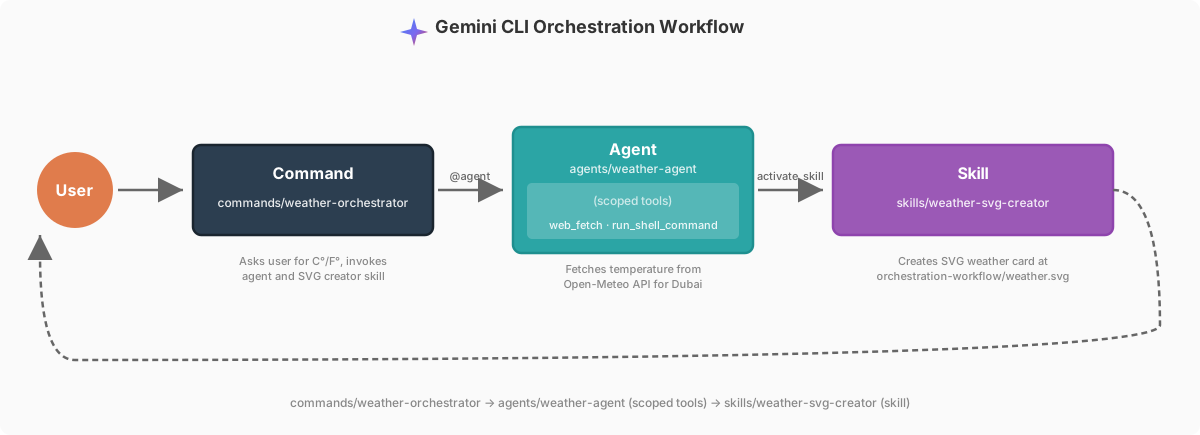
See orchestration-workflow for implementation details of the Command → Agent → Skill pattern — built on Gemini CLI's TOML commands, native subagents (v0.38.1+), and first-class Agent Skills (v0.23.0+).
gemini
/weather-orchestrator
Gemini asks for your unit, fetches the temperature from Open-Meteo, writes an SVG card, and prints the paths. The full command prompt: .gemini/commands/weather-orchestrator.toml.
⚙️ DEVELOPMENT WORKFLOWS
All major workflows converge on the same architectural pattern: Research → Plan → Execute → Review → Ship.
Name
★
Workflow
Superpowers
171k
→ → → → →
5
3
14
Everything Claude Code
167k
→ → → → →
48
143
230
Spec Kit
92k
→ → → →
0
9+
0
gstack
86k
→ → → → → → → →
0
0
37
Get Shit Done
58k
→ → → → → →
33
122
0
BMAD-METHOD
46k
→ → → → → → → →
0
0
39
OpenSpec
44k
→ →
0
11
0
oh-my-claudecode
31k
→ → → → → → → →
19
0
37
Compound Engineering
16k
→ → → → → →
50
4
44
Note: yellow tags are sub-loops — steps that repeat inside a parent step (e.g. per task, per story, or until a verify condition passes).
Others
Taylor Mullen (Creator of Gemini CLI) Workflow — · GitHub · X · Gemini CLI repo
store project-specific instructions in GEMINI.md for zero-prompt context — auto-loaded every session
/memory add <fact> · /memory show · /memory refresh for runtime facts — volatile but beats retyping
/chat save <tag> + /chat resume <tag> for parallel multi-day threads — context survives across days 🚫👶
/compress at ~50% context before auto-compact fires at the model's least intelligent point
GEMINI.md (3)
GEMINI.md and its nested variants hold persistent context. Keep them focused — the same lazy-loading pattern Claude Code uses applies here.
Tip
Source
keep each GEMINI.md under ~200 lines — longer files dilute attention and the model starts ignoring rules
for monorepos, push scoped instructions into per-package GEMINI.md files rather than one mega root file — ancestor + descendant loading covers the tree
use @path imports inside GEMINI.md to pull in style guides or build docs — cheaper and more reliable than pasting content inline
Agents (5)
Tip
Source
delegate long, tool-heavy work to the built-in codebase_investigator — 20 file reads + 12 greps stay in the child's context, only the final report returns 🚫👶
use @agent_name in the prompt to force a specific subagent — auto-delegation via description: matching works, but explicit is more reliable for orchestrated flows
scope tools: tightly — read-only allowlist for audit agents, no MCP for offline agents · tools: ["*"] means the agent can do anything, scope explicitly
write a specific description: — it's what the main agent reads to decide when to delegate · "helpful assistant" gets ignored, "Reviews diffs for SQLi/XSS/SSRF before merging auth PRs" gets routed
drop temperature: 0.2 for review / audit agents; let generators run at 1.0 — deterministic reviewers, creative generators
Skills (5)
Tip
Source
treat the skill description: as a trigger, not a summary — "Use this skill to X. It handles Y. Activate when Z." routes reliably
skills are folders, not files — use scripts/, references/, assets/ subdirectories for progressive disclosure so activation is cheap
include scripts and asset templates in skills so the model composes rather than reconstructs boilerplate each time
don't put skills that fetch data — use subagents for fetching · skills are procedural (render, review, migrate)
precedence is Workspace > User > Extension — rename on name collisions instead of relying on shadowing
Commands (4)
Tip
Source
TOML slash commands in .gemini/commands/ — namespace with sub-folders · git/commit.toml → /git:commit
inject shell output at load time with !{cmd} instead of asking the model to run it — deterministic and the prompt reads the result directly
~/.gemini/settings.json for cross-project personal defaults; project-level .gemini/settings.json for team-shared
if you do something more than once a day, turn it into a skill or command — build /status, /techdebt, /review:security
■ MCP & Integrations (4)
Tip
Source
MCP servers are first-class — Figma, Google Workspace, GitHub, Playwright, proprietary DBs all plug in via .gemini/settings.json → mcpServers
paste Google Docs / Sheets links directly into prompts once the Workspace MCP is configured — Gemini fetches and summarizes on the spot
ask Gemini to write and spin up a temporary MCP server mid-session when you hit a gap — it generates the server, you register it, and the tool is live for the rest of the session
IDE plugins (VS Code / JetBrains) pipe diffs and code context straight into the CLI — skip the copy/paste dance
■ Context & Input (5)
Tip
Source
@./path injects files, directories, images, PDFs, and audio into the prompt — multimodal works out of the box
--include-directories ../sibling,../shared works across multiple repos in one session — cross-repo reasoning without leaving Gemini
AI-assisted file organization — point Gemini at a messy directory and ask it to classify, rename (using vision), dedupe
multimodal OCR — invoice parsing, UI mockup analysis, audio transcription, chart reading all via @file.png / @file.pdf / @file.mp3
/stats shows token usage — structure long prompts so the stable prefix comes first to benefit from cache hits
■ Safety & Modes (4)
Tip
Source
--checkpointing snapshots files before every edit · /restore rolls back · safety net for exploratory refactors
prefer scoped allowlists (Shell(npm test), WebFetch(domain:*.google.com)) over global --yolo — scoped auto-approval doesn't unlock rm -rf /
GEMINI_SANDBOX=1 for container / macOS Seatbelt isolation when the session touches untrusted code or data
restrict $PATH for Gemini CLI so it can't reach unwanted tools — improves safety in CI and shared envs 🚫👶
■ Automation & Scripting (4)
Tip
Source
gemini -p "<prompt>" for headless / CI / scheduled runs · pipes through stdin/stdout, no chat UI
GEMINI_SYSTEM_MD=./ci-prompt.md replaces the baked-in system prompt — perfect for scoping CI personas per job
!cmd shell passthrough for one-shot commands; ! alone enters persistent shell mode — terminal without leaving the session
your entire $PATH (Docker, ffmpeg, ImageMagick, gcloud, kubectl) is Gemini's toolkit — CLI tools beat asking the model to re-implement them
■ Cost & Observability (3)
Tip
Source
/stats for token usage and cache-hit insight — catch context bloat before it hits your wallet
local telemetry on (telemetry.target: "local") for session-level observability — tool calls, tokens, durations without data leaving the machine
summarizeToolOutput in settings caps tool-call context bloat — long ReadFile / Shell outputs get summarized before being appended
1. Read the repo like a course — learn what commands, agents, and skills are before trying to use them.
2. Clone this repo and play with the examples. Try /weather-orchestrator, watch @weather-agent run in isolated context, and consent to the weather-svg-creator skill activation so you can see how the pieces connect.
3. Go to your own project and ask Gemini to suggest what best practices from this repo you should add — give it this repo as a reference so it knows what's possible.
How active is development on shanraisshan/gemini-cli-best-practice?
The most recent commit recorded on shanraisshan/gemini-cli-best-practice was 5 months ago, based on the GitHub push timestamp. The repository has 8 forks — one of the better signals of community interest.
How many stars does shanraisshan/gemini-cli-best-practice have?
shanraisshan/gemini-cli-best-practice has 78 GitHub stars — refresh the page for the live number, or check github.com/shanraisshan/gemini-cli-best-practice. TopGit mirrors GitHub's count but does not claim minute-by-minute accuracy.
Is shanraisshan/gemini-cli-best-practice open source?
Yes — shanraisshan/gemini-cli-best-practice ships under the MIT license, which makes its source code freely readable (and, depending on license terms, forkable and reusable). Source: github.com/shanraisshan/gemini-cli-best-practice.
What else is in the AI Tools space?
shanraisshan/gemini-cli-best-practice is tracked by TopGit under the AI Tools category, alongside 6 GitHub-tagged topics. Trending and Topics pages list peer repositories of comparable stars and language.
What is shanraisshan/gemini-cli-best-practice?
shanraisshan/gemini-cli-best-practice (shanraisshan/gemini-cli-best-practice) is a Python project on GitHub. From the project's own README: from vibe coding to agentic engineering - practice makes gemini perfect
What language is shanraisshan/gemini-cli-best-practice written in?
shanraisshan/gemini-cli-best-practice is written primarily in Python. GitHub's language field is based on the largest share of bytes in the default branch.
What license does shanraisshan/gemini-cli-best-practice use?
shanraisshan/gemini-cli-best-practice is released under the MIT license. Always verify the LICENSE file directly on GitHub for the authoritative terms — license strings can be edited out of sync with a project's actual stance.
Where do I read more about shanraisshan/gemini-cli-best-practice?
This TopGit page is a snapshot — the READ ME tab shows the project's own README content (links stripped, images preserved). The GitHub repository at github.com/shanraisshan/gemini-cli-best-practice is the definitive source.
Read full README in the tab above.
Want a second opinion on gemini-cli-best-practice?
Ask an AI that can read this page — one click and you get its take on gemini-cli-best-practice.
 /gemini-cli-best-practice
-white?style=flat&labelColor=555)






 = Agents ·
  = Skills ·
  = Commands



 →
→  →
→  →
→  →
→  →
→ 
 →
→  →
→  →
→  →
→  →
→ 
 →
→  →
→  →
→  →
→ 
 →
→  →
→  →
→  →
→  →
→  →
→  →
→  →
→ 
 →
→  →
→  →
→  →
→  →
→  →
→ 
 →
→  →
→  →
→  →
→  →
→  →
→  →
→  →
→ 
 →
→  →
→ 
 →
→  →
→  →
→  →
→  →
→  →
→  →
→  →
→  →
→  →
→  →
→  →
→  →
→  →
→ 
 · source · X
 GEMINI.md (3)







 Sponsor My Work
 Polar
Polar