stas00/ipyexperiments sits at 235 stars on GitHub, written primarily in Jupyter Notebook. Automatic GPU+CPU memory profiling, re-use and memory leaks detection using jupyter/ipython experiment containers
Snapshot summary built from the project's own GitHub metadata — there's no written TopGit review yet. The page will update automatically when a full review is published.
WHY NO REVIEW YET
TopGit writes full reviews for the most-starred, most-requested repositories. This page is a snapshot until then — see the READ ME tab for the original README in full.
Automatic GPU+CPU memory profiling, re-use and memory leaks detection using jupyter/ipython experiment containers.
About
This module's main purpose is to help calibrate hyper parameters in deep learning notebooks to fit the available GPU and CPU memory, but, of course, it can be useful for any other use where CPU memory limits is a constant issue. It is also useful for detecting memory leaks in your code. And over time other goodies that help with running machine learning experiments have been added.
This package is slowly evolving into a suite of different helper modules that are designed to help diagnose issues with memory leakages and make the debug of these easy.
Currently the package contains several modules:
IpyExperiments - a smart container for ipython/jupyter experiments (documentation / demo)
CellLogger - per cell memory profiler and more features (documentation / demo)
ipython utils - workarounds for ipython memory leakage on exception (documentation)
memory debugging and profiling utils (documentation)
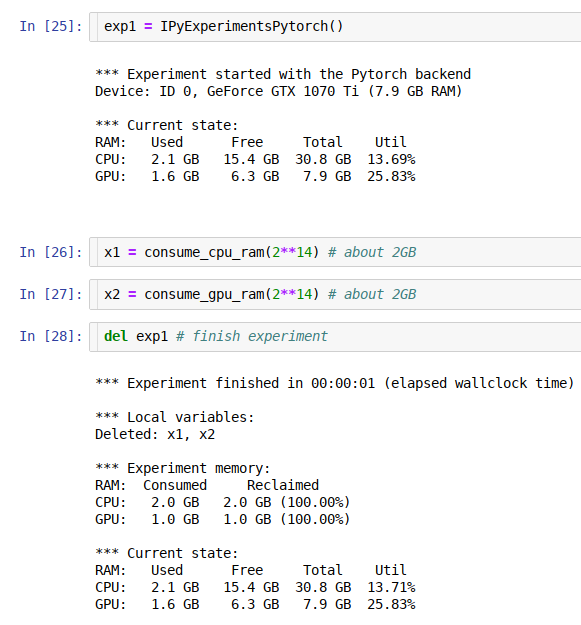
Using this framework you can run multiple consequent experiments without needing to restart the kernel all the time, especially when you run out of GPU memory - the familiar to all "cuda: out of memory" error. When this happens you just go back to the notebook cell where you started the experiment, change the hyper parameters, and re-run the updated experiment until it fits the available memory. This is much more efficient and less error-prone then constantly restarting the kernel, and re-running the whole notebook.
As an extra bonus you get access to the memory consumption data, so you can use it to automate the discovery of the hyper parameters to suit your hardware's unique memory limits.
The idea behind this module is very simple - it implements a python function-like functionality, where its local variables get destroyed at the end of its run, giving us memory back, except it'll work across multiple jupyter notebook cells (or ipython). In addition it also runs gc.collect() to immediately release badly behaved variables with circular references, and reclaim general and GPU RAM. It also helps to discover memory leaks, and performs various other useful things behind the scenes.
If you need a more fine-grained memory profiling, the CellLogger sub-system reports RAM usage on a per cell-level when used with jupyter or per line of code in ipython. You get the resource usage report automatically as soon as a command or a cell finished executing. It includes other features, such as resetting RNG seed in python/numpy/pytorch if you need a reproducible result when re-running the whole notebook or just one cell.
Currently this sub-system logs GPU RAM, general RAM and execution time. But it can be expanded to track other important things. While there are various similar loggers out there, the main focus of this implementation is to help track GPU, whose main scarce resource is GPU RAM.
See this demo notebook, to see how this system works.
Documentation
IPyExperiments
CellLogger sub-system
ipython utils
memory debug/profiling utils
Contributing and Testing
Please see CONTRIBUTING.md.
Caveats
Google Colab
As of this writing colab runs a really old version of ipython (5.5.0) which doesn't support the modern ipython events API.
To solve this problem automatically so you never have to think about it again, always add this cell as the very first one in each colab notebook
# This magic cell should be put first in your colab notebook.
# It'll automatically upgrade colab's really antique ipython/ipykernel to their
# latest versions which are required for packages like ipyexperiments
from packaging import version
import IPython, ipykernel
if version.parse(IPython.__version__) <= version.parse("5.5.0"):
    !pip install -q --upgrade ipython
    !pip install -q --upgrade ipykernel

    import os
    import signal
    os.kill(os.getpid(), signal.SIGTERM)
print(f"ipykernel=={ipykernel.__version__}")
print(f"IPython=={IPython.__version__}")
If you're on the default old ipykernel/ipython this cell will update it, then crash the current session. After the crash restart the execution and the code will work normally.
History
A detailed history of changes can be found here.
Related Projects
https://github.com/Stonesjtu/pytorch_memlab - A simple and accurate CUDA memory management laboratory for pytorch.
(If you know of a related pytorch gpu memory profiler please send a PR to add the link. Thank you!)
How active is development on stas00/ipyexperiments?
The most recent commit recorded on stas00/ipyexperiments was 2.7 years ago, based on the GitHub push timestamp. The repository has 14 forks — one of the better signals of community interest.
How does stas00/ipyexperiments compare to other AI Tools projects?
stas00/ipyexperiments is tracked by TopGit in the AI Tools category, with 235 GitHub stars and written in Jupyter Notebook. Browse the AI Tools topic page on TopGit to compare it against similar projects by stars and activity.
How many stars does stas00/ipyexperiments have?
stas00/ipyexperiments has 235 GitHub stars — refresh the page for the live number, or check github.com/stas00/ipyexperiments. TopGit mirrors GitHub's count but does not claim minute-by-minute accuracy.
Is stas00/ipyexperiments open source?
TopGit's metadata for stas00/ipyexperiments does not record a license. Most public repositories on GitHub ARE open source, but the exact terms vary — verify by opening the LICENSE file directly.
What is stas00/ipyexperiments?
stas00/ipyexperiments (stas00/ipyexperiments) is a Jupyter Notebook project on GitHub. From the project's own README: Automatic GPU+CPU memory profiling, re-use and memory leaks detection using jupyter/ipython experiment containers
Where do I read more about stas00/ipyexperiments?
This TopGit page is a snapshot — the READ ME tab shows the project's own README content (links stripped, images preserved). The GitHub repository at github.com/stas00/ipyexperiments is the definitive source.
Read full README in the tab above.
Want a second opinion on ipyexperiments?
Ask an AI that can read this page — one click and you get its take on ipyexperiments.