Trên GitHub, stas00/ipyexperiments đã đạt 236 sao, nhóm AI Tools, ngôn ngữ Jupyter Notebook. Automatic GPU+CPU memory profiling, re-use and memory leaks detection using jupyter/ipython experiment containers
Tóm tắt dựng từ metadata GitHub của chính dự án — chưa có bài review TopGit. Trang sẽ tự động cập nhật khi bài review đầy đủ được xuất bản.
VÌ SAO CHƯA CÓ REVIEW
TopGit viết bài đầy đủ cho repo có nhiều sao nhất và được yêu cầu nhiều nhất. Trang này là snapshot trong thời gian chờ — xem README gốc ở tab READ ME.
Automatic GPU+CPU memory profiling, re-use and memory leaks detection using jupyter/ipython experiment containers.
About
This module's main purpose is to help calibrate hyper parameters in deep learning notebooks to fit the available GPU and CPU memory, but, of course, it can be useful for any other use where CPU memory limits is a constant issue. It is also useful for detecting memory leaks in your code. And over time other goodies that help with running machine learning experiments have been added.
This package is slowly evolving into a suite of different helper modules that are designed to help diagnose issues with memory leakages and make the debug of these easy.
Currently the package contains several modules:
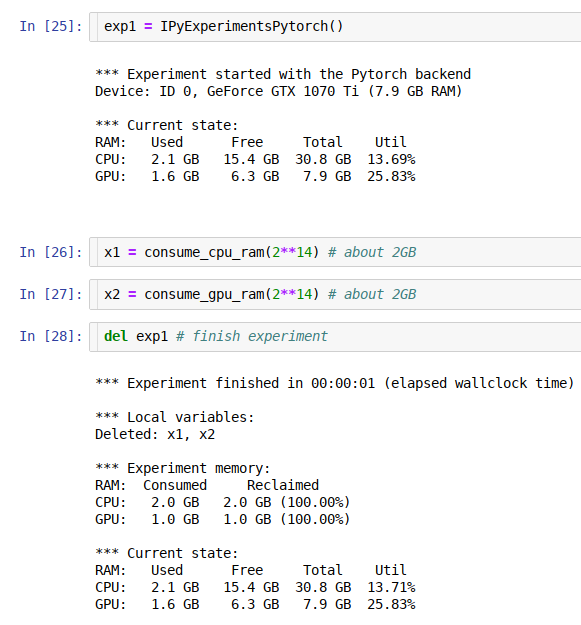
IpyExperiments - a smart container for ipython/jupyter experiments (documentation / demo)
CellLogger - per cell memory profiler and more features (documentation / demo)
ipython utils - workarounds for ipython memory leakage on exception (documentation)
memory debugging and profiling utils (documentation)
Using this framework you can run multiple consequent experiments without needing to restart the kernel all the time, especially when you run out of GPU memory - the familiar to all "cuda: out of memory" error. When this happens you just go back to the notebook cell where you started the experiment, change the hyper parameters, and re-run the updated experiment until it fits the available memory. This is much more efficient and less error-prone then constantly restarting the kernel, and re-running the whole notebook.
As an extra bonus you get access to the memory consumption data, so you can use it to automate the discovery of the hyper parameters to suit your hardware's unique memory limits.
The idea behind this module is very simple - it implements a python function-like functionality, where its local variables get destroyed at the end of its run, giving us memory back, except it'll work across multiple jupyter notebook cells (or ipython). In addition it also runs gc.collect() to immediately release badly behaved variables with circular references, and reclaim general and GPU RAM. It also helps to discover memory leaks, and performs various other useful things behind the scenes.
If you need a more fine-grained memory profiling, the CellLogger sub-system reports RAM usage on a per cell-level when used with jupyter or per line of code in ipython. You get the resource usage report automatically as soon as a command or a cell finished executing. It includes other features, such as resetting RNG seed in python/numpy/pytorch if you need a reproducible result when re-running the whole notebook or just one cell.
Currently this sub-system logs GPU RAM, general RAM and execution time. But it can be expanded to track other important things. While there are various similar loggers out there, the main focus of this implementation is to help track GPU, whose main scarce resource is GPU RAM.
See this demo notebook, to see how this system works.
Documentation
IPyExperiments
CellLogger sub-system
ipython utils
memory debug/profiling utils
Contributing and Testing
Please see CONTRIBUTING.md.
Caveats
Google Colab
As of this writing colab runs a really old version of ipython (5.5.0) which doesn't support the modern ipython events API.
To solve this problem automatically so you never have to think about it again, always add this cell as the very first one in each colab notebook
# This magic cell should be put first in your colab notebook.
# It'll automatically upgrade colab's really antique ipython/ipykernel to their
# latest versions which are required for packages like ipyexperiments
from packaging import version
import IPython, ipykernel
if version.parse(IPython.__version__) <= version.parse("5.5.0"):
    !pip install -q --upgrade ipython
    !pip install -q --upgrade ipykernel

    import os
    import signal
    os.kill(os.getpid(), signal.SIGTERM)
print(f"ipykernel=={ipykernel.__version__}")
print(f"IPython=={IPython.__version__}")
If you're on the default old ipykernel/ipython this cell will update it, then crash the current session. After the crash restart the execution and the code will work normally.
History
A detailed history of changes can be found here.
Related Projects
https://github.com/Stonesjtu/pytorch_memlab - A simple and accurate CUDA memory management laboratory for pytorch.
(If you know of a related pytorch gpu memory profiler please send a PR to add the link. Thank you!)
Trang TopGit này là một snapshot — tab "Readme" hiển thị nguyên văn README của repo (đã bỏ link, giữ ảnh). Repo GitHub ở github.com/stas00/ipyexperiments là nguồn chính thức.
stas00/ipyexperiments có bao nhiêu sao?
stas00/ipyexperiments có 236 sao GitHub — tải lại trang để xem số mới nhất, hoặc xem trực tiếp github.com/stas00/ipyexperiments. TopGit phản chiếu số sao của GitHub nhưng không cam kết đến từng phút.
stas00/ipyexperiments có phải mã nguồn mở không?
TopGit chưa ghi nhận license cho stas00/ipyexperiments. Phần lớn repo public trên GitHub là mã nguồn mở, nhưng điều khoản khác nhau từng repo — mở file LICENSE để xác nhận.
stas00/ipyexperiments còn đang phát triển không?
Commit gần nhất trên stas00/ipyexperiments là 2.7 năm trước (theo timestamp GitHub). Repo có 15 fork — một chỉ báo về mức độ quan tâm của cộng đồng.
stas00/ipyexperiments là gì?
stas00/ipyexperiments (stas00/ipyexperiments) là dự án Jupyter Notebook trên GitHub. Theo mô tả gốc: Automatic GPU+CPU memory profiling, re-use and memory leaks detection using jupyter/ipython experiment containers
stas00/ipyexperiments so với các dự án AI Tools khác thế nào?
stas00/ipyexperiments được TopGit xếp vào nhóm AI Tools, với 236 sao GitHub và viết bằng Jupyter Notebook. Xem trang chủ đề AI Tools trên TopGit để so sánh với các dự án tương tự theo số sao và mức độ hoạt động.
Đọc đầy đủ README ở tab phía trên.
Muốn nghe thêm một ý kiến về ipyexperiments?
Hỏi một AI đọc được trang này — một cú bấm là có ngay nhận định về ipyexperiments.
 /ipyexperiments