SVProgressHUD/SVProgressHUD is tracked by TopGit as a mobile project, with 12.5k stars on GitHub, written primarily in Objective-C. A clean and lightweight progress HUD for your iOS and tvOS app.
Snapshot summary built from the project's own GitHub metadata — there's no written TopGit review yet. The page will update automatically when a full review is published.
WHY NO REVIEW YET
TopGit writes full reviews for the most-starred, most-requested repositories. This page is a snapshot until then — see the READ ME tab for the original README in full.
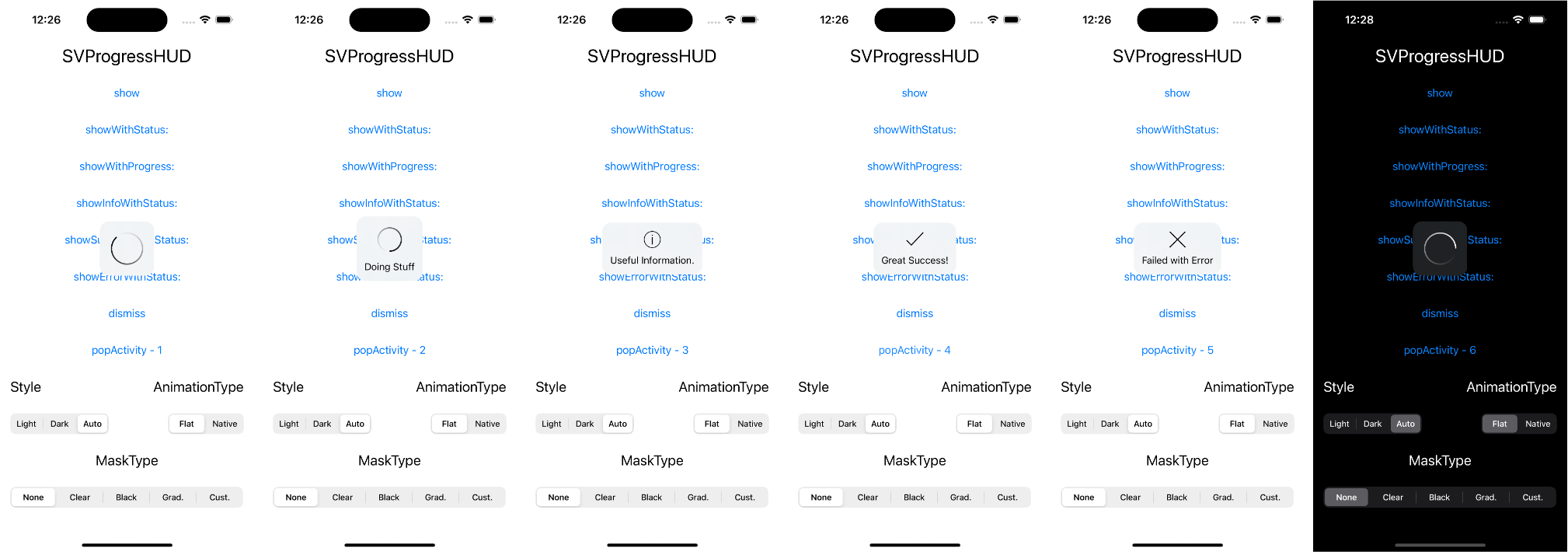
SVProgressHUD is a clean and easy-to-use HUD meant to display the progress of an ongoing task on iOS and tvOS.
Installation
Swift Package Manager
Swift Package Manager (SwiftPM) is a tool for managing the distribution of Swift code. It simplifies the process of managing Swift package dependencies.
To integrate SVProgressHUD into your project using SwiftPM:
In Xcode, select File > Add Package Dependency.
Enter the following package repository URL: https://github.com/SVProgressHUD/SVProgressHUD.git
Choose the appropriate version (e.g. a specific version, branch, or commit).
Add SVProgressHUD to your target dependencies.
SVProgressHUD requires at least Swift tools version 5.3.
From CocoaPods
CocoaPods is a dependency manager for Objective-C, which automates and simplifies the process of using 3rd-party libraries like SVProgressHUD in your projects. First, add the following line to your Podfile:
pod 'SVProgressHUD'
If you want to use the latest features of SVProgressHUD use normal external source dependencies.
pod 'SVProgressHUD', :git => 'https://github.com/SVProgressHUD/SVProgressHUD.git'
This pulls from the master branch directly.
Second, install SVProgressHUD into your project:
pod install
Carthage
Carthage is a decentralized dependency manager that builds your dependencies and provides you with binary frameworks. To integrate SVProgressHUD into your Xcode project using Carthage, specify it in your Cartfile:
github "SVProgressHUD/SVProgressHUD"
Run carthage bootstrap to build the framework in your repository's Carthage directory. You can then include it in your target's carthage copy-frameworks build phase. For more information on this, please see Carthage's documentation.
Manually
Drag the SVProgressHUD/SVProgressHUD folder into your project.
Take care that SVProgressHUD.bundle is added to Targets->Build Phases->Copy Bundle Resources.
Add the QuartzCore framework to your project.
Swift
Even though SVProgressHUD is written in Objective-C, it can be used in Swift with no hassle.
If you use CocoaPods add the following line to your Podfile:
use_frameworks!
If you added SVProgressHUD manually, just add a bridging header file to your project with the SVProgressHUD header included.
Usage
(see sample Xcode project in /Demo)
SVProgressHUD is created as a singleton (i.e. it doesn't need to be explicitly allocated and instantiated; you directly call [SVProgressHUD method] / SVProgressHUD.method()).
Use SVProgressHUD wisely! Only use it if you absolutely need to perform a task before taking the user forward. Bad use case examples: pull to refresh, infinite scrolling, sending message.
Using SVProgressHUD in your app will usually look as simple as this.
If you'd like to stack HUDs, you can balance out every show call using:
+ (void)popActivity;
The HUD will get dismissed once the popActivity calls will match the number of show calls.
Or show an image with status before getting dismissed a little bit later. The display time depends on minimumDismissTimeInterval and the length of the given string.
SVProgressHUD is designed with flexibility in mind, providing a myriad of customization options to fit the look and feel of your application seamlessly.
Appearance: Make use of the UI_APPEARANCE_SELECTOR to adjust styles, colors, fonts, size, and images app-wide.
Behavior: Control visibility durations, display delays, and animation speeds.
Feedback: Enhance the user experience with options for haptic feedback and motion effects.
For a comprehensive list of properties and detailed explanations, refer to the SVProgressHUD.h file in the API documentation.
Hint
As standard SVProgressHUD offers three preconfigured styles:
SVProgressHUDStyleAutomatic: Automatically switch between the light and dark style
SVProgressHUDStyleLight: White background with black spinner and text
SVProgressHUDStyleDark: Black background with white spinner and text
If you want to use custom colors use setForegroundColor: and/or setBackgroundColor:. These implicitly set the HUD's style to SVProgressHUDStyleCustom.
Haptic Feedback
Available on iPhone 7 and newer, SVProgressHUD can automatically trigger haptic feedback depending on which HUD is being displayed. The feedback maps as follows:
To enable this functionality, use setHapticsEnabled:.
Notifications
SVProgressHUD posts four notifications via NSNotificationCenter in response to being shown/dismissed:
SVProgressHUDWillAppearNotification when the show animation starts
SVProgressHUDDidAppearNotification when the show animation completes
SVProgressHUDWillDisappearNotification when the dismiss animation starts
SVProgressHUDDidDisappearNotification when the dismiss animation completes
Each notification passes a userInfo dictionary holding the HUD's status string (if any), retrievable via SVProgressHUDStatusUserInfoKey.
SVProgressHUD also posts SVProgressHUDDidReceiveTouchEventNotification when users touch on the overall screen or SVProgressHUDDidTouchDownInsideNotification when a user touches on the HUD directly. For these notifications userInfo is not passed but the object parameter contains the UIEvent that related to the touch.
App Extensions
When using SVProgressHUD in an App Extension, #define SV_APP_EXTENSIONS to avoid using unavailable APIs. This will be done automatically when using the AppExtension CocoaPods subspec. Additionally, call setViewForExtension: from your extensions view controller with self.view.
Contributing to this project
If you have feature requests or bug reports, feel free to help out by sending pull requests or by creating new issues. Please take a moment to
review the guidelines written by Nicolas Gallagher:
Bug reports
Feature requests
Pull requests
License
SVProgressHUD is distributed under the terms and conditions of the MIT license. The success, error and info icons used on iOS 12 are made by Freepik from Flaticon and are licensed under Creative Commons BY 3.0.
Privacy
SVProgressHUD does not collect any data. A privacy manifest file is provided.
Credits
SVProgressHUD is brought to you by Sam Vermette, Tobias Totzek and contributors to the project. If you're using SVProgressHUD in your project, attribution would be very appreciated.
How active is development on SVProgressHUD/SVProgressHUD?
The most recent commit recorded on SVProgressHUD/SVProgressHUD was 5 months ago, based on the GitHub push timestamp. The repository has 2.7k forks — one of the better signals of community interest.
How many stars does SVProgressHUD/SVProgressHUD have?
SVProgressHUD/SVProgressHUD has 12.5k GitHub stars — refresh the page for the live number, or check github.com/SVProgressHUD/SVProgressHUD. TopGit mirrors GitHub's count but does not claim minute-by-minute accuracy.
Is SVProgressHUD/SVProgressHUD open source?
Yes — SVProgressHUD/SVProgressHUD ships under the MIT license, which makes its source code freely readable (and, depending on license terms, forkable and reusable). Source: github.com/SVProgressHUD/SVProgressHUD.
What else is in the Mobile space?
SVProgressHUD/SVProgressHUD is tracked by TopGit under the Mobile category, alongside 10 GitHub-tagged topics. Trending and Topics pages list peer repositories of comparable stars and language.
What topics is SVProgressHUD/SVProgressHUD associated with?
GitHub's repository topics for SVProgressHUD/SVProgressHUD: "apple", "carthage", "cocoapods", "hud", "ios", "objective-c", "progress", "svprogresshud", "swift", "tvos". TopGit's editorial category is Mobile.
Where can I see SVProgressHUD/SVProgressHUD in action?
The project maintains a homepage at https://github.com/SVProgressHUD/SVProgressHUD. The README tab on this page also usually contains screenshots and a quickstart.
Where do I read more about SVProgressHUD/SVProgressHUD?
This TopGit page is a snapshot — the READ ME tab shows the project's own README content (links stripped, images preserved). The GitHub repository at github.com/SVProgressHUD/SVProgressHUD is the definitive source.
Read full README in the tab above.
Is SVProgressHUD worth your time?
ChatGPT, Claude and Perplexity can all read this page. Ask one of them what it makes of SVProgressHUD.
 /SVProgressHUD