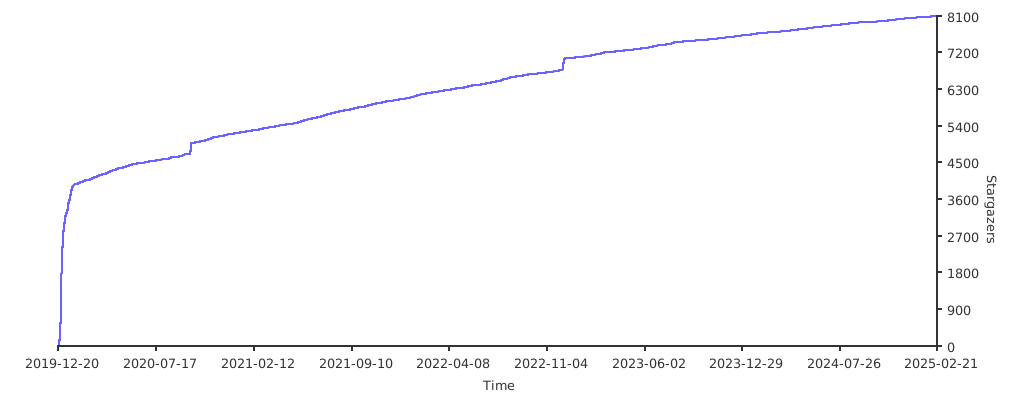
Indexed by TopGit from live GitHub metadata: Tencent/Hippy has 8.6k stars, written primarily in C++. Hippy is designed to easily build cross-platform dynamic apps. 👏
Snapshot summary built from the project's own GitHub metadata — there's no written TopGit review yet. The page will update automatically when a full review is published.
WHY NO REVIEW YET
TopGit writes full reviews for the most-starred, most-requested repositories. This page is a snapshot until then — see the READ ME tab for the original README in full.
Hippy is a cross-platform development framework, that aims to help developers write once, and run on multiple platforms(iOS, Android, Web, and so on). Hippy is quite friendly to Web developers, especially those who are familiar with React or Vue. With Hippy, developers can create the cross-platform app easily.
Hippy is now applied in Tencent major apps such as Mobile QQ, Mobile QQ Browser, Tencent Video App, QQ Music App, and Tencent News, reaching hundreds of millions of ordinary users.
💯 Advantages
Designed for Web developers, officially support Web frameworks like React and Vue.
Same APIs for different platforms.
Excellent performance with JS engine binding communication.
Build-in recyclable component with better performance.
Smoothly and gracefully migrate to Web browser.
Fully supported Flex Layout engine.
🔨 Getting started
Preparing environment
Make sure you have git and npm installed locally.
Run git clone https://github.com/Tencent/Hippy.git and npm install at project root directory.
The Hippy repository applies git-lfs to manage so,gz,otf files, make sure you have installed git-lfs first.
For macOS developers:
Xcode with iOS sdk: build the iOS app.
Android Studio with NDK: build the android app.
Node.JS: run the build scripts.
homebrew is recommended to install the dependencies.
For Windows developers:
Android Studio with NDK: build the android app.
Node.JS: run the build scripts.
Windows can't run the iOS development environment so far.
Build the iOS simulator with js demo
For iOS, we recommend to use iOS simulator when first try. However, you can change the Xcode configuration to install the app to iPhone if you are an iOS expert.
cd to driver/js/.
Run npm run init.
This command is combined with npm install && npx lerna bootstrap && npm run build.
npm install: Install the project build scripts dependencies.
npx lerna bootstrap: Install dependencies of each npm package.(Hippy uses Lerna to manage multi js packages, if lerna command is not found, execute npm install lerna -g first.)
npm run build: Build each front-end sdk package.
Choose a demo to build with npm run buildexample [hippy-react-demo|hippy-vue-demo|hippy-vue-next-demo].
Install CocoaPods with brew install cocoapods, install cmake with brew install cmake, then execute pod install command at framework/examples/ios-demo directory, which will create HippyDemo.xcworkspace files and install Cocoapods dependencies.
Start the Xcode and build the iOS app with opening framework/examples/ios-demo/HippyDemo.xcworkspace.
If Step 2 throw error, you can cd to driver/js/examples hippy-react-demo or hippy-vue-demo, and run npm install to install demo dependencies first.
More details for iOS SDK integration.
Build the Android app with js demo
For Android, we recommend using the real cellphone for better develop experience, because Hippy is using X5 JS engine which can't support x86 simulator, as well as ARM simulator has a low performance.
Before build the android app, please make sure the SDK and NDK is installed, And DO NOT update the build toolchain.
cd to driver/js/.
Run npm run init.
This command is combined with npm install && npx lerna bootstrap && npm run build.
npm install: Install the project build scripts dependencies.
npx lerna bootstrap: Install dependencies of each npm package.(Hippy uses Lerna to manage multi js packages, if lerna command is not found, execute npm install lerna -g first.)
npm run build: Build each front-end sdk package.
Choose a demo to build with npm run buildexample [hippy-react-demo|hippy-vue-demo|hippy-vue-next-demo].
Open the Hippy Project at root directory with Android Studio.
Connect Android phone with USB cable and make sure USB debugging mode is enabled(Run adb devices on the computer terminal to check cellphone connection status).
Open the project with Android Studio, run and install the apk.
If Step 2 throw error, you can cd to driver/js/examples hippy-react-demo, hippy-vue-demo or hippy-vue-next-demo, and run npm install to install demo dependencies first.
If you encounter the issue of No toolchains found in the NDK toolchains folder for ABI with prefix: mips64el-linux-android, here is the solution.
More details for Android SDK integration.
Debug the js demo
Follow Build the iOS simulator with js demo or Build the Android app with js demo first to build the App.
cd to driver/js/.
Run npm run init:example [hippy-react-demo|hippy-vue-demo|hippy-vue-next-demo].
Run npm run debugexample [hippy-react-demo|hippy-vue-demo|hippy-vue-next-demo] dev.
Or you can cd to driver/js/examples/hippy-react-demo, driver/js/examples/hippy-vue-demo or driver/js/examples/hippy-vue-next-demo directory to run npm run hippy:dev instead.
On example debug mode, npm packages such as @hippy/react, @hippy/vue, @hippy/vue-next are linked to driver/js/packages > [different package] > dist(not node_modules), so if you have changed js package source code and want to make it take effect in target example, please call npm run build again.
More details for debugging can be read in Hippy Debug Document.
Build the js production demo
Follow Build the iOS simulator with js demo or Build the Android app with js demo first to build the App.
cd to driver/js/examples/hippy-react-demo, driver/js/examples/hippy-vue-demo or driver/js/examples/hippy-vue-next-demo.
Run npm install to install demo js dependencies.
Run npm run hippy:vendor and npm run hippy:build in sequence to build the production vendor.[android|ios].js and index.[android|ios].js.
Hippy demo uses DllPlugin to split the common chunk and app chunk.
📁 Documentation
To check out hippy examples and visit framework.tds.qq.com.
📅 Changelog
Detailed changes for each release version are documented in the project release notes.
🧱 Project structure
Hippy
├── devtools                                                      # Devtools for Hippy.
├── dom                                                           # DOM Layer for Hippy.
├── driver                                                        # Different UI Driver Layers for Hippy.
│   └── js                                                     # JS Driver Layer for Hippy.
│       ├── examples                                                # Related examples for JS Driver.
│       ├── include
│       ├── packages                                                # Related JS Packages for JS Driver.
│       │   ├── hippy-react
│       │   ├── hippy-react-web
│       │   ├── hippy-vue
│       │   ├── hippy-vue-css-loader
│       │   ├── hippy-vue-loader
│       │   ├── hippy-vue-native-components
│       │   └── hippy-vue-router
│       └── src
├── framework
│   ├── android
│   ├── examples
│   │   ├── android-demo
│   │   └── ios-demo
│   └── ios
├── layout                                                      # Layout engine for Hippy.
├── modules
│   ├── android
│   └── footstone
├── renderer                                                    # Different Renderers for Hippy.
│   ├── flutter
│   └── native
│       ├── android
│       └── ios
└── static
🤝 Contribution
Developers are welcome to contribute to Tencent's open source, and we will also give them incentives to acknowledge and thank them. Here we provide an official description of Tencent's open source contribution. Specific contribution rules for each project are formulated by the project team. Developers can choose the appropriate project and participate according to the corresponding rules. The Tencent Project Management Committee will report regularly to qualified contributors and awards will be issued by the official contact. Before making a pull request or issue to Hippy, please make sure to read Contributing Guide.
All the people who already contributed to Hippy can be seen in Contributors and Authors File.
How does Tencent/Hippy compare to other Mobile projects?
Tencent/Hippy is tracked by TopGit in the Mobile category, with 8.6k GitHub stars and written in C++. Browse the Mobile topic page on TopGit to compare it against similar projects by stars and activity.
Is Tencent/Hippy open source?
Yes — Tencent/Hippy ships under the Apache-2.0 license, which makes its source code freely readable (and, depending on license terms, forkable and reusable). Source: github.com/Tencent/Hippy.
What else is in the Mobile space?
Tencent/Hippy is tracked by TopGit under the Mobile category, alongside 9 GitHub-tagged topics. Trending and Topics pages list peer repositories of comparable stars and language.
What is Tencent/Hippy?
Tencent/Hippy (Tencent/Hippy) is a C++ project on GitHub. From the project's own README: Hippy is designed to easily build cross-platform dynamic apps. 👏
Where do I read more about Tencent/Hippy?
This TopGit page is a snapshot — the READ ME tab shows the project's own README content (links stripped, images preserved). The GitHub repository at github.com/Tencent/Hippy is the definitive source.
Why is Tencent/Hippy categorized under Mobile?
TopGit places Tencent/Hippy in the Mobile category based on its GitHub topics and description (tagged: "android", "cross-platform", "frontend"). Categories are assigned from real repository metadata, not editorial guesswork.
Read full README in the tab above.
Is Hippy worth your time?
ChatGPT, Claude and Perplexity can all read this page. Ask one of them what it makes of Hippy.

 /Hippy