A look at trekhleb/homemade-machine-learning: 24.8k stars on GitHub, written primarily in Jupyter Notebook, tracked under the Developer Tools category. 🤖 Python examples of popular machine learning algorithms with interactive Jupyter demos and math being explained
Snapshot summary built from the project's own GitHub metadata — there's no written TopGit review yet. The page will update automatically when a full review is published.
WHY NO REVIEW YET
TopGit writes full reviews for the most-starred, most-requested repositories. This page is a snapshot until then — see the READ ME tab for the original README in full.
🇺🇦 UKRAINE IS BEING ATTACKED BY RUSSIAN ARMY. CIVILIANS ARE GETTING KILLED. RESIDENTIAL AREAS ARE GETTING BOMBED.
Help Ukraine via:
Serhiy Prytula Charity Foundation
Come Back Alive Charity Foundation
National Bank of Ukraine
More info on war.ukraine.ua and MFA of Ukraine
Read this in other languages:Español
You might be interested in:
Homemade GPT • JS
Interactive Machine Learning Experiments
For Octave/MatLab version of this repository please check machine-learning-octave project.
This repository contains examples of popular machine learning algorithms implemented in Python with mathematics behind them being explained. Each algorithm has interactive Jupyter Notebook demo that allows you to play with training data, algorithms configurations and immediately see the results, charts and predictions right in your browser. In most cases the explanations are based on this great machine learning course by Andrew Ng.
The purpose of this repository is not to implement machine learning algorithms by using 3rd party library one-liners but rather to practice implementing these algorithms from scratch and get better understanding of the mathematics behind each algorithm. That's why all algorithms implementations are called "homemade" and not intended to be used for production.
Supervised Learning
In supervised learning we have a set of training data as an input and a set of labels or "correct answers" for each training set as an output. Then we're training our model (machine learning algorithm parameters) to map the input to the output correctly (to do correct prediction). The ultimate purpose is to find such model parameters that will successfully continue correct input→output mapping (predictions) even for new input examples.
Regression
In regression problems we do real value predictions. Basically we try to draw a line/plane/n-dimensional plane along the training examples.
Usage examples: stock price forecast, sales analysis, dependency of any number, etc.
🤖 Linear Regression
📗 Math | Linear Regression - theory and links for further readings
⚙️ Code | Linear Regression - implementation example
▶️ Demo | Univariate Linear Regression - predict country happiness score by economy GDP
▶️ Demo | Multivariate Linear Regression - predict country happiness score by economy GDP and freedom index
▶️ Demo | Non-linear Regression - use linear regression with polynomial and sinusoid features to predict non-linear dependencies
Classification
In classification problems we split input examples by certain characteristic.
Usage examples: spam-filters, language detection, finding similar documents, handwritten letters recognition, etc.
🤖 Logistic Regression
📗 Math | Logistic Regression - theory and links for further readings
⚙️ Code | Logistic Regression - implementation example
▶️ Demo | Logistic Regression (Linear Boundary) - predict Iris flower class based on petal_length and petal_width
▶️ Demo | Logistic Regression (Non-Linear Boundary) - predict microchip validity based on param_1 and param_2
Unsupervised learning is a branch of machine learning that learns from test data that has not been labeled, classified or categorized. Instead of responding to feedback, unsupervised learning identifies commonalities in the data and reacts based on the presence or absence of such commonalities in each new piece of data.
Clustering
In clustering problems we split the training examples by unknown characteristics. The algorithm itself decides what characteristic to use for splitting.
Usage examples: market segmentation, social networks analysis, organize computing clusters, astronomical data analysis, image compression, etc.
🤖 K-means Algorithm
📗 Math | K-means Algorithm - theory and links for further readings
⚙️ Code | K-means Algorithm - implementation example
▶️ Demo | K-means Algorithm - split Iris flowers into clusters based on petal_length and petal_width
Anomaly Detection
Anomaly detection (also outlier detection) is the identification of rare items, events or observations which raise suspicions by differing significantly from the majority of the data.
Usage examples: intrusion detection, fraud detection, system health monitoring, removing anomalous data from the dataset etc.
🤖 Anomaly Detection using Gaussian Distribution
📗 Math | Anomaly Detection using Gaussian Distribution - theory and links for further readings
⚙️ Code | Anomaly Detection using Gaussian Distribution - implementation example
▶️ Demo | Anomaly Detection - find anomalies in server operational parameters like latency and threshold
Neural Network (NN)
The neural network itself isn't an algorithm, but rather a framework for many different machine learning algorithms to work together and process complex data inputs.
Usage examples: as a substitute of all other algorithms in general, image recognition, voice recognition, image processing (applying specific style), language translation, etc.
🤖 Multilayer Perceptron (MLP)
📗 Math | Multilayer Perceptron - theory and links for further readings
⚙️ Code | Multilayer Perceptron - implementation example
▶️ Demo | Multilayer Perceptron | Fashion MNIST - recognize the type of clothes from 28x28 pixel images
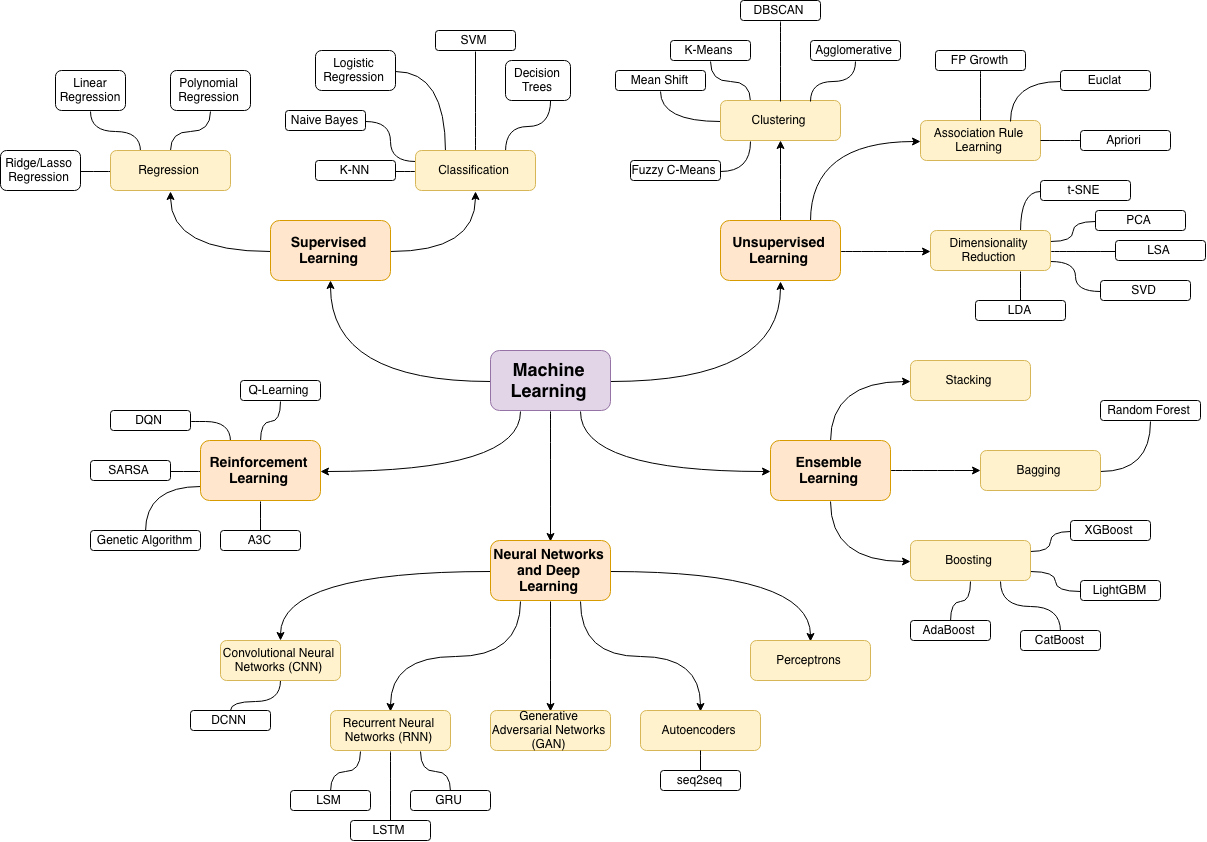
Machine Learning Map
The source of the following machine learning topics map is this wonderful blog post
Prerequisites
Installing Python
Make sure that you have Python installed on your machine.
You might want to use venv standard Python library
to create virtual environments and have Python, pip and all dependent packages to be installed and
served from the local project directory to avoid messing with system wide packages and their
versions.
Installing Dependencies
Install all dependencies that are required for the project by running:
pip install -r requirements.txt
Launching Jupyter Locally
All demos in the project may be run directly in your browser without installing Jupyter locally. But if you want to launch Jupyter Notebook locally you may do it by running the following command from the root folder of the project:
jupyter notebook
After this Jupyter Notebook will be accessible by http://localhost:8888.
Launching Jupyter Remotely
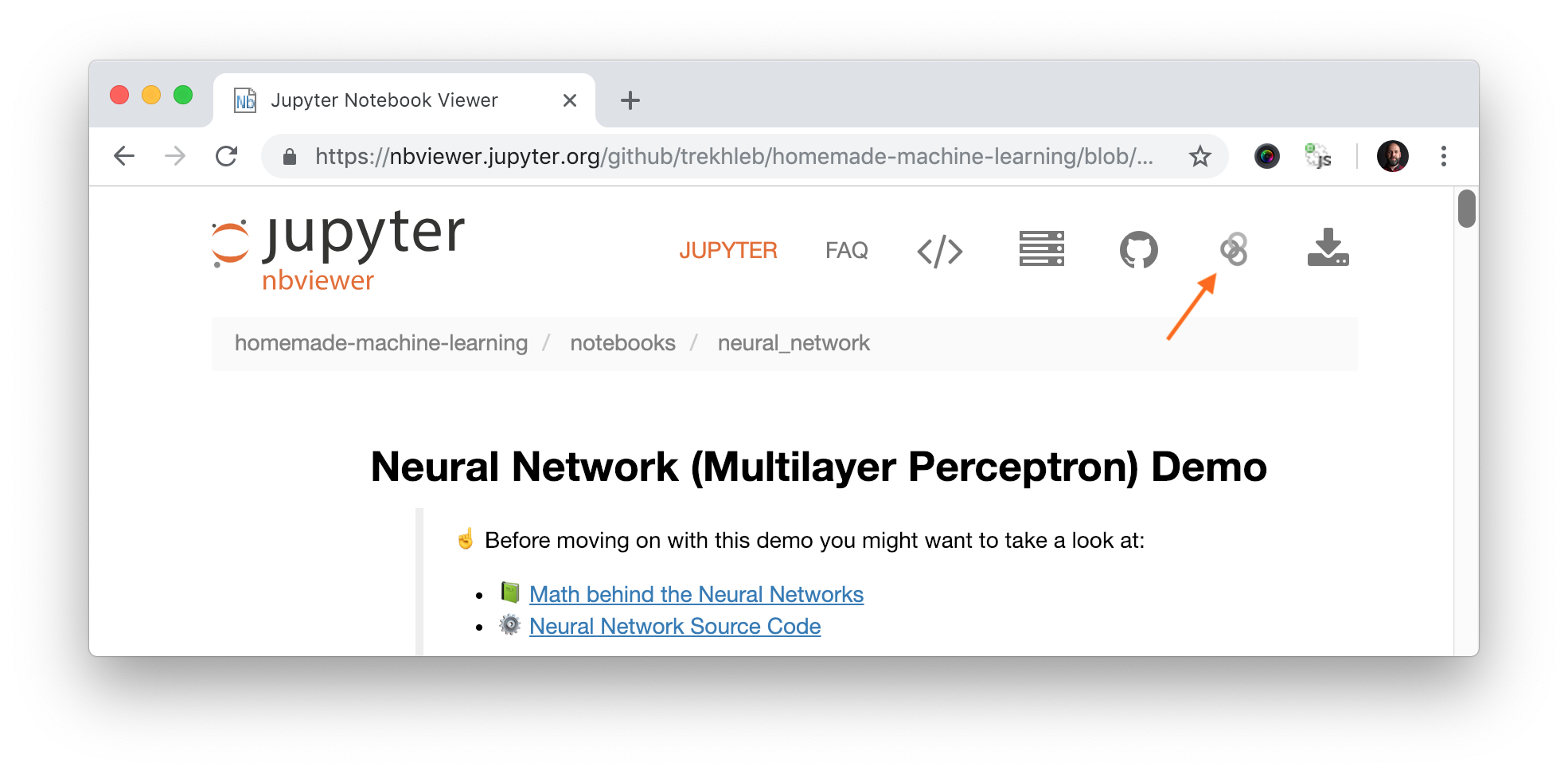
Each algorithm section contains demo links to Jupyter NBViewer. This is fast online previewer for Jupyter notebooks where you may see demo code, charts and data right in your browser without installing anything locally. In case if you want to change the code and experiment with demo notebook you need to launch the notebook in Binder. You may do it by simply clicking the "Execute on Binder" link in top right corner of the NBViewer.
Datasets
The list of datasets that is being used for Jupyter Notebook demos may be found in data folder.
Supporting the project
You may support this project via ❤️️ GitHub or ❤️️ Patreon.
How active is development on trekhleb/homemade-machine-learning?
The most recent commit recorded on trekhleb/homemade-machine-learning was 11 months ago, based on the GitHub push timestamp. The repository has 4.2k forks — one of the better signals of community interest.
How many stars does trekhleb/homemade-machine-learning have?
trekhleb/homemade-machine-learning has 24.8k GitHub stars — refresh the page for the live number, or check github.com/trekhleb/homemade-machine-learning. TopGit mirrors GitHub's count but does not claim minute-by-minute accuracy.
What else is in the Developer Tools space?
trekhleb/homemade-machine-learning is tracked by TopGit under the Developer Tools category, alongside 7 GitHub-tagged topics. Trending and Topics pages list peer repositories of comparable stars and language.
What language is trekhleb/homemade-machine-learning written in?
trekhleb/homemade-machine-learning is written primarily in Jupyter Notebook. GitHub's language field is based on the largest share of bytes in the default branch.
What topics is trekhleb/homemade-machine-learning associated with?
GitHub's repository topics for trekhleb/homemade-machine-learning: "algorithm", "jupyter", "jupyter-notebook", "machine-learning", "machine-learning-algorithms", "machinelearning", "python". TopGit's editorial category is Developer Tools.
Where do I read more about trekhleb/homemade-machine-learning?
This TopGit page is a snapshot — the READ ME tab shows the project's own README content (links stripped, images preserved). The GitHub repository at github.com/trekhleb/homemade-machine-learning is the definitive source.
Why is trekhleb/homemade-machine-learning categorized under Developer Tools?
TopGit places trekhleb/homemade-machine-learning in the Developer Tools category based on its GitHub topics and description (tagged: "algorithm", "jupyter", "jupyter-notebook"). Categories are assigned from real repository metadata, not editorial guesswork.
Read full README in the tab above.
Want a second opinion on homemade-machine-learning?
Ask an AI that can read this page — one click and you get its take on homemade-machine-learning.
 /homemade-machine-learning