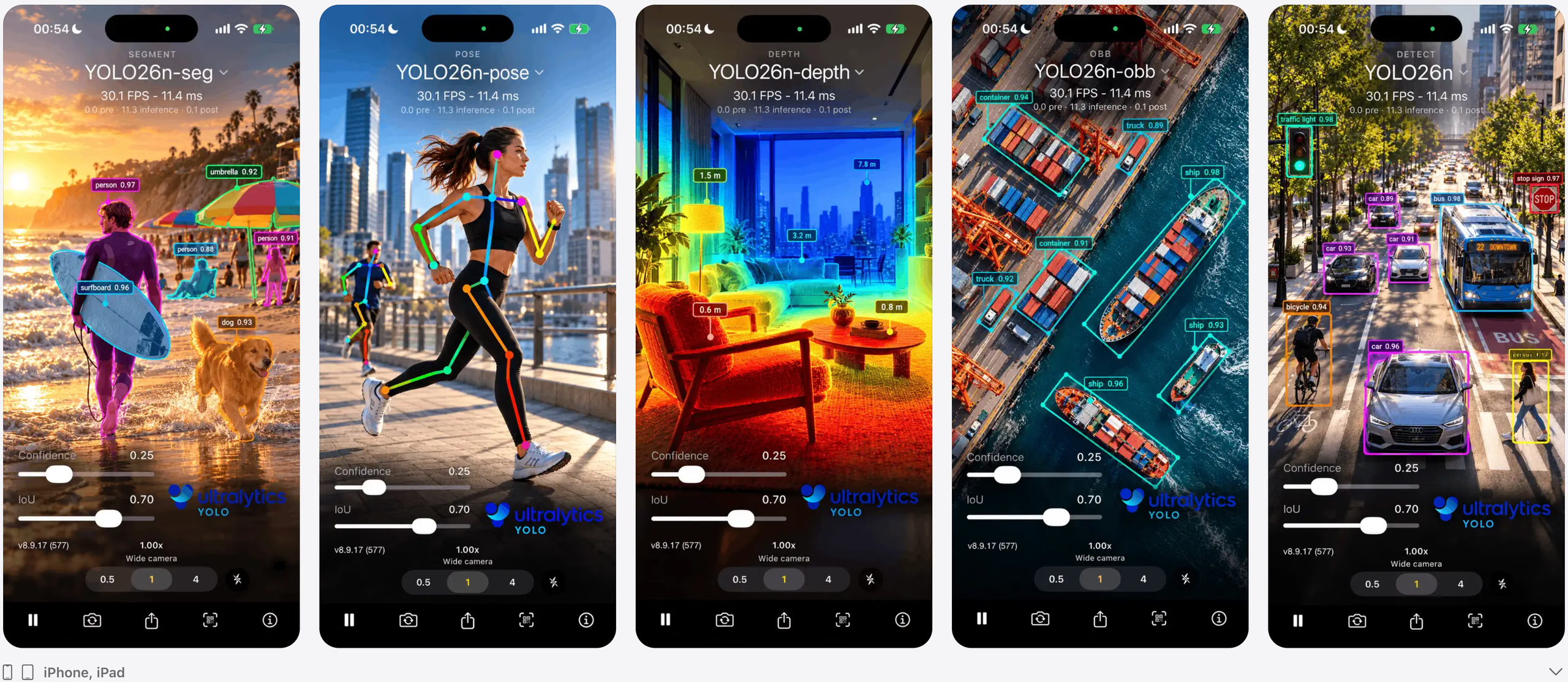
ultralytics/yolo-flutter-app is a mobile-focused project on GitHub with 513 stars, written primarily in Dart. Official Ultralytics YOLO Flutter plugin for real-time inference on Android and iOS across major vision tasks.
Snapshot summary built from the project's own GitHub metadata — there's no written TopGit review yet. The page will update automatically when a full review is published.
WHY NO REVIEW YET
TopGit writes full reviews for the most-starred, most-requested repositories. This page is a snapshot until then — see the READ ME tab for the original README in full.
Ultralytics YOLO Flutter is the official plugin for running YOLO models in Flutter apps on iOS and Android. It supports detection, instance segmentation, semantic segmentation, depth estimation, classification, pose, and OBB on both platforms, with two simple entry points:
YOLO for single-image inference
YOLOView for real-time camera inference
The main goal is simple integration: use an official model ID, or drop in your own exported model and let the plugin resolve task metadata for you.
✨ Features
Official Ultralytics plugin for Flutter
One Dart API for Android and iOS
Metadata-first model loading with official model download and caching
Real-time camera inference and single-image inference
Controls for thresholds, accelerator selection, and result streaming
YOLO26 and YOLO11 model families supported
Feature
Android
iOS
Details
Object Detection
✅
✅
Bounding boxes, labels, and confidence scores
Instance Segmentation
✅
✅
Instance masks with boxes and classes
Semantic Segmentation
✅
✅
Dense class masks for every pixel
Monocular Depth Estimation
✅
✅
Official LiteRT and Core ML models
Image Classification
✅
✅
Top class predictions and scores
Pose Estimation
✅
✅
Keypoints with boxes and confidence scores
Oriented Bounding Box (OBB) Detection
✅
✅
Rotated boxes and polygon corners
Real-Time Camera Inference
✅
✅
YOLOView for live camera workflows
Single-Image Inference
✅
✅
YOLO for image bytes
Official Models
✅
✅
Discovery, download, and caching for packaged model IDs
Custom Models
✅
✅
LiteRT (TFLite) on Android, Core ML on iOS, metadata-first tasks
Qualcomm NPU (QNN)
✅
—
Opt-in Hexagon NPU inference for *_qnn.onnx models on Snapdragon
In your model's Export tab, click the QR button on a completed LiteRT export (or Core ML for iPhone), then open the app, tap the QR button in the bottom toolbar, and point the existing camera preview at the code. While scanning, the camera dims around a viewfinder; tap Cancel or the QR button again to return to live inference. Use LiteRT with FP32 or W8A32 precision for Android, or Core ML for iPhone; exports must use batch 1 and static input shapes. The example app previews the model before downloading and adds it to the Models picker for selection, removal, and offline use. Tap the active model's name to choose a Custom import or any Official model from compact task rows with size choices. The header shows the task, with a Custom marker for imports, above the model name. The Custom section also provides a Scan QR row with a help button for the Platform export guide. Core AI import links open in the native iOS app.
Import links authorize one export for 24 hours. Anyone with the link can download it during that time; installed models keep working after the link expires. Each export installs separately, even when model names match. App-link handling belongs to the example app; the plugin's resolver and model picker remain usable with your own download source.
📦 Model Loading
The plugin supports three model flows.
1. Official model IDs
Use the default official model or a specific official ID and let the plugin handle download and caching:
final yolo = YOLO(modelPath: YOLO.defaultOfficialModel() ?? 'yolo26n');
Call YOLO.officialModels() to see which official IDs are available on the current platform. Official assets are downloaded on first use and cached in app storage, so the app package does not carry large model files.
Official assets are maintained as GitHub release assets:
Platform
Runtime asset
Release
Android
LiteRT w8a32 .tflite
yolo-flutter-app v0.7.0
Android NPU (opt-in)
QNN *_v73/_v81_qnn.onnx
yolo-flutter-app v0.7.0
iOS
Core ML int8 .mlpackage.zip
yolo-ios-app v8.3.0
The Flutter resolver uses the LiteRT release for Android and the Core ML release for Apple platforms. Every mobile
asset uses a fixed 224 × 224 classification input or 640 × 640 input for every other task. These release tags are
intentionally pinned for reproducible first-use downloads. See the model guide for the official
export matrix, URL patterns, and model properties.
Core ML (.mlpackage) remains the default. Core AI (.aimodel) is an opt-in for iOS 27 and later devices: pass an
.aimodel path, an .aimodel.zip Flutter asset, or an .aimodel.zip URL. It is not available on earlier iOS versions or
in the iOS Simulator. The Ultralytics iOS app exposes the same opt-in as a Settings toggle (off by default). The official
opt-in assets are the .aimodel.zip files on the
yolo-ios-app v8.3.0 release; see the
yolo-ios-app performance record for the trade-offs.
final yolo = YOLO(modelPath: 'https://github.com/ultralytics/yolo-ios-app/releases/download/v8.3.0/yolo26n.aimodel.zip');
2. Your own exported model
Pass your own exported YOLO model as a local path or Flutter asset path:
final yolo = YOLO(modelPath: 'assets/models/my-finetuned-model.tflite');
If the exported model includes embedded metadata, the plugin infers task and class labels automatically — it reads Ultralytics' appended-ZIP metadata, with a standard TFLite (FlatBuffers) metadata fallback — so drag-and-drop custom models auto-detect. If metadata is missing, pass task explicitly.
final yolo = YOLO(
modelPath: 'assets/models/my-finetuned-model.tflite',
task: YOLOTask.detect,
);
3. Remote model URL
Pass an http or https URL and the plugin will download it into app storage before loading it.
4. Qualcomm NPU models (Android, opt-in)
Android ships with LiteRT (TFLite) and that remains the default — nothing changes for existing apps, and the
QNN support adds zero bytes to your build. Any model path ending in _qnn.onnx (a Qualcomm QNN context binary
exported with yolo export model=yolo26n.pt format=qnn nms=None imgsz=640, or imgsz=224 for classification) is routed to the Hexagon NPU through the ONNX Runtime QNN Execution
Provider instead. Export with ultralytics>=8.4.188: earlier releases running onnxruntime-qnn 2.4 or newer write
context binaries that fail to load here with Input name not found. nms=None selects raw one-to-many outputs for
Android-side NMS.
Running QNN models requires a Snapdragon device with a Hexagon HTP (Snapdragon 8 Gen 2 or newer for the official
_v73 assets; _v81 targets Snapdragon 8 Elite Gen 5) and three additions to your app's
android/app/build.gradle:
android {
packagingOptions {
jniLibs {
useLegacyPackaging = true // the Hexagon DSP loader needs real .so files, not APK-mmapped ones
}
}
}
dependencies {
implementation 'com.microsoft.onnxruntime:onnxruntime-android-qnn:1.29.0'
implementation 'com.qualcomm.qti:qnn-runtime:2.51.0' // newer than the AAR's bundled QAIRT; required for the latest Snapdragons
}
final yolo = YOLO(
modelPath: 'https://github.com/ultralytics/yolo-flutter-app/releases/download/v0.7.0/yolo26n_v73_qnn.onnx',
task: YOLOTask.detect,
);
Without the Gradle opt-in, loading a _qnn.onnx model fails with a clear error and TFLite models are unaffected. The bundled example app follows the same opt-in — it ships without the QNN runtime to keep its download small, so build it with ENABLE_QNN=1 (e.g. ENABLE_QNN=1 flutter run --release) to test the NPU path on a device.
See the performance guide for measured CPU/GPU/NPU numbers and tuning notes.
🧭 Official vs. Custom
Use case
Recommended path
Fastest first integration
Official model ID like yolo26n
You trained or exported your own model
Custom asset or local file
You ship different models per customer or environment
Remote URL
You need the plugin to infer task automatically
Any export with metadata
You have an older or stripped export without metadata
Custom model plus explicit task
For official models, start with YOLO.defaultOfficialModel() or YOLO.officialModels(). For custom models, start with the exported file you actually plan to ship.
📥 Using Your Own Model
For custom models, keep the app-side setup minimal.
Android native assets: place .tflite files in android/app/src/main/assets
Flutter assets on Android: place .tflite files in assets/models/
iOS bundle: drag .mlpackage or .mlmodel into ios/Runner.xcworkspace
Flutter assets on iOS: place .mlpackage.zip files in assets/models/
Then point modelPath at that file or asset path.
Official asset maintenance
The Android TFLite release assets are generated by scripts/export-tflite-models.py. The script defines the official YOLO26 task/size matrix, w8a32 export settings (int8 weights, FP32 activations — dynamic-range, so no calibration data is needed), optional one-shot TFLite inference verification, and optional GitHub release upload.
Run it on Linux x86 or macOS with Python ≥3.10:
uv venv --python 3.12 .venv
uv pip install --torch-backend cpu "ultralytics-opencv-headless[export-litert]>=8.4.188"
uv run python scripts/export-tflite-models.py --verify
Use --upload --repo ultralytics/yolo-flutter-app --tag v0.7.0 to replace the existing .tflite assets. Export QNN
with Ultralytics using the same task-specific imgsz. Core ML assets are generated by
../yolo-ios-app/scripts/export-models.py and hosted on the existing iOS v8.3.0 release.
Android inference runs on LiteRT 2.x through an automatic GPU -> CPU accelerator ladder. w8a32 assets are the official download artifacts (the smallest GPU-compatible litert format); the GPU delegate compiles the whole graph on supported devices and otherwise falls back to CPU. GPU coverage still depends on the device driver and graph, so confirm delegate placement on your target hardware (the GPU delegate runs the graph in FP16):
# Requires ultralytics>=8.4.142
from ultralytics import YOLO
YOLO("yolo26n.pt").export(format="litert", nms=None, imgsz=640)
# Classification models use imgsz=224.
🎯 Choosing an API
Use YOLO when you already have image bytes and want one prediction at a time:
final yolo = YOLO(modelPath: 'yolo26n');
await yolo.loadModel();
final results = await yolo.predict(imageBytes);
Version 0.4.0 removes the old Dart-side overlay/control layer. Camera detections are rendered natively by YOLOView; Flutter now owns only the surrounding app controls.
Removed 0.3.x API
0.4.0 replacement
YOLOOverlay, YOLOOverlayTheme
Remove these widgets. Use native YOLOView overlays, or consume onResult/YOLO.predict() data.
YOLOControls
Use YOLOShowcase for the full UI, or compose the exported Material widgets directly.
YOLOView.showNativeUI
Use YOLOShowcase for built-in controls; use bare YOLOView when building your own UI.
YOLOView.showOverlays, YOLOView.overlayTheme
No constructor replacement. Camera overlay drawing is native and not themed from Dart.
YOLOViewController.setShowUIControls()
Show/hide your own Flutter controls around YOLOView.
YOLOViewController.setShowOverlays()
Still available: toggles native overlay rendering. capturePhoto(withOverlays: false) only affects captured JPEG output.
🧩 Recommended Patterns
App type
Model loading pattern
Live camera app
YOLOView(modelPath: 'yolo26n')
Photo picker or gallery workflow
YOLO(modelPath: 'yolo26n')
App with your own bundled model
YOLO(modelPath: 'assets/models/custom.tflite')
Cross-platform Core ML + TFLite app
Use platform-appropriate exported assets and let metadata drive task
App that changes models at runtime
YOLOViewController.switchModel(...)
📚 Documentation
Guide
Description
Installation Guide
Requirements and platform setup
Quick Start
Minimal setup for the first working app
Model Guide
Official models, custom models, export flow
Usage Guide
Common app patterns and examples
API Reference
Full API surface
Performance Guide
Tuning controls and on-device benchmark record
Troubleshooting
Common problems and fixes
🤝 Community & Support
💬 Questions? Discord | Forums | GitHub Issues
🐛 Found a bug? Report it here
💡 Feature request? Let us know
💡 Contribute
Ultralytics thrives on community collaboration, and we deeply value your contributions! Whether it's bug fixes, feature enhancements, or documentation improvements, your involvement is crucial. Please review our Contributing Guide for detailed insights on how to participate. We also encourage you to share your feedback through our Survey. A heartfelt thank you 🙏 goes out to all our contributors!
📄 License
Ultralytics offers two licensing options to accommodate diverse needs:
AGPL-3.0 License: Ideal for students, researchers, and enthusiasts passionate about open-source collaboration. This OSI-approved license promotes knowledge sharing and open contribution. See the LICENSE file for details.
Enterprise License: Designed for commercial applications, this license permits seamless integration of Ultralytics software and AI models into commercial products and services, bypassing the open-source requirements of AGPL-3.0. For commercial use cases, please inquire about an Enterprise License.
🔗 Related Resources
Native iOS Development
If you're interested in using YOLO models directly in iOS applications with Swift (without Flutter), check out our dedicated iOS repository:
👉 Ultralytics YOLO iOS App - A native iOS application for real-time detection, instance segmentation, semantic segmentation, depth estimation, classification, pose estimation, and OBB detection with Ultralytics YOLO models.
This repository provides:
Pure Swift implementation for iOS
Direct Core ML integration
Native iOS UI components
Example code for various YOLO tasks
Optimized for iOS performance
[!NOTE]
On iOS this plugin is built on the shared UltralyticsYOLO Swift package (import UltralyticsYOLO) — the same inference core used by the native iOS app — so both stay in sync from a single source of truth. The plugin's iOS sources (ios/ultralytics_yolo/) hold only the Flutter bridge and the camera/view components, and ship for both Swift Package Manager and CocoaPods.
📮 Contact
Encountering issues or have feature requests related to Ultralytics YOLO? Please report them via GitHub Issues. For broader discussions, questions, and community support, join our Discord server!
How active is development on ultralytics/yolo-flutter-app?
The most recent commit recorded on ultralytics/yolo-flutter-app was 11 days ago, based on the GitHub push timestamp. The repository has 176 forks — one of the better signals of community interest.
How many stars does ultralytics/yolo-flutter-app have?
ultralytics/yolo-flutter-app has 513 GitHub stars — refresh the page for the live number, or check github.com/ultralytics/yolo-flutter-app. TopGit mirrors GitHub's count but does not claim minute-by-minute accuracy.
Is ultralytics/yolo-flutter-app open source?
Yes — ultralytics/yolo-flutter-app ships under the AGPL-3.0 license, which makes its source code freely readable (and, depending on license terms, forkable and reusable). Source: github.com/ultralytics/yolo-flutter-app.
What else is in the Mobile space?
ultralytics/yolo-flutter-app is tracked by TopGit under the Mobile category, alongside 19 GitHub-tagged topics. Trending and Topics pages list peer repositories of comparable stars and language.
What topics is ultralytics/yolo-flutter-app associated with?
Where can I see ultralytics/yolo-flutter-app in action?
The project maintains a homepage at https://pub.dev/packages/ultralytics_yolo. The README tab on this page also usually contains screenshots and a quickstart.
Where do I read more about ultralytics/yolo-flutter-app?
This TopGit page is a snapshot — the READ ME tab shows the project's own README content (links stripped, images preserved). The GitHub repository at github.com/ultralytics/yolo-flutter-app is the definitive source.
Read full README in the tab above.
Is yolo-flutter-app worth your time?
ChatGPT, Claude and Perplexity can all read this page. Ask one of them what it makes of yolo-flutter-app.

 /yolo-flutter-app