Tóm tắt dựng từ metadata GitHub của chính dự án — chưa có bài review TopGit. Trang sẽ tự động cập nhật khi bài review đầy đủ được xuất bản.
VÌ SAO CHƯA CÓ REVIEW
TopGit viết bài đầy đủ cho repo có nhiều sao nhất và được yêu cầu nhiều nhất. Trang này là snapshot trong thời gian chờ — xem README gốc ở tab READ ME.
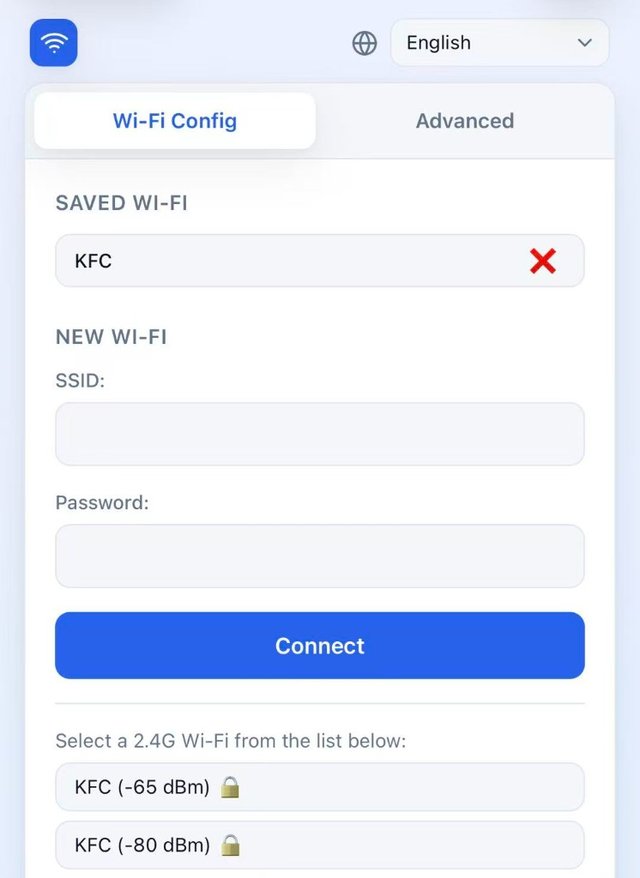
This component helps with Wi-Fi connection for the device.
It first tries to connect to a Wi-Fi network using the credentials stored in the flash. If this fails, it starts an access point and a web server to allow the user to connect to a Wi-Fi network.
The URL to access the web server is http://192.168.4.1.
Screenshot: Wi-Fi Configuration v3.2
Changelog: v3.3.1
Bound SSID/password copies into wifi_config so a full 32-byte SSID no longer overflows with strcpy.
Config portal and SmartConfig now handle a maximum-length SSID without truncating or reading past the buffer.
Changelog: v3.3.0
Persist each saved AP's channel in NVS as channel, channel1, ... channel9 (same indexing as password / passwordN). 2.4 GHz (1-14) and 5 GHz (36-177) share one uint8 key because the channel numbers do not overlap.
The first station scan after start only visits those saved channels. If no matching AP is found, the next scan is a full-band scan.
After a successful connection, the current channel is written back so later boots stay accurate if the AP moved.
Changelog: v3.2.0
Station mode now connects to the strongest same-SSID AP. StartConnect() sets WIFI_ALL_CHANNEL_SCAN + WIFI_CONNECT_AP_BY_SIGNAL on the station config so the driver picks the AP with the best signal instead of the first match it finds (the previous default was WIFI_FAST_SCAN).
Added station_failure_retry_cnt (default: 3) to WifiManagerConfig. The driver retries the strongest AP this many times before falling back to a weaker same-SSID AP, avoiding spurious fallback on a single transient auth failure.
Added show_ota_config and show_sleep_config flags to WifiManagerConfig. Both default to false, hiding the corresponding fields in the config portal Advanced tab. Set them to true to make the fields visible.
Changelog: v3.1.0
Event callback now includes an additional data parameter for extra information.
Disconnected event now provides the disconnect reason code via the data parameter.
This allows applications to handle different disconnect scenarios appropriately.
Changelog: v3.0.0
Added WifiManager class for unified WiFi connection management.
Improved DnsServer and WifiConfigurationAp classes for better resource handling.
Updated HTML for configuration success message to use exit endpoint instead of reboot.
Enhanced error handling and state management in WifiStation.
Cleaned up unused code and improved thread safety across components.
Changelog: v2.6.0
Add support for ESP32C5 5G mode.
Changelog: v2.4.0
Add ja / zh-TW languages.
Add advanced tab.
Add "Connection: close" headers to save open sockets.
Changelog: v2.3.0
Add support for language request.
Changelog: v2.2.0
Add support for ESP32 SmartConfig(ESPTouch v2)
Changelog: v2.1.0
Improve Wi-Fi connection logic.
Changelog: v2.0.0
Add support for multiple Wi-Fi SSID management.
Auto switch to the best Wi-Fi network.
Captive portal for Wi-Fi configuration.
Support for multiple languages (English, Chinese).
Configuration
The Wi-Fi credentials are stored in the flash under the "wifi" namespace.
The keys are "ssid", "ssid1", ... "ssid9", "password", "password1", ... "password9", and "channel", "channel1", ... "channel9". Channel is a uint8 (0 = unknown; 1-14 = 2.4 GHz; 36-177 = 5 GHz).
Usage
#include <wifi_manager.h>
#include <ssid_manager.h>

// Initialize the default event loop
ESP_ERROR_CHECK(esp_event_loop_create_default());

// Initialize NVS flash for Wi-Fi configuration
esp_err_t ret = nvs_flash_init();
if (ret == ESP_ERR_NVS_NO_FREE_PAGES || ret == ESP_ERR_NVS_NEW_VERSION_FOUND) {
    ESP_ERROR_CHECK(nvs_flash_erase());
    ret = nvs_flash_init();
}
ESP_ERROR_CHECK(ret);

// Get the WifiManager singleton
auto& wifi_manager = WifiManager::GetInstance();

// Initialize with configuration
WifiManagerConfig config;
config.ssid_prefix = "ESP32";  // AP mode SSID prefix
config.language = "zh-CN";     // Web UI language

// Optional: tune connection-to-strongest-AP behavior
// config.station_failure_retry_cnt = 3;  // retries before falling back to weaker AP

// Optional: show advanced fields in the config portal
// config.show_ota_config = true;    // show Custom OTA URL input
// config.show_sleep_config = true;  // show Sleep Mode toggle

wifi_manager.Initialize(config);

// Set event callback to handle WiFi events
// The callback receives the event type and optional data (e.g., disconnect reason)
wifi_manager.SetEventCallback([](WifiEvent event, const std::string& data) {
    switch (event) {
        case WifiEvent::Scanning:
            ESP_LOGI("WiFi", "Scanning for networks...");
            break;
        case WifiEvent::Connecting:
            ESP_LOGI("WiFi", "Connecting to network...");
            break;
        case WifiEvent::Connected:
            ESP_LOGI("WiFi", "Connected successfully!");
            break;
        case WifiEvent::Disconnected:
            // data contains the disconnect reason code
            ESP_LOGW("WiFi", "Disconnected from network, reason: %s", data.c_str());
            break;
        case WifiEvent::ConfigModeEnter:
            ESP_LOGI("WiFi", "Entered config mode");
            break;
        case WifiEvent::ConfigModeExit:
            ESP_LOGI("WiFi", "Exited config mode");
            break;
    }
});

// Check if there are saved Wi-Fi credentials
auto& ssid_list = SsidManager::GetInstance().GetSsidList();
if (ssid_list.empty()) {
    // No credentials saved, start config AP mode
    wifi_manager.StartConfigAp();
} else {
    // Try to connect to the saved Wi-Fi network
    wifi_manager.StartStation();
}
Please check https://github.com/78/xiaozhi-esp32 for more usage.
Có — 78/esp-wifi-connect phát hành theo license MIT, nghĩa là mã nguồn mở để đọc, fork và (tùy license) tái sử dụng. Mã: github.com/78/esp-wifi-connect.
78/esp-wifi-connect có tag gì không?
Bản đồng bộ chưa ghi nhận topic GitHub nào cho 78/esp-wifi-connect. GitHub topics hiển thị ở thanh bên phải trang repo — đó là nơi đáng kiểm tra nhất.
78/esp-wifi-connect có website riêng không?
TopGit chưa ghi nhận URL trang chủ cho 78/esp-wifi-connect. Phần README ở tab phía trên thường có link demo, hoặc xem mô tả GitHub của repo.
78/esp-wifi-connect còn đang phát triển không?
Commit gần nhất trên 78/esp-wifi-connect là 2 tháng trước (theo timestamp GitHub). Repo có 119 fork — một chỉ báo về mức độ quan tâm của cộng đồng.
78/esp-wifi-connect dùng license gì?
78/esp-wifi-connect phát hành theo license MIT. Nên mở file LICENSE trên GitHub để xác nhận — license metadata đôi khi lệch với thực tế dự án.
Đọc thêm về 78/esp-wifi-connect ở đâu?
Trang TopGit này là một snapshot — tab "Readme" hiển thị nguyên văn README của repo (đã bỏ link, giữ ảnh). Repo GitHub ở github.com/78/esp-wifi-connect là nguồn chính thức.
Đọc đầy đủ README ở tab phía trên.
Muốn nghe thêm một ý kiến về esp-wifi-connect?
Hỏi một AI đọc được trang này — một cú bấm là có ngay nhận định về esp-wifi-connect.

 /esp-wifi-connect