78/esp-wifi-connect is tracked by TopGit as an open-source project, with 93 stars on GitHub, written primarily in HTML. ESP32 component helps connect WiFi
Snapshot summary built from the project's own GitHub metadata — there's no written TopGit review yet. The page will update automatically when a full review is published.
WHY NO REVIEW YET
TopGit writes full reviews for the most-starred, most-requested repositories. This page is a snapshot until then — see the READ ME tab for the original README in full.
This component helps with Wi-Fi connection for the device.
It first tries to connect to a Wi-Fi network using the credentials stored in the flash. If this fails, it starts an access point and a web server to allow the user to connect to a Wi-Fi network.
The URL to access the web server is http://192.168.4.1.
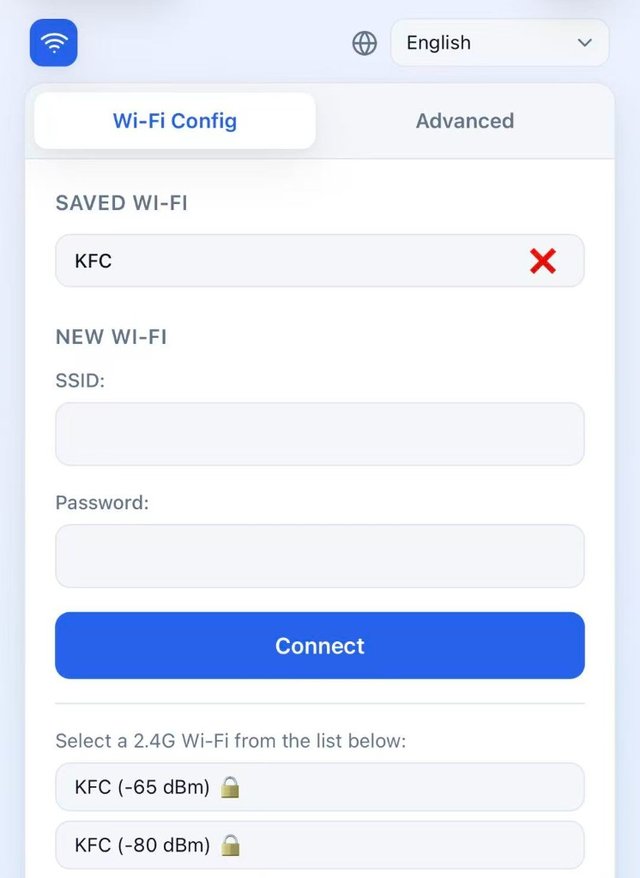
Screenshot: Wi-Fi Configuration v3.2
Changelog: v3.2.0
Station mode now connects to the strongest same-SSID AP. StartConnect() sets WIFI_ALL_CHANNEL_SCAN + WIFI_CONNECT_AP_BY_SIGNAL on the station config so the driver picks the AP with the best signal instead of the first match it finds (the previous default was WIFI_FAST_SCAN).
Added station_failure_retry_cnt (default: 3) to WifiManagerConfig. The driver retries the strongest AP this many times before falling back to a weaker same-SSID AP, avoiding spurious fallback on a single transient auth failure.
Added show_ota_config and show_sleep_config flags to WifiManagerConfig. Both default to false, hiding the corresponding fields in the config portal Advanced tab. Set them to true to make the fields visible.
Changelog: v3.1.0
Event callback now includes an additional data parameter for extra information.
Disconnected event now provides the disconnect reason code via the data parameter.
This allows applications to handle different disconnect scenarios appropriately.
Changelog: v3.0.0
Added WifiManager class for unified WiFi connection management.
Improved DnsServer and WifiConfigurationAp classes for better resource handling.
Updated HTML for configuration success message to use exit endpoint instead of reboot.
Enhanced error handling and state management in WifiStation.
Cleaned up unused code and improved thread safety across components.
Changelog: v2.6.0
Add support for ESP32C5 5G mode.
Changelog: v2.4.0
Add ja / zh-TW languages.
Add advanced tab.
Add "Connection: close" headers to save open sockets.
Changelog: v2.3.0
Add support for language request.
Changelog: v2.2.0
Add support for ESP32 SmartConfig(ESPTouch v2)
Changelog: v2.1.0
Improve Wi-Fi connection logic.
Changelog: v2.0.0
Add support for multiple Wi-Fi SSID management.
Auto switch to the best Wi-Fi network.
Captive portal for Wi-Fi configuration.
Support for multiple languages (English, Chinese).
Configuration
The Wi-Fi credentials are stored in the flash under the "wifi" namespace.
The keys are "ssid", "ssid1", "ssid2" ... "ssid9", "password", "password1", "password2" ... "password9".
Usage
#include <wifi_manager.h>
#include <ssid_manager.h>

// Initialize the default event loop
ESP_ERROR_CHECK(esp_event_loop_create_default());

// Initialize NVS flash for Wi-Fi configuration
esp_err_t ret = nvs_flash_init();
if (ret == ESP_ERR_NVS_NO_FREE_PAGES || ret == ESP_ERR_NVS_NEW_VERSION_FOUND) {
    ESP_ERROR_CHECK(nvs_flash_erase());
    ret = nvs_flash_init();
}
ESP_ERROR_CHECK(ret);

// Get the WifiManager singleton
auto& wifi_manager = WifiManager::GetInstance();

// Initialize with configuration
WifiManagerConfig config;
config.ssid_prefix = "ESP32";  // AP mode SSID prefix
config.language = "zh-CN";     // Web UI language

// Optional: tune connection-to-strongest-AP behavior
// config.station_failure_retry_cnt = 3;  // retries before falling back to weaker AP

// Optional: show advanced fields in the config portal
// config.show_ota_config = true;    // show Custom OTA URL input
// config.show_sleep_config = true;  // show Sleep Mode toggle

wifi_manager.Initialize(config);

// Set event callback to handle WiFi events
// The callback receives the event type and optional data (e.g., disconnect reason)
wifi_manager.SetEventCallback([](WifiEvent event, const std::string& data) {
    switch (event) {
        case WifiEvent::Scanning:
            ESP_LOGI("WiFi", "Scanning for networks...");
            break;
        case WifiEvent::Connecting:
            ESP_LOGI("WiFi", "Connecting to network...");
            break;
        case WifiEvent::Connected:
            ESP_LOGI("WiFi", "Connected successfully!");
            break;
        case WifiEvent::Disconnected:
            // data contains the disconnect reason code
            ESP_LOGW("WiFi", "Disconnected from network, reason: %s", data.c_str());
            break;
        case WifiEvent::ConfigModeEnter:
            ESP_LOGI("WiFi", "Entered config mode");
            break;
        case WifiEvent::ConfigModeExit:
            ESP_LOGI("WiFi", "Exited config mode");
            break;
    }
});

// Check if there are saved Wi-Fi credentials
auto& ssid_list = SsidManager::GetInstance().GetSsidList();
if (ssid_list.empty()) {
    // No credentials saved, start config AP mode
    wifi_manager.StartConfigAp();
} else {
    // Try to connect to the saved Wi-Fi network
    wifi_manager.StartStation();
}
Please check https://github.com/78/xiaozhi-esp32 for more usage.
No homepage URL was recorded for 78/esp-wifi-connect in TopGit's last sync. The README tab above frequently contains screenshots and demo links, or check the repository description on GitHub.
Does 78/esp-wifi-connect have any tags?
TopGit's last sync did not record any GitHub topics for 78/esp-wifi-connect. GitHub topics appear in the right sidebar of a repository page; that's the authoritative place to check.
How active is development on 78/esp-wifi-connect?
The most recent commit recorded on 78/esp-wifi-connect was 16 days ago, based on the GitHub push timestamp. The repository has 110 forks — one of the better signals of community interest.
Is 78/esp-wifi-connect open source?
Yes — 78/esp-wifi-connect ships under the MIT license, which makes its source code freely readable (and, depending on license terms, forkable and reusable). Source: github.com/78/esp-wifi-connect.
What license does 78/esp-wifi-connect use?
78/esp-wifi-connect is released under the MIT license. Always verify the LICENSE file directly on GitHub for the authoritative terms — license strings can be edited out of sync with a project's actual stance.
Where do I read more about 78/esp-wifi-connect?
This TopGit page is a snapshot — the READ ME tab shows the project's own README content (links stripped, images preserved). The GitHub repository at github.com/78/esp-wifi-connect is the definitive source.
Read full README in the tab above.
Curious whether esp-wifi-connect is right for you?
Let ChatGPT, Claude, or Perplexity look into it — click below and see what AI actually says about esp-wifi-connect.