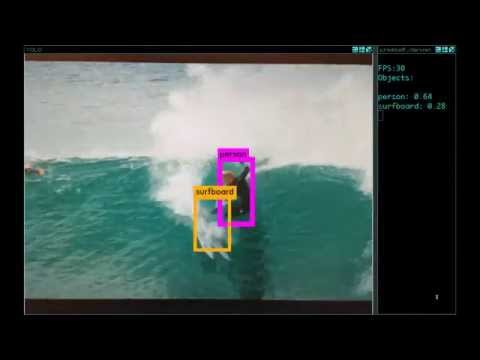
AlexeyAB/yolo-windows là một trong những repo mã nguồn mở mà TopGit theo dõi, hiện có 71 sao, viết chủ yếu bằng C. a yolo windows version(for object detection)
Tóm tắt dựng từ metadata GitHub của chính dự án — chưa có bài review TopGit. Trang sẽ tự động cập nhật khi bài review đầy đủ được xuất bản.
VÌ SAO CHƯA CÓ REVIEW
TopGit viết bài đầy đủ cho repo có nhiều sao nhất và được yêu cầu nhiều nhất. Trang này là snapshot trong thời gian chờ — xem README gốc ở tab READ ME.
To compile without OpenCV - remove define OPENCV from: Visual Studio->Project->Properties->C/C++->Preprocessor
To compile with different OpenCV version - change in file yolo_kernels.cu each string #pragma comment(lib, "opencv_core249.lib") from 249 to required version.
With OpenCV will show image or video detection in window and store result to test_dnn_out.avi
Pre-trained models for different cfg-files can be downloaded from (smaller -> faster & lower quality):
darknet.cmd - initialization with 1 GB model yolo.weights & yolo.cfg and get command prompt: enter the jpg-image-filename
darknet_demo.cmd - initialization with 1 GB model yolo.weights & yolo.cfg and play your video file which you must rename to: test.mp4
darknet_demo_small.cmd - initialization with 359 MB small model yolo-small.weights & yolo-small.cfg and play your video file which you must rename to: test.mp4
darknet_net_cam.cmd - initialization with 1 GB model, play video from network video-camera mjpeg-stream and store result to: test_dnn_out.avi
For using network video-camera mjpeg-stream with any Android smartphone:
Download for Android phone mjpeg-stream soft: IP Webcam / Smart WebCam
Smart WebCam - preferably: https://play.google.com/store/apps/details?id=com.acontech.android.SmartWebCam
IP Webcam: https://play.google.com/store/apps/details?id=com.pas.webcam
Connect your Android phone to computer by WiFi (through a WiFi-router) or USB
Start Smart WebCam on your phone
Replace the address below, on shown in the phone application (Smart WebCam) and launch:
Windows (Visual Studio) Support
Now yolo supports windows with Visual Studio. Just change the include directories / library directories to your own ones,
and compile the codes with X64 Release mode. You may need pthread-windows while compiling and linking
How to train yourself:
To training for your 20 objects download pre-trained convolutional layers:
For tiny-model: darknet yolo train yolo-tiny.cfg darknet.conv.weights
For small-model: darknet yolo train yolo-small.cfg extraction.conv.weights
For full-model: darknet yolo train yolo.cfg extraction.conv.weights
To train for a different number of objects (not 20) or for different number of sides (not 7), you should change your .cfg-file 3 lines:
output= (5 x 2 + C) x S x S
classes= C
side= S
Where:
C = number of objects (by default 20)
S = number of sides (by default 7)
More details: http://pjreddie.com/darknet/yolov1/
How to compile:
If you have CUDA 7.5, OpenCV 2.4.9 (C:\opencv_2.4.9) and MSVS 2013 (or 2015) then start MSVS, open yolo-windows\build\darknet\darknet.sln and do the: Build -> Build darknet
If you have other version of CUDA (not 7.5) then open yolo-windows\build\darknet\darknet\darknet.vcxproj by using Notepad, find 2 places with "CUDA 7.5" and change it to your CUDA-version, then do step 1
If you have other version of OpenCV 2.4.x (not 2.4.9) then you should change pathes after \darknet.sln is opened
3.1 (right click on project) -> properties -> C/C++ -> General -> Additional Include Directories
3.2 (right click on project) -> properties -> Linker -> General -> Additional Library Directories
If you have other version of OpenCV 3.x (not 2.4.x) then you should change many places in code by yourself.
How to compile (custom):
Also, you can to create your own darknet.sln & darknet.vcxproj, this example for CUDA 7.5 and OpenCV 2.4.9
Then add to your created project:
(right click on project) -> properties -> C/C++ -> General -> Additional Include Directories, put here:
right click on project -> Build dependecies -> Build Customizations -> set check on CUDA 7.5 or what version you have - for example as here: http://devblogs.nvidia.com/parallelforall/wp-content/uploads/2015/01/VS2013-R-5.jpg
add to project all .c & .cu files from yolo-windows\src
(right click on project) -> properties -> Linker -> General -> Additional Library Directories, put here:
compile to .exe (X64 & Release) and put .dll`s near with .exe:
pthreadVC2.dll, pthreadGC2.dll from yolo-windows\3rdparty\dll\x64
cusolver64_75.dll, curand64_75.dll, cudart64_75.dll, cublas64_75.dll - 75 for CUDA 7.5 or your version, from C:\Program Files\NVIDIA GPU Computing Toolkit\CUDA\v7.5\bin
AlexeyAB/yolo-windows có 71 sao GitHub — tải lại trang để xem số mới nhất, hoặc xem trực tiếp github.com/AlexeyAB/yolo-windows. TopGit phản chiếu số sao của GitHub nhưng không cam kết đến từng phút.
AlexeyAB/yolo-windows có phải mã nguồn mở không?
TopGit chưa ghi nhận license cho AlexeyAB/yolo-windows. Phần lớn repo public trên GitHub là mã nguồn mở, nhưng điều khoản khác nhau từng repo — mở file LICENSE để xác nhận.
AlexeyAB/yolo-windows còn đang phát triển không?
Commit gần nhất trên AlexeyAB/yolo-windows là 9.8 năm trước (theo timestamp GitHub). Repo có 56 fork — một chỉ báo về mức độ quan tâm của cộng đồng.
AlexeyAB/yolo-windows là gì?
AlexeyAB/yolo-windows (AlexeyAB/yolo-windows) là dự án C trên GitHub. Theo mô tả gốc: a yolo windows version(for object detection)
AlexeyAB/yolo-windows viết bằng ngôn ngữ gì?
AlexeyAB/yolo-windows chủ yếu viết bằng C. Trường "language" của GitHub dựa trên phần lớn byte ở nhánh mặc định.
Đọc thêm về AlexeyAB/yolo-windows ở đâu?
Trang TopGit này là một snapshot — tab "Readme" hiển thị nguyên văn README của repo (đã bỏ link, giữ ảnh). Repo GitHub ở github.com/AlexeyAB/yolo-windows là nguồn chính thức.
Đọc đầy đủ README ở tab phía trên.
Vẫn đang phân vân về yolo-windows?
Một cú bấm sẽ gửi câu hỏi kèm trang này cho AI — xem AI nói gì về yolo-windows.

 /yolo-windows