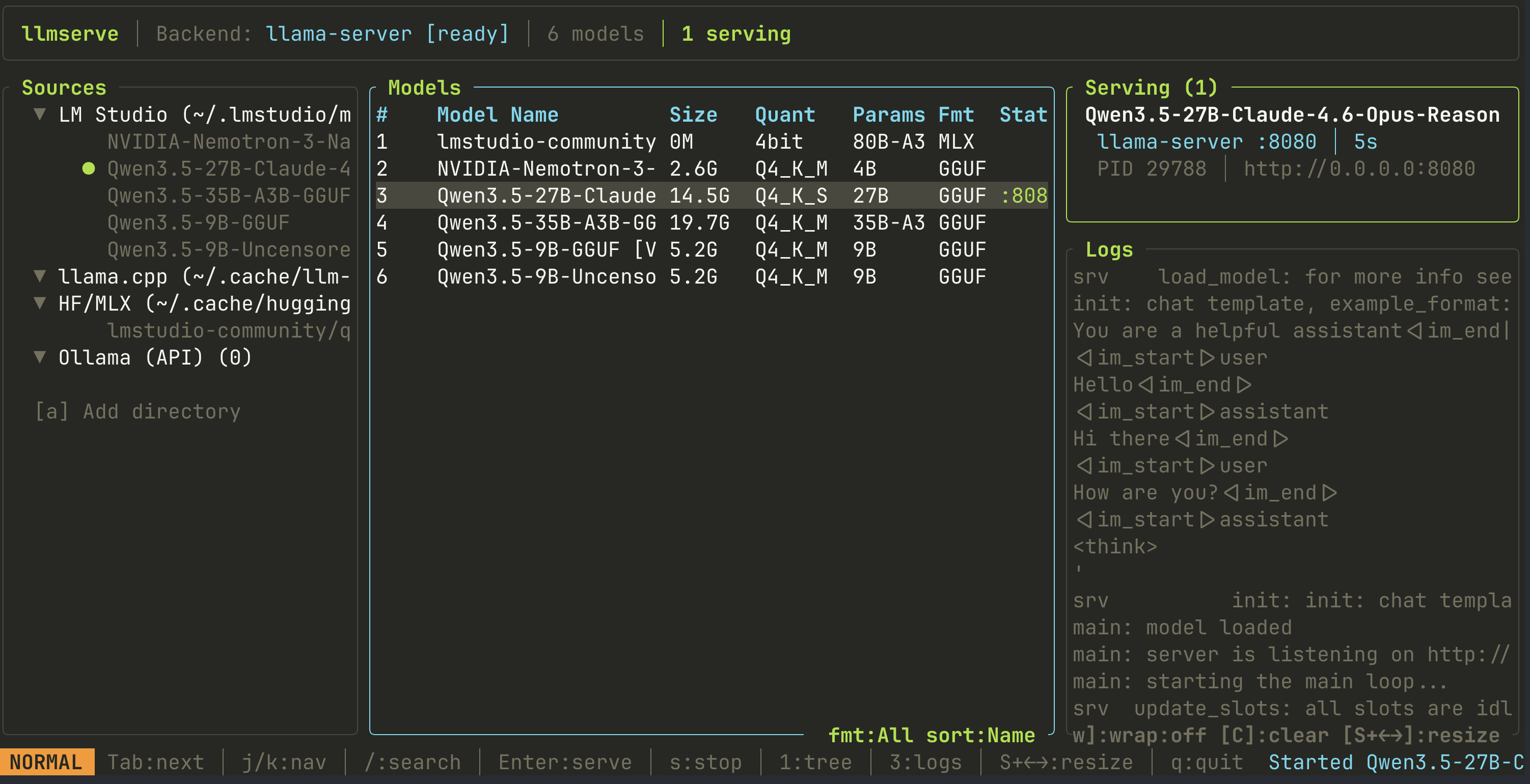
AlexsJones/llmserve là dự án mã nguồn mở trên GitHub, viết chủ yếu bằng Rust, với 417 sao. A simple TUI for serving local LLM models. Pick a model, pick a backend, serve it
Tóm tắt dựng từ metadata GitHub của chính dự án — chưa có bài review TopGit. Trang sẽ tự động cập nhật khi bài review đầy đủ được xuất bản.
VÌ SAO CHƯA CÓ REVIEW
TopGit viết bài đầy đủ cho repo có nhiều sao nhất và được yêu cầu nhiều nhất. Trang này là snapshot trong thời gian chờ — xem README gốc ở tab READ ME.
Any model. Any backend. One TUI to serve them all.
If you're like me, you've got dozens of GGUF and MLX models scattered across LM Studio, HuggingFace cache, and random directories — and you want to quickly spin one up with whichever inference engine happens to be installed. llmserve is the front door for that. It finds your models, finds your backends, and gets out of the way.
It auto-detects locally installed inference engines (llama-server, KoboldCpp, LocalAI, MLX, and more), discovers model files across multiple locations, and lets you launch servers with live log output — all from a single interactive TUI. No config files to write, no CLI flags to remember.
Sister project: Use llmfit to figure out which models fit your hardware, then use llmserve to actually run them.
Install
Quick install (macOS / Linux)
curl -fsSL https://llmserve.axjns.dev/install.sh | sh
Homebrew
brew trust AlexsJones/llmserve
brew tap AlexsJones/llmserve
brew install llmserve
Homebrew 5.1.15+ refuses to load formulae from untrusted third-party taps, so brew trust is required before brew install. On older versions the brew trust line is unnecessary (and unavailable); skip it.
Cargo
cargo install llmserve
From source
cargo install --path .
Usage
llmserve
The TUI has three panels:
Panel
Position
Toggle
Description
Sources
Left
1
File tree of model locations with counts and serving indicators
Models
Center
Always on
Searchable, sortable model table with serve status
Serve/Logs
Right
3
Running server cards + live backend output logs
Focus cycles between visible panels with Tab. Resize the focused panel with Shift+Left/Shift+Right.
Keybindings
Key
Action
Tab
Cycle focus: Sources -> Models -> Logs
1 / 3
Toggle sources / logs panel
j/k
Navigate (works in focused panel)
g/G
Jump to top / bottom
Ctrl-d/Ctrl-u
Half page down / up
Shift+Left/Right
Resize focused panel
Enter
Models: open serve dialog / Sources: filter by source
Space
Sources: expand/collapse node
a
Add model directory (with tab-completion)
x
Remove custom directory (sources panel)
/
Search / filter models by name
b
Pick default backend
f
Cycle format filter (All / GGUF / MLX)
o
Cycle sort (Name / Size / Source)
s
Stop a server
S
Stop all servers
w
Toggle log word wrap
C
Clear dead server logs
r
Refresh models and backends
t
Cycle theme
q
Quit
Serve dialog
When you press Enter on a model, a confirmation dialog opens:
Key
Action
h/l or Left/Right
Cycle through backends (shows availability + already-serving status)
p or Tab
Edit port number
Enter/y
Launch server
Esc/n
Cancel
The dialog shows the resolved preset for the selected backend (context size, flash attention, batch size, GPU layers, extra args).
llmserve detects 7 backends at startup. Backends that can serve local model files are marked with a checkmark:
Backend
Local GGUF
Local MLX
Detection
Env override
llama-server
Yes
—
which llama-server
—
KoboldCpp
Yes
—
binary + API :5001
KOBOLDCPP_HOST
LocalAI
Yes
—
binary + API :8080 + Docker
LOCALAI_HOST
MLX
—
Yes
python3 -c "import mlx_lm" (macOS)
—
Ollama
—
—
GET :11434/api/tags
OLLAMA_HOST
vLLM
—
—
binary + API :8000
VLLM_HOST
LM Studio
—
—
GET :1234/v1/models
LMSTUDIO_HOST
Backends that can't serve local files (Ollama, vLLM, LM Studio) are detected but show a clear reason in the serve dialog. They use their own model registries or manage their own servers.
Model discovery
Source
Default path
LM Studio
~/.lmstudio/models/
llama.cpp
~/.cache/llm-models/
HuggingFace/MLX
~/.cache/huggingface/hub/ (mlx-community repos)
Ollama
Via API
Custom
extra_model_dirs in config
Development
make build       # Debug build
make test        # Unit + integration tests (CI-safe)
make test-local  # All tests including local model serve rotation
make clippy      # Lint
make fmt         # Format
make install     # Install to ~/.cargo/bin
AlexsJones/llmserve có 417 sao GitHub — tải lại trang để xem số mới nhất, hoặc xem trực tiếp github.com/AlexsJones/llmserve. TopGit phản chiếu số sao của GitHub nhưng không cam kết đến từng phút.
AlexsJones/llmserve có phải mã nguồn mở không?
Có — AlexsJones/llmserve phát hành theo license MIT, nghĩa là mã nguồn mở để đọc, fork và (tùy license) tái sử dụng. Mã: github.com/AlexsJones/llmserve.
AlexsJones/llmserve có tag gì không?
Bản đồng bộ chưa ghi nhận topic GitHub nào cho AlexsJones/llmserve. GitHub topics hiển thị ở thanh bên phải trang repo — đó là nơi đáng kiểm tra nhất.
AlexsJones/llmserve có website riêng không?
TopGit chưa ghi nhận URL trang chủ cho AlexsJones/llmserve. Phần README ở tab phía trên thường có link demo, hoặc xem mô tả GitHub của repo.
AlexsJones/llmserve còn đang phát triển không?
Commit gần nhất trên AlexsJones/llmserve là 9 ngày trước (theo timestamp GitHub). Repo có 26 fork — một chỉ báo về mức độ quan tâm của cộng đồng.
Đọc thêm về AlexsJones/llmserve ở đâu?
Trang TopGit này là một snapshot — tab "Readme" hiển thị nguyên văn README của repo (đã bỏ link, giữ ảnh). Repo GitHub ở github.com/AlexsJones/llmserve là nguồn chính thức.
Đọc đầy đủ README ở tab phía trên.
Chưa chắc llmserve có hợp với bạn?
Để ChatGPT, Claude hoặc Perplexity tìm hiểu giúp — bấm bên dưới và xem AI nói gì về llmserve.

 /llmserve