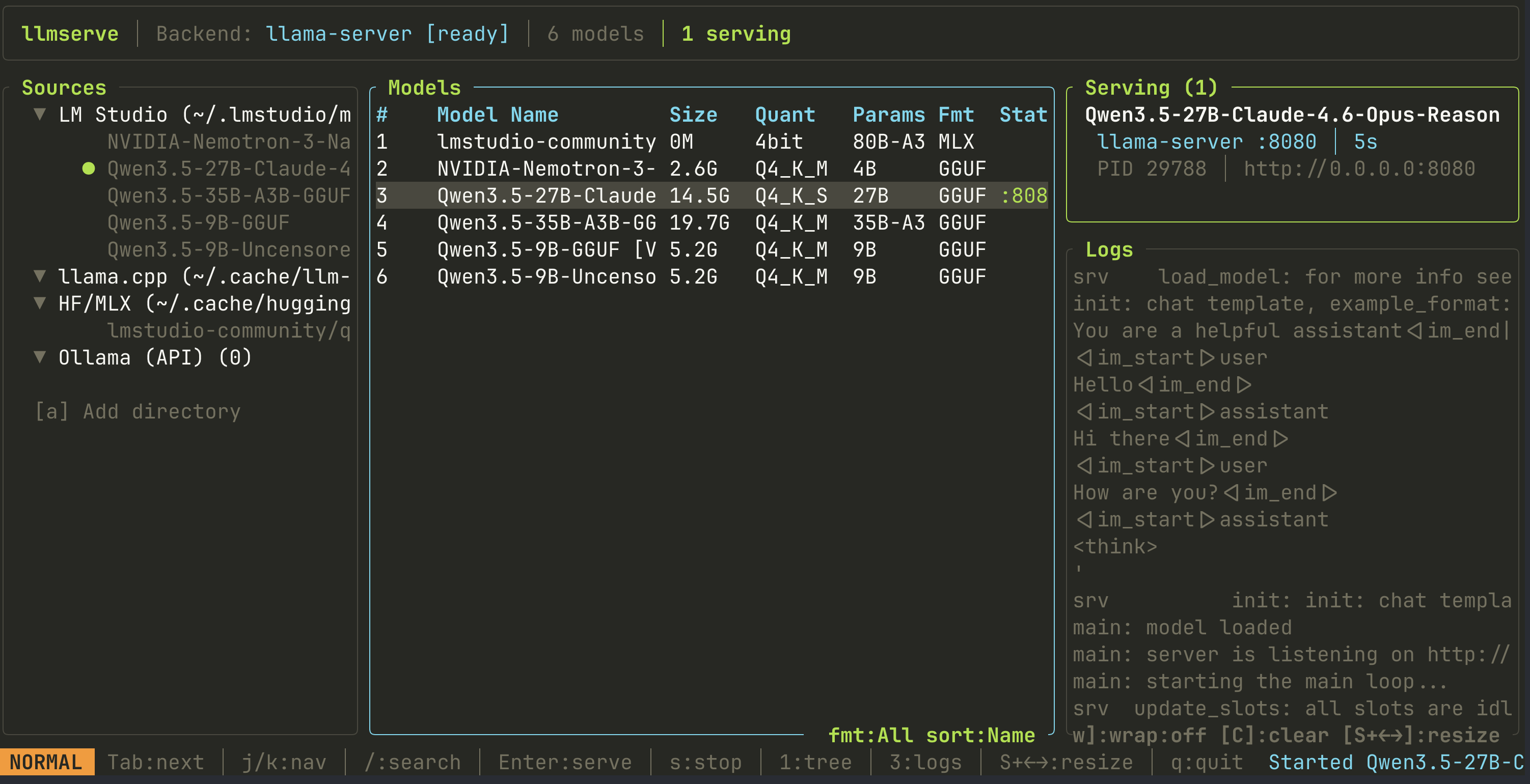
AlexsJones/llmserve is one of the open-source repositories TopGit tracks, currently at 340 stars, written primarily in Rust. A simple TUI for serving local LLM models. Pick a model, pick a backend, serve it
Snapshot summary built from the project's own GitHub metadata — there's no written TopGit review yet. The page will update automatically when a full review is published.
WHY NO REVIEW YET
TopGit writes full reviews for the most-starred, most-requested repositories. This page is a snapshot until then — see the READ ME tab for the original README in full.
Any model. Any backend. One TUI to serve them all.
If you're like me, you've got dozens of GGUF and MLX models scattered across LM Studio, HuggingFace cache, and random directories — and you want to quickly spin one up with whichever inference engine happens to be installed. llmserve is the front door for that. It finds your models, finds your backends, and gets out of the way.
It auto-detects locally installed inference engines (llama-server, KoboldCpp, LocalAI, MLX, and more), discovers model files across multiple locations, and lets you launch servers with live log output — all from a single interactive TUI. No config files to write, no CLI flags to remember.
Sister project: Use llmfit to figure out which models fit your hardware, then use llmserve to actually run them.
Install
Quick install (macOS / Linux)
curl -fsSL https://llmserve.axjns.dev/install.sh | sh
Homebrew
brew tap AlexsJones/llmserve
brew install llmserve
Cargo
cargo install llmserve
From source
cargo install --path .
Usage
llmserve
The TUI has three panels:
Panel
Position
Toggle
Description
Sources
Left
1
File tree of model locations with counts and serving indicators
Models
Center
Always on
Searchable, sortable model table with serve status
Serve/Logs
Right
3
Running server cards + live backend output logs
Focus cycles between visible panels with Tab. Resize the focused panel with Shift+Left/Shift+Right.
Keybindings
Key
Action
Tab
Cycle focus: Sources -> Models -> Logs
1 / 3
Toggle sources / logs panel
j/k
Navigate (works in focused panel)
g/G
Jump to top / bottom
Ctrl-d/Ctrl-u
Half page down / up
Shift+Left/Right
Resize focused panel
Enter
Models: open serve dialog / Sources: filter by source
Space
Sources: expand/collapse node
a
Add model directory (with tab-completion)
x
Remove custom directory (sources panel)
/
Search / filter models by name
b
Pick default backend
f
Cycle format filter (All / GGUF / MLX)
o
Cycle sort (Name / Size / Source)
s
Stop a server
S
Stop all servers
w
Toggle log word wrap
C
Clear dead server logs
r
Refresh models and backends
t
Cycle theme
q
Quit
Serve dialog
When you press Enter on a model, a confirmation dialog opens:
Key
Action
h/l or Left/Right
Cycle through backends (shows availability + already-serving status)
p or Tab
Edit port number
Enter/y
Launch server
Esc/n
Cancel
The dialog shows the resolved preset for the selected backend (context size, flash attention, batch size, GPU layers, extra args).
llmserve detects 7 backends at startup. Backends that can serve local model files are marked with a checkmark:
Backend
Local GGUF
Local MLX
Detection
Env override
llama-server
Yes
—
which llama-server
—
KoboldCpp
Yes
—
binary + API :5001
KOBOLDCPP_HOST
LocalAI
Yes
—
binary + API :8080 + Docker
LOCALAI_HOST
MLX
—
Yes
python3 -c "import mlx_lm" (macOS)
—
Ollama
—
—
GET :11434/api/tags
OLLAMA_HOST
vLLM
—
—
binary + API :8000
VLLM_HOST
LM Studio
—
—
GET :1234/v1/models
LMSTUDIO_HOST
Backends that can't serve local files (Ollama, vLLM, LM Studio) are detected but show a clear reason in the serve dialog. They use their own model registries or manage their own servers.
Model discovery
Source
Default path
LM Studio
~/.lmstudio/models/
llama.cpp
~/.cache/llm-models/
HuggingFace/MLX
~/.cache/huggingface/hub/ (mlx-community repos)
Ollama
Via API
Custom
extra_model_dirs in config
Development
make build       # Debug build
make test        # Unit + integration tests (CI-safe)
make test-local  # All tests including local model serve rotation
make clippy      # Lint
make fmt         # Format
make install     # Install to ~/.cargo/bin
No homepage URL was recorded for AlexsJones/llmserve in TopGit's last sync. The README tab above frequently contains screenshots and demo links, or check the repository description on GitHub.
Does AlexsJones/llmserve have any tags?
TopGit's last sync did not record any GitHub topics for AlexsJones/llmserve. GitHub topics appear in the right sidebar of a repository page; that's the authoritative place to check.
How active is development on AlexsJones/llmserve?
The most recent commit recorded on AlexsJones/llmserve was 2 days ago, based on the GitHub push timestamp. The repository has 17 forks — one of the better signals of community interest.
How many stars does AlexsJones/llmserve have?
AlexsJones/llmserve has 340 GitHub stars — refresh the page for the live number, or check github.com/AlexsJones/llmserve. TopGit mirrors GitHub's count but does not claim minute-by-minute accuracy.
Is AlexsJones/llmserve open source?
Yes — AlexsJones/llmserve ships under the MIT license, which makes its source code freely readable (and, depending on license terms, forkable and reusable). Source: github.com/AlexsJones/llmserve.
Where do I read more about AlexsJones/llmserve?
This TopGit page is a snapshot — the READ ME tab shows the project's own README content (links stripped, images preserved). The GitHub repository at github.com/AlexsJones/llmserve is the definitive source.
Read full README in the tab above.
Still deciding about llmserve?
One click hands the question to an AI along with this page — see what it says about llmserve.
 /llmserve