amueller/scipy-2018-sklearn hiện có 248 sao trên GitHub, viết chủ yếu bằng Jupyter Notebook. Scipy 2018 scikit-learn tutorial by Guillaume Lemaitre and Andreas Mueller
Tóm tắt dựng từ metadata GitHub của chính dự án — chưa có bài review TopGit. Trang sẽ tự động cập nhật khi bài review đầy đủ được xuất bản.
VÌ SAO CHƯA CÓ REVIEW
TopGit viết bài đầy đủ cho repo có nhiều sao nhất và được yêu cầu nhiều nhất. Trang này là snapshot trong thời gian chờ — xem README gốc ở tab READ ME.
Andreas Mueller @amuellerml - Columbia University; Book: Introduction to Machine Learning with Python
This repository will contain the teaching material and other info associated with our scikit-learn tutorial
at SciPy 2018 held July 9-15 in Austin, Texas.
Parts 1 to 12 make up the morning session, while
parts 13 to 23 will be presented in the afternoon (approximately)
Schedule:
The 2-part tutorial will be held on Tuesday, July 10, 2018.
Obtaining the Tutorial Material
If you have a GitHub account, it is probably most convenient if you clone or
fork the GitHub repository. You can clone the repository by running:
If you are not familiar with git or don’t have an
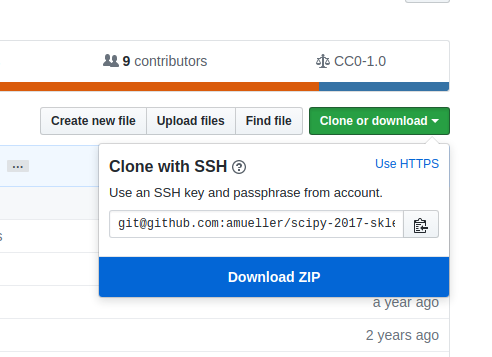
GitHub account, you can download the repository as a .zip file by heading over
to the GitHub repository (https://github.com/amueller/scipy-2018-sklearn) in
your browser and click the green “Download” button in the upper right.
Please note that we may add and improve the material until shortly before the
tutorial session, and we recommend you to update your copy of the materials one
day before the tutorials. If you have an GitHub account and cloned the
repository via GitHub, you can sync your existing local repository with:
git pull origin master
If you don’t have a GitHub account, you may have to re-download the .zip
archive from GitHub.
Installation Notes
This tutorial will require recent installations of
NumPy
SciPy
matplotlib
pandas
pillow
scikit-learn
IPython
Jupyter Notebook
The last one is important and you should be able to type:
jupyter notebook
in your terminal window and see the notebook panel load in your web browser.
Try opening and running a notebook from the material to see check that it works. Alternatively you can use Jupyter lab.
For users who do not yet have the required packages installed, a relatively
painless way to install all the requirements is to use a Python distribution
such as Anaconda, which includes
the most relevant Python packages for science, math, engineering, and
data analysis; Anaconda can be downloaded and installed for free
including commercial use and redistribution.
The code examples in this tutorial should be compatible to Python 2.7,
Python 3.4-3.6.
After obtaining the material, we strongly recommend you to open and execute
the Jupyter Notebook jupter notebook check_env.ipynb that is located at the
top level of this repository. Inside the repository, you can open the notebook
by executing
jupyter notebook check_env.ipynb
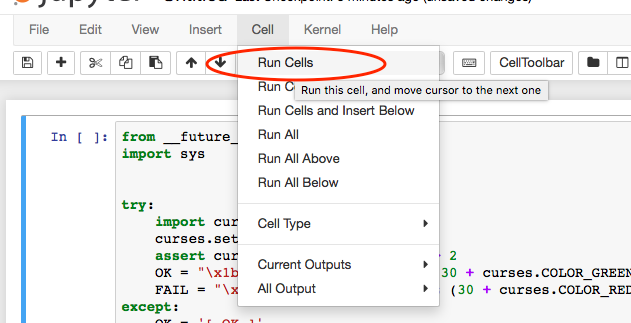
inside this repository. Inside the Notebook, you can run the code cell by
clicking on the "Run Cells" button as illustrated in the figure below:
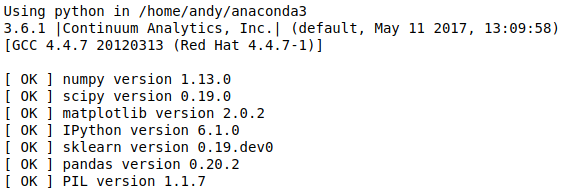
Finally, if your environment satisfies the requirements for the tutorials, the
executed code cell will produce an output message as shown below:
Although not required, we also recommend you to update the scikit-learn the latest release version to ensure best compatibility with the teaching material. Please upgrade already installed packages by executing
pip install --no-deps --upgrade [package-name]
or conda update [package-name]
Depending on how you installed scikit-learn.
Data Downloads
The data for this tutorial is not included in the repository. We will be
using several data sets during the tutorial: most are built-in to
scikit-learn, which
includes code that automatically downloads and caches these
data.
Because the wireless network
at conferences can often be spotty, it would be a good idea to download these
data sets before arriving at the conference.
Please run
python fetch_data.py
to download all necessary data beforehand.
The download size of the data files are approx. 280 MB, and after fetch_data.py
extracted the data on your disk, the ./notebook/dataset folder will take 480 MB
of your local hard drive.
Outline
Morning Session
01 Introduction to machine learning with sample applications, Supervised and Unsupervised learning [view]
02 Scientific Computing Tools for Python: NumPy, SciPy, and matplotlib [view]
03 Data formats, preparation, and representation [view]
04 Supervised learning: Training and test data [view]
05 Supervised learning: Estimators for classification [view]
06 Supervised learning: Estimators for regression analysis [view]
amueller/scipy-2018-sklearn có 248 sao GitHub — tải lại trang để xem số mới nhất, hoặc xem trực tiếp github.com/amueller/scipy-2018-sklearn. TopGit phản chiếu số sao của GitHub nhưng không cam kết đến từng phút.
amueller/scipy-2018-sklearn có phải mã nguồn mở không?
Có — amueller/scipy-2018-sklearn phát hành theo license CC0-1.0, nghĩa là mã nguồn mở để đọc, fork và (tùy license) tái sử dụng. Mã: github.com/amueller/scipy-2018-sklearn.
amueller/scipy-2018-sklearn có tag gì không?
Bản đồng bộ chưa ghi nhận topic GitHub nào cho amueller/scipy-2018-sklearn. GitHub topics hiển thị ở thanh bên phải trang repo — đó là nơi đáng kiểm tra nhất.
amueller/scipy-2018-sklearn có website riêng không?
TopGit chưa ghi nhận URL trang chủ cho amueller/scipy-2018-sklearn. Phần README ở tab phía trên thường có link demo, hoặc xem mô tả GitHub của repo.
amueller/scipy-2018-sklearn còn đang phát triển không?
Commit gần nhất trên amueller/scipy-2018-sklearn là 7.8 năm trước (theo timestamp GitHub). Repo có 152 fork — một chỉ báo về mức độ quan tâm của cộng đồng.
Đọc thêm về amueller/scipy-2018-sklearn ở đâu?
Trang TopGit này là một snapshot — tab "Readme" hiển thị nguyên văn README của repo (đã bỏ link, giữ ảnh). Repo GitHub ở github.com/amueller/scipy-2018-sklearn là nguồn chính thức.
Đọc đầy đủ README ở tab phía trên.
Muốn nghe thêm một ý kiến về scipy-2018-sklearn?
Hỏi một AI đọc được trang này — một cú bấm là có ngay nhận định về scipy-2018-sklearn.
 /scipy-2018-sklearn