An open-source entry in TopGit's GitHub warehouse: amueller/scipy-2018-sklearn, 248 stars, Jupyter Notebook. Scipy 2018 scikit-learn tutorial by Guillaume Lemaitre and Andreas Mueller
Snapshot summary built from the project's own GitHub metadata — there's no written TopGit review yet. The page will update automatically when a full review is published.
WHY NO REVIEW YET
TopGit writes full reviews for the most-starred, most-requested repositories. This page is a snapshot until then — see the READ ME tab for the original README in full.
Andreas Mueller @amuellerml - Columbia University; Book: Introduction to Machine Learning with Python
This repository will contain the teaching material and other info associated with our scikit-learn tutorial
at SciPy 2018 held July 9-15 in Austin, Texas.
Parts 1 to 12 make up the morning session, while
parts 13 to 23 will be presented in the afternoon (approximately)
Schedule:
The 2-part tutorial will be held on Tuesday, July 10, 2018.
Obtaining the Tutorial Material
If you have a GitHub account, it is probably most convenient if you clone or
fork the GitHub repository. You can clone the repository by running:
If you are not familiar with git or don’t have an
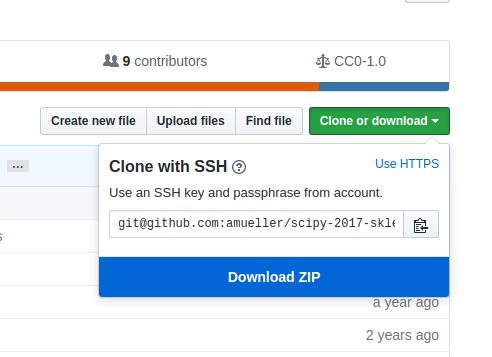
GitHub account, you can download the repository as a .zip file by heading over
to the GitHub repository (https://github.com/amueller/scipy-2018-sklearn) in
your browser and click the green “Download” button in the upper right.
Please note that we may add and improve the material until shortly before the
tutorial session, and we recommend you to update your copy of the materials one
day before the tutorials. If you have an GitHub account and cloned the
repository via GitHub, you can sync your existing local repository with:
git pull origin master
If you don’t have a GitHub account, you may have to re-download the .zip
archive from GitHub.
Installation Notes
This tutorial will require recent installations of
NumPy
SciPy
matplotlib
pandas
pillow
scikit-learn
IPython
Jupyter Notebook
The last one is important and you should be able to type:
jupyter notebook
in your terminal window and see the notebook panel load in your web browser.
Try opening and running a notebook from the material to see check that it works. Alternatively you can use Jupyter lab.
For users who do not yet have the required packages installed, a relatively
painless way to install all the requirements is to use a Python distribution
such as Anaconda, which includes
the most relevant Python packages for science, math, engineering, and
data analysis; Anaconda can be downloaded and installed for free
including commercial use and redistribution.
The code examples in this tutorial should be compatible to Python 2.7,
Python 3.4-3.6.
After obtaining the material, we strongly recommend you to open and execute
the Jupyter Notebook jupter notebook check_env.ipynb that is located at the
top level of this repository. Inside the repository, you can open the notebook
by executing
jupyter notebook check_env.ipynb
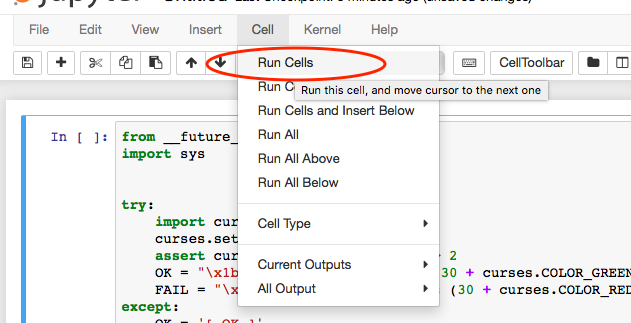
inside this repository. Inside the Notebook, you can run the code cell by
clicking on the "Run Cells" button as illustrated in the figure below:
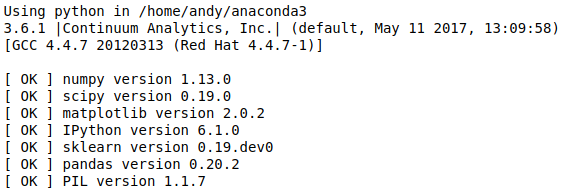
Finally, if your environment satisfies the requirements for the tutorials, the
executed code cell will produce an output message as shown below:
Although not required, we also recommend you to update the scikit-learn the latest release version to ensure best compatibility with the teaching material. Please upgrade already installed packages by executing
pip install --no-deps --upgrade [package-name]
or conda update [package-name]
Depending on how you installed scikit-learn.
Data Downloads
The data for this tutorial is not included in the repository. We will be
using several data sets during the tutorial: most are built-in to
scikit-learn, which
includes code that automatically downloads and caches these
data.
Because the wireless network
at conferences can often be spotty, it would be a good idea to download these
data sets before arriving at the conference.
Please run
python fetch_data.py
to download all necessary data beforehand.
The download size of the data files are approx. 280 MB, and after fetch_data.py
extracted the data on your disk, the ./notebook/dataset folder will take 480 MB
of your local hard drive.
Outline
Morning Session
01 Introduction to machine learning with sample applications, Supervised and Unsupervised learning [view]
02 Scientific Computing Tools for Python: NumPy, SciPy, and matplotlib [view]
03 Data formats, preparation, and representation [view]
04 Supervised learning: Training and test data [view]
05 Supervised learning: Estimators for classification [view]
06 Supervised learning: Estimators for regression analysis [view]
Does amueller/scipy-2018-sklearn have a project website?
No homepage URL was recorded for amueller/scipy-2018-sklearn in TopGit's last sync. The README tab above frequently contains screenshots and demo links, or check the repository description on GitHub.
Does amueller/scipy-2018-sklearn have any tags?
TopGit's last sync did not record any GitHub topics for amueller/scipy-2018-sklearn. GitHub topics appear in the right sidebar of a repository page; that's the authoritative place to check.
How active is development on amueller/scipy-2018-sklearn?
The most recent commit recorded on amueller/scipy-2018-sklearn was 8.1 years ago, based on the GitHub push timestamp. The repository has 152 forks — one of the better signals of community interest.
How many stars does amueller/scipy-2018-sklearn have?
amueller/scipy-2018-sklearn has 248 GitHub stars — refresh the page for the live number, or check github.com/amueller/scipy-2018-sklearn. TopGit mirrors GitHub's count but does not claim minute-by-minute accuracy.
Is amueller/scipy-2018-sklearn open source?
Yes — amueller/scipy-2018-sklearn ships under the CC0-1.0 license, which makes its source code freely readable (and, depending on license terms, forkable and reusable). Source: github.com/amueller/scipy-2018-sklearn.
Where do I read more about amueller/scipy-2018-sklearn?
This TopGit page is a snapshot — the READ ME tab shows the project's own README content (links stripped, images preserved). The GitHub repository at github.com/amueller/scipy-2018-sklearn is the definitive source.
Read full README in the tab above.
Is scipy-2018-sklearn worth your time?
ChatGPT, Claude and Perplexity can all read this page. Ask one of them what it makes of scipy-2018-sklearn.

 /scipy-2018-sklearn