
angular-ui/AngularJS-sublime-package

angular-ui/AngularJS-sublime-package được TopGit xếp vào nhóm dự án mã nguồn mở, với 1.4k sao trên GitHub, viết chủ yếu bằng JavaScript. AngularJS code completion, snippets, go to definition, quick panel search, and more.
Tóm tắt dựng từ metadata GitHub của chính dự án — chưa có bài review TopGit. Trang sẽ tự động cập nhật khi bài review đầy đủ được xuất bản.
TopGit viết bài đầy đủ cho repo có nhiều sao nhất và được yêu cầu nhiều nhất. Trang này là snapshot trong thời gian chờ — xem README gốc ở tab READ ME.
Snapshot
Cộng tác viên hàng đầu
Xem cộng tác viên hàng đầu
AngularJS Sublime Text Package
Installation Options
- Package Control
- Download this repo, rename it to 'AngularJS', and place it within your
Packagesfolder. This can be found within Sublime Text atPreferences > Browse Packages… - Clone the repo into your
Packagesfoldergit clone git://github.com/angular-ui/AngularJS-sublime-package.git AngularJS
Recommended Settings
Update your User Settings to the following. This setting update will automatically open the completion list for HTML attributes. You can add scopes for other preprocessor to get the list to automatically show.
(this is currently a ST3 default)
// Controls what scopes auto complete will be triggered in)
"auto_complete_selector": "source - comment, meta.tag - punctuation.definition.tag.begin"
(this is currently a ST3 default, sans 'text.haml')
// For haml you could add
"auto_complete_selector": "source - comment, meta.tag - punctuation.definition.tag.begin, text.haml"
// add for auto triggering controller completions within the ng-controller=""
"auto_complete_triggers":
	[
		{
			"characters": "ng-controller=\"*",
			"selector": "punctuation.definition.string"
		}
	]
Keymaps
super+ctrl+l
If not indexed: Indexes current project; If indexed: Opens quick panel with a list of definitions to search through [command: angularjs_find]
super+ctrl+alt+l
Attempts to goto definition (project must be indexed first) [command: angularjs_go_to_definition]
super+shift+ctrl+l
Attempts to open browser to directive documentation at current cursor location [command: angularjs_go_to_documentation]
notice
The above keymaps could be used by other plugins as well, so, you my need to remap them via
Preferences > Key Bindings - UserTo check if another plugin is using the above keymaps all you have to do is open the ST console (ctrl+`) and write out
sublime.log_commands(True)and that will log all the commands ran in ST.
Command Palette
- AngularJS: Rebuild Search Index
- AngularJS: Delete Cache
- AngularJS: Prune Cache (removes missing files from index)
- AngularJS: Look Up Definition
- AngularJS: Toggle - Disable All Completions
- AngularJS: Toggle - Disable Indexed Directive Completions
- AngularJS: Toggle - Disable Indexed Isolate Completions
- AngularJS: Toggle - Disable Built-in Directive Completions
- AngularJS: Toggle - Disable Built-in Element Completions
- AngularJS: Toggle - Disable JS Completions
- AngularJS: Toggle - Enable data- Prefix
Completion Options
Preferences > Package Settings > AngularJS > Completions - User
You can use the following properties to either extend or override the default completions provided.
extended_attribute_list: []; Allows you to extend the plug-in with more attributes
angular_elements: [*]; Default list of directives that can be used as HTML elements
filter_list: [*]; Default list of filters
core_attribute_list: [*]; Default list of filters
[*] - Adding any of these properties to your User file will override all default values for that setting
Example Completions - User
{
	"extended_attribute_list":[
		["my-directive\tMy Directives", "my-directive=\"${1:string}\"$0"],
	]
}
Checkout the default completions settings (Preferences > Package Settings > AngularJS > Completions - Default) to see more examples.
Completion Settings
Preferences > Package Settings > AngularJS > Settings - User
js_scope: "source.js - string.quoted - comment - meta.brace.square"; Scope to return JS completions in
filter_scope: "text.html string.quoted"; Scope to return filters in
js_prefixes: [","]; add characters that you want to prevent completion triggers
disable_all_completions: false,
disable_indexed_directive_completions: false; bare-bones completion of any directives that have been index
disable_indexed_isolate_completions: false; attempts to provide isolate scope completions when a directive is used as an element
disable_default_directive_completions: false;
disable_default_element_completions: false;
disable_default_js_completions: false;
enable_data_prefix: bool (false); adds the 'data-' prefix to attribute completions, note that you must still type 'ng-' to get autocompletion-list
Example Settings - User, enable "data-" prefix
{
	"enable_data_prefix": true
}
Indexing Options
Preferences > Package Settings > AngularJS > Settings - User (requires project to be re-indexed)
The regex that's used for look up expects the definitions to start like one of the the following examples:
filter('interpolate', ['version', function(version) { ...

.filter('interpolate', ['version', function(version) { ...

('chained').filter('interpolate', ['version', function(version) { ...

/**
 *  If you use something other than `app` as a variable name
 *  you will need to update the `match_expressions` setting
 *  and change `app` to some other name.
 */
app.filter('interpolate', ['version', function(version) { ...

angular.module('myApp', [])
you can change app to some other name if you need to
match_expression: "((^[ \\\\t]*\\.{0}|^[ \\\\t]*{0}|angular\\.{0}|\\)\\.{0}|app\\.{0})[ ]*\\([ ]*[\"\\'])([\\w\\.\\$]*)([\"\\'])"
if you want to match against a group of names change app to (app|somethingElse|foo) and bump the following setting to 4
match_expression_group: 3
match_definitions: ["controller", "directive", "module", "factory", "filter"]; Determines what type of definitions to index
excluded_dirs: ["node_modules/"]; Global setting for excluding folders
exclude_file_suffixes: ["min.js", "angular.js"]; exclude files via their suffix
Excluding Folders Per Project
You can exclude folders at the project level by opening your project settings file Project > Edit Project
Example:
"settings":
    {
        "AngularJS":
        {
            "exclude_dirs": ["someFolder/*/lib/angular/*"]
        }
    }
Including Folders Per Project
You can override the default project folders by setting the AngularJS folders variable within your projects settings Project > Edit Project
Example:
{
	"folders":
	[
		{
			"follow_symlinks": true,
			"path": "/Users/username/Projects/example"
		}
	],
	"settings": {
		"AngularJS": {
			"folders": [
				"/Users/username/Projects/example/ng/src",
				"/Users/username/Vendors/someother/lib/outside/of/project"
			]
		}
	}
}
You can use 'shell-like' wildcards within your folder paths, they're expanded via the glob module.
Quick Panel Options
Preferences > Package Settings > AngularJS > Settings - User (Sublime Text 3 Only)
show_file_preview: bool(true); As you type, the current file and definition will be shown in the buffer
Example Settings - User, hide file preview
{
	"show_file_preview": false
}
Plug-in Details
Syntax File
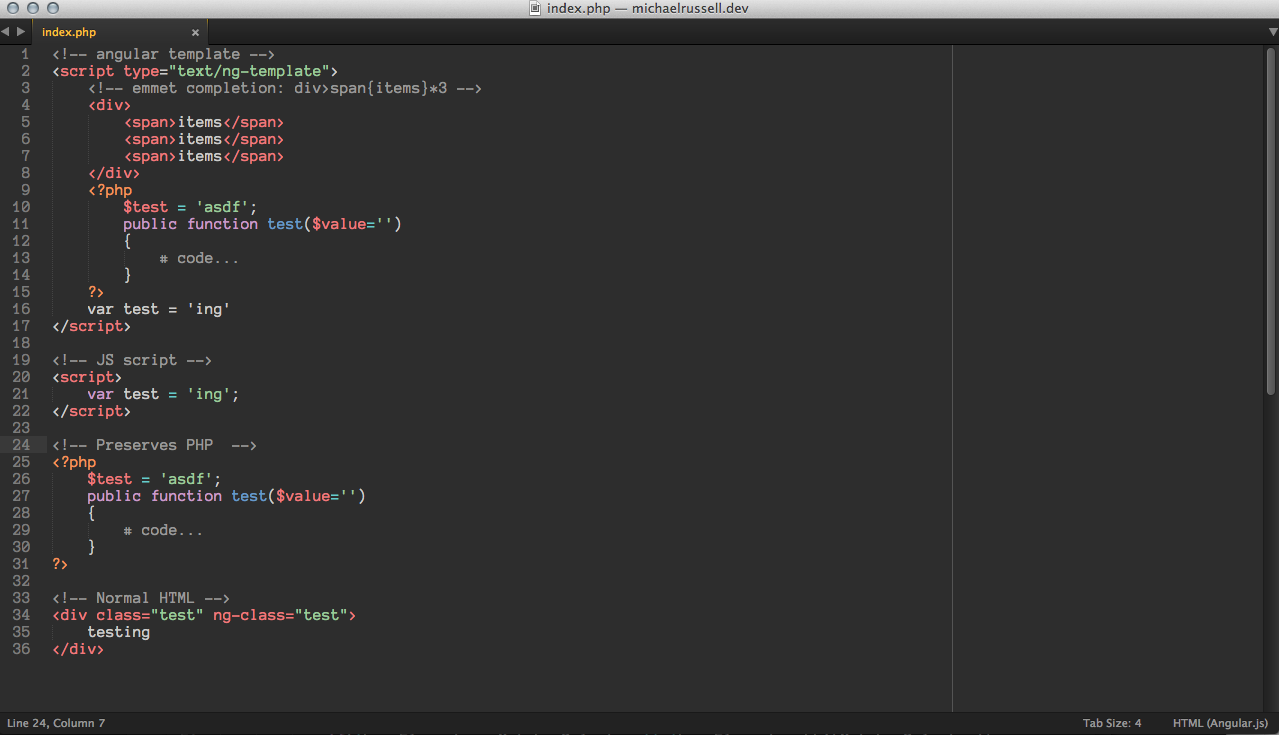
Provides a syntax file, HTML (Angular.js), that you can set to your view which adds the HTML scope back to <script type="text/ng-template"> tags.
Completions
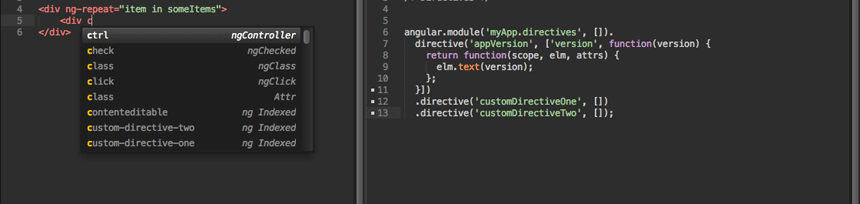
Provides auto-completion of core AngularJS directives, such as ng-repeat, ng-click, as well as any custom directives you create.
The following completions require you to index your project
(Index your project via super+ctrl+l)
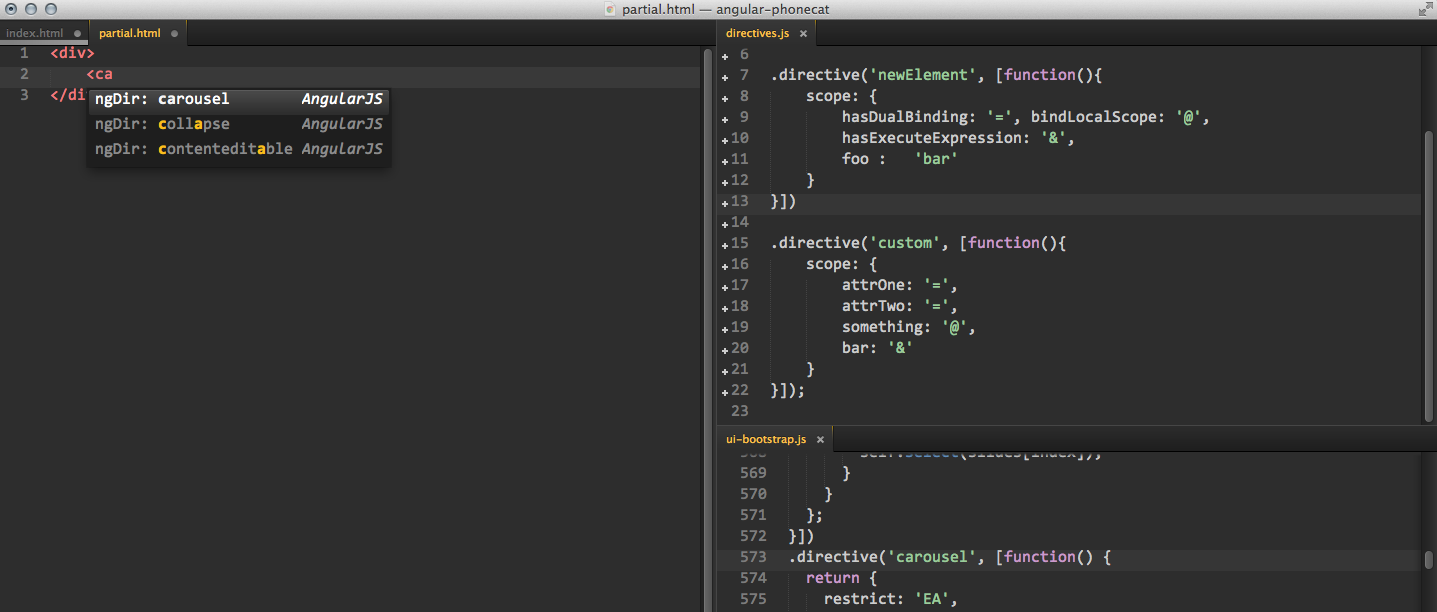
Provides auto-completions for any directive as an HTML element, prefixed with ngDir to easily find via fuzzy search.
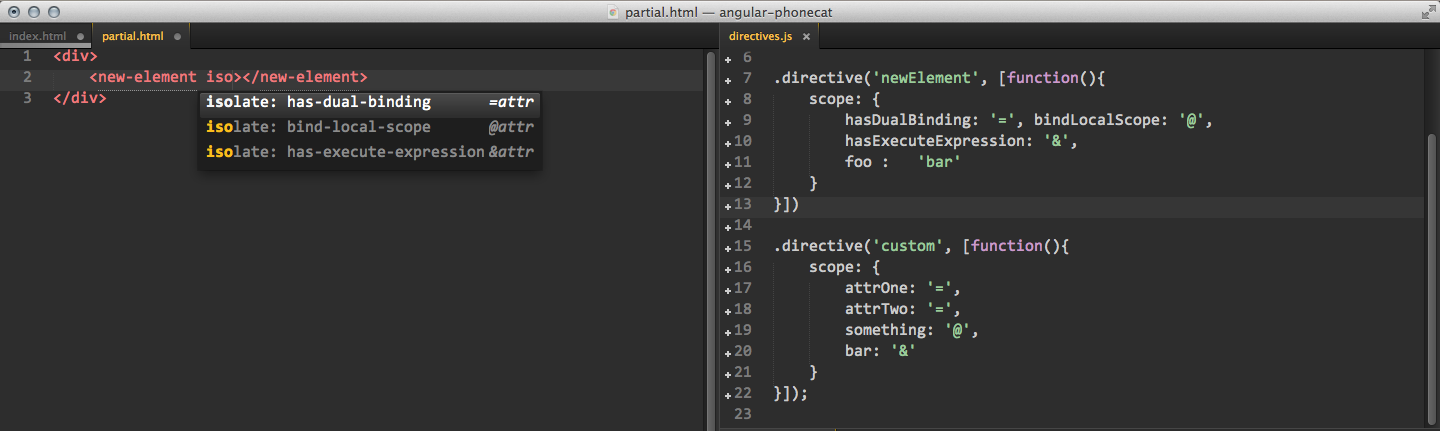
Provides isolate scope completions (with binding types hinted on the right) specific to any directive used as an element, prefixed with isolate to easily find via fuzzy search.
You can also get completions for filters within HTML markup. Trigger the completions list via ctrl+space right after typing | (pipe plus a space) and you should find all your filters that have been indexed within the completion list.

Provides controller completions when the cursor is within the double quotes of ng-controller="". You can have this triggered automatically via the settings provided in the 'Recommending Settings' section

Goto Definition
Once you have your project indexed you can use the keyboard shortcut super+alt+ctrl+l when your cursor is within directive/services/etc.. and you'll be transported to the file that contains the definition.
Quick Panel Definition Look Ups
Quickly find your directives/filters/modules/factories via the quick_panel. Once your project has been indexed, by either executing the command 'AngularJS: Rebuild Search Index' from the command palette or executing the shortcut super+ctrl+l to open the quick_panel search for the first time.
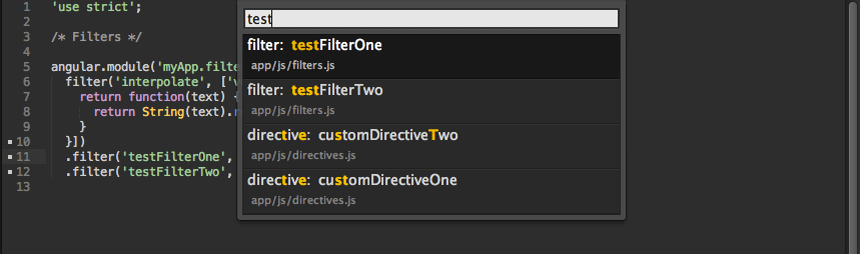
Each time you save a file that file will be reindexed, if you have already triggered indexing, so that the quick_panel search stays up-to-date.
Javascript Completions
Global Context
- angular -
angular - $animate -
$animate - $animateProvider -
$animateProvider - $cacheFactory -
$cacheFactory(cacheId[, options]) - $compile -
$compile(element, transclude, maxPriority) - $compileProvider -
$compileProvider - $controller -
$controller(constructor, locals) - $controllerProvider -
$controllerProvider - $exceptionHandler -
$exceptionHandler(exception[, cause]) - $exceptionHandlerProvider -
$exceptionHandlerProvider - $filter -
$filter(name) - $filterProvider -
$filterProvider - $http -
$http - $httpBackend -
$httpBackend - $injector -
$injector - $interpolate -
$interpolate(text[, mustHaveExpression, trustedContext]) - $interpolateProvider -
$interpolateProvider - $interval -
$interval - $locale -
$locale - $location -
$location - $locationProvider -
$locationProvider - $log -
$log - $logProvider -
$logProvider - $parse -
$parse(expression) - $parseProvider -
$parseProvider - $provide -
$provide - $q -
$q - $rootElement -
$rootElement - $rootScope -
$rootScope - $rootScopeProvider -
$rootScopeProvider - $sce -
$sce - $sceDelegate -
$sceDelegate - $sceDelegateProvider -
$sceDelegateProvider - $sceProvider -
$sceProvider - $scope -
$scope - $templateCache -
$templateCache - $timeout -
$timeout - $window -
$window - $cookies -
$cookies - $cookieStore -
$cookieStore - $resource -
$resource(url[, paramDefaults, actions]) - $route -
$route - $routeParams -
$routeParams - $routeProvider -
$routeProvider - $sanitize -
$sanitize(html) - $swipe -
$swipe
Context Specific
-
angular
- bind
- bootstrap
- copy
- element
- equals
- extend
- forEach
- fromJson
- identity
- injector
- isArray
- isDate
- isDefined
- isElement
- isFunction
- isNumber
- isObject
- isString
- isUndefined
- lowercase
- mock
- module
- noop
- toJson
- uppercase
- version
-
$animate
- addClass
- enter
- leave
- move
- removeClass
-
$animateProvider
- classNameFilter
- register
-
$compileProvider
- aHrefSanitizationWhitelist
- directive
- imgSrcSanitizationWhitelist
-
$controllerProvider
- register
-
$exceptionHandlerProvider
- mode
-
$filterProvider
- register
-
$http
- delete
- get
- head
- jsonp
- post
- put
- defaults
- pendingRequests
-
$httpBackend
- expect
- expectDELETE
- expectGET
- expectHEAD
- expectJSONP
- expectPATCH
- expectPOST
- expectPUT
- flush
- resetExpectations
- verifyNoOutstandingExpectation
- verifyNoOutstandingRequest
- when
- whenDELETE
- whenGET
- whenHEAD
- whenJSONP
- whenPOST
- whenPUT
-
$injector
- annotate
- get
- has
- instantiate
- invoke
-
$interpolateProvider
- endSymbol
- startSymbol
-
$interval
- cancel
- flush
-
$locale
- id
-
$location
- absUrl
- hash
- host
- path
- port
- protocol
- replace
- search
- url
-
$locationProvider
- hashPrefix
- html5Mode
-
$log
- debug
- error
- info
- log
- warn
- assertEmpty
- reset
-
$logProvider
- debugEnabled
-
$parseProvider
- logPromiseWarnings
- unwrapPromises
-
$provide
- constant
- decorator
- factory
- provider
- service
- value
-
$q
- all
- defer
- reject
- when
-
$rootScope, $scope
- $apply
- $broadcast
- $destroy
- $digest
- $emit
- $eval
- $evalAsync
- $new
- $on
- $parent
- $root
- $watch
- $watchCollection
- $id
-
$rootScopeProvider
- digestTtl
-
$sce
- getTrusted
- getTrustedCss
- getTrustedHtml
- getTrustedJs
- getTrustedResourceUrl
- getTrustedUrl
- parse
- parseAsCss
- parseAsHtml
- parseAsJs
- parseAsResourceUrl
- parseAsUrl
- trustAs
- trustAsHtml
- trustAsJs
- trustAsResourceUrl
- trustAsUrl
- isEnabled
-
$sceDelegate
- getTrusted
- trustAs
- valueOf
-
$sceDelegateProvider
- resourceUrlBlacklist
- resourceUrlWhitelist
-
$sceProvider
- enabled
-
$timeout
- cancel
- flush
-
$cookieStore
- get
- put
- remove
-
$route
- reload
- current
- routes
-
$routeProvider
- otherwise
- when
-
$swipe
- bind
-
mock
- dump
- module
-
events
- $locationChangeStart
- $locationChangeSuccess
- $destroy
- $includeContentLoaded
- $includeContentRequested
- $routeChangeError
- $routeChangeStart
- $routeChangeSuccess
- $routeUpdate
- $viewContentLoaded
-
attrs
- $addClass
- $observe
- $removeClass
- $set
- $updateClass
- $attr
verbose
verbose_$http
$http('GET|POST|PUT|DELETE', url, post, function(status, response){
  // success
}, function(status, response){
  // error
});
verbose_$filter
$filter('currency|date|filter|json|limitTo|linky|lowercase|number|orderBy|uppercase')(array, expression);
verbose_$interval
$interval(fn, delay, count, invokeApply)
verbose_$timeout
$timeout(function(){

}, delay);
verbose_directive
directive('', ['', function(){
  // Runs during compile
  return {
    // name: '',
    // priority: 1,
    // terminal: true,
    // scope: {}, // {} = isolate, true = child, false/undefined = no change
    // controller: function($scope, $element, $attrs, $transclude) {},
    // require: 'ngModel', // Array = multiple requires, ? = optional, ^ = check parent elements
    // restrict: 'A', // E = Element, A = Attribute, C = Class, M = Comment
    // template: '',
    // templateUrl: '',
    // replace: true,
    // transclude: true,
    // compile: function(tElement, tAttrs, function transclude(function(scope, cloneLinkingFn){ return function linking(scope, elm, attrs){}})),
    link: function($scope, iElm, iAttrs, controller) {

    }
  };
}]);
verbose_module
/**
*  Module
*
* Description
*/
angular.module('', []).
providers
config
config(['',function() {

}])
constant
constant('name', value)
controller
controller('name', ['', function(){

}])
factory
factory('name', ['', function(){
  return function name(){

  };
}])
run
run('name', ['', function(){

}])
service
service('name', ['', function(){

}])
value
value('name', value)
Repo liên quan
Master programming by recreating your favorite technologies from scratch.
A curated meta-list of curated lists organized by technology domain. The repository acts as a directory pointing to hundreds of specialized awesome lists covering programming languages, platforms, frameworks, and tooling. All content is community-contributed under the CC0 public domain dedication.
Public APIs is a community-curated GitHub repository listing free, publicly accessible APIs across a wide range of categories, with auth type, HTTPS, and CORS noted for each entry. It's a browsable reference, not a library to install.
REA is an MCP server and CLI that gives AI coding agents the ability to reverse engineer binaries, JavaScript apps, .NET assemblies, and websites. It hooks into Hopper, Ghidra, or IDA Pro for native binary work, or runs static JavaScript analysis with just Node.js. Every investigation returns an Evidence bundle that includes what was found, what was not, and the reasoning path. Setup registers REA with supported agents and walks you through connecting an analysis engine. The CLI also works standalone for terminal-first workflows.
Trả lời nhanh
angular-ui/AngularJS-sublime-package có phải mã nguồn mở không?
Có — angular-ui/AngularJS-sublime-package phát hành theo license MIT, nghĩa là mã nguồn mở để đọc, fork và (tùy license) tái sử dụng. Mã: github.com/angular-ui/AngularJS-sublime-package.
angular-ui/AngularJS-sublime-package có website riêng không?
TopGit chưa ghi nhận URL trang chủ cho angular-ui/AngularJS-sublime-package. Phần README ở tab phía trên thường có link demo, hoặc xem mô tả GitHub của repo.
angular-ui/AngularJS-sublime-package dùng license gì?
angular-ui/AngularJS-sublime-package phát hành theo license MIT. Nên mở file LICENSE trên GitHub để xác nhận — license metadata đôi khi lệch với thực tế dự án.
angular-ui/AngularJS-sublime-package là gì?
angular-ui/AngularJS-sublime-package (angular-ui/AngularJS-sublime-package) là dự án JavaScript trên GitHub. Theo mô tả gốc: AngularJS code completion, snippets, go to definition, quick panel search, and more.
Đọc thêm về angular-ui/AngularJS-sublime-package ở đâu?
Trang TopGit này là một snapshot — tab "Readme" hiển thị nguyên văn README của repo (đã bỏ link, giữ ảnh). Repo GitHub ở github.com/angular-ui/AngularJS-sublime-package là nguồn chính thức.
Đọc đầy đủ README ở tab phía trên.
Vẫn đang phân vân về AngularJS-sublime-package?
Một cú bấm sẽ gửi câu hỏi kèm trang này cho AI — xem AI nói gì về AngularJS-sublime-package.