Điểm qua antfu/vue-starport: 1.9k sao trên GitHub, viết chủ yếu bằng TypeScript. 🛰 Shared component across routes with animations
Tóm tắt dựng từ metadata GitHub của chính dự án — chưa có bài review TopGit. Trang sẽ tự động cập nhật khi bài review đầy đủ được xuất bản.
VÌ SAO CHƯA CÓ REVIEW
TopGit viết bài đầy đủ cho repo có nhiều sao nhất và được yêu cầu nhiều nhất. Trang này là snapshot trong thời gian chờ — xem README gốc ở tab READ ME.
Shared Vue component across routes with animations
Live Demo
English | 简体中文
Note: With the View Transitions API coming to the browsers, you may not this library anymore (even tho it's not a 1:1 replacement as View Transition does not preseve dom and state).
Why?
It's quite common you might have a same component used in different routes (pages) with a bit different sizes and positions. Sometimes you might want to animate them when user navigates between routes to provide a smooth UX. While such animation is common to be seen in native apps, it's could be a bit challenging to do it in Web.
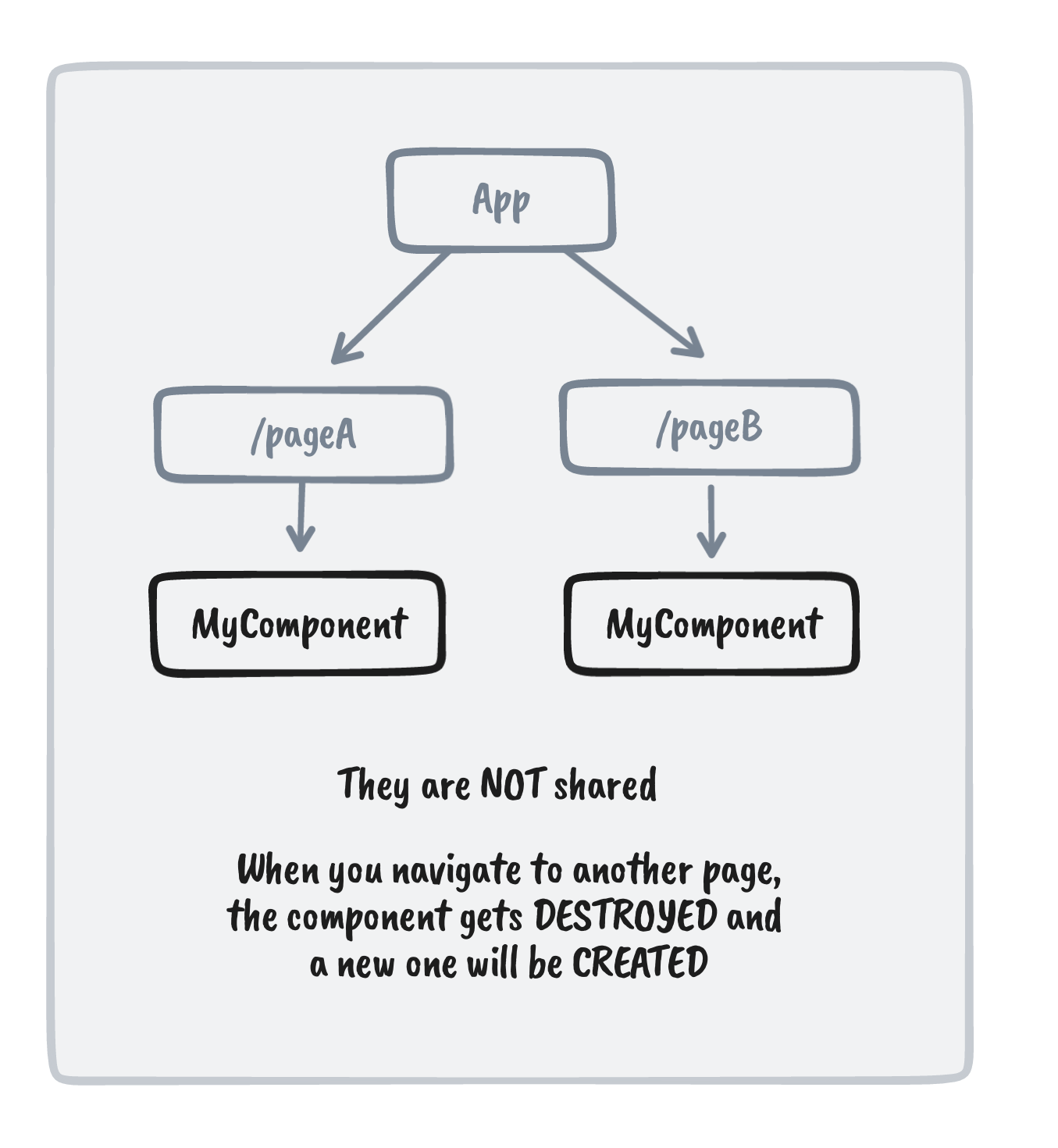
Vue's component structure is presented as a tree, and the child components are in different branches with their own instances. Meaning when users navigate between routes, the components are not shared across routes.
By that means you can't directly animate the changes because they are in two different instances. The good news is, there is a technique called FLIP to enumerate the transitions between them.
However, FLIP only solves the problem of transitions, the components are still not the same. During the navigation, the internal state of the component will lost.
Thus I started this new approach Starport to experiment with a better solution to fit this requirement.
How?
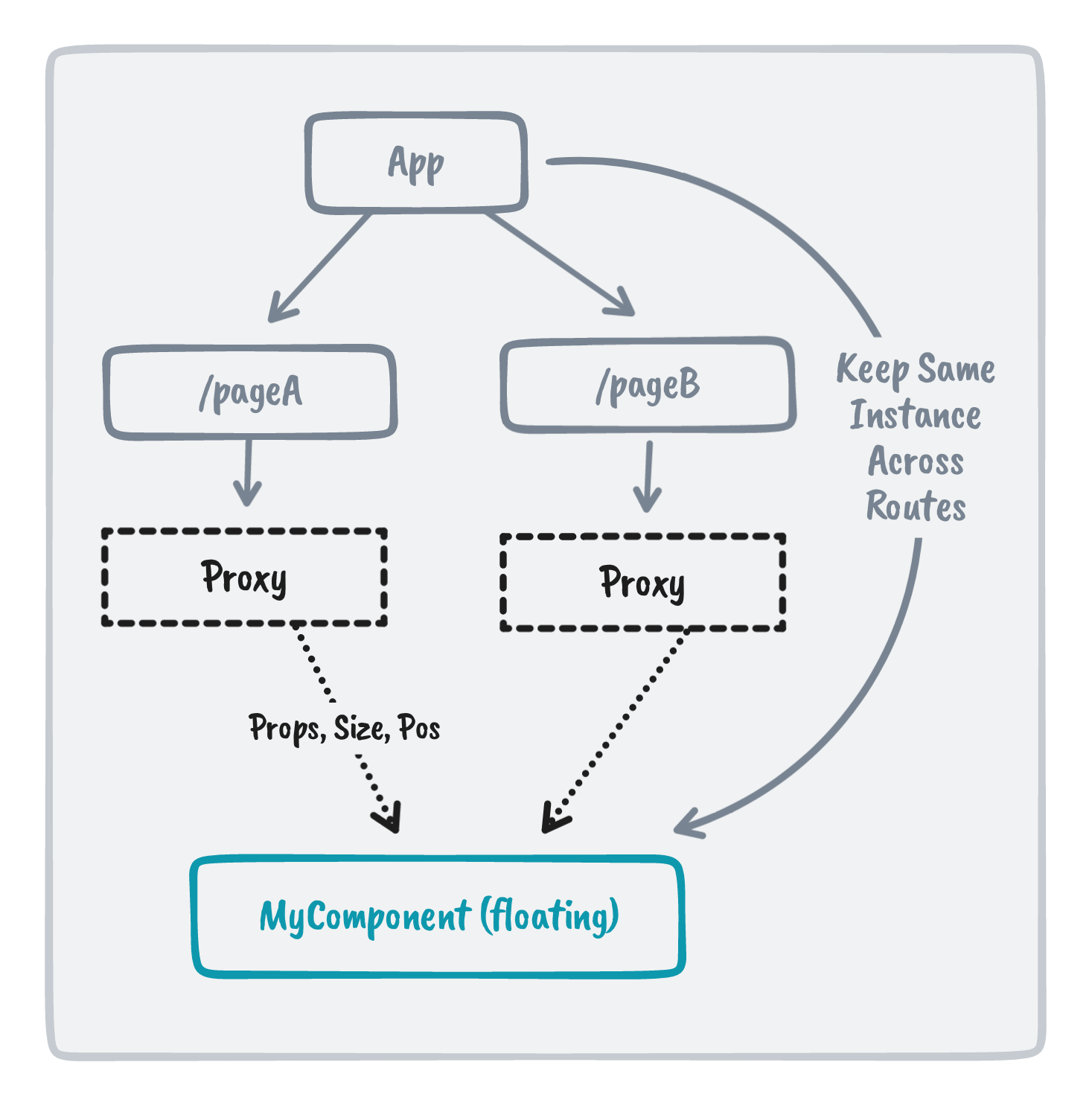
So since we can't share the components across different branches in the component tree, we could actually hoist them to the root so they become independent from the routes.
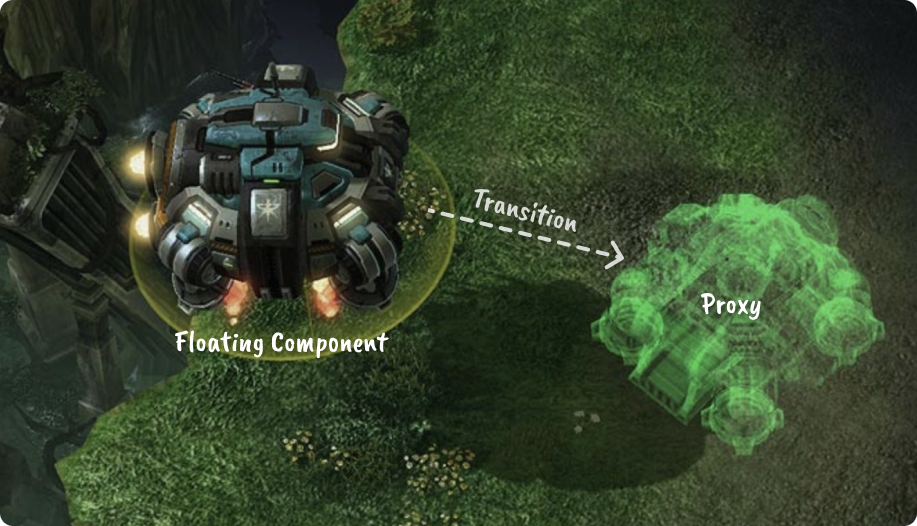
To allow each page to still have control of the components, we introduced a Proxy component to present the expected size and position of that component. The proxy will pass the props and position information to the actual component and let it "fly over" the proxy with animations.
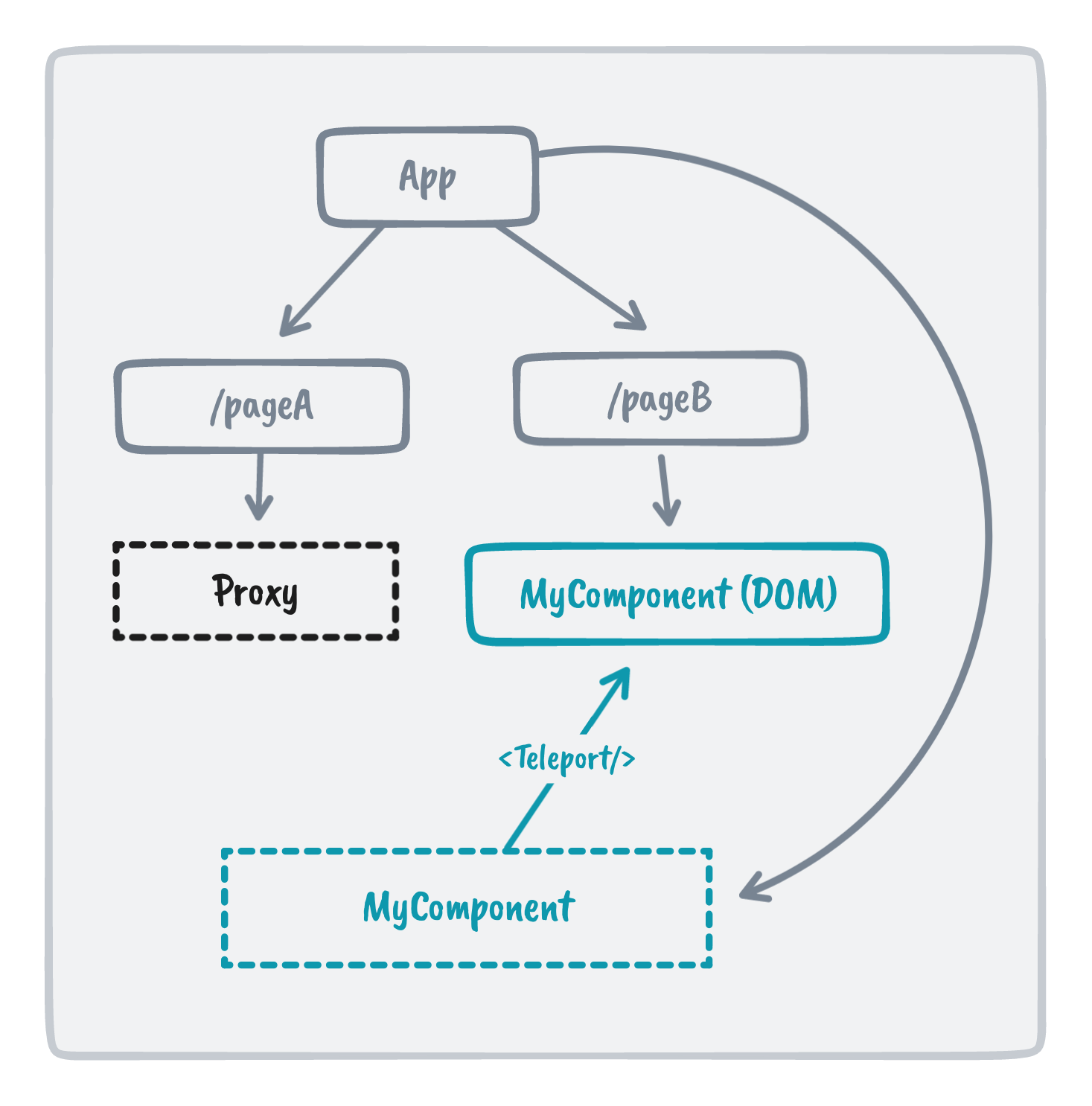
When the transition ends and it arrived to the expected position, it will then "land down" to the actual component using the <Teleport/> component.
With this "landing" mechanism, the DOM tree will be preserved as what you will have with the original tree structure. When navigating to another route, the component then will "lift off" back to the floating state, "fly" to the new proxy's position and "land" again.
This is very similar to Terran's Buildings in StarCraft (able to leave the ground and fly to new locations). It's also the inspiration source of the project name Starport.
Install
⚗️ Experimental
npm i vue-starport
Vue Starport only works for Vue 3
Usage
Add <StarportCarrier> component from vue-starport to your root component (app.vue). All <Starport> usage should be inside <StarportCarrier> component.
<script setup>
import { StarportCarrier } from 'vue-starport'
</script>

<template>
  <StarportCarrier> <!-- here -->
    <RouterView />
  </StarportCarrier>
</template>
In routes, wrap the component with the <Starport> component.
Note that you might need to apply some styles to <Starport> to make it have a defined size indicating the area for the "floating starcraft" to land.
Checkout the Playground for more examples.
Register Components Globally
// main.ts
import StarportPlugin from 'vue-starport'

app.use(StarportPlugin())
And then you can use Starport and StarportCarrier components without importing.
Keep Alive
By default, when navigating to a page without a corresponding <Starport> proxy to land, the component will be destroyed. If you want to keep the component alive even when it's not presented in the current route, you can set keepAlive to true for that specific instance.
Thanks to @hangsman who helped to provide the initial solution of proper teleport the element and made this idea valid. Also thanks to the viewers of my live-streaming on Bilibili, those who spend time with me to working on this idea and provided useful feedback during the live.
You can check the recordings of my live-streams (in Chinese), where I wrote this project from scratch.
antfu/vue-starport có 1.9k sao GitHub — tải lại trang để xem số mới nhất, hoặc xem trực tiếp github.com/antfu/vue-starport. TopGit phản chiếu số sao của GitHub nhưng không cam kết đến từng phút.
antfu/vue-starport có tag gì không?
Bản đồng bộ chưa ghi nhận topic GitHub nào cho antfu/vue-starport. GitHub topics hiển thị ở thanh bên phải trang repo — đó là nơi đáng kiểm tra nhất.
antfu/vue-starport có trang demo không?
Dự án có trang chủ ở https://vue-starport.netlify.app/. Tab "Readme" ở trang này thường có ảnh chụp và hướng dẫn bắt đầu nhanh.
antfu/vue-starport còn đang phát triển không?
Commit gần nhất trên antfu/vue-starport là 3.2 năm trước (theo timestamp GitHub). Repo có 98 fork — một chỉ báo về mức độ quan tâm của cộng đồng.
antfu/vue-starport dùng license gì?
antfu/vue-starport phát hành theo license MIT. Nên mở file LICENSE trên GitHub để xác nhận — license metadata đôi khi lệch với thực tế dự án.
antfu/vue-starport viết bằng ngôn ngữ gì?
antfu/vue-starport chủ yếu viết bằng TypeScript. Trường "language" của GitHub dựa trên phần lớn byte ở nhánh mặc định.
Đọc thêm về antfu/vue-starport ở đâu?
Trang TopGit này là một snapshot — tab "Readme" hiển thị nguyên văn README của repo (đã bỏ link, giữ ảnh). Repo GitHub ở github.com/antfu/vue-starport là nguồn chính thức.
Đọc đầy đủ README ở tab phía trên.
vue-starport có đáng để bạn bỏ thời gian?
ChatGPT, Claude và Perplexity đều đọc được trang này. Hỏi thử xem họ nghĩ gì về vue-starport.

 /vue-starport