
appleboy/ssh-action

appleboy/ssh-action — 6.2k★ trên GitHub (Shell). GitHub Actions for executing remote ssh commands.
Tóm tắt dựng từ metadata GitHub của chính dự án — chưa có bài review TopGit. Trang sẽ tự động cập nhật khi bài review đầy đủ được xuất bản.
TopGit viết bài đầy đủ cho repo có nhiều sao nhất và được yêu cầu nhiều nhất. Trang này là snapshot trong thời gian chờ — xem README gốc ở tab READ ME.
Snapshot
Cộng tác viên hàng đầu
Xem cộng tác viên hàng đầu
🚀 SSH for GitHub Actions
English | 繁體中文 | 简体中文
Table of Contents
- 🚀 SSH for GitHub Actions
- Table of Contents
- 📖 Introduction
- 🧩 Core Concepts & Input Parameters
- 🔌 Connection Settings
- 🛠️ SSH Command Settings
- 🌐 Proxy Settings
- 📤 Output Variables
- ⚡ Quick Start
- 🔑 SSH Key Setup & OpenSSH Compatibility
- Setting Up SSH Keys
- Generate RSA key
- Generate ED25519 key
- OpenSSH Compatibility
- Setting Up SSH Keys
- 🛠️ Usage Scenarios & Advanced Examples
- Using password authentication
- Using private key authentication
- Multiple commands
- Run commands from a file
- Multiple hosts
- Multiple hosts with different ports
- Synchronous execution on multiple hosts
- Pass environment variables to shell script
- Capturing command output
- 🌐 Proxy & Jump Host Usage
- 🛡️ Security Best Practices
- Protecting Your Private Key
- Host Fingerprint Verification
- 🚨 Error Handling & Troubleshooting
- Q&A
- Command not found (npm or other command)
- Q&A
- 🤝 Contributing
- 📝 License
📖 Introduction
SSH for GitHub Actions is a powerful GitHub Action for executing remote SSH commands easily and securely in your CI/CD workflows.
Built with Golang and drone-ssh, it supports a wide range of SSH scenarios, including multi-host, proxy, and advanced authentication.


Slides: SSH for GitHub Actions
🧩 Core Concepts & Input Parameters
This action provides flexible SSH command execution with a rich set of configuration options.
For full details, see action.yml.
🔌 Connection Settings
These parameters control how the action connects to your remote host.
| Parameter | Description | Default |
|---|---|---|
| host | SSH host address | |
| port | SSH port number | 22 |
| username | SSH username | |
| password | SSH password | |
| protocol | SSH protocol version (tcp, tcp4, tcp6) | tcp |
| sync | Run synchronously if multiple hosts are specified | false |
| timeout | Timeout for SSH connection to host | 30s |
| key | Content of SSH private key (e.g., raw content of ~/.ssh/id_rsa) | |
| key_path | Path to SSH private key | |
| passphrase | Passphrase for the SSH private key | |
| fingerprint | SHA256 fingerprint of the host public key | |
| use_insecure_cipher | Allow additional (less secure) ciphers | false |
| cipher | Allowed cipher algorithms. Uses sensible defaults if unspecified |
🛠️ SSH Command Settings
These parameters control the commands executed on the remote host and related behaviors.
| Parameter | Description | Default |
|---|---|---|
| script | Commands to execute remotely | |
| script_path | Path to a file in the repository containing commands to execute remotely | |
| envs | Environment variables to pass to the shell script | |
| envs_format | Flexible configuration for environment variable transfer | |
| allenvs | Pass all environment variables with GITHUB_ and INPUT_ prefixes to the script | false |
| command_timeout | Timeout for SSH command execution | 10m |
| debug | Enable debug mode | false |
| request_pty | Request a pseudo-terminal from the server | false |
| curl_insecure | Allow curl to connect to SSL sites without certificates | false |
| capture_stdout | Capture standard output from commands as action output | false |
| version | drone-ssh binary version. If not specified, the latest version will be used. |
🌐 Proxy Settings
These parameters control the use of a proxy (jump host) for connecting to your target host.
| Parameter | Description | Default |
|---|---|---|
| proxy_host | SSH proxy host | |
| proxy_port | SSH proxy port | 22 |
| proxy_username | SSH proxy username | |
| proxy_password | SSH proxy password | |
| proxy_passphrase | SSH proxy key passphrase | |
| proxy_protocol | SSH proxy protocol version | tcp |
| proxy_timeout | Timeout for SSH connection to proxy host | 30s |
| proxy_key | Content of SSH proxy private key | |
| proxy_key_path | Path to SSH proxy private key | |
| proxy_fingerprint | SHA256 fingerprint of the proxy host public key | |
| proxy_cipher | Allowed cipher algorithms for the proxy | |
| proxy_use_insecure_cipher | Allow insecure ciphers for the proxy | false |
Note: To mimic the removed
script_stopoption, addset -eat the top of your shell script.
📤 Output Variables
This action provides the following outputs that you can use in subsequent steps:
| Output | Description |
|---|---|
| stdout | Standard output of the executed commands (requires capture_stdout: true) |
⚡ Quick Start
Run remote SSH commands in your workflow with minimal configuration:
name: Remote SSH Command
on: [push]
jobs:
  build:
    name: Build
    runs-on: ubuntu-latest
    steps:
      - name: Execute remote SSH commands using password
        uses: appleboy/ssh-action@v1
        with:
          host: ${{ secrets.HOST }}
          username: ${{ secrets.USERNAME }}
          password: ${{ secrets.PASSWORD }}
          port: ${{ secrets.PORT }}
          script: whoami
Output:
======CMD======
whoami
======END======
out: your_username
===============================================
✅ Successfully executed commands to all hosts.
===============================================
🔑 SSH Key Setup & OpenSSH Compatibility
Setting Up SSH Keys
It is best practice to create SSH keys on your local machine (not on a remote server). Log in with the username specified in GitHub Secrets and generate a key pair:
Generate RSA key
ssh-keygen -t rsa -b 4096 -C "[email protected]"
Generate ED25519 key
ssh-keygen -t ed25519 -a 200 -C "[email protected]"
Add the new public key to the authorized keys on your server. Learn more about authorized keys.
# Add RSA key
cat .ssh/id_rsa.pub | ssh user@host 'cat >> .ssh/authorized_keys'

# Add ED25519 key
cat .ssh/id_ed25519.pub | ssh user@host 'cat >> .ssh/authorized_keys'
Copy the private key content and paste it into GitHub Secrets.
# macOS
pbcopy < ~/.ssh/id_rsa
# Ubuntu
xclip < ~/.ssh/id_rsa
Tip: Copy from
-----BEGIN OPENSSH PRIVATE KEY-----to-----END OPENSSH PRIVATE KEY-----(inclusive).
For ED25519:
# macOS
pbcopy < ~/.ssh/id_ed25519
# Ubuntu
xclip < ~/.ssh/id_ed25519
See more: SSH login without a password.
Note: Depending on your SSH version, you may also need to:
- Place the public key in
.ssh/authorized_keys2- Set
.sshpermissions to 700- Set
.ssh/authorized_keys2permissions to 640
OpenSSH Compatibility
If you see this error:
ssh: handshake failed: ssh: unable to authenticate, attempted methods [none publickey]
On Ubuntu 20.04+ you may need to explicitly allow the ssh-rsa algorithm. Add this to your OpenSSH daemon config (/etc/ssh/sshd_config or a drop-in under /etc/ssh/sshd_config.d/):
CASignatureAlgorithms +ssh-rsa
Alternatively, use ED25519 keys (supported by default):
ssh-keygen -t ed25519 -a 200 -C "[email protected]"
🛠️ Usage Scenarios & Advanced Examples
This section covers common and advanced usage patterns, including multi-host, proxy, and environment variable passing.
Using password authentication
- name: Execute remote SSH commands using password
  uses: appleboy/ssh-action@v1
  with:
    host: ${{ secrets.HOST }}
    username: ${{ secrets.USERNAME }}
    password: ${{ secrets.PASSWORD }}
    port: ${{ secrets.PORT }}
    script: whoami
Using private key authentication
- name: Execute remote SSH commands using SSH key
  uses: appleboy/ssh-action@v1
  with:
    host: ${{ secrets.HOST }}
    username: ${{ secrets.USERNAME }}
    key: ${{ secrets.KEY }}
    port: ${{ secrets.PORT }}
    script: whoami
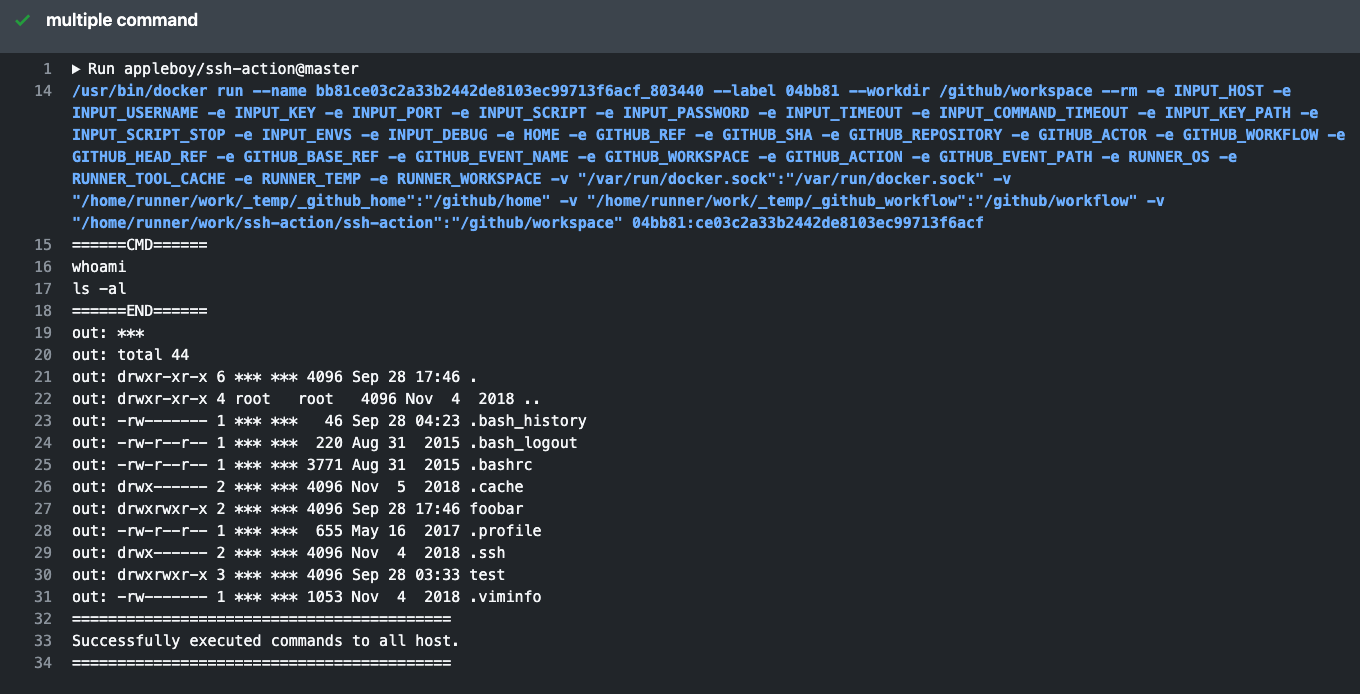
Multiple commands
- name: Multiple commands
  uses: appleboy/ssh-action@v1
  with:
    host: ${{ secrets.HOST }}
    username: ${{ secrets.USERNAME }}
    key: ${{ secrets.KEY }}
    port: ${{ secrets.PORT }}
    script: |
      whoami
      ls -al
Run commands from a file
- name: File commands
  uses: appleboy/ssh-action@v1
  with:
    host: ${{ secrets.HOST }}
    username: ${{ secrets.USERNAME }}
    key: ${{ secrets.KEY }}
    port: ${{ secrets.PORT }}
    script_path: scripts/script.sh
Multiple hosts
  - name: Multiple hosts
    uses: appleboy/ssh-action@v1
    with:
-     host: "foo.com"
+     host: "foo.com,bar.com"
      username: ${{ secrets.USERNAME }}
      key: ${{ secrets.KEY }}
      port: ${{ secrets.PORT }}
      script: |
        whoami
        ls -al
Default port is 22.
Multiple hosts with different ports
  - name: Multiple hosts
    uses: appleboy/ssh-action@v1
    with:
-     host: "foo.com"
+     host: "foo.com:1234,bar.com:5678"
      username: ${{ secrets.USERNAME }}
      key: ${{ secrets.KEY }}
      script: |
        whoami
        ls -al
Synchronous execution on multiple hosts
  - name: Multiple hosts
    uses: appleboy/ssh-action@v1
    with:
      host: "foo.com,bar.com"
+     sync: true
      username: ${{ secrets.USERNAME }}
      key: ${{ secrets.KEY }}
      port: ${{ secrets.PORT }}
      script: |
        whoami
        ls -al
Pass environment variables to shell script
  - name: Pass environment
    uses: appleboy/ssh-action@v1
+   env:
+     FOO: "BAR"
+     BAR: "FOO"
+     SHA: ${{ github.sha }}
    with:
      host: ${{ secrets.HOST }}
      username: ${{ secrets.USERNAME }}
      key: ${{ secrets.KEY }}
      port: ${{ secrets.PORT }}
+     envs: FOO,BAR,SHA
      script: |
        echo "I am $FOO"
        echo "I am $BAR"
        echo "sha: $SHA"
All environment variables in the
envobject must be strings. Using integers or other types may cause unexpected results.
Capturing command output
You can capture the standard output of remote commands and use it in subsequent steps:
- name: Execute and capture output
  id: ssh
  uses: appleboy/ssh-action@v1
  with:
    host: ${{ secrets.HOST }}
    username: ${{ secrets.USERNAME }}
    key: ${{ secrets.KEY }}
    port: ${{ secrets.PORT }}
    capture_stdout: true
    script: |
      echo "Hello World"
      hostname

- name: Use captured output
  run: echo "SSH output was ${{ steps.ssh.outputs.stdout }}"
🌐 Proxy & Jump Host Usage
You can connect to remote hosts via a proxy (jump host) for advanced network topologies.
+--------+       +----------+      +-----------+
| Laptop | <-->  | Jumphost | <--> | FooServer |
+--------+       +----------+      +-----------+
Example ~/.ssh/config:
Host Jumphost
  HostName Jumphost
  User ubuntu
  Port 22
  IdentityFile ~/.ssh/keys/jump_host.pem

Host FooServer
  HostName FooServer
  User ubuntu
  Port 22
  ProxyCommand ssh -q -W %h:%p Jumphost
GitHub Actions YAML:
  - name: SSH proxy command
    uses: appleboy/ssh-action@v1
    with:
      host: ${{ secrets.HOST }}
      username: ${{ secrets.USERNAME }}
      key: ${{ secrets.KEY }}
      port: ${{ secrets.PORT }}
+     proxy_host: ${{ secrets.PROXY_HOST }}
+     proxy_username: ${{ secrets.PROXY_USERNAME }}
+     proxy_key: ${{ secrets.PROXY_KEY }}
+     proxy_port: ${{ secrets.PROXY_PORT }}
      script: |
        mkdir abc/def
        ls -al
🛡️ Security Best Practices
Protecting Your Private Key
A passphrase encrypts your private key, making it useless to attackers if leaked. Always store your private key securely.
  - name: SSH key passphrase
    uses: appleboy/ssh-action@v1
    with:
      host: ${{ secrets.HOST }}
      username: ${{ secrets.USERNAME }}
      key: ${{ secrets.KEY }}
      port: ${{ secrets.PORT }}
+     passphrase: ${{ secrets.PASSPHRASE }}
      script: |
        whoami
        ls -al
Host Fingerprint Verification
Verifying the SSH host fingerprint helps prevent man-in-the-middle attacks. To get your host's fingerprint (replace ed25519 with your key type and example.com with your host):
ssh example.com ssh-keygen -l -f /etc/ssh/ssh_host_ed25519_key.pub | cut -d ' ' -f2
Update your config:
  - name: SSH key passphrase
    uses: appleboy/ssh-action@v1
    with:
      host: ${{ secrets.HOST }}
      username: ${{ secrets.USERNAME }}
      key: ${{ secrets.KEY }}
      port: ${{ secrets.PORT }}
+     fingerprint: ${{ secrets.FINGERPRINT }}
      script: |
        whoami
        ls -al
🚨 Error Handling & Troubleshooting
Q&A
Command not found (npm or other command)
If you encounter "command not found" errors, see this issue comment about interactive vs non-interactive shells.
On many Linux distros, /etc/bash.bashrc contains:
# If not running interactively, don't do anything
[ -z "$PS1" ] && return
Comment out this line or use absolute paths for your commands.
🤝 Contributing
Contributions are welcome! Please submit a pull request to help improve appleboy/ssh-action.
📝 License
This project is licensed under the MIT License.
Repo liên quan
Master programming by recreating your favorite technologies from scratch.
A curated meta-list of curated lists organized by technology domain. The repository acts as a directory pointing to hundreds of specialized awesome lists covering programming languages, platforms, frameworks, and tooling. All content is community-contributed under the CC0 public domain dedication.
Public APIs is a community-curated GitHub repository listing free, publicly accessible APIs across a wide range of categories, with auth type, HTTPS, and CORS noted for each entry. It's a browsable reference, not a library to install.
REA is an MCP server and CLI that gives AI coding agents the ability to reverse engineer binaries, JavaScript apps, .NET assemblies, and websites. It hooks into Hopper, Ghidra, or IDA Pro for native binary work, or runs static JavaScript analysis with just Node.js. Every investigation returns an Evidence bundle that includes what was found, what was not, and the reasoning path. Setup registers REA with supported agents and walks you through connecting an analysis engine. The CLI also works standalone for terminal-first workflows.
Trả lời nhanh
appleboy/ssh-action có bao nhiêu sao?
appleboy/ssh-action có 6.2k sao GitHub — tải lại trang để xem số mới nhất, hoặc xem trực tiếp github.com/appleboy/ssh-action. TopGit phản chiếu số sao của GitHub nhưng không cam kết đến từng phút.
appleboy/ssh-action có phải mã nguồn mở không?
Có — appleboy/ssh-action phát hành theo license MIT, nghĩa là mã nguồn mở để đọc, fork và (tùy license) tái sử dụng. Mã: github.com/appleboy/ssh-action.
appleboy/ssh-action còn đang phát triển không?
Commit gần nhất trên appleboy/ssh-action là 3 tháng trước (theo timestamp GitHub). Repo có 678 fork — một chỉ báo về mức độ quan tâm của cộng đồng.
appleboy/ssh-action là gì?
appleboy/ssh-action (appleboy/ssh-action) là dự án Shell trên GitHub. Theo mô tả gốc: GitHub Actions for executing remote ssh commands.
Đọc thêm về appleboy/ssh-action ở đâu?
Trang TopGit này là một snapshot — tab "Readme" hiển thị nguyên văn README của repo (đã bỏ link, giữ ảnh). Repo GitHub ở github.com/appleboy/ssh-action là nguồn chính thức.
Đọc đầy đủ README ở tab phía trên.
Vẫn đang phân vân về ssh-action?
Một cú bấm sẽ gửi câu hỏi kèm trang này cho AI — xem AI nói gì về ssh-action.