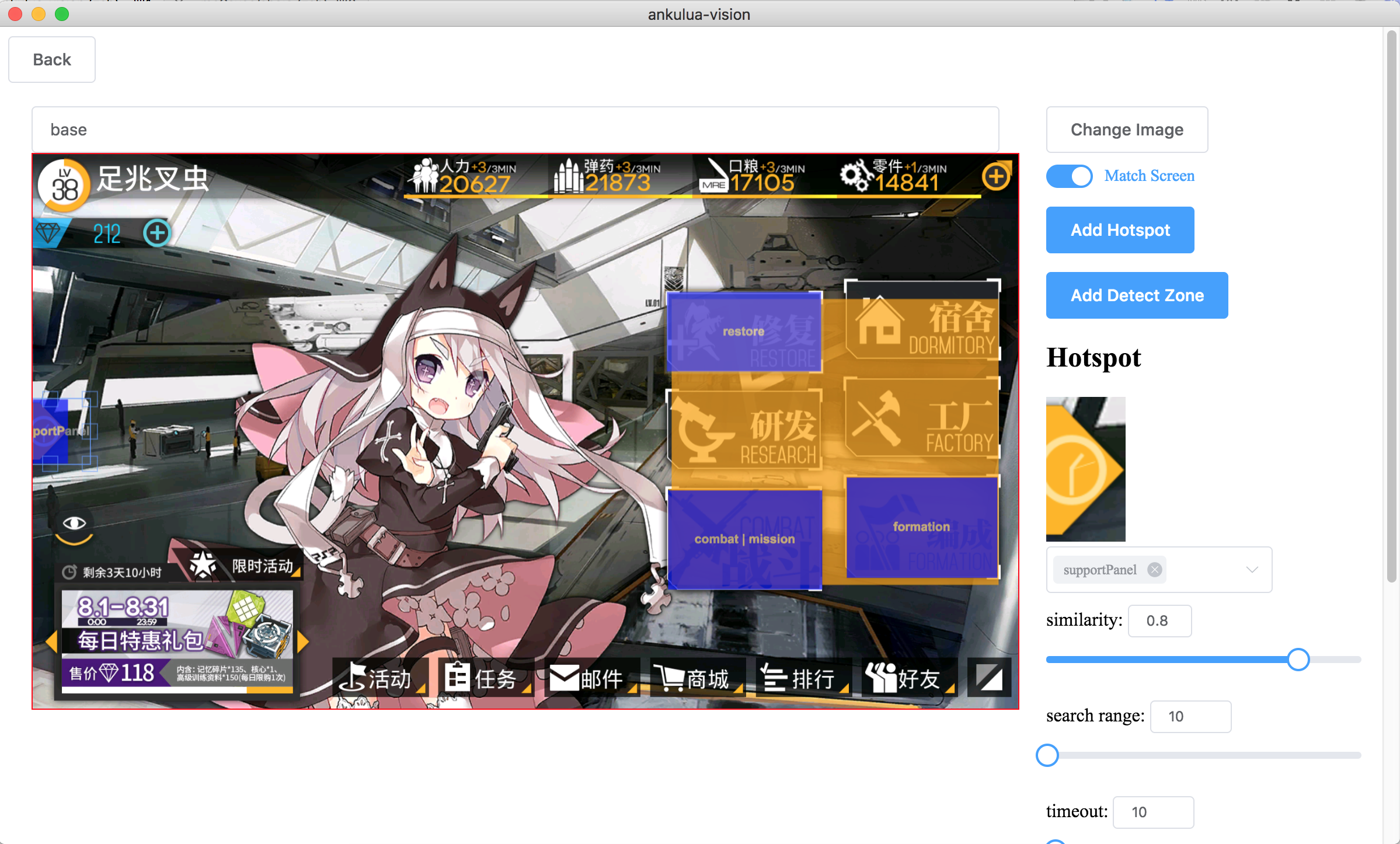
Snapshot của binux/ankulua-vision: 38★ · Lua. UI to help making ankulua scripts
Tóm tắt dựng từ metadata GitHub của chính dự án — chưa có bài review TopGit. Trang sẽ tự động cập nhật khi bài review đầy đủ được xuất bản.
VÌ SAO CHƯA CÓ REVIEW
TopGit viết bài đầy đủ cho repo có nhiều sao nhất và được yêu cầu nhiều nhất. Trang này là snapshot trong thời gian chờ — xem README gốc ở tab READ ME.
You need AnkuLua to use the scripts generated by this app
AnkuLua:
AnkuLua is an Android app that focus on the automation of any Android app.
The basic operations are:
take screen snap shop and look for specific image on the screen
take some actions (such as click, drag and drop and etc.) based on the searching result
Read more: http://ankulua.boards.net/thread/2/ankulua-introduction
Download
https://github.com/binux/ankulua-vision/releases
How to use
Run the app, select your work folder for the script.
Add screen capture of the game by clicking Add Screen or drag and drop into the window.
Name the screen like base, battle, mission
Click Add Detect Zone and drag and draw the region that can be used to identify the screen.
You could adjust the similarity required or search range if the position may changes.
If you are detecting a popup dialog that partly overlaying on another screen, make sure add more detect zones than the lower layer screen. Otherwise it may detected as the screen below the dialog.
Click Add Hotspot and drag and draw the region that can be clicked, and list all possible screens it may link to.
You could adjust the similarity and search range like detect zone.
You could use them later in your lua script (see below).
After region created, you can double click it and jump between screens.
Back and Save & Generate
Start editing your script <WORK_FOLDER>/start.lua
Script & APIs
Edit the script <WORK_FOLDER>/start.lua with your favorite editor.
It's basically a AnkuLua script written in lua language. You could find more information from here or here in Chinese
stateMachine:goto(...)
Goto one or more screens/states. Example: stateMachine:goto('base', 'mission', 'battle', 'missionResult');
Return: last state
stateMachine:find([region], image, [timeout])
Find image, you could use the file generated by ankulua-vision, if you do so, find method will respect the similarity and search range you set. If timeout set, it will wait up to timeout seconds before return nil. Example: stateMachine:find('btn_base_combat', 10)
Return: Match Object or nil
stateMachine:dragFind(image, down, left)
Drag the screen and find the image. down > 0 drag down, down < 0 drag up, down = 0 drag up then down. left > 0 drag left, left < 0 drag right, left = 0 drag right then left
Return: Match Object or nil
stateMachine:click(image, [timeout])
Click on image, if image is a file generated by ankulua-vision, it will respect the setting, and try to match the image before click, you could set similarity to 0 by skip image matching and always click the region. if timeout set, it will wait up to timeout seconds before return nil.
Return: true if success
stateMachine:zoomOut()
stateMachine:checkState(state)
Return: score if match given state
stateMachine:getState()
Return: current state
stateMachine:leaveState(state, timeout=10)
Wait until leave state
Return: true if success
stateMachine:waitStates(states, [timeout])
Wait until enter state or states, example: stateMachine:waitStates({'base', 'battle'})
stateMachine:plan(state, target)
stateMachine:play(state, target)
stateMachine:register(state, target, action)
Register an action(type: function) from state to target, target could be a name of existing screen or a new screen. You can stateMachine:goto the target screen you defined here. It can be used to defined complex state transfers or short cuts. action is a function, and must return a known state name. Example:
stateMachine:register('mission', 'mission_43e_select', function ()
  stateMachine:log('select mission')
  stateMachine:click('btn_mission_mission_ep04.png', 2)
  stateMachine:click('btn_mission_emergency.png', 2)
  if not stateMachine:click('btn_mission_ep04_emergency_combatSetting.png', 3) then return end
  return stateMachine:waitStates("combatSetting")
end)

stateMachine:goto('mission', 'mission_43e_select', 'combat')
binux/ankulua-vision có 38 sao GitHub — tải lại trang để xem số mới nhất, hoặc xem trực tiếp github.com/binux/ankulua-vision. TopGit phản chiếu số sao của GitHub nhưng không cam kết đến từng phút.
binux/ankulua-vision có tag gì không?
Bản đồng bộ chưa ghi nhận topic GitHub nào cho binux/ankulua-vision. GitHub topics hiển thị ở thanh bên phải trang repo — đó là nơi đáng kiểm tra nhất.
binux/ankulua-vision có website riêng không?
TopGit chưa ghi nhận URL trang chủ cho binux/ankulua-vision. Phần README ở tab phía trên thường có link demo, hoặc xem mô tả GitHub của repo.
binux/ankulua-vision còn đang phát triển không?
Commit gần nhất trên binux/ankulua-vision là 8.1 năm trước (theo timestamp GitHub). Repo có 12 fork — một chỉ báo về mức độ quan tâm của cộng đồng.
binux/ankulua-vision viết bằng ngôn ngữ gì?
binux/ankulua-vision chủ yếu viết bằng Lua. Trường "language" của GitHub dựa trên phần lớn byte ở nhánh mặc định.
Đọc thêm về binux/ankulua-vision ở đâu?
Trang TopGit này là một snapshot — tab "Readme" hiển thị nguyên văn README của repo (đã bỏ link, giữ ảnh). Repo GitHub ở github.com/binux/ankulua-vision là nguồn chính thức.
Đọc đầy đủ README ở tab phía trên.
Vẫn đang phân vân về ankulua-vision?
Một cú bấm sẽ gửi câu hỏi kèm trang này cho AI — xem AI nói gì về ankulua-vision.

 /ankulua-vision