binux/ankulua-vision — an open-source project — sits at 38 GitHub stars. UI to help making ankulua scripts
Snapshot summary built from the project's own GitHub metadata — there's no written TopGit review yet. The page will update automatically when a full review is published.
WHY NO REVIEW YET
TopGit writes full reviews for the most-starred, most-requested repositories. This page is a snapshot until then — see the READ ME tab for the original README in full.
You need AnkuLua to use the scripts generated by this app
AnkuLua:
AnkuLua is an Android app that focus on the automation of any Android app.
The basic operations are:
take screen snap shop and look for specific image on the screen
take some actions (such as click, drag and drop and etc.) based on the searching result
Read more: http://ankulua.boards.net/thread/2/ankulua-introduction
Download
https://github.com/binux/ankulua-vision/releases
How to use
Run the app, select your work folder for the script.
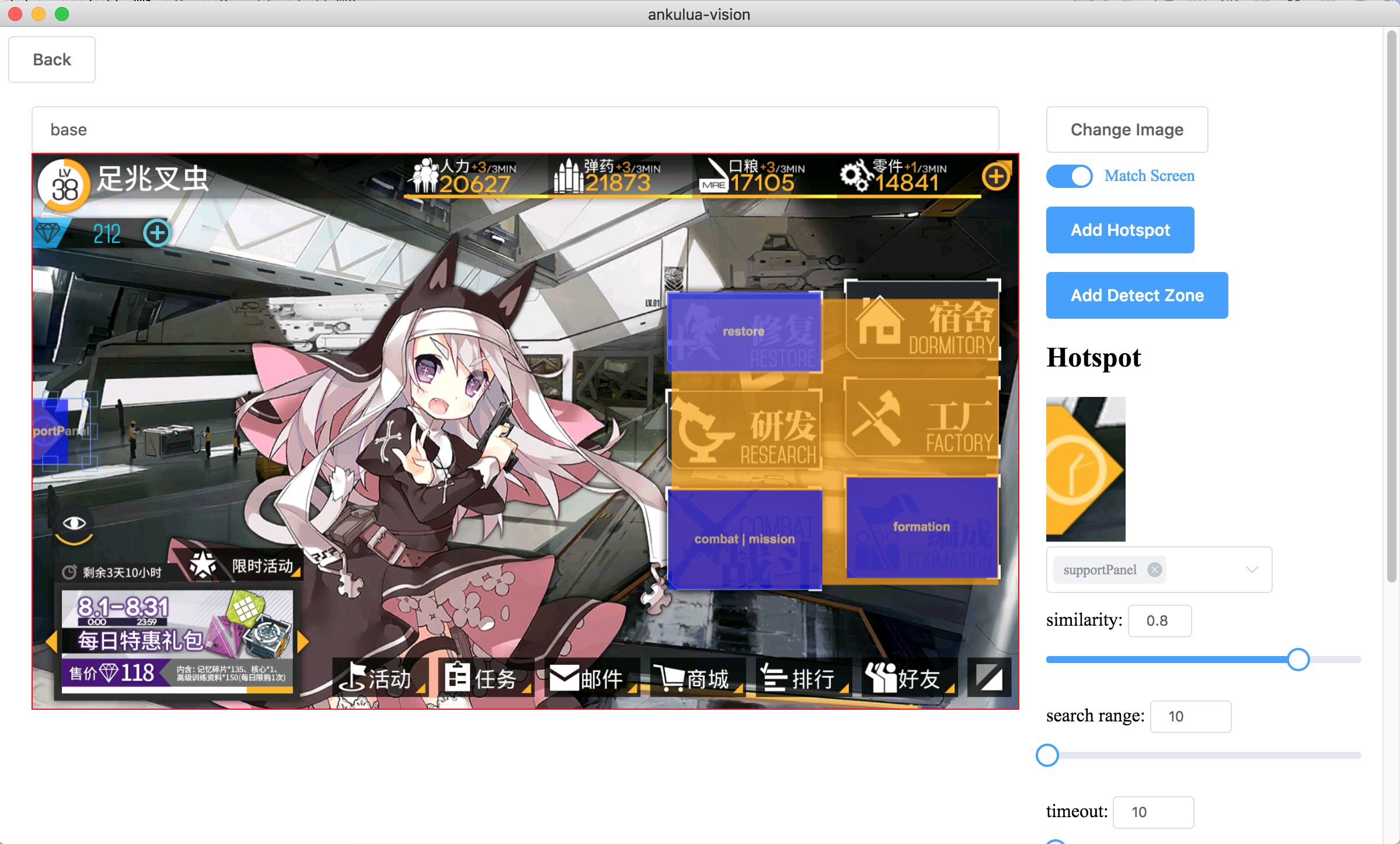
Add screen capture of the game by clicking Add Screen or drag and drop into the window.
Name the screen like base, battle, mission
Click Add Detect Zone and drag and draw the region that can be used to identify the screen.
You could adjust the similarity required or search range if the position may changes.
If you are detecting a popup dialog that partly overlaying on another screen, make sure add more detect zones than the lower layer screen. Otherwise it may detected as the screen below the dialog.
Click Add Hotspot and drag and draw the region that can be clicked, and list all possible screens it may link to.
You could adjust the similarity and search range like detect zone.
You could use them later in your lua script (see below).
After region created, you can double click it and jump between screens.
Back and Save & Generate
Start editing your script <WORK_FOLDER>/start.lua
Script & APIs
Edit the script <WORK_FOLDER>/start.lua with your favorite editor.
It's basically a AnkuLua script written in lua language. You could find more information from here or here in Chinese
stateMachine:goto(...)
Goto one or more screens/states. Example: stateMachine:goto('base', 'mission', 'battle', 'missionResult');
Return: last state
stateMachine:find([region], image, [timeout])
Find image, you could use the file generated by ankulua-vision, if you do so, find method will respect the similarity and search range you set. If timeout set, it will wait up to timeout seconds before return nil. Example: stateMachine:find('btn_base_combat', 10)
Return: Match Object or nil
stateMachine:dragFind(image, down, left)
Drag the screen and find the image. down > 0 drag down, down < 0 drag up, down = 0 drag up then down. left > 0 drag left, left < 0 drag right, left = 0 drag right then left
Return: Match Object or nil
stateMachine:click(image, [timeout])
Click on image, if image is a file generated by ankulua-vision, it will respect the setting, and try to match the image before click, you could set similarity to 0 by skip image matching and always click the region. if timeout set, it will wait up to timeout seconds before return nil.
Return: true if success
stateMachine:zoomOut()
stateMachine:checkState(state)
Return: score if match given state
stateMachine:getState()
Return: current state
stateMachine:leaveState(state, timeout=10)
Wait until leave state
Return: true if success
stateMachine:waitStates(states, [timeout])
Wait until enter state or states, example: stateMachine:waitStates({'base', 'battle'})
stateMachine:plan(state, target)
stateMachine:play(state, target)
stateMachine:register(state, target, action)
Register an action(type: function) from state to target, target could be a name of existing screen or a new screen. You can stateMachine:goto the target screen you defined here. It can be used to defined complex state transfers or short cuts. action is a function, and must return a known state name. Example:
stateMachine:register('mission', 'mission_43e_select', function ()
  stateMachine:log('select mission')
  stateMachine:click('btn_mission_mission_ep04.png', 2)
  stateMachine:click('btn_mission_emergency.png', 2)
  if not stateMachine:click('btn_mission_ep04_emergency_combatSetting.png', 3) then return end
  return stateMachine:waitStates("combatSetting")
end)

stateMachine:goto('mission', 'mission_43e_select', 'combat')
No homepage URL was recorded for binux/ankulua-vision in TopGit's last sync. The README tab above frequently contains screenshots and demo links, or check the repository description on GitHub.
Does binux/ankulua-vision have any tags?
TopGit's last sync did not record any GitHub topics for binux/ankulua-vision. GitHub topics appear in the right sidebar of a repository page; that's the authoritative place to check.
How active is development on binux/ankulua-vision?
The most recent commit recorded on binux/ankulua-vision was 7.8 years ago, based on the GitHub push timestamp. The repository has 13 forks — one of the better signals of community interest.
How many stars does binux/ankulua-vision have?
binux/ankulua-vision has 38 GitHub stars — refresh the page for the live number, or check github.com/binux/ankulua-vision. TopGit mirrors GitHub's count but does not claim minute-by-minute accuracy.
What language is binux/ankulua-vision written in?
binux/ankulua-vision is written primarily in Lua. GitHub's language field is based on the largest share of bytes in the default branch.
Where do I read more about binux/ankulua-vision?
This TopGit page is a snapshot — the READ ME tab shows the project's own README content (links stripped, images preserved). The GitHub repository at github.com/binux/ankulua-vision is the definitive source.
Read full README in the tab above.
Is ankulua-vision worth your time?
ChatGPT, Claude and Perplexity can all read this page. Ask one of them what it makes of ankulua-vision.