TopGit theo dõi Fannovel16/comfyui_controlnet_aux trên GitHub, đã đạt 4.3k sao. ComfyUI's ControlNet Auxiliary Preprocessors
Tóm tắt dựng từ metadata GitHub của chính dự án — chưa có bài review TopGit. Trang sẽ tự động cập nhật khi bài review đầy đủ được xuất bản.
VÌ SAO CHƯA CÓ REVIEW
TopGit viết bài đầy đủ cho repo có nhiều sao nhất và được yêu cầu nhiều nhất. Trang này là snapshot trong thời gian chờ — xem README gốc ở tab READ ME.
Plug-and-play ComfyUI node sets for making ControlNet hint images
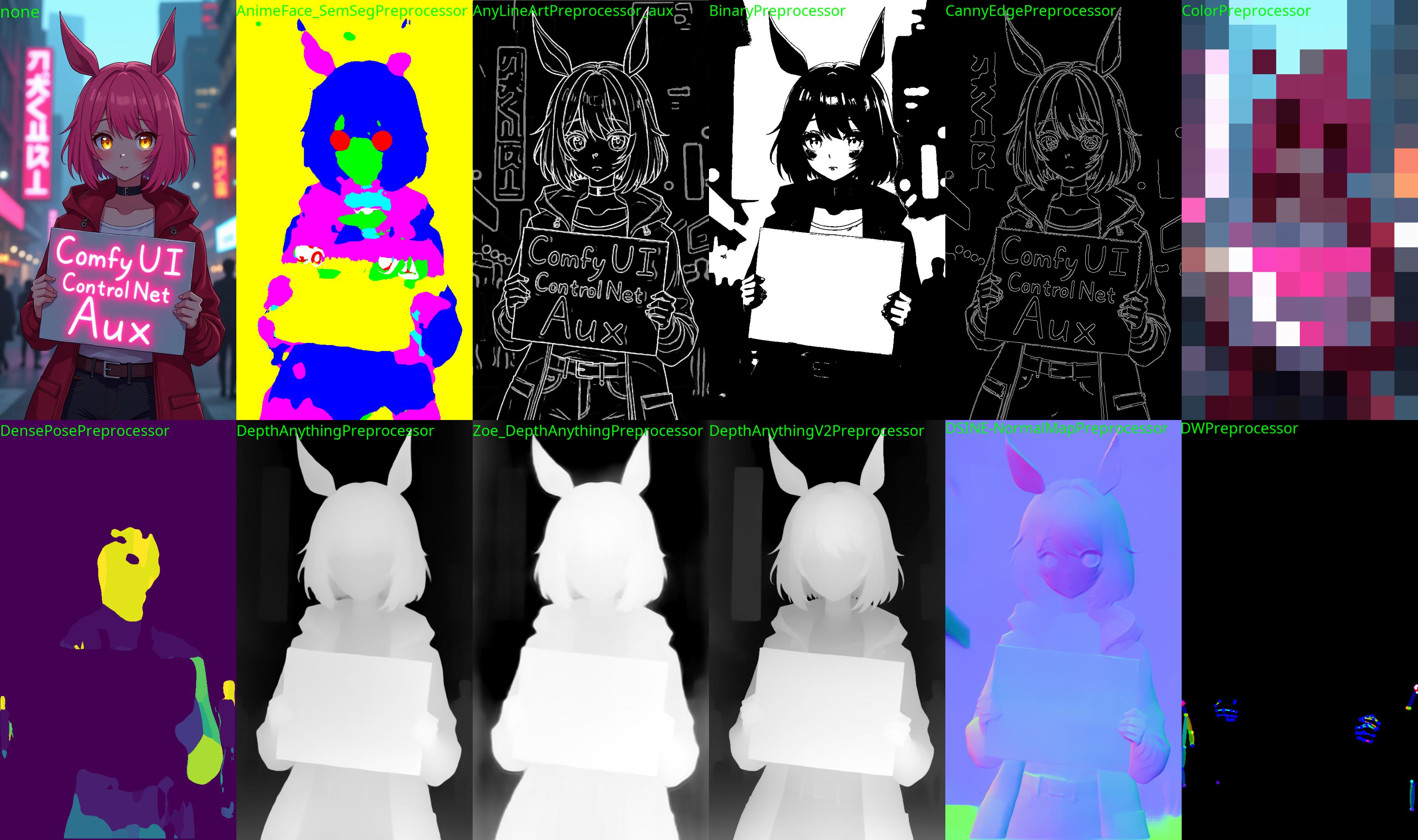
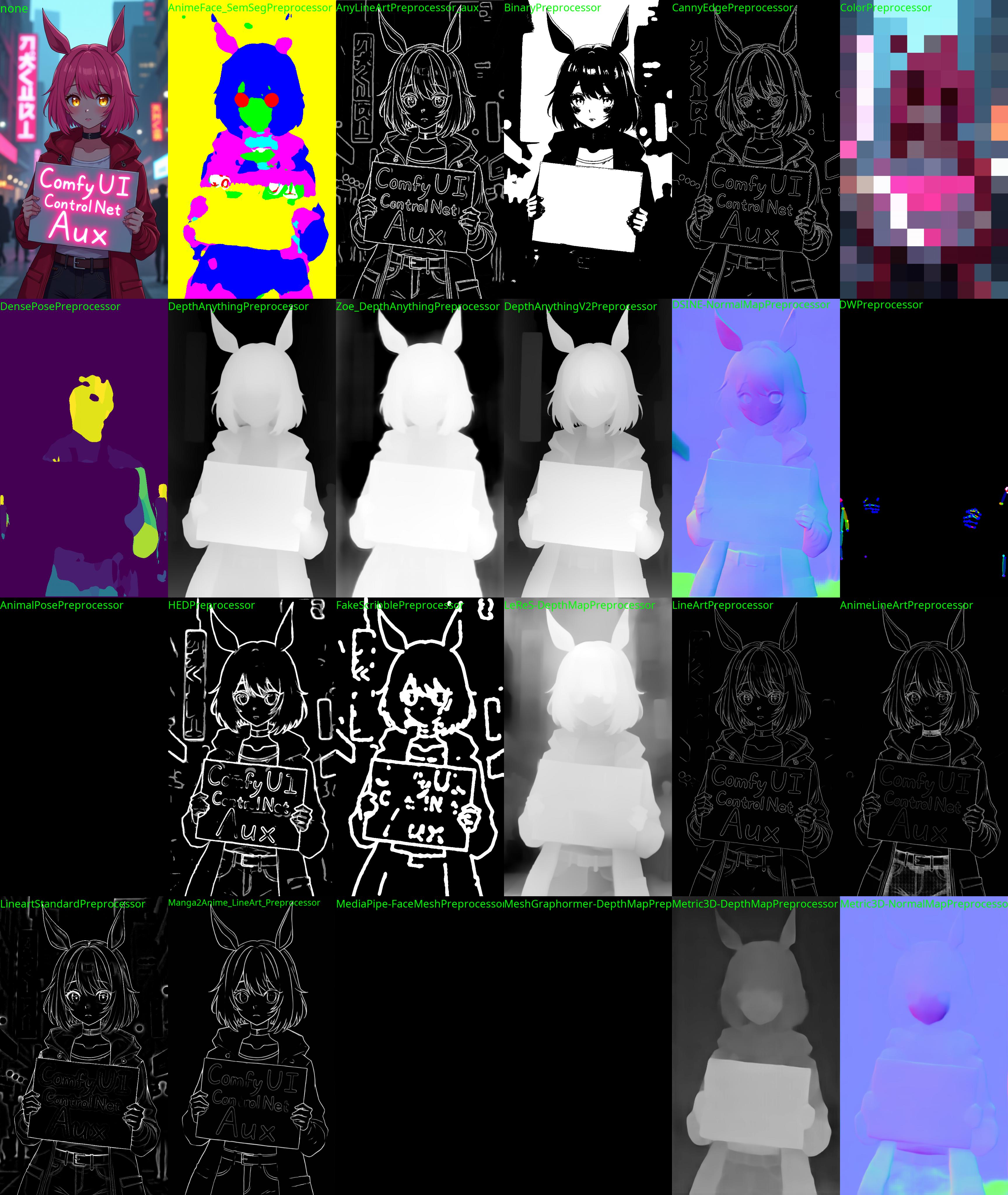
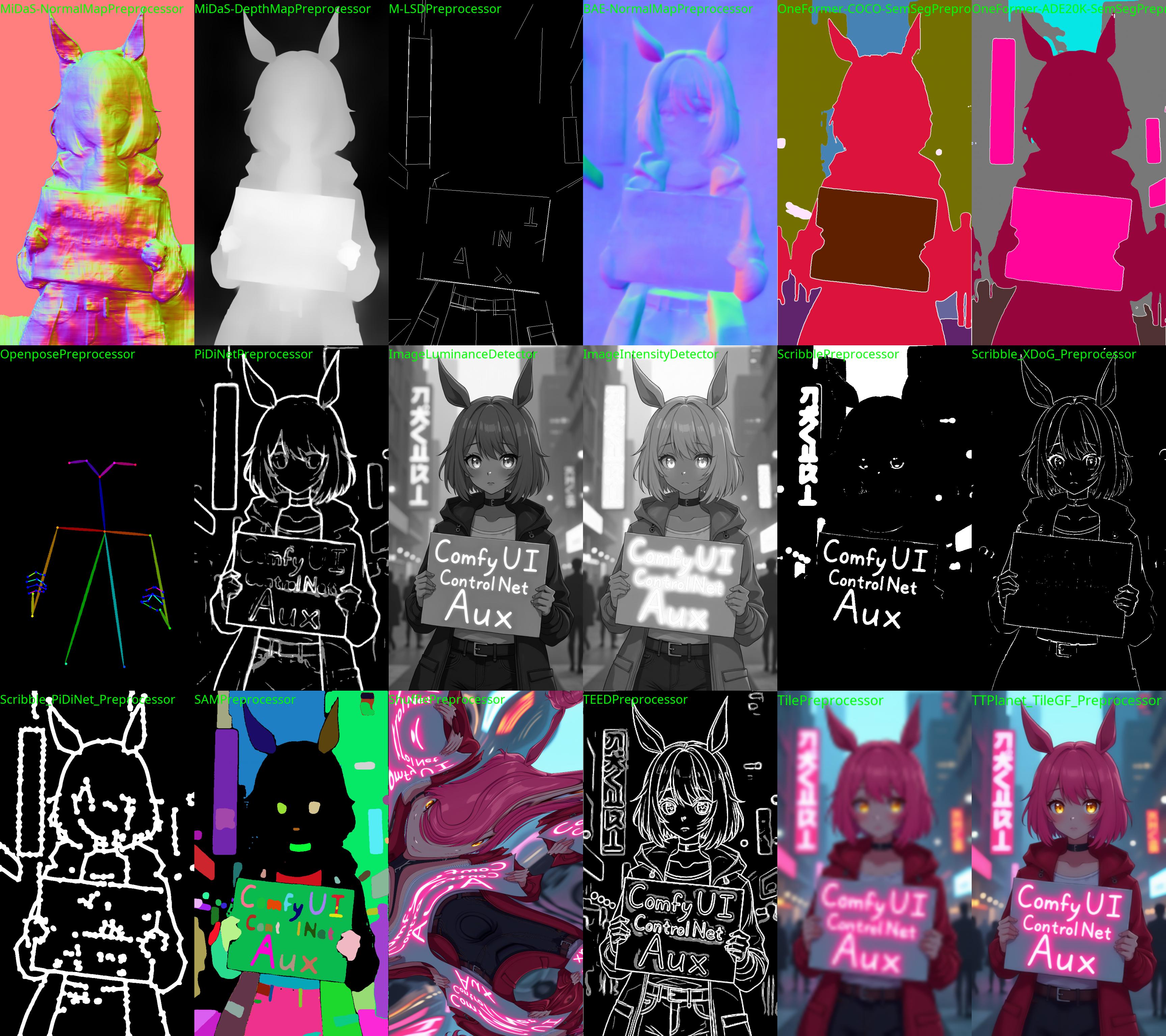
"anime style, a protest in the street, cyberpunk city, a woman with pink hair and golden eyes (looking at the viewer) is holding a sign with the text "ComfyUI ControlNet Aux" in bold, neon pink" on Flux.1 Dev
The code is copy-pasted from the respective folders in https://github.com/lllyasviel/ControlNet/tree/main/annotator and connected to the 🤗 Hub.
All credit & copyright goes to https://github.com/lllyasviel.
Updates
Go to Update page to follow updates
Installation:
Using ComfyUI Manager (recommended):
Install ComfyUI Manager and do steps introduced there to install this repo.
Alternative:
If you're running on Linux, or non-admin account on windows you'll want to ensure /ComfyUI/custom_nodes and comfyui_controlnet_aux has write permissions.
There is now a install.bat you can run to install to portable if detected. Otherwise it will default to system and assume you followed ConfyUI's manual installation steps.
If you can't run install.bat (e.g. you are a Linux user). Open the CMD/Shell and do the following:
Navigate to your /ComfyUI/custom_nodes/ folder
Run git clone https://github.com/Fannovel16/comfyui_controlnet_aux/
Navigate to your comfyui_controlnet_aux folder
Portable/venv:
Run path/to/ComfUI/python_embeded/python.exe -s -m pip install -r requirements.txt
With system python
Run pip install -r requirements.txt
Start ComfyUI
Nodes
Please note that this repo only supports preprocessors making hint images (e.g. stickman, canny edge, etc).
All preprocessors except Inpaint are intergrated into AIO Aux Preprocessor node.
This node allow you to quickly get the preprocessor but a preprocessor's own threshold parameters won't be able to set.
You need to use its node directly to set thresholds.
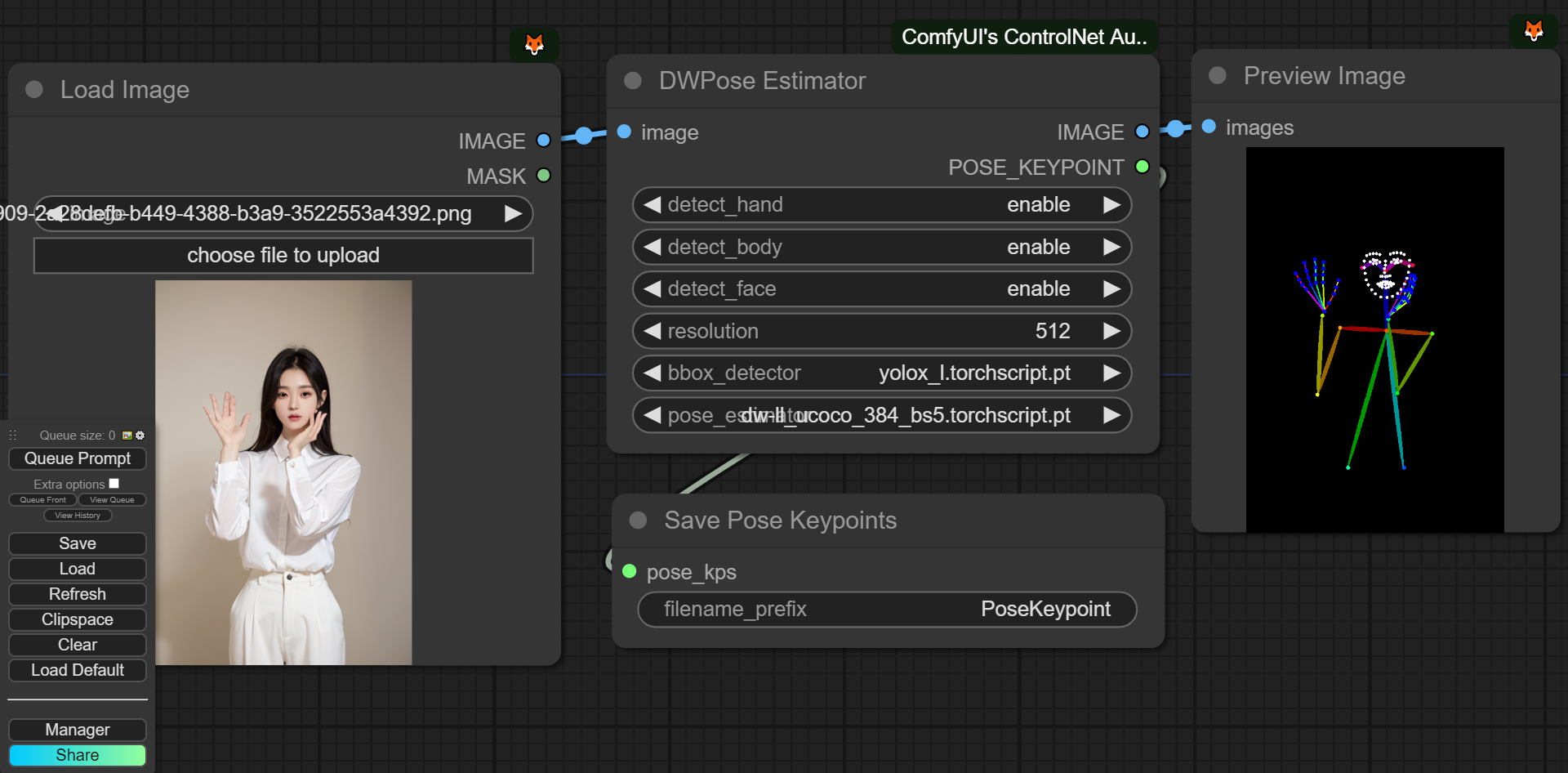
This workflow will save images to ComfyUI's output folder (the same location as output images). If you haven't found Save Pose Keypoints node, update this extension
Dev-side
An array of OpenPose-format JSON corresponsding to each frame in an IMAGE batch can be gotten from DWPose and OpenPose using app.nodeOutputs on the UI or /history API endpoint. JSON output from AnimalPose uses a kinda similar format to OpenPose JSON:
const poseNodes = app.graph._nodes.filter(node => ["OpenposePreprocessor", "DWPreprocessor", "AnimalPosePreprocessor"].includes(node.type))
for (const poseNode of poseNodes) {
    const openposeResults = JSON.parse(app.nodeOutputs[poseNode.id].openpose_json[0])
    console.log(openposeResults) //An array containing Openpose JSON for each frame
}
For API users:
Javascript
import fetch from "node-fetch" //Remember to add "type": "module" to "package.json"
async function main() {
    const promptId = '792c1905-ecfe-41f4-8114-83e6a4a09a9f' //Too lazy to POST /queue
    let history = await fetch(`http://127.0.0.1:8188/history/${promptId}`).then(re => re.json())
    history = history[promptId]
    const nodeOutputs = Object.values(history.outputs).filter(output => output.openpose_json)
    for (const nodeOutput of nodeOutputs) {
        const openposeResults = JSON.parse(nodeOutput.openpose_json[0])
        console.log(openposeResults) //An array containing Openpose JSON for each frame
    }
}
main()
Python
import json, urllib.request

server_address = "127.0.0.1:8188"
prompt_id = '' #Too lazy to POST /queue

def get_history(prompt_id):
    with urllib.request.urlopen("http://{}/history/{}".format(server_address, prompt_id)) as response:
        return json.loads(response.read())

history = get_history(prompt_id)[prompt_id]
for o in history['outputs']:
    for node_id in history['outputs']:
        node_output = history['outputs'][node_id]
        if 'openpose_json' in node_output:
            print(json.loads(node_output['openpose_json'][0])) #An list containing Openpose JSON for each frame
Why some nodes doesn't appear after I installed this repo?
This repo has a new mechanism which will skip any custom node can't be imported. If you meet this case, please create a issue on Issues tab with the log from the command line.
DWPose/AnimalPose only uses CPU so it's so slow. How can I make it use GPU?
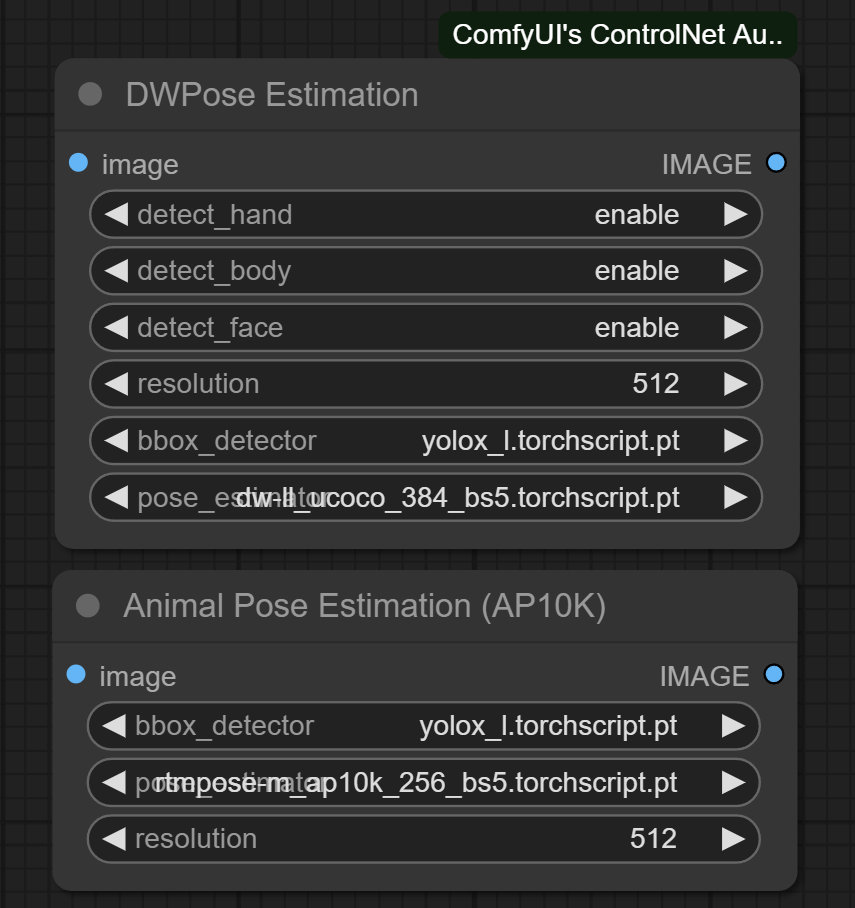
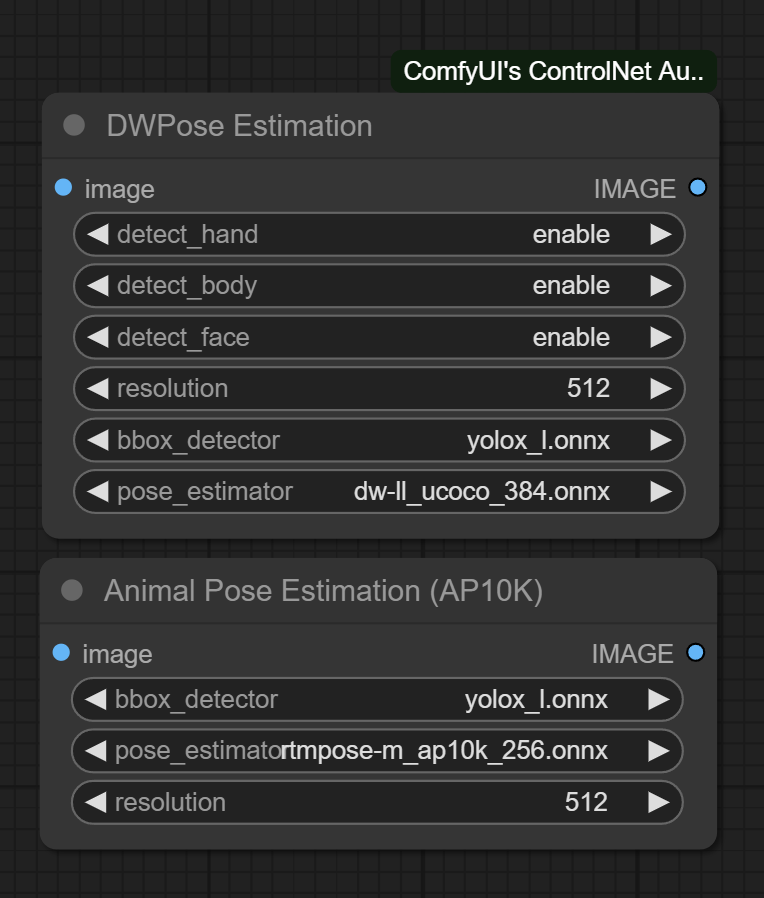
There are two ways to speed-up DWPose: using TorchScript checkpoints (.torchscript.pt) checkpoints or ONNXRuntime (.onnx). TorchScript way is little bit slower than ONNXRuntime but doesn't require any additional library and still way way faster than CPU.
A torchscript bbox detector is compatiable with an onnx pose estimator and vice versa.
TorchScript
Set bbox_detector and pose_estimator according to this picture. You can try other bbox detector endings with .torchscript.pt to reduce bbox detection time if input images are ideal.
ONNXRuntime
If onnxruntime is installed successfully and the checkpoint used endings with .onnx, it will replace default cv2 backend to take advantage of GPU. Note that if you are using NVidia card, this method currently can only works on CUDA 11.8 (ComfyUI_windows_portable_nvidia_cu118_or_cpu.7z) unless you compile onnxruntime yourself.
Know your onnxruntime build:
NVidia CUDA 11.x or bellow/AMD GPU: onnxruntime-gpu
NVidia CUDA 12.x: onnxruntime-gpu --extra-index-url https://aiinfra.pkgs.visualstudio.com/PublicPackages/_packaging/onnxruntime-cuda-12/pypi/simple/
DirectML: onnxruntime-directml
OpenVINO: onnxruntime-openvino
Note that if this is your first time using ComfyUI, please test if it can run on your device before doing next steps.
Add it into requirements.txt
Run install.bat or pip command mentioned in Installation
depth_anything: Either LiheYoung/Depth-Anything/checkpoints/depth_anything_vitl14.pth, LiheYoung/Depth-Anything/checkpoints/depth_anything_vitb14.pth or LiheYoung/Depth-Anything/checkpoints/depth_anything_vits14.pth
diffusion_edge: Either hr16/Diffusion-Edge/diffusion_edge_indoor.pt, hr16/Diffusion-Edge/diffusion_edge_urban.pt or hr16/Diffusion-Edge/diffusion_edge_natrual.pt
unimatch: Either hr16/Unimatch/gmflow-scale2-regrefine6-mixdata.pth, hr16/Unimatch/gmflow-scale2-mixdata.pth or hr16/Unimatch/gmflow-scale1-mixdata.pth
zoe_depth_anything: Either LiheYoung/Depth-Anything/checkpoints_metric_depth/depth_anything_metric_depth_indoor.pt or LiheYoung/Depth-Anything/checkpoints_metric_depth/depth_anything_metric_depth_outdoor.pt
2000 Stars 😄
Thanks for yalls supports. I never thought the graph for stars would be linear lol.
Đọc thêm về Fannovel16/comfyui_controlnet_aux ở đâu?
Trang TopGit này là một snapshot — tab "Readme" hiển thị nguyên văn README của repo (đã bỏ link, giữ ảnh). Repo GitHub ở github.com/Fannovel16/comfyui_controlnet_aux là nguồn chính thức.
Fannovel16/comfyui_controlnet_aux có phải mã nguồn mở không?
Có — Fannovel16/comfyui_controlnet_aux phát hành theo license Apache-2.0, nghĩa là mã nguồn mở để đọc, fork và (tùy license) tái sử dụng. Mã: github.com/Fannovel16/comfyui_controlnet_aux.
Fannovel16/comfyui_controlnet_aux có tag gì không?
Bản đồng bộ chưa ghi nhận topic GitHub nào cho Fannovel16/comfyui_controlnet_aux. GitHub topics hiển thị ở thanh bên phải trang repo — đó là nơi đáng kiểm tra nhất.
Fannovel16/comfyui_controlnet_aux có website riêng không?
TopGit chưa ghi nhận URL trang chủ cho Fannovel16/comfyui_controlnet_aux. Phần README ở tab phía trên thường có link demo, hoặc xem mô tả GitHub của repo.
Fannovel16/comfyui_controlnet_aux còn đang phát triển không?
Commit gần nhất trên Fannovel16/comfyui_controlnet_aux là 7 ngày trước (theo timestamp GitHub). Repo có 404 fork — một chỉ báo về mức độ quan tâm của cộng đồng.
Fannovel16/comfyui_controlnet_aux dùng license gì?
Fannovel16/comfyui_controlnet_aux phát hành theo license Apache-2.0. Nên mở file LICENSE trên GitHub để xác nhận — license metadata đôi khi lệch với thực tế dự án.
Đọc đầy đủ README ở tab phía trên.
Vẫn đang phân vân về comfyui_controlnet_aux?
Một cú bấm sẽ gửi câu hỏi kèm trang này cho AI — xem AI nói gì về comfyui_controlnet_aux.

 /comfyui_controlnet_aux