Snapshot of Fannovel16/comfyui_controlnet_aux: 4.1k★, Python. ComfyUI's ControlNet Auxiliary Preprocessors
Snapshot summary built from the project's own GitHub metadata — there's no written TopGit review yet. The page will update automatically when a full review is published.
WHY NO REVIEW YET
TopGit writes full reviews for the most-starred, most-requested repositories. This page is a snapshot until then — see the READ ME tab for the original README in full.
Plug-and-play ComfyUI node sets for making ControlNet hint images
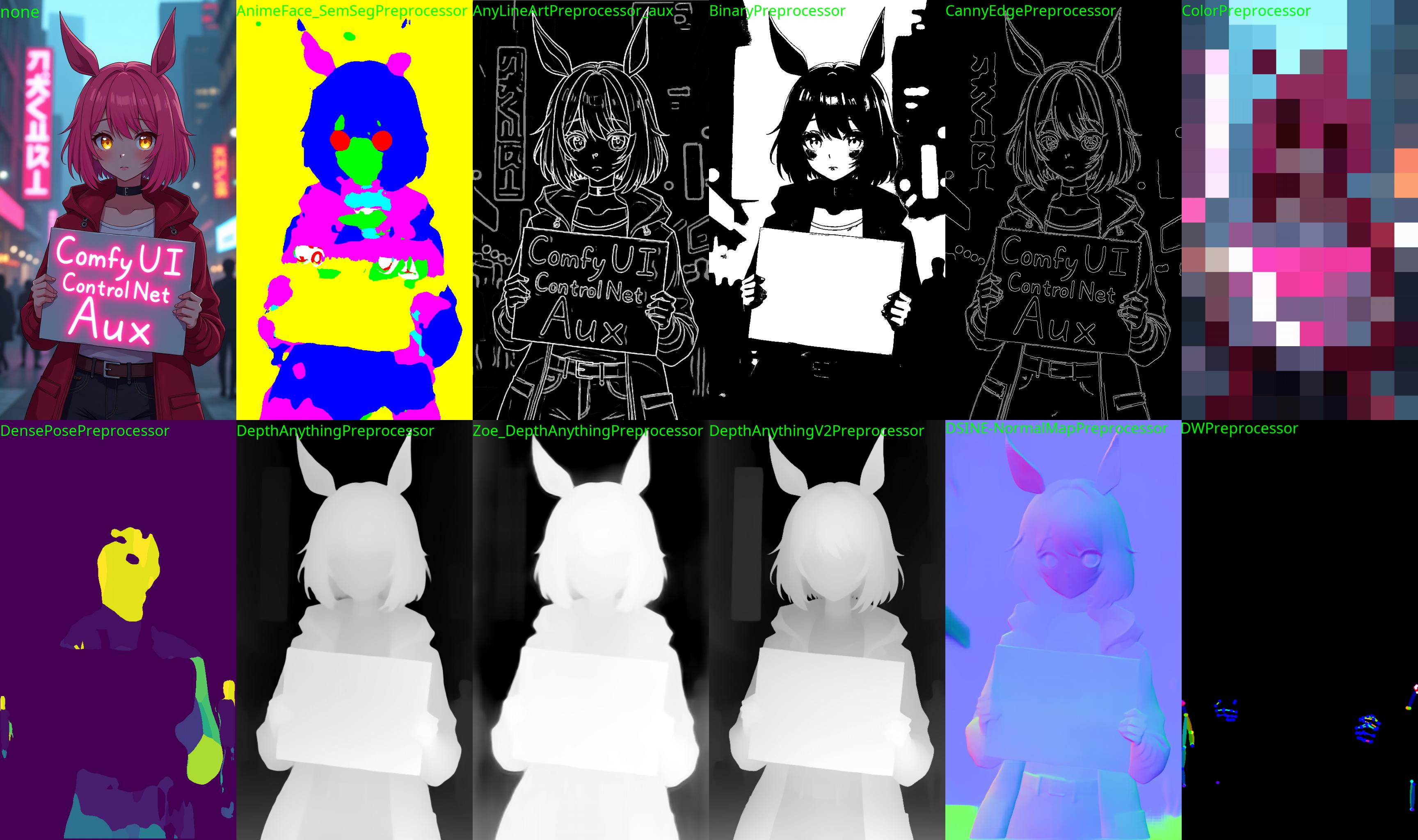
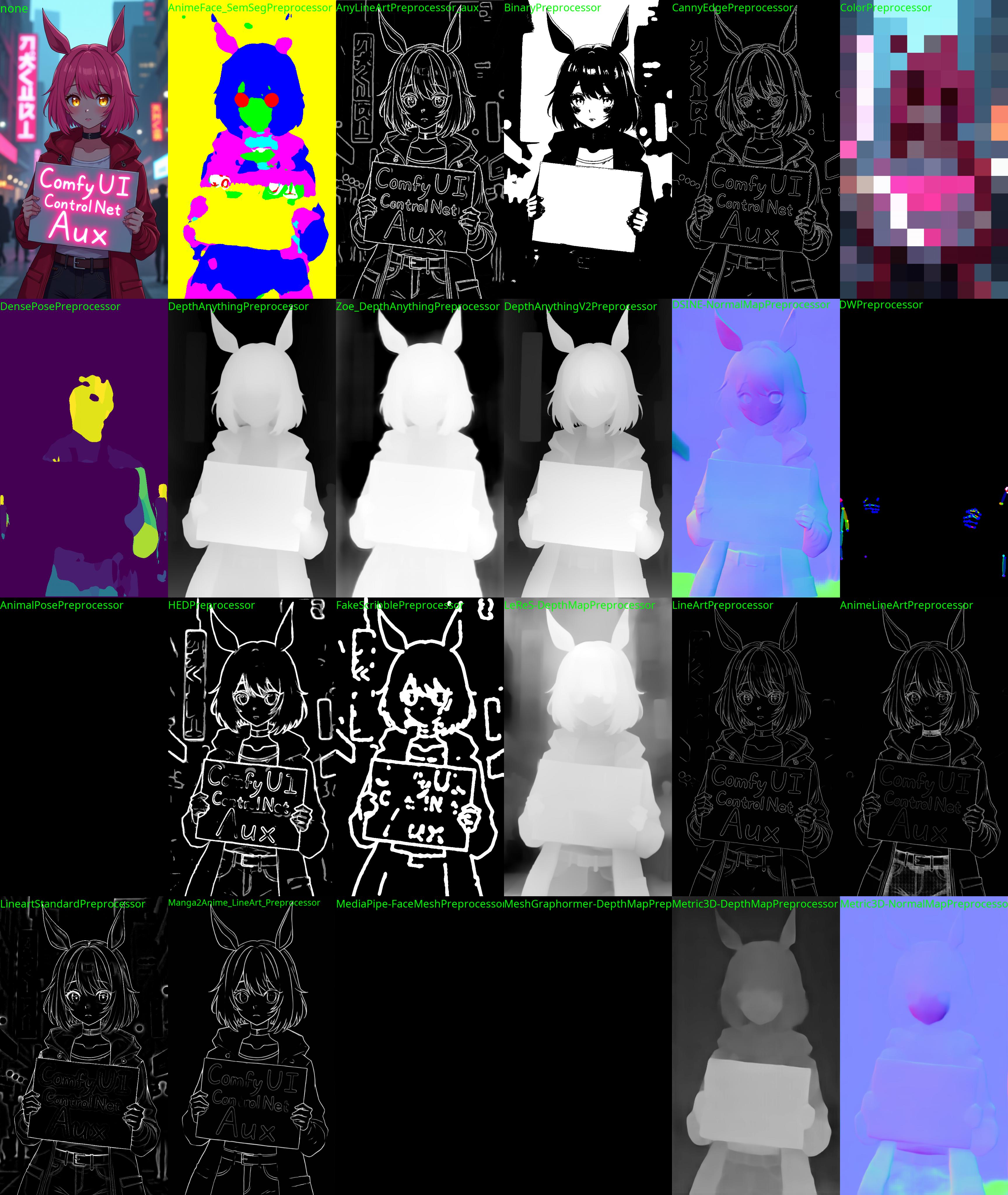
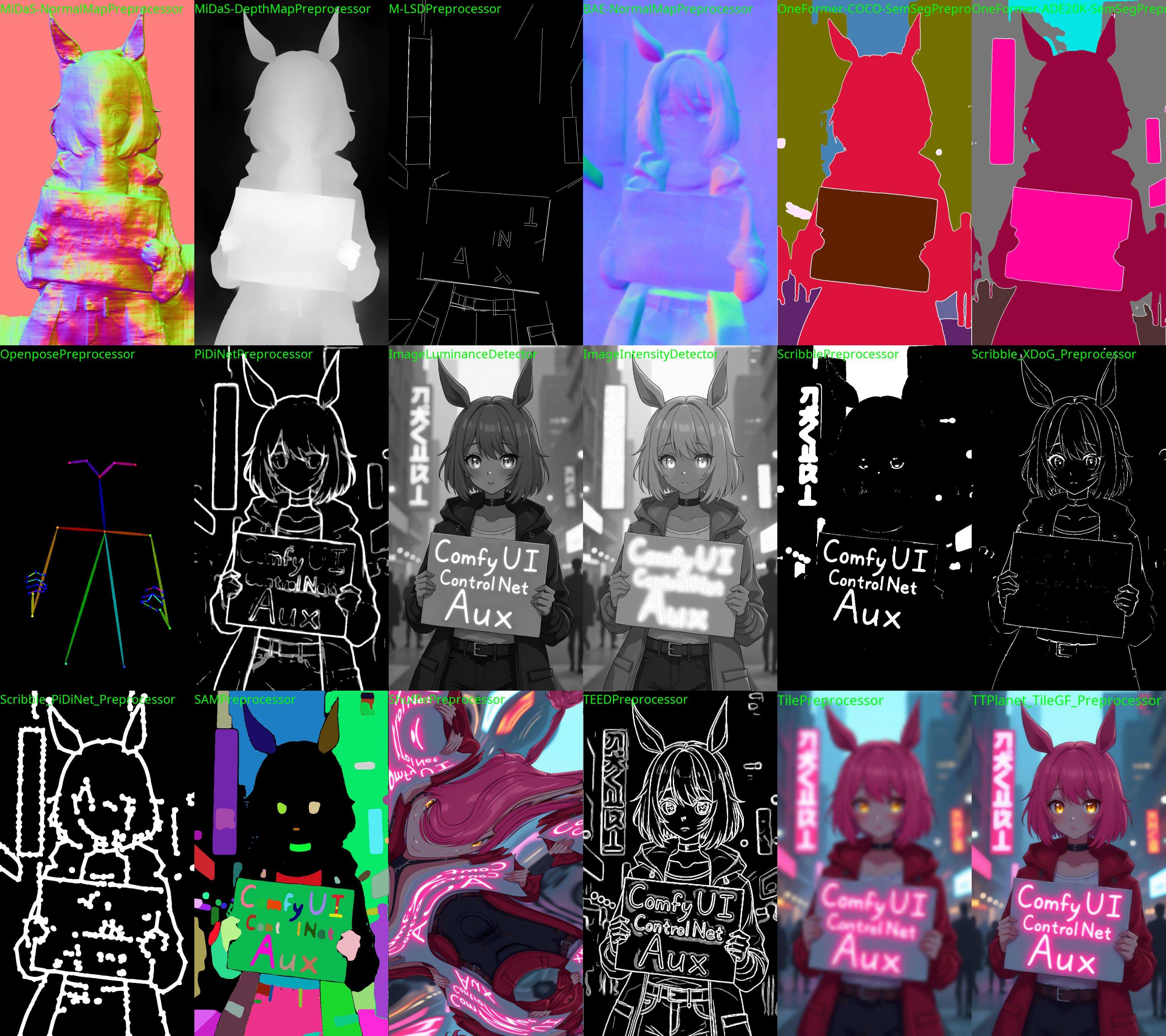
"anime style, a protest in the street, cyberpunk city, a woman with pink hair and golden eyes (looking at the viewer) is holding a sign with the text "ComfyUI ControlNet Aux" in bold, neon pink" on Flux.1 Dev
The code is copy-pasted from the respective folders in https://github.com/lllyasviel/ControlNet/tree/main/annotator and connected to the 🤗 Hub.
All credit & copyright goes to https://github.com/lllyasviel.
Updates
Go to Update page to follow updates
Installation:
Using ComfyUI Manager (recommended):
Install ComfyUI Manager and do steps introduced there to install this repo.
Alternative:
If you're running on Linux, or non-admin account on windows you'll want to ensure /ComfyUI/custom_nodes and comfyui_controlnet_aux has write permissions.
There is now a install.bat you can run to install to portable if detected. Otherwise it will default to system and assume you followed ConfyUI's manual installation steps.
If you can't run install.bat (e.g. you are a Linux user). Open the CMD/Shell and do the following:
Navigate to your /ComfyUI/custom_nodes/ folder
Run git clone https://github.com/Fannovel16/comfyui_controlnet_aux/
Navigate to your comfyui_controlnet_aux folder
Portable/venv:
Run path/to/ComfUI/python_embeded/python.exe -s -m pip install -r requirements.txt
With system python
Run pip install -r requirements.txt
Start ComfyUI
Nodes
Please note that this repo only supports preprocessors making hint images (e.g. stickman, canny edge, etc).
All preprocessors except Inpaint are intergrated into AIO Aux Preprocessor node.
This node allow you to quickly get the preprocessor but a preprocessor's own threshold parameters won't be able to set.
You need to use its node directly to set thresholds.
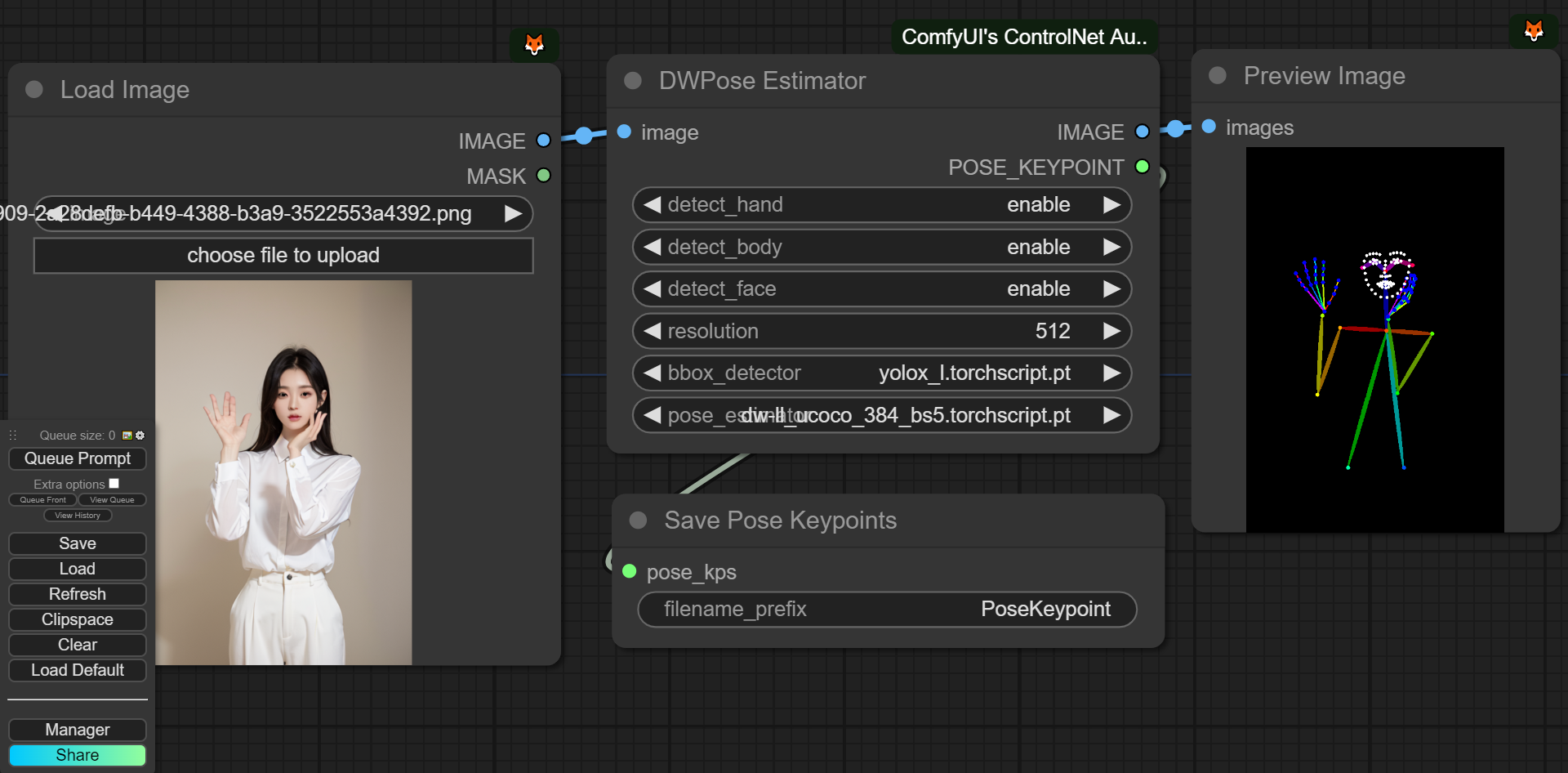
This workflow will save images to ComfyUI's output folder (the same location as output images). If you haven't found Save Pose Keypoints node, update this extension
Dev-side
An array of OpenPose-format JSON corresponsding to each frame in an IMAGE batch can be gotten from DWPose and OpenPose using app.nodeOutputs on the UI or /history API endpoint. JSON output from AnimalPose uses a kinda similar format to OpenPose JSON:
const poseNodes = app.graph._nodes.filter(node => ["OpenposePreprocessor", "DWPreprocessor", "AnimalPosePreprocessor"].includes(node.type))
for (const poseNode of poseNodes) {
    const openposeResults = JSON.parse(app.nodeOutputs[poseNode.id].openpose_json[0])
    console.log(openposeResults) //An array containing Openpose JSON for each frame
}
For API users:
Javascript
import fetch from "node-fetch" //Remember to add "type": "module" to "package.json"
async function main() {
    const promptId = '792c1905-ecfe-41f4-8114-83e6a4a09a9f' //Too lazy to POST /queue
    let history = await fetch(`http://127.0.0.1:8188/history/${promptId}`).then(re => re.json())
    history = history[promptId]
    const nodeOutputs = Object.values(history.outputs).filter(output => output.openpose_json)
    for (const nodeOutput of nodeOutputs) {
        const openposeResults = JSON.parse(nodeOutput.openpose_json[0])
        console.log(openposeResults) //An array containing Openpose JSON for each frame
    }
}
main()
Python
import json, urllib.request

server_address = "127.0.0.1:8188"
prompt_id = '' #Too lazy to POST /queue

def get_history(prompt_id):
    with urllib.request.urlopen("http://{}/history/{}".format(server_address, prompt_id)) as response:
        return json.loads(response.read())

history = get_history(prompt_id)[prompt_id]
for o in history['outputs']:
    for node_id in history['outputs']:
        node_output = history['outputs'][node_id]
        if 'openpose_json' in node_output:
            print(json.loads(node_output['openpose_json'][0])) #An list containing Openpose JSON for each frame
Why some nodes doesn't appear after I installed this repo?
This repo has a new mechanism which will skip any custom node can't be imported. If you meet this case, please create a issue on Issues tab with the log from the command line.
DWPose/AnimalPose only uses CPU so it's so slow. How can I make it use GPU?
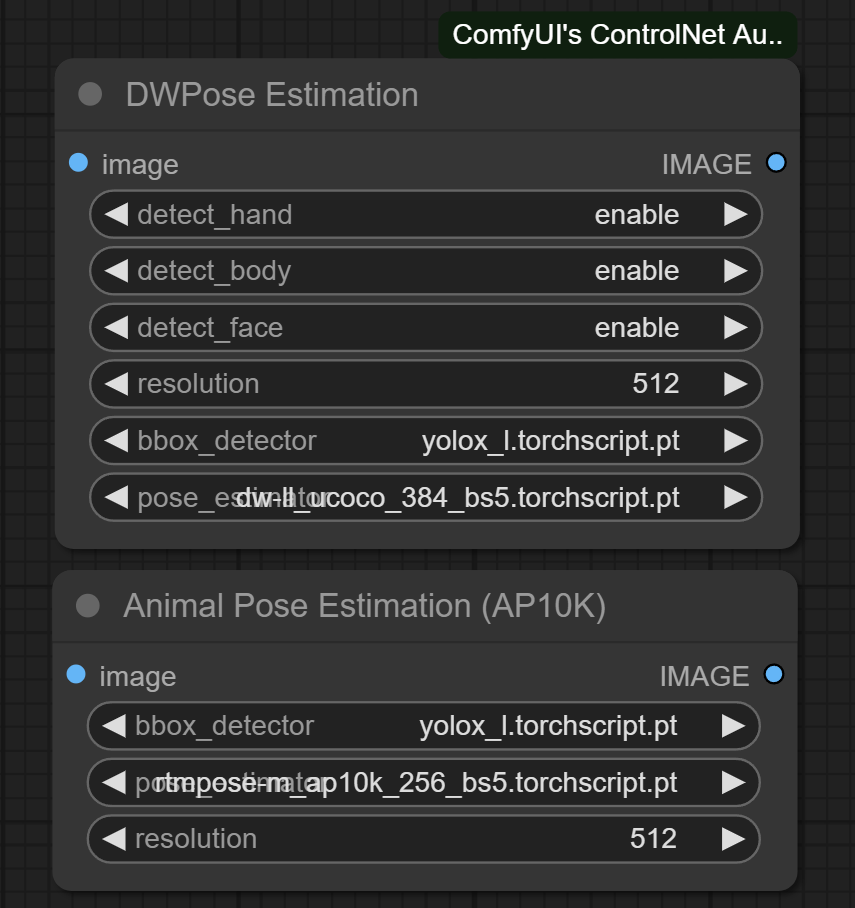
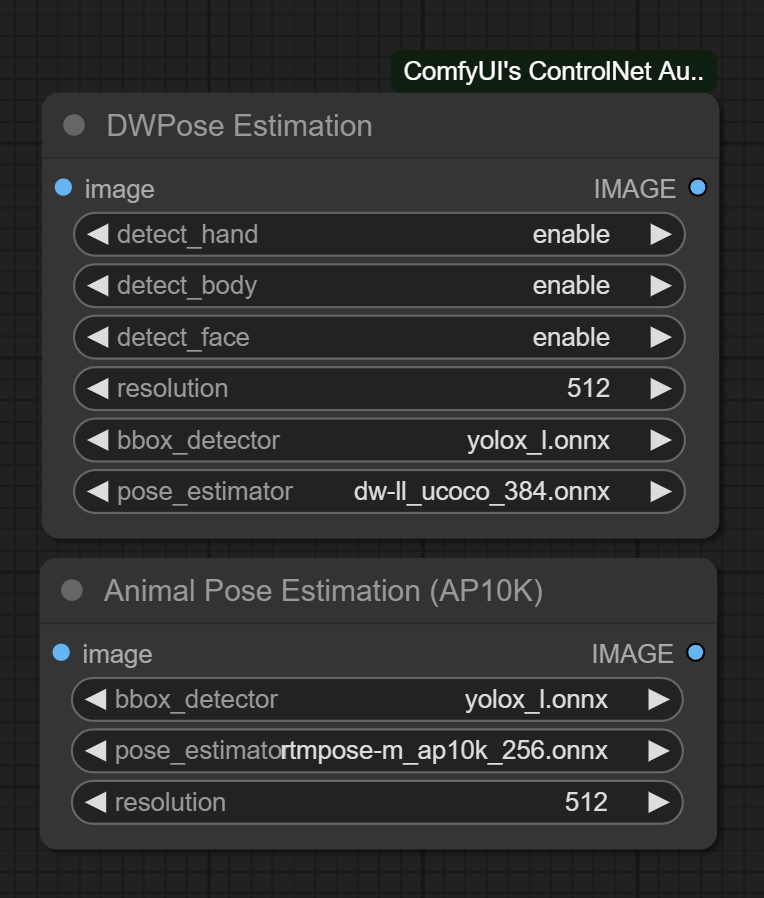
There are two ways to speed-up DWPose: using TorchScript checkpoints (.torchscript.pt) checkpoints or ONNXRuntime (.onnx). TorchScript way is little bit slower than ONNXRuntime but doesn't require any additional library and still way way faster than CPU.
A torchscript bbox detector is compatiable with an onnx pose estimator and vice versa.
TorchScript
Set bbox_detector and pose_estimator according to this picture. You can try other bbox detector endings with .torchscript.pt to reduce bbox detection time if input images are ideal.
ONNXRuntime
If onnxruntime is installed successfully and the checkpoint used endings with .onnx, it will replace default cv2 backend to take advantage of GPU. Note that if you are using NVidia card, this method currently can only works on CUDA 11.8 (ComfyUI_windows_portable_nvidia_cu118_or_cpu.7z) unless you compile onnxruntime yourself.
Know your onnxruntime build:
NVidia CUDA 11.x or bellow/AMD GPU: onnxruntime-gpu
NVidia CUDA 12.x: onnxruntime-gpu --extra-index-url https://aiinfra.pkgs.visualstudio.com/PublicPackages/_packaging/onnxruntime-cuda-12/pypi/simple/
DirectML: onnxruntime-directml
OpenVINO: onnxruntime-openvino
Note that if this is your first time using ComfyUI, please test if it can run on your device before doing next steps.
Add it into requirements.txt
Run install.bat or pip command mentioned in Installation
depth_anything: Either LiheYoung/Depth-Anything/checkpoints/depth_anything_vitl14.pth, LiheYoung/Depth-Anything/checkpoints/depth_anything_vitb14.pth or LiheYoung/Depth-Anything/checkpoints/depth_anything_vits14.pth
diffusion_edge: Either hr16/Diffusion-Edge/diffusion_edge_indoor.pt, hr16/Diffusion-Edge/diffusion_edge_urban.pt or hr16/Diffusion-Edge/diffusion_edge_natrual.pt
unimatch: Either hr16/Unimatch/gmflow-scale2-regrefine6-mixdata.pth, hr16/Unimatch/gmflow-scale2-mixdata.pth or hr16/Unimatch/gmflow-scale1-mixdata.pth
zoe_depth_anything: Either LiheYoung/Depth-Anything/checkpoints_metric_depth/depth_anything_metric_depth_indoor.pt or LiheYoung/Depth-Anything/checkpoints_metric_depth/depth_anything_metric_depth_outdoor.pt
2000 Stars 😄
Thanks for yalls supports. I never thought the graph for stars would be linear lol.
Does Fannovel16/comfyui_controlnet_aux have a project website?
No homepage URL was recorded for Fannovel16/comfyui_controlnet_aux in TopGit's last sync. The README tab above frequently contains screenshots and demo links, or check the repository description on GitHub.
Does Fannovel16/comfyui_controlnet_aux have any tags?
TopGit's last sync did not record any GitHub topics for Fannovel16/comfyui_controlnet_aux. GitHub topics appear in the right sidebar of a repository page; that's the authoritative place to check.
How active is development on Fannovel16/comfyui_controlnet_aux?
The most recent commit recorded on Fannovel16/comfyui_controlnet_aux was 4 months ago, based on the GitHub push timestamp. The repository has 372 forks — one of the better signals of community interest.
Is Fannovel16/comfyui_controlnet_aux open source?
Yes — Fannovel16/comfyui_controlnet_aux ships under the Apache-2.0 license, which makes its source code freely readable (and, depending on license terms, forkable and reusable). Source: github.com/Fannovel16/comfyui_controlnet_aux.
What license does Fannovel16/comfyui_controlnet_aux use?
Fannovel16/comfyui_controlnet_aux is released under the Apache-2.0 license. Always verify the LICENSE file directly on GitHub for the authoritative terms — license strings can be edited out of sync with a project's actual stance.
Where do I read more about Fannovel16/comfyui_controlnet_aux?
This TopGit page is a snapshot — the READ ME tab shows the project's own README content (links stripped, images preserved). The GitHub repository at github.com/Fannovel16/comfyui_controlnet_aux is the definitive source.
Read full README in the tab above.
Curious whether comfyui_controlnet_aux is right for you?
Let ChatGPT, Claude, or Perplexity look into it — click below and see what AI actually says about comfyui_controlnet_aux.
 /comfyui_controlnet_aux