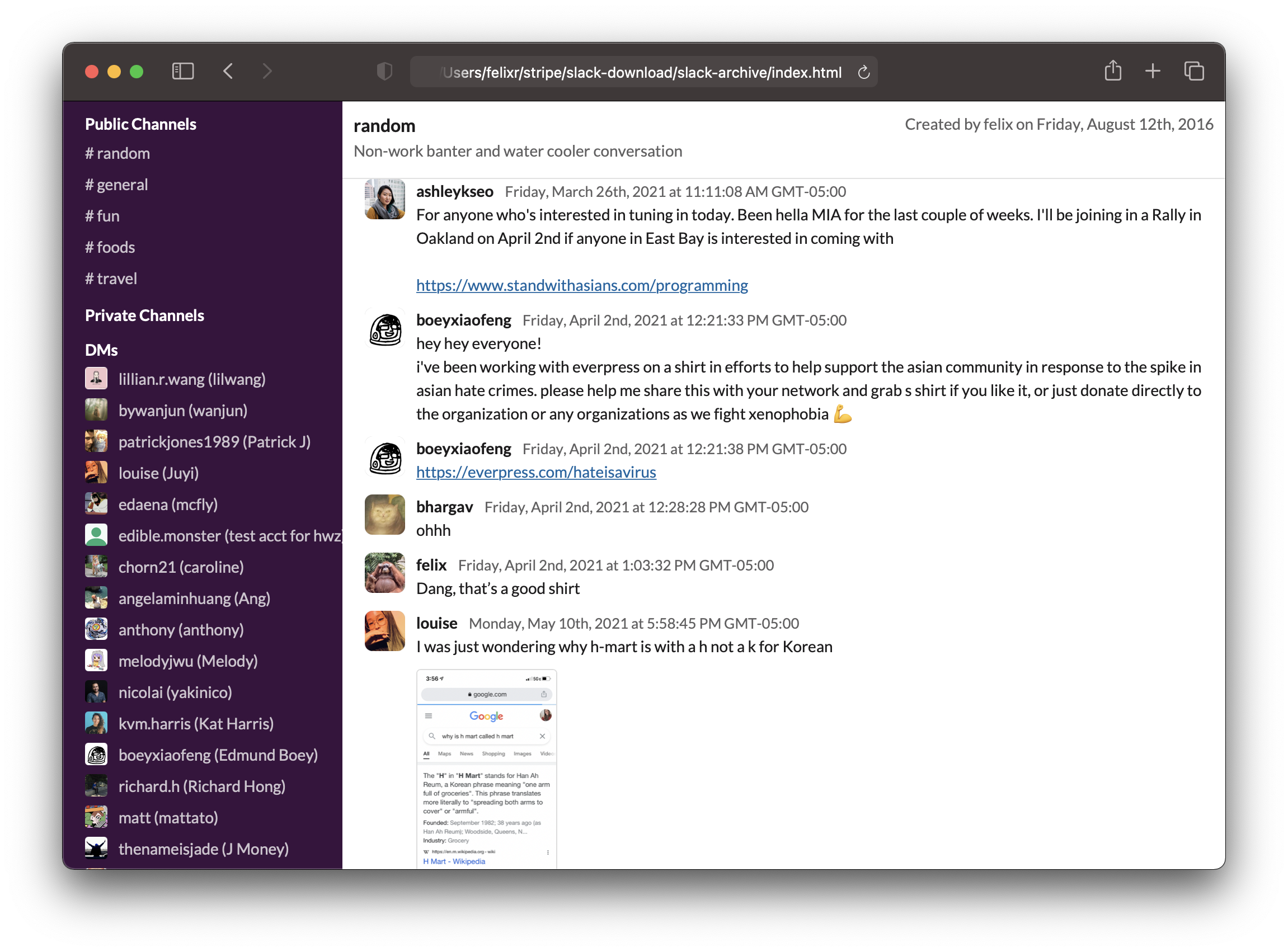
280 sao GitHub và vẫn tăng — felixrieseberg/slack-archive là dự án TypeScript mà TopGit đang theo dõi trên nền tảng. Generate static HTML archives of Slack workspaces
Tóm tắt dựng từ metadata GitHub của chính dự án — chưa có bài review TopGit. Trang sẽ tự động cập nhật khi bài review đầy đủ được xuất bản.
VÌ SAO CHƯA CÓ REVIEW
TopGit viết bài đầy đủ cho repo có nhiều sao nhất và được yêu cầu nhiều nhất. Trang này là snapshot trong thời gian chờ — xem README gốc ở tab READ ME.
Alright, so you want to export all your messages on Slack. You want them in a format that you
can still enjoy in 20 years. This tool will help you do that.
Completely static: The generated files are pure HTML and will still work in 50 years.
Everything you care about: This tool downloads messages, files, and avatars.
Nothing you do not care about: Choose exactly which channels and DMs to download.
All types of conversations: We'll fetch public channels, private channels, DMs, and multi-person DMs.
Incremental backups: If you already have local data, we'll extend it - no need to download existing stuff again.
JSON included: All data is also stored as JSON, so you can consume it with other tools later.
No cloud, free: Do all of this for free, without giving anyone your information.
Basic search: Offers basic search functionality.
Using it
Do you already have a user token for your workspace? If not, read on below on how to get a token.
Make sure you have node and npm installed, ideally something newer than Node v14.
Run slack-archive, which will interactively guide you through the options.
npx slack-archive
Parameters
--automatic:                Don't prompt and automatically fetch all messages from all channels.
--use-previous-channel-config: Fetch messages from channels selected in previous run instead of prompting.
--channel-types             Comma-separated list of channel types to fetch messages from.
                            (public_channel, private_channel, mpim, im)
--exclude-channels          Comma-separated list of channels to exclude, in automatic mode
--no-backup:                Don't create backups. Not recommended.
--no-search:                Don't create a search file, saving disk space.
--no-file-download:         Don't download files.
--no-slack-connect:         Don't connect to Slack, just generate HTML from local data.
--force-html-generation:    Force regeneration of HTML files. Useful after slack-archive upgrades.
Getting a token
In order to download messages from private channels and direct messages, we will need a "user
token". Slack uses the token to identify what permissions it'll give this app. We used to be able
to just copy a token out of your Slack app, but now, we'll need to create a custom app and jump
through a few hoops.
This will be mostly painless, I promise.
1) Make a custom app
Head over to https://api.slack.com/apps and Create New App. Select From scratch.
Give it a name and choose the workspace you'd like to export.
Then, from the Features menu on the left, select OAuth & Permission.
As a redirect URL, enter something random that doesn't actually exist, or a domain you control. For instace:
https://notarealurl.com/
(Note that redirects will take a very long time if using a domain that doesn't actually exist)
Then, add the following User Token Scopes:
channels:history
channels:read
files:read
groups:history
groups:read
im:history
im:read
mpim:history
mpim:read
remote_files:read
users:read
Finally, head back to Basic Information and make a note of your app's client id and client secret. We'll need both later.
2) Authorize
Make sure you have your Slack workspace URL (aka team name) and your app's client id.
Then, in a browser, open this URL - replacing {your-team-name} and {your-client-id}
with your values.
Confirm everything until Slack sends you to the mentioned non-existent URL. Look at your
browser's address bar - it should contain an URL that looks like this:
https://notarealurl.com/?code={code}&state=
Copy everything between ?code= and &state. This is your code. We'll need it in the
next step.
Next, we'll exchange your code for a token. To do so, we'll also need your client secret
from the first step when we created your app. In a browser, open this URL - replacing
{your-team-name}, {your-client-id}, {your-code} and {your-client-secret} with
your values.
Your browser should now be returning some JSON including a token. Make a note of it - that's what we'll use. Paste it in the command line, OR create a file called .token in the slack-archive directory (created when the command is first run) and paste it in there.
Trang TopGit này là một snapshot — tab "Readme" hiển thị nguyên văn README của repo (đã bỏ link, giữ ảnh). Repo GitHub ở github.com/felixrieseberg/slack-archive là nguồn chính thức.
felixrieseberg/slack-archive có bao nhiêu sao?
felixrieseberg/slack-archive có 280 sao GitHub — tải lại trang để xem số mới nhất, hoặc xem trực tiếp github.com/felixrieseberg/slack-archive. TopGit phản chiếu số sao của GitHub nhưng không cam kết đến từng phút.
felixrieseberg/slack-archive có phải mã nguồn mở không?
TopGit chưa ghi nhận license cho felixrieseberg/slack-archive. Phần lớn repo public trên GitHub là mã nguồn mở, nhưng điều khoản khác nhau từng repo — mở file LICENSE để xác nhận.
felixrieseberg/slack-archive còn đang phát triển không?
Commit gần nhất trên felixrieseberg/slack-archive là 1.5 năm trước (theo timestamp GitHub). Repo có 38 fork — một chỉ báo về mức độ quan tâm của cộng đồng.
felixrieseberg/slack-archive là gì?
felixrieseberg/slack-archive (felixrieseberg/slack-archive) là dự án TypeScript trên GitHub. Theo mô tả gốc: Generate static HTML archives of Slack workspaces
Đọc đầy đủ README ở tab phía trên.
slack-archive có đáng để bạn bỏ thời gian?
ChatGPT, Claude và Perplexity đều đọc được trang này. Hỏi thử xem họ nghĩ gì về slack-archive.
 /slack-archive