Một mục mã nguồn mở trong kho dữ liệu GitHub của TopGit: imthenachoman/ExquisiteW, 16 sao, AutoHotkey. ExquisiteW is a GUI driven window manager utility for Windows 10 that lets you create custom window layouts and then quickly move and resize windows to zones using a GUI or keyboard shortcuts.
Tóm tắt dựng từ metadata GitHub của chính dự án — chưa có bài review TopGit. Trang sẽ tự động cập nhật khi bài review đầy đủ được xuất bản.
VÌ SAO CHƯA CÓ REVIEW
TopGit viết bài đầy đủ cho repo có nhiều sao nhất và được yêu cầu nhiều nhất. Trang này là snapshot trong thời gian chờ — xem README gốc ở tab READ ME.
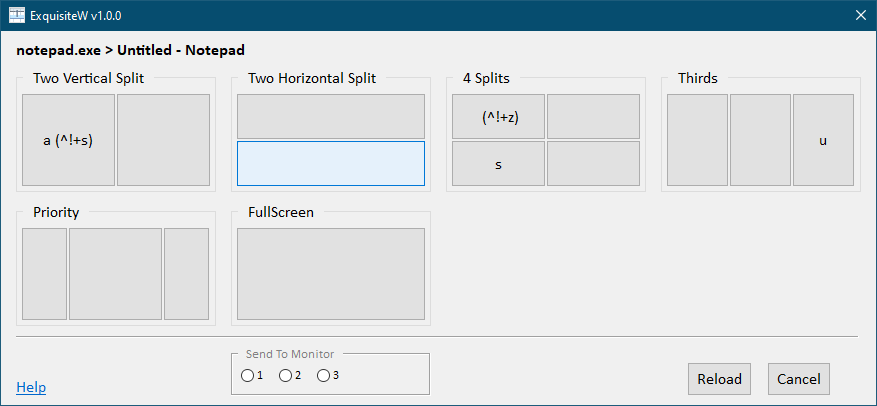
ExquisiteW is a customizable GUI driven window manager utility for Windows 10 that lets you create custom window layouts and then quickly move and resize windows to zones using a GUI or keyboard shortcuts.
After layouts have been configured, and ExquisiteW is running, you can use ExquisiteW to move and resize the window under the mouse to a specific zones in one of 2 ways:
Activate the ExquisiteW GUI (using your configured trigger) and then either:
Click on the zone you want
Press the zone's activator key
Press the global keyboard shortcut you have defined for the zone
ExquisiteW was inspired by Exquisite and the beta version was written in AutoHotKey by Malcev.
Table of Contents
Features
How It Works
Getting It
Requirements
Installation
Using It
Configuration File Specification
settings.ini
Section General
Section Layout Selector
layouts.json
windowPaddingInPixels
padAtMonitorEdges
layouts[].zones[].hotkey
AutoHotKey Hotkeys
Limitations And Known Bugs
Support / Help
Inspiration
Credits
Features
Custom layouts (currently through a JSON configuration file)
GUI for moving + resizing the window under the mouse
Customizable keyboard shortcuts
Multi-monitor support to move + resize a window to another monitor from the GUI
How It Works
ExquisiteW uses layouts to define a set of zones
You can have multiple layouts
A layout represents the usable area of a monitor (the taskbar is automatically excluded)
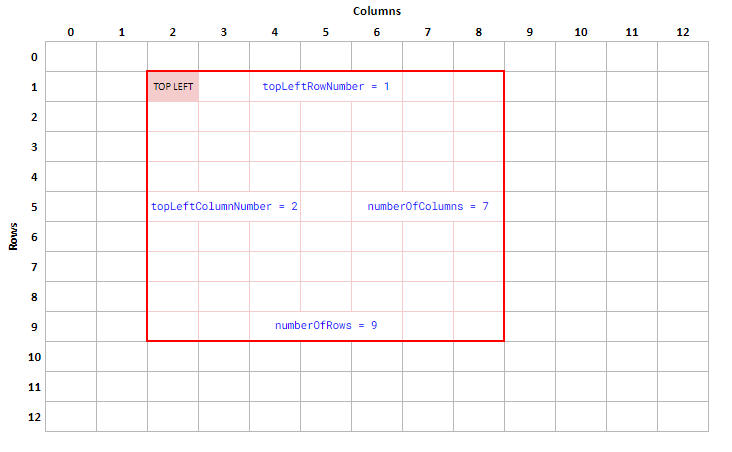
A layout is a 12 row by 12 column representation of a a monitor (for the same reason as the inspiration for ExquisiteW)
Each layout can have multiple zones
A zone represents the location and area of the monitor where you want a window to be moved and resized to
Getting It
Requirements
Windows 10 *
AutoHotKey 2.0
* I only have Windows 10 machines. I do not have access to Windows 11 (nor do I really want it). If you have Windows 11 and are willing to help me test ExquisiteW, please contact me.
Installation
Go to https://github.com/imthenachoman/ExquisiteW/releases
Download the latest release ZIP file
Extract the ZIP file to wherever you like/want
Edit settings.ini and layouts.json to your liking
Run/execute ExquisiteW.ahk
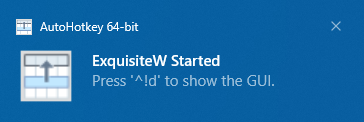
You'll get a notification letting you know it's running, along with what ExquisiteW's GUI activation trigger is.
Using It
You can customize the global shortcut/trigger used to show ExquisiteW's GUI
ExquisiteW's GUI will show you all of your configured layouts
Each layout will have 1+ buttons to represent each zone in that layout
Each button/zone will be visually placed in the layout to represent the area of the monitor the window will be moved and resized to
Clicking on a zone, or pressing the zone's activator key, will move and resize the window that was under the mouse when you activated the GUI
If you have multiple monitors, ExquisiteW's GUI will let you select the monitor you want to move and resize the window to
You can configure a global shortcut/trigger for a specific zone
This will let you move and resize the window under the mouse without opening ExquisiteW's GUI
Configuration File Specification
There are two configuration files used by ExquisiteW:
settings.ini
layouts.json
settings.ini
This is a standard INI file with some global, non-layout specific settings.
Section General
Setting
Valid Options
Default
Description
Update Check Frequency
whole number greater than -1
24
How often to check for updates, in hours:
-1 = check once at start up
0 = do not check for updates
X = check every X hours
Section Layout Selector
Setting
Valid Options
Default
Description
Close After Selection
1 or 0
1
0 = leave ExquisiteW's GUI open after you select a zone
1 = close it
Opacity
whole number from 0 to 100
100
0 = make ExquisiteW's GUI completely transparent
... = percent transparent
100 = completely opaque
Trigger
AHK HotKey
^!d (ctrl + alt + d)
The global keyboard shortcut to show ExquisiteW's GUI when the mouse is over a window/application that can be resized
Number Of Layouts In A Row
whole number greater than 3
4
Number of layouts per row in ExquisiteW's GUI; 3 is the minimum
Layout Box Width In Pixels
whole number greater than 50
200
Width of each layout (in pixels) in ExquisiteW's GUI; 50 is the minimum
Layout Box Height In Pixels
whole number greater than 50
125
Height of each layout (in pixels) in ExquisiteW's GUI; 50 is the minimum
layouts.json
layouts.json is a JSON formatted configuration file where layouts are defined. The structure of layouts.json is below. See layouts.json for a real example.
Global window padding for all zones in all layouts (see windowPaddingInPixels)
padAtMonitorEdges
true or false
Global setting for if padding should be added when a window is at the edge of the monitor (see padAtMonitorEdges)
layouts *
array of layouts
All of the layouts
layouts[].name *
string
Name of the layout to show in the GUI
layouts[].windowPaddingInPixels
number
Window padding for all of zones in this layout (see windowPaddingInPixels)
layouts[].padAtMonitorEdges
number
Setting for this layout for if padding should be added when a window is at the edge of the monitor (see padAtMonitorEdges)
layouts[].zones *
array of zones
All of the zones for this layout
layouts[].zones[].topLeftRowNumber *
0 - 11
Row number of the top left corner of the window (see How It Works)
layouts[].zones[].topLeftColumnNumber *
0 - 11
Column number of the top left corner of the window (see How It Works)
layouts[].zones[].numberOfRows *
1 - 12
Height of the window, in number of rows (see How It Works)
layouts[].zones[].numberOfColumns *
1 - 12
Width of the window, in number of columns (see How It Works)
layouts[].zones[].activator
letter
Single letter to activate a zone/button in the GUI
layouts[].zones[].hotkey
AHK HotKey
Global shortcut to activate a zone without the GUI (see layouts[].zones[].hotkey)
layouts[].zones[].windowPaddingInPixels
number
Window padding for this zone in this layout (see windowPaddingInPixels)
layouts[].zones[].padAtMonitorEdges
number
Setting for this zone in this layout for if padding should be added when a window is at the edge of the monitor (see padAtMonitorEdges)
* required properties
windowPaddingInPixels
You can add a custom padding (in pixels) around a window when it is moved and resized
Window padding can be set in 3 places:
globally, for all layouts, by setting the windowPaddingInPixels property at the root of layouts.json
for all zones of a specific layout by setting the windowPaddingInPixels property for a layout
for a specific zone by setting the windowPaddingInPixels property of a specific zone
If windowPaddingInPixels is not set for a zone, it will use the value of windowPaddingInPixels for the layout
If windowPaddingInPixels is not set for a layout, it will use the global value of windowPaddingInPixels
padAtMonitorEdges
If you have set windowPaddingInPixels then padding will be added to all four sides of the window
If the window is at the edge of the monitor, you may not want padding added to that edge
This lets you disable padding at the edge
This setting can be set in 3 places:
globally, for all layouts, by setting the padAtMonitorEdges property at the root of layouts.json
for all zones of a specific layout by setting the padAtMonitorEdges property for a layout
for a specific zone by setting the padAtMonitorEdges property of a specific zone
If padAtMonitorEdges is not set for a zone, it will use the value of padAtMonitorEdges for the layout
If padAtMonitorEdges is not set for a layout, it will use the global value of padAtMonitorEdges
layouts[].zones[].hotkey
This is an AutoHotKey HotKey
If set, a global keyboard shortcut will be created and associated to the zone
When the ExquisiteW GUI is not active, and this keyboard shortcut is used, the current window under the mouse will be moved and resized according to the zone's configuration
AutoHotKey Hotkeys
Since ExquisiteW is written in AutoHotKey, it uses AHK's structure for defining hotkeys. You can read about it and see examples at https://www.autohotkey.com/docs/v2/Hotkeys.htm.
Limitations And Known Bugs
Issue
Type
Details
No support for administrator windows
limitation
ExquisiteW cannot move and resize windows running as an administrator.
Not monitor/desktop change aware
limitation
ExquisiteW does not know when your monitor arrangement/configuration changes, or your desktop changes. You will need to manually reload ExquisiteW when you make those kinds of changes.
Support / Help
You can get support/help in one of two ways:
Open an issue at https://github.com/imthenachoman/ExquisiteW/issues
Contact me at the information listed in my GitHub profile
Inspiration
My daily driver is Linux (Debian + KDE Plasma)
Exquisite (without the W) is a window manager for KDE written by qewer33
It is the best window manager I have ever seen
I still use Windows 10 on some machines
Windows 10 built-in window snapping is adequate
FancyZones (part of PowerToys) is awesome but you have to drag/drop windows and that's a lot of mouse travel (especially on an ultrawide monitor)
So I* decided to build a Windows clone of Exquisite.
Disclaimer: I didn't know AutoHotKey when I started. I reached out to Malcev who created the beta version for me. I took his's code -- with his permission -- and ran with it. (In the interest of transprency, I paid him for his work.)
Credits
Malcev for the initial version
andymbody for https://www.autohotkey.com/boards/viewtopic.php?p=540471#p540471
jNizM for https://www.autohotkey.com/boards/viewtopic.php?p=540898#p540898
just me for https://www.autohotkey.com/boards/viewtopic.php?p=539922#p539922 and https://www.autohotkey.com/boards/viewtopic.php?p=540310#p540310
neogna2 for https://www.autohotkey.com/boards/viewtopic.php?p=539921#p539921
niCode for https://www.autohotkey.com/boards/viewtopic.php?p=540587#p540587
ntepa for https://www.autohotkey.com/boards/viewtopic.php?p=540461#p540461
teadrinker for https://www.autohotkey.com/boards/viewtopic.php?p=540162#p540162
Trang TopGit này là một snapshot — tab "Readme" hiển thị nguyên văn README của repo (đã bỏ link, giữ ảnh). Repo GitHub ở github.com/imthenachoman/ExquisiteW là nguồn chính thức.
imthenachoman/ExquisiteW có bao nhiêu sao?
imthenachoman/ExquisiteW có 16 sao GitHub — tải lại trang để xem số mới nhất, hoặc xem trực tiếp github.com/imthenachoman/ExquisiteW. TopGit phản chiếu số sao của GitHub nhưng không cam kết đến từng phút.
imthenachoman/ExquisiteW có phải mã nguồn mở không?
Có — imthenachoman/ExquisiteW phát hành theo license GPL-3.0, nghĩa là mã nguồn mở để đọc, fork và (tùy license) tái sử dụng. Mã: github.com/imthenachoman/ExquisiteW.
imthenachoman/ExquisiteW còn đang phát triển không?
Commit gần nhất trên imthenachoman/ExquisiteW là 3.0 năm trước (theo timestamp GitHub). Repo có 1 fork — một chỉ báo về mức độ quan tâm của cộng đồng.
imthenachoman/ExquisiteW dùng license gì?
imthenachoman/ExquisiteW phát hành theo license GPL-3.0. Nên mở file LICENSE trên GitHub để xác nhận — license metadata đôi khi lệch với thực tế dự án.
imthenachoman/ExquisiteW là gì?
imthenachoman/ExquisiteW (imthenachoman/ExquisiteW) là dự án AutoHotkey trên GitHub. Theo mô tả gốc: ExquisiteW is a GUI driven window manager utility for Windows 10 that lets you create custom window layouts and then quickly move and resize windows to zones using a GUI or keyboard shortcuts.
imthenachoman/ExquisiteW viết bằng ngôn ngữ gì?
imthenachoman/ExquisiteW chủ yếu viết bằng AutoHotkey. Trường "language" của GitHub dựa trên phần lớn byte ở nhánh mặc định.
Đọc đầy đủ README ở tab phía trên.
ExquisiteW có đáng để bạn bỏ thời gian?
ChatGPT, Claude và Perplexity đều đọc được trang này. Hỏi thử xem họ nghĩ gì về ExquisiteW.
 /ExquisiteW