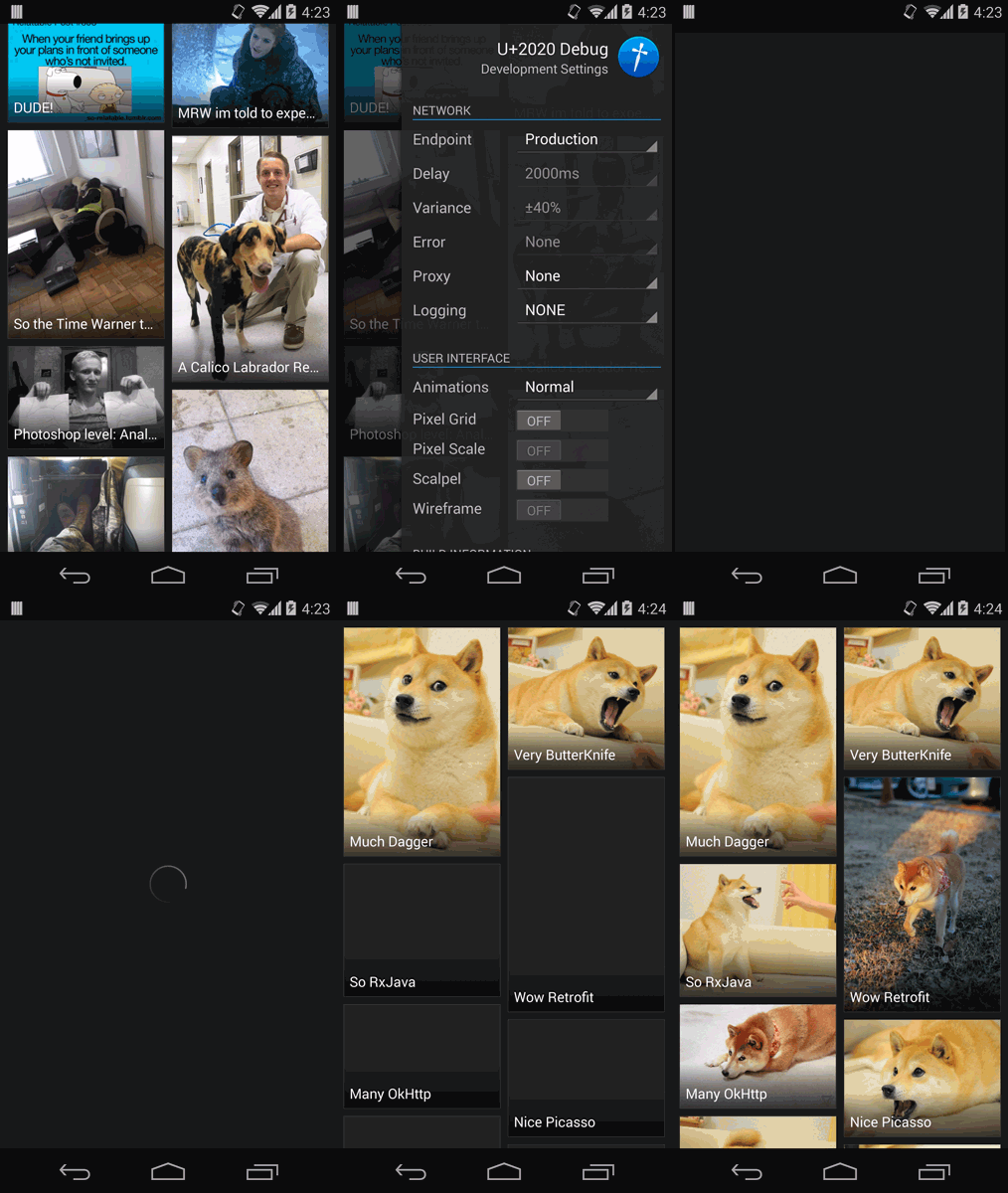
JakeWharton/u2020 được TopGit xếp vào nhóm dự án mã nguồn mở, với 5.6k sao trên GitHub, viết chủ yếu bằng Java. A sample Android app which showcases advanced usage of Dagger among other open source libraries.
Tóm tắt dựng từ metadata GitHub của chính dự án — chưa có bài review TopGit. Trang sẽ tự động cập nhật khi bài review đầy đủ được xuất bản.
VÌ SAO CHƯA CÓ REVIEW
TopGit viết bài đầy đủ cho repo có nhiều sao nhất và được yêu cầu nhiều nhất. Trang này là snapshot trong thời gian chờ — xem README gốc ở tab READ ME.
A sample Android app which showcases advanced usage of Dagger among other open source libraries.
Watch the corresponding talk or view the slides.
The ObjectGraph is created in the U2020App's onCreate method. The Modules class provides a
single method, list, which returns the list of module instances to use.
In order to add functionality in the 'debug' version of the app, this class is only present in the
release/ and debug/ build type folders. The 'release' version only includes the U2020Module while
the 'debug' version includes both U2020Module and DebugU2020Module, the latter of which is only
present in the debug/ build type folder and is an override module.
Through the use of Dagger overrides, the 'debug' version of the app adds a slew of debugging
features to the app which are presented in the Debug Drawer™. The drawer is opened by a bezel
swipe from the right of the screen. From here you can change and view all of the developer options
of the application.
The drawer is provided by the simple interface ViewContainer. This is an indirection that the
single activity uses to fetch its container into which it can place its content. The default
implementation returns the Android-provided content view. The 'debug' version overrides this with
DebugViewContainer which is responsible for creating the drawer, adding it to the activity, and
returning its content view group. It also injects all of the developer objects and binds them to
controls in the drawer.
The most notable feature the 'debug' version exposes is the concept of endpoints. Using the spinner
at the top of the drawer, you can change the endpoint to which the app communicates. We also expose
a false endpoint named "Mock Mode" which simulates an in-memory server inside the app. This "Mock
Mode" eases manual testing and also provides a static set of data to write instrumentation tests
against.
"Mock Mode" can be queried when modules are configuring their dependencies which is what allows
simulating the remote server in-memory.
@Singleton class MockFoo() {
  @Inject MockFoo() {}
  // ...
}
See DebugDataModule and DebugApiModule to see this in action in the real app.
The mock implementations of these types are some of those injected into the DebugViewContainer for
binding in the drawer. This allows us to do things like control their fake network behavior and
alter their behavior.
In order to keep the shared state which represents the server-side data we use a ServerDatabase
singleton. At present this is only done with a combination of in-memory collections and images in
the debug/assets/. In a more complex app you could even use a full database. This class is
injected into each mock service which uses its methods to query and mutate state
(e.g., MockGalleryService).
Something with animations to showcase animation control.
Network errors probably crash the app.
Add another part of the app other than 'trending' so we can demo child graphs.
License
Copyright 2014 Jake Wharton

Licensed under the Apache License, Version 2.0 (the "License");
you may not use this file except in compliance with the License.
You may obtain a copy of the License at

   http://www.apache.org/licenses/LICENSE-2.0

Unless required by applicable law or agreed to in writing, software
distributed under the License is distributed on an "AS IS" BASIS,
WITHOUT WARRANTIES OR CONDITIONS OF ANY KIND, either express or implied.
See the License for the specific language governing permissions and
limitations under the License.
Trang TopGit này là một snapshot — tab "Readme" hiển thị nguyên văn README của repo (đã bỏ link, giữ ảnh). Repo GitHub ở github.com/JakeWharton/u2020 là nguồn chính thức.
JakeWharton/u2020 có phải mã nguồn mở không?
Có — JakeWharton/u2020 phát hành theo license Apache-2.0, nghĩa là mã nguồn mở để đọc, fork và (tùy license) tái sử dụng. Mã: github.com/JakeWharton/u2020.
JakeWharton/u2020 có trang demo không?
Dự án có trang chủ ở https://www.youtube.com/watch?v=0XHx9jtxIxU. Tab "Readme" ở trang này thường có ảnh chụp và hướng dẫn bắt đầu nhanh.
JakeWharton/u2020 dùng license gì?
JakeWharton/u2020 phát hành theo license Apache-2.0. Nên mở file LICENSE trên GitHub để xác nhận — license metadata đôi khi lệch với thực tế dự án.
JakeWharton/u2020 là gì?
JakeWharton/u2020 (JakeWharton/u2020) là dự án Java trên GitHub. Theo mô tả gốc: A sample Android app which showcases advanced usage of Dagger among other open source libraries.
Đọc đầy đủ README ở tab phía trên.
Chưa chắc u2020 có hợp với bạn?
Để ChatGPT, Claude hoặc Perplexity tìm hiểu giúp — bấm bên dưới và xem AI nói gì về u2020.

 /u2020