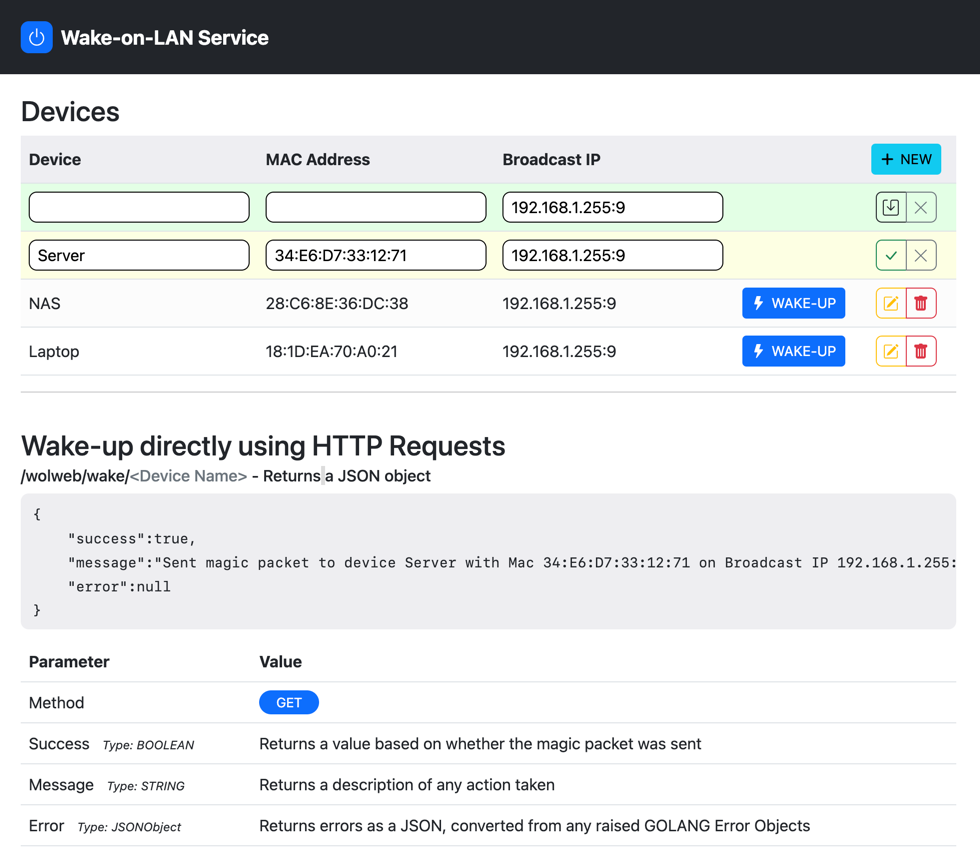
Trên GitHub, juanfont/wolweb đã đạt 3 sao. Web interface for sending Wake-on-lan (magic packet). An HTTP server built using GoLang and uses Bootstrap for UI.
Tóm tắt dựng từ metadata GitHub của chính dự án — chưa có bài review TopGit. Trang sẽ tự động cập nhật khi bài review đầy đủ được xuất bản.
VÌ SAO CHƯA CÓ REVIEW
TopGit viết bài đầy đủ cho repo có nhiều sao nhất và được yêu cầu nhiều nhất. Trang này là snapshot trong thời gian chờ — xem README gốc ở tab READ ME.
Web interface for sending Wake-on-LAN (Magic Packet)
A GoLang based HTTP server which will send a Wake-on-LAN package (magic packet) on a local network. The request can be send using web interface or directly using HTTP request with the mapped device name in the URL. The only computing device I have running 24x7 is handy-dandy Raspberry Pi 4 (4GB) with docker containers. All other devices like server, laptop and NAS as powered only when I need them. I needed a way to easily turn them on specifically when trying to automate things like nightly builds.
This application is intended do be used in conjunction with a reverse proxy and secured with an SSL certificate. As the intended use case was with home networks, the application has no in-built authentication. While this could pose a slight security risk even if this was hacked to application is intended to be containerised so the attack surface if limited.
I have bookmarked direct link to device(s) on my browsers to wake them using single HTTP call for ease of access.
Use cases:
Wake-up my home computers remotely, for access remotely over RDP.
Integration with automated routines to allow parts of a home lab to sleep instead of running 24x7 to save energy.
Configuring WOL
On some devices WOL can be difficult to correctly configure and have work reliably.
Follow this article for Dell Laptops.
Bootstrap UI with JS Grid for editing data
The UI features CRUD operation implemented using js-grid.com plugin.
Wake-up directly using HTTP Request
/wolweb/wake/<hostname> - Returns a JSON object
{
  "success": true,
  "message": "Sent magic packet to device Server with Mac 34:E6:D7:33:12:71 on Broadcast IP 192.168.1.255:9",
  "error": null
}
Configure the app
The application will use the following default values if they are not explicitly configured as explained in sections below.
Config
Description
Default
Host
Define the host address on which the webserver will listen
0.0.0.0
Port
Define the port on which the webserver will listen
8089
Virtual Directory
A virtual directory to mount this application under
/wolweb
Broadcast IP and Port
This is broadcast IP address and port for the local network. Please include the port :9
192.168.1.255:9
You can override the default application configuration by using a config file or by setting environment variables. The application will first load values from config file and look for environment variables and overwrites values from the file with the values which were found in the environment.
This project includes Dockerfile (based on Alpine) and docker-compose.yml files which you can use to build the image for your platform and run it using the docker compose file. If interested, I also have alternate Dockerfile (based on Debian). Both of these Dockerfile are tested to run on Raspberry Pi Docker CE. If you want to use this application as-is, you will only need to download these two docker-related files to get started. The docker file will grab the code and compile it for your platform.
I could not get this to run using Docker's bridged network. The only way I was able to make it work was to use host network for the docker container. See this https://github.com/docker/for-linux/issues/637 for details.
I initially thought of running this application on my router, so I needed to build the application without having to install build tool on my router. I use the following PowerShell one liner to build targeting the ARM v5 platform on my Windows machine with VS Code:
Copy the file over to router and make it executable.
chmod +x wolweb
To see detailed instructions on how to run this application as service on ASUS router with custom firmware asuswrt-merlin see this Wiki guide
NGiNX Config
I am already using NGiNX as web-proxy for accessing multiple services (web interfaces) from single IP and port 443 using free Let's Encrypt HTTPS certificate. For accessing this service, I just added the following configuration under my existing server node.
This is also the reason why I have an option in this application to use virtual directory /wolweb as I can easily map all requests for this application. My / is already occupied for other web application in my network.
Credits
This project is based on a couple of framworks and provided below:
https://github.com/dabondi/go-rest-wol - Provided the initial project framework
https://github.com/sabhiram/go-wol - Provided the functionality to the REST
Thank you to the developers behind both projects, David Baumann and Shaba Abhiram!
License
Distributed with GNU General Public License (c) 2023
juanfont/wolweb có 3 sao GitHub — tải lại trang để xem số mới nhất, hoặc xem trực tiếp github.com/juanfont/wolweb. TopGit phản chiếu số sao của GitHub nhưng không cam kết đến từng phút.
juanfont/wolweb có tag gì không?
Bản đồng bộ chưa ghi nhận topic GitHub nào cho juanfont/wolweb. GitHub topics hiển thị ở thanh bên phải trang repo — đó là nơi đáng kiểm tra nhất.
juanfont/wolweb còn đang phát triển không?
Commit gần nhất trên juanfont/wolweb là 3.3 năm trước (theo timestamp GitHub). Repo có 1 fork — một chỉ báo về mức độ quan tâm của cộng đồng.
juanfont/wolweb là gì?
juanfont/wolweb (juanfont/wolweb) là dự án đa ngôn ngữ trên GitHub. Theo mô tả gốc: Web interface for sending Wake-on-lan (magic packet). An HTTP server built using GoLang and uses Bootstrap for UI.
juanfont/wolweb viết bằng ngôn ngữ gì?
Dữ liệu TopGit chưa ghi nhận ngôn ngữ chính cho juanfont/wolweb. Xem danh sách file trên GitHub để biết chi tiết.
Đọc đầy đủ README ở tab phía trên.
Vẫn đang phân vân về wolweb?
Một cú bấm sẽ gửi câu hỏi kèm trang này cho AI — xem AI nói gì về wolweb.

 /wolweb