Một mục mã nguồn mở trong kho dữ liệu GitHub của TopGit: Juanpe/JDAnimationKit, 2 sao, Swift. Animate easy and with less code with Swift
Tóm tắt dựng từ metadata GitHub của chính dự án — chưa có bài review TopGit. Trang sẽ tự động cập nhật khi bài review đầy đủ được xuất bản.
VÌ SAO CHƯA CÓ REVIEW
TopGit viết bài đầy đủ cho repo có nhiều sao nhất và được yêu cầu nhiều nhất. Trang này là snapshot trong thời gian chờ — xem README gốc ở tab READ ME.
JDAnimationKit is designed to be extremely easy to use. You can animate your UI withe less lines of code. This library use internally POP framework, an extensible iOS and OS X animation library, useful for physics-based interactions.
Supported OS & SDK Versions
iOS 8.0+
Swift 3 (JDAnimationKit 1.0.x), Swift 2.3 (JDAnimationKit 1.1.x)
Demo
Beetripper App's screenshots
Installation
JDAnimationKit is available through CocoaPods. To install
it, simply add the following line to your Podfile:
pod "JDAnimationKit"
Note: Due to CocoaPods/CocoaPods#4420 issue there is problem with compiling project with Xcode 7.1 and CocoaPods v0.39.0. However there is a temporary workaround for this:
Add next lines to the end of your Podfile
post_install do |installer|
  `find Pods -regex 'Pods/pop.*\\.h' -print0 | xargs -0 sed -i '' 's/\\(<\\)pop\\/\\(.*\\)\\(>\\)/\\"\\2\\"/'`
end
To install manually the JDAnimationKit class in an app, just drag the JDAnimationKit.swift class file (demo files and assets are not needed) into your project. Also you need to install facebook-pop. Or add bridging header if you are using CocoaPods.
Usage
Import JDAnimationKit in proper place.
import JDAnimationKit
You can animate CALayers and UIViews (and subclasses). Only you add the animation you want after element.
Indicate if apply physics effects to animate (Default: false)
-> springConfig : JDSpringConfig (struct)
If spring property is true, configure the physics params (bounciness and speed) (Default: bounciness: 10, speed: 10)
-> timing : JDTimingFunction (enum)
The animation-timing-function specifies the speed curve of an animation (Default: .None)
Values:
EaseIn
EaseOut
EaseInOut
Linear
None
-> delay : Double
You can execute the animation after X seconds. (Default: 0)
-> key : String
Identify the animation
Anchoring
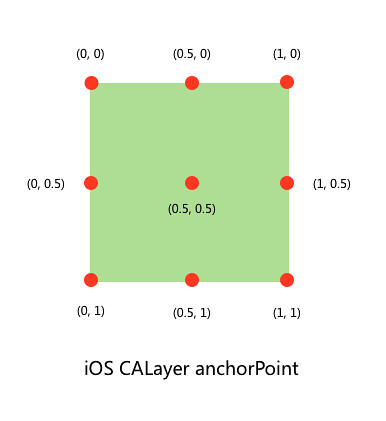
The anchor point represents the point from which certain coordinates originate. The anchor point is one of several properties that you specify using the unit coordinate system. Core Animation uses unit coordinates to represent properties whose values might change when the layer’s size changes. You can think of the unit coordinates as specifying a percentage of the total possible value. Every coordinate in the unit coordinate space has a range of 0.0 to 1.0. For example, along the x-axis, the left edge is at the coordinate 0.0 and the right edge is at the coordinate 1.0.
You can set the anchor point with this code:
self.squareView.changeAnchorPoint(0, y: 0)
Callback
If you want to get animations callbacks or if you want to run code after an animation finishes, you are supposed to call didStopAnimation or didStartAnimation block.
Trang TopGit này là một snapshot — tab "Readme" hiển thị nguyên văn README của repo (đã bỏ link, giữ ảnh). Repo GitHub ở github.com/Juanpe/JDAnimationKit là nguồn chính thức.
Juanpe/JDAnimationKit có phải mã nguồn mở không?
Có — Juanpe/JDAnimationKit phát hành theo license MIT, nghĩa là mã nguồn mở để đọc, fork và (tùy license) tái sử dụng. Mã: github.com/Juanpe/JDAnimationKit.
Juanpe/JDAnimationKit là gì?
Juanpe/JDAnimationKit (Juanpe/JDAnimationKit) là dự án Swift trên GitHub. Theo mô tả gốc: Animate easy and with less code with Swift
Đọc đầy đủ README ở tab phía trên.
Vẫn đang phân vân về JDAnimationKit?
Một cú bấm sẽ gửi câu hỏi kèm trang này cho AI — xem AI nói gì về JDAnimationKit.
 /JDAnimationKit