Juanpe/JDAnimationKit is a Swift project with 2 stars. Animate easy and with less code with Swift
Snapshot summary built from the project's own GitHub metadata — there's no written TopGit review yet. The page will update automatically when a full review is published.
WHY NO REVIEW YET
TopGit writes full reviews for the most-starred, most-requested repositories. This page is a snapshot until then — see the READ ME tab for the original README in full.
JDAnimationKit is designed to be extremely easy to use. You can animate your UI withe less lines of code. This library use internally POP framework, an extensible iOS and OS X animation library, useful for physics-based interactions.
Supported OS & SDK Versions
iOS 8.0+
Swift 3 (JDAnimationKit 1.0.x), Swift 2.3 (JDAnimationKit 1.1.x)
Demo
Beetripper App's screenshots
Installation
JDAnimationKit is available through CocoaPods. To install
it, simply add the following line to your Podfile:
pod "JDAnimationKit"
Note: Due to CocoaPods/CocoaPods#4420 issue there is problem with compiling project with Xcode 7.1 and CocoaPods v0.39.0. However there is a temporary workaround for this:
Add next lines to the end of your Podfile
post_install do |installer|
  `find Pods -regex 'Pods/pop.*\\.h' -print0 | xargs -0 sed -i '' 's/\\(<\\)pop\\/\\(.*\\)\\(>\\)/\\"\\2\\"/'`
end
To install manually the JDAnimationKit class in an app, just drag the JDAnimationKit.swift class file (demo files and assets are not needed) into your project. Also you need to install facebook-pop. Or add bridging header if you are using CocoaPods.
Usage
Import JDAnimationKit in proper place.
import JDAnimationKit
You can animate CALayers and UIViews (and subclasses). Only you add the animation you want after element.
Indicate if apply physics effects to animate (Default: false)
-> springConfig : JDSpringConfig (struct)
If spring property is true, configure the physics params (bounciness and speed) (Default: bounciness: 10, speed: 10)
-> timing : JDTimingFunction (enum)
The animation-timing-function specifies the speed curve of an animation (Default: .None)
Values:
EaseIn
EaseOut
EaseInOut
Linear
None
-> delay : Double
You can execute the animation after X seconds. (Default: 0)
-> key : String
Identify the animation
Anchoring
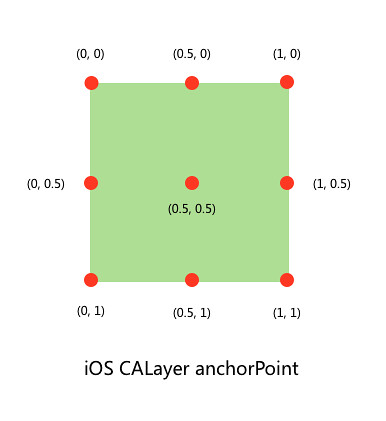
The anchor point represents the point from which certain coordinates originate. The anchor point is one of several properties that you specify using the unit coordinate system. Core Animation uses unit coordinates to represent properties whose values might change when the layer’s size changes. You can think of the unit coordinates as specifying a percentage of the total possible value. Every coordinate in the unit coordinate space has a range of 0.0 to 1.0. For example, along the x-axis, the left edge is at the coordinate 0.0 and the right edge is at the coordinate 1.0.
You can set the anchor point with this code:
self.squareView.changeAnchorPoint(0, y: 0)
Callback
If you want to get animations callbacks or if you want to run code after an animation finishes, you are supposed to call didStopAnimation or didStartAnimation block.
Yes — Juanpe/JDAnimationKit ships under the MIT license, which makes its source code freely readable (and, depending on license terms, forkable and reusable). Source: github.com/Juanpe/JDAnimationKit.
What is Juanpe/JDAnimationKit?
Juanpe/JDAnimationKit (Juanpe/JDAnimationKit) is a Swift project on GitHub. From the project's own README: Animate easy and with less code with Swift
Where do I read more about Juanpe/JDAnimationKit?
This TopGit page is a snapshot — the READ ME tab shows the project's own README content (links stripped, images preserved). The GitHub repository at github.com/Juanpe/JDAnimationKit is the definitive source.
Read full README in the tab above.
Still deciding about JDAnimationKit?
One click hands the question to an AI along with this page — see what it says about JDAnimationKit.

 /JDAnimationKit