KrauseFx/TSMessages là dự án tập trung di động trên GitHub với 4.8k sao, viết chủ yếu bằng Objective-C. 💌 Easy to use and customizable messages/notifications for iOS à la Tweetbot
Tóm tắt dựng từ metadata GitHub của chính dự án — chưa có bài review TopGit. Trang sẽ tự động cập nhật khi bài review đầy đủ được xuất bản.
VÌ SAO CHƯA CÓ REVIEW
TopGit viết bài đầy đủ cho repo có nhiều sao nhất và được yêu cầu nhiều nhất. Trang này là snapshot trong thời gian chờ — xem README gốc ở tab READ ME.
Notice: TSMessages is no longer being maintained/updated. We recommend everyone migrate to RMessage.
This repository will be kept as is for those who want to continue using TSMessages or are in the process of migrating. If an issue you submitted to TSMessages still applies to RMessage feel free to create a new issue in RMessage's repository.
If your project is Swift based, you might want to check out SwiftMessages, which offers the same features, but is written completely in Swift.
TSMessages
This library provides an easy to use class to show little notification views on the top of the screen. (à la Tweetbot).
The notification moves from the top of the screen underneath the navigation bar and stays there for a few seconds, depending on the length of the displayed text. To dismiss a notification before the time runs out, the user can swipe it to the top or just tap it.
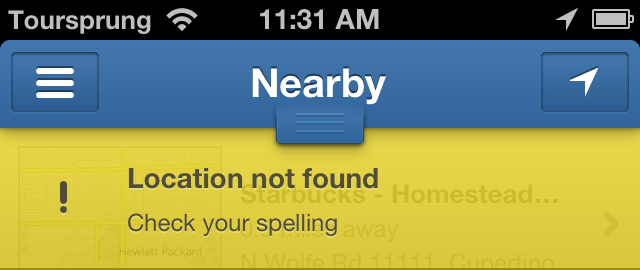
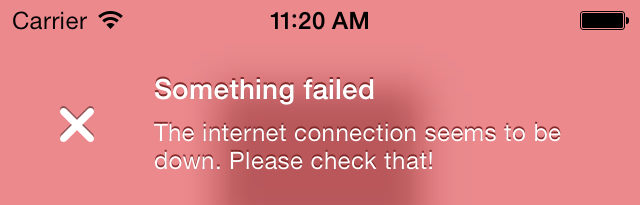
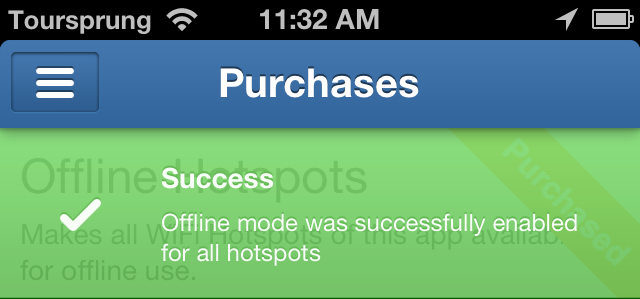
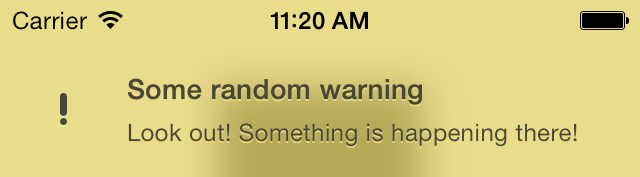
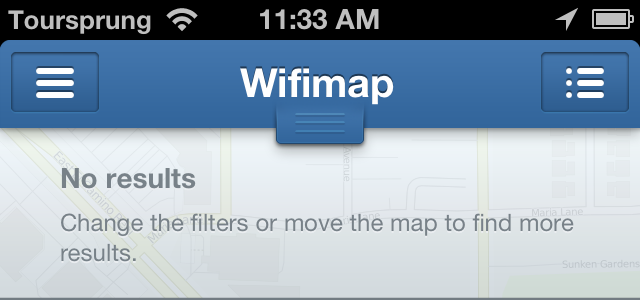
There are 4 different types already set up for you: Success, Error, Warning, Message (take a look at the screenshots)
It is very easy to add new notification types with a different design. Add the new type to the notificationType enum, add the needed design properties to the configuration file and set the name of the theme (used in the config file and images) in TSMessagesView.m inside the switch case.
Take a look at the Example project to see how to use this library. You have to open the workspace, not the project file, since the Example project uses cocoapods.
Get in contact with the developer on Twitter: KrauseFx (Felix Krause)
Screenshots
Installation
From CocoaPods
TSMessages is available through CocoaPods. To install
it, simply add the following line to your Podfile:
pod "TSMessages"
Manually
Copy the source files TSMessageView and TSMessage into your project. Also copy the TSMessagesDesignDefault.json.
Usage
To show notifications use the following code:
    [TSMessage showNotificationWithTitle:@"Your Title"
                                subtitle:@"A description"
                                    type:TSMessageNotificationTypeError];


    // Add a button inside the message
    [TSMessage showNotificationInViewController:self
                                          title:@"Update available"
                                       subtitle:@"Please update the app"
                                          image:nil
                                           type:TSMessageNotificationTypeMessage
                                       duration:TSMessageNotificationDurationAutomatic
                                       callback:nil
                                    buttonTitle:@"Update"
                                 buttonCallback:^{
                                     NSLog(@"User tapped the button");
                                 }
                                     atPosition:TSMessageNotificationPositionTop
                           canBeDismissedByUser:YES];


    // Use a custom design file
    [TSMessage addCustomDesignFromFileWithName:@"AlternativeDesign.json"];
You can define a default view controller in which the notifications should be displayed:
You can customize message view elements using UIAppearance
#import <TSMessages/TSMessageView.h>
@implementation TSAppDelegate
....

- (BOOL)application:(UIApplication *)application didFinishLaunchingWithOptions:(NSDictionary *)launchOptions
{
//If you want you can overidde some properties using UIAppearance
[[TSMessageView appearance] setTitleFont:[UIFont boldSystemFontOfSize:6]];
[[TSMessageView appearance] setTitleTextColor:[UIColor redColor]];
[[TSMessageView appearance] setContentFont:[UIFont boldSystemFontOfSize:10]];
[[TSMessageView appearance]setContentTextColor:[UIColor greenColor]];
[[TSMessageView appearance]setErrorIcon:[UIImage imageNamed:@"NotificationButtonBackground"]];
[[TSMessageView appearance]setSuccessIcon:[UIImage imageNamed:@"NotificationButtonBackground"]];
[[TSMessageView appearance]setMessageIcon:[UIImage imageNamed:@"NotificationButtonBackground"]];
[[TSMessageView appearance]setWarningIcon:[UIImage imageNamed:@"NotificationButtonBackground"]];
//End of override

return YES;
}
The following properties can be set when creating a new notification:
viewController: The view controller to show the notification in. This might be the navigation controller.
title: The title of the notification view
subtitle: The text that is displayed underneath the title (optional)
image: A custom icon image that is used instead of the default one (optional)
type: The notification type (Message, Warning, Error, Success)
duration: The duration the notification should be displayed
callback: The block that should be executed, when the user dismissed the message by tapping on it or swiping it to the top.
Except the title and the notification type, all of the listed values are optional
If you don't want a detailed description (the text underneath the title) you don't need to set one. The notification will automatically resize itself properly.
License
TSMessages is available under the MIT license. See the LICENSE file for more information.
Recent Changes
Can be found in the releases section of this repo.
KrauseFx/TSMessages thuộc nhóm Mobile trên TopGit, cùng 6 topic GitHub. Trang Trending và Topics liệt kê các repo cùng số sao và cùng ngôn ngữ để so sánh.
Đọc thêm về KrauseFx/TSMessages ở đâu?
Trang TopGit này là một snapshot — tab "Readme" hiển thị nguyên văn README của repo (đã bỏ link, giữ ảnh). Repo GitHub ở github.com/KrauseFx/TSMessages là nguồn chính thức.
KrauseFx/TSMessages có bao nhiêu sao?
KrauseFx/TSMessages có 4.8k sao GitHub — tải lại trang để xem số mới nhất, hoặc xem trực tiếp github.com/KrauseFx/TSMessages. TopGit phản chiếu số sao của GitHub nhưng không cam kết đến từng phút.
KrauseFx/TSMessages có những chủ đề gì?
GitHub topics của KrauseFx/TSMessages: "cocoapods", "ios", "library", "notifications", "objective-c", "tsmessages". TopGit xếp repo vào nhóm Mobile.
KrauseFx/TSMessages có phải mã nguồn mở không?
Có — KrauseFx/TSMessages phát hành theo license MIT, nghĩa là mã nguồn mở để đọc, fork và (tùy license) tái sử dụng. Mã: github.com/KrauseFx/TSMessages.
KrauseFx/TSMessages có trang demo không?
Dự án có trang chủ ở http://krausefx.com. Tab "Readme" ở trang này thường có ảnh chụp và hướng dẫn bắt đầu nhanh.
KrauseFx/TSMessages còn đang phát triển không?
Commit gần nhất trên KrauseFx/TSMessages là 3.2 năm trước (theo timestamp GitHub). Repo có 703 fork — một chỉ báo về mức độ quan tâm của cộng đồng.
Đọc đầy đủ README ở tab phía trên.
Chưa chắc TSMessages có hợp với bạn?
Để ChatGPT, Claude hoặc Perplexity tìm hiểu giúp — bấm bên dưới và xem AI nói gì về TSMessages.
 /TSMessages