On GitHub, KrauseFx/TSMessages has picked up 4.8k stars, Mobile, Objective-C. 💌 Easy to use and customizable messages/notifications for iOS à la Tweetbot
Snapshot summary built from the project's own GitHub metadata — there's no written TopGit review yet. The page will update automatically when a full review is published.
WHY NO REVIEW YET
TopGit writes full reviews for the most-starred, most-requested repositories. This page is a snapshot until then — see the READ ME tab for the original README in full.
Notice: TSMessages is no longer being maintained/updated. We recommend everyone migrate to RMessage.
This repository will be kept as is for those who want to continue using TSMessages or are in the process of migrating. If an issue you submitted to TSMessages still applies to RMessage feel free to create a new issue in RMessage's repository.
If your project is Swift based, you might want to check out SwiftMessages, which offers the same features, but is written completely in Swift.
TSMessages
This library provides an easy to use class to show little notification views on the top of the screen. (à la Tweetbot).
The notification moves from the top of the screen underneath the navigation bar and stays there for a few seconds, depending on the length of the displayed text. To dismiss a notification before the time runs out, the user can swipe it to the top or just tap it.
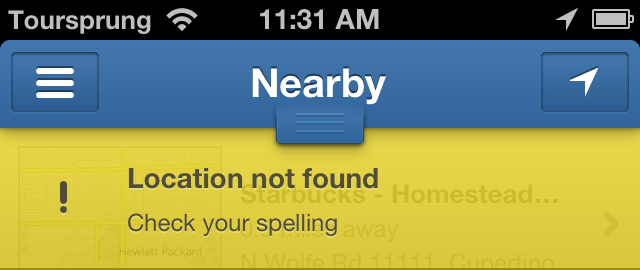
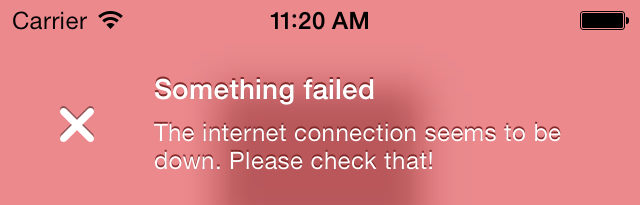
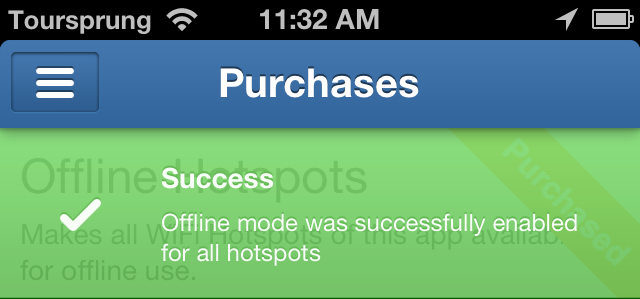
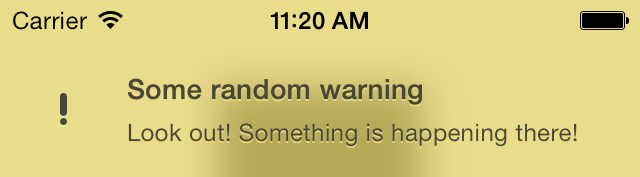
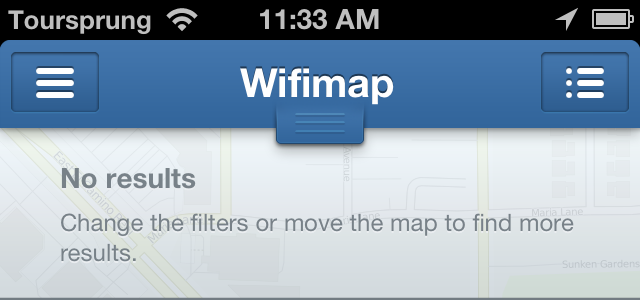
There are 4 different types already set up for you: Success, Error, Warning, Message (take a look at the screenshots)
It is very easy to add new notification types with a different design. Add the new type to the notificationType enum, add the needed design properties to the configuration file and set the name of the theme (used in the config file and images) in TSMessagesView.m inside the switch case.
Take a look at the Example project to see how to use this library. You have to open the workspace, not the project file, since the Example project uses cocoapods.
Get in contact with the developer on Twitter: KrauseFx (Felix Krause)
Screenshots
Installation
From CocoaPods
TSMessages is available through CocoaPods. To install
it, simply add the following line to your Podfile:
pod "TSMessages"
Manually
Copy the source files TSMessageView and TSMessage into your project. Also copy the TSMessagesDesignDefault.json.
Usage
To show notifications use the following code:
    [TSMessage showNotificationWithTitle:@"Your Title"
                                subtitle:@"A description"
                                    type:TSMessageNotificationTypeError];


    // Add a button inside the message
    [TSMessage showNotificationInViewController:self
                                          title:@"Update available"
                                       subtitle:@"Please update the app"
                                          image:nil
                                           type:TSMessageNotificationTypeMessage
                                       duration:TSMessageNotificationDurationAutomatic
                                       callback:nil
                                    buttonTitle:@"Update"
                                 buttonCallback:^{
                                     NSLog(@"User tapped the button");
                                 }
                                     atPosition:TSMessageNotificationPositionTop
                           canBeDismissedByUser:YES];


    // Use a custom design file
    [TSMessage addCustomDesignFromFileWithName:@"AlternativeDesign.json"];
You can define a default view controller in which the notifications should be displayed:
You can customize message view elements using UIAppearance
#import <TSMessages/TSMessageView.h>
@implementation TSAppDelegate
....

- (BOOL)application:(UIApplication *)application didFinishLaunchingWithOptions:(NSDictionary *)launchOptions
{
//If you want you can overidde some properties using UIAppearance
[[TSMessageView appearance] setTitleFont:[UIFont boldSystemFontOfSize:6]];
[[TSMessageView appearance] setTitleTextColor:[UIColor redColor]];
[[TSMessageView appearance] setContentFont:[UIFont boldSystemFontOfSize:10]];
[[TSMessageView appearance]setContentTextColor:[UIColor greenColor]];
[[TSMessageView appearance]setErrorIcon:[UIImage imageNamed:@"NotificationButtonBackground"]];
[[TSMessageView appearance]setSuccessIcon:[UIImage imageNamed:@"NotificationButtonBackground"]];
[[TSMessageView appearance]setMessageIcon:[UIImage imageNamed:@"NotificationButtonBackground"]];
[[TSMessageView appearance]setWarningIcon:[UIImage imageNamed:@"NotificationButtonBackground"]];
//End of override

return YES;
}
The following properties can be set when creating a new notification:
viewController: The view controller to show the notification in. This might be the navigation controller.
title: The title of the notification view
subtitle: The text that is displayed underneath the title (optional)
image: A custom icon image that is used instead of the default one (optional)
type: The notification type (Message, Warning, Error, Success)
duration: The duration the notification should be displayed
callback: The block that should be executed, when the user dismissed the message by tapping on it or swiping it to the top.
Except the title and the notification type, all of the listed values are optional
If you don't want a detailed description (the text underneath the title) you don't need to set one. The notification will automatically resize itself properly.
License
TSMessages is available under the MIT license. See the LICENSE file for more information.
Recent Changes
Can be found in the releases section of this repo.
The most recent commit recorded on KrauseFx/TSMessages was 3.2 years ago, based on the GitHub push timestamp. The repository has 703 forks — one of the better signals of community interest.
How many stars does KrauseFx/TSMessages have?
KrauseFx/TSMessages has 4.8k GitHub stars — refresh the page for the live number, or check github.com/KrauseFx/TSMessages. TopGit mirrors GitHub's count but does not claim minute-by-minute accuracy.
Is KrauseFx/TSMessages open source?
Yes — KrauseFx/TSMessages ships under the MIT license, which makes its source code freely readable (and, depending on license terms, forkable and reusable). Source: github.com/KrauseFx/TSMessages.
What else is in the Mobile space?
KrauseFx/TSMessages is tracked by TopGit under the Mobile category, alongside 6 GitHub-tagged topics. Trending and Topics pages list peer repositories of comparable stars and language.
What topics is KrauseFx/TSMessages associated with?
GitHub's repository topics for KrauseFx/TSMessages: "cocoapods", "ios", "library", "notifications", "objective-c", "tsmessages". TopGit's editorial category is Mobile.
Where can I see KrauseFx/TSMessages in action?
The project maintains a homepage at http://krausefx.com. The README tab on this page also usually contains screenshots and a quickstart.
Where do I read more about KrauseFx/TSMessages?
This TopGit page is a snapshot — the READ ME tab shows the project's own README content (links stripped, images preserved). The GitHub repository at github.com/KrauseFx/TSMessages is the definitive source.
Read full README in the tab above.
Is TSMessages worth your time?
ChatGPT, Claude and Perplexity can all read this page. Ask one of them what it makes of TSMessages.
 /TSMessages