lukeed/kleur được TopGit xếp vào nhóm dự án mã nguồn mở, với 1.7k sao trên GitHub, viết chủ yếu bằng JavaScript. The fastest Node.js library for formatting terminal text with ANSI colors~!
Tóm tắt dựng từ metadata GitHub của chính dự án — chưa có bài review TopGit. Trang sẽ tự động cập nhật khi bài review đầy đủ được xuất bản.
VÌ SAO CHƯA CÓ REVIEW
TopGit viết bài đầy đủ cho repo có nhiều sao nhất và được yêu cầu nhiều nhất. Trang này là snapshot trong thời gian chờ — xem README gốc ở tab READ ME.
const { bold, green } = require('kleur');

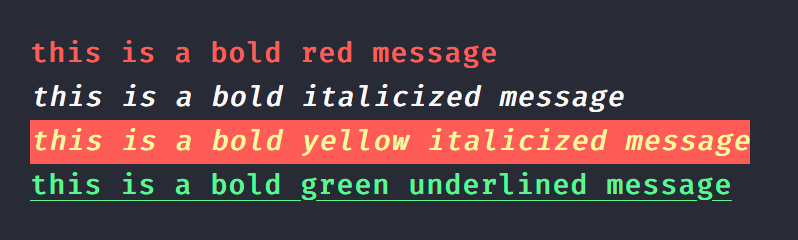
console.log(bold().red('this is a bold red message'));
console.log(bold().italic('this is a bold italicized message'));
console.log(bold().yellow().bgRed().italic('this is a bold yellow italicized message'));
console.log(green().bold().underline('this is a bold green underlined message'));
Toggle color support as needed; kleur includes simple auto-detection which may not cover all cases.
Note: Both kleur and kleur/colors share the same detection logic.
import kleur from 'kleur';

// manually disable
kleur.enabled = false;

// or use another library to detect support
kleur.enabled = require('color-support').level > 0;

console.log(kleur.red('I will only be colored red if the terminal supports colors'));
Important: Colors will be disabled automatically in non TTY contexts. For example, spawning another process or piping output into another process will disable colorization automatically. To force colors in your piped output, you may do so with the FORCE_COLOR=1 environment variable:
When you only need a few colors, it doesn't make sense to import all of kleur because, as small as it is, kleur is not treeshakeable, and so most of its code will be doing nothing. In order to fix this, you can import from the kleur/colors submodule which fully supports tree-shaking.
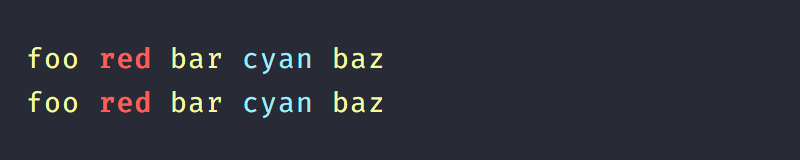
The caveat with this approach is that color functions are not chainable~! Each function receives and colorizes its input. You may combine colors, backgrounds, and modifiers by nesting function calls within other functions.
// or: import * as kleur from 'kleur/colors';
import { red, underline, bgWhite } from 'kleur/colors';

red('red text');
//~> kleur.red('red text');

underline(red('red underlined text'));
//~> kleur.underline().red('red underlined text');

bgWhite(underline(red('red underlined text w/ white background')));
//~> kleur.bgWhite().underline().red('red underlined text w/ white background');
Note: All the same colors, backgrounds, and modifiers are available.
Conditional Support
The kleur/colors submodule also allows you to toggle color support, as needed.
It includes the same initial assumptions as kleur, in an attempt to have colors enabled by default.
Unlike kleur, this setting exists as kleur.$.enabled instead of kleur.enabled:
import * as kleur from 'kleur/colors';
// or: import { $, red } from 'kleur/colors';

// manually disabled
kleur.$.enabled = false;

// or use another library to detect support
kleur.$.enabled = require('color-support').level > 0;

console.log(red('I will only be colored red if the terminal supports colors'));
As I work more with Rust, the newer syntax feels so much better & more natural!
If you prefer the old syntax, you may migrate to ansi-colors or newer chalk releases. Versions below [email protected] have been officially deprecated.
Trang TopGit này là một snapshot — tab "Readme" hiển thị nguyên văn README của repo (đã bỏ link, giữ ảnh). Repo GitHub ở github.com/lukeed/kleur là nguồn chính thức.
lukeed/kleur có bao nhiêu sao?
lukeed/kleur có 1.7k sao GitHub — tải lại trang để xem số mới nhất, hoặc xem trực tiếp github.com/lukeed/kleur. TopGit phản chiếu số sao của GitHub nhưng không cam kết đến từng phút.
lukeed/kleur có phải mã nguồn mở không?
Có — lukeed/kleur phát hành theo license MIT, nghĩa là mã nguồn mở để đọc, fork và (tùy license) tái sử dụng. Mã: github.com/lukeed/kleur.
lukeed/kleur có website riêng không?
TopGit chưa ghi nhận URL trang chủ cho lukeed/kleur. Phần README ở tab phía trên thường có link demo, hoặc xem mô tả GitHub của repo.
lukeed/kleur là gì?
lukeed/kleur (lukeed/kleur) là dự án JavaScript trên GitHub. Theo mô tả gốc: The fastest Node.js library for formatting terminal text with ANSI colors~!
Đọc đầy đủ README ở tab phía trên.
Chưa chắc kleur có hợp với bạn?
Để ChatGPT, Claude hoặc Perplexity tìm hiểu giúp — bấm bên dưới và xem AI nói gì về kleur.

 /kleur