Snapshot of lukeed/kleur: 1.7k★, JavaScript. The fastest Node.js library for formatting terminal text with ANSI colors~!
Snapshot summary built from the project's own GitHub metadata — there's no written TopGit review yet. The page will update automatically when a full review is published.
WHY NO REVIEW YET
TopGit writes full reviews for the most-starred, most-requested repositories. This page is a snapshot until then — see the READ ME tab for the original README in full.
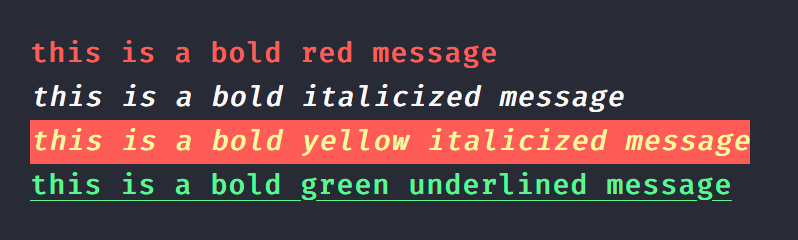
const { bold, green } = require('kleur');

console.log(bold().red('this is a bold red message'));
console.log(bold().italic('this is a bold italicized message'));
console.log(bold().yellow().bgRed().italic('this is a bold yellow italicized message'));
console.log(green().bold().underline('this is a bold green underlined message'));
Toggle color support as needed; kleur includes simple auto-detection which may not cover all cases.
Note: Both kleur and kleur/colors share the same detection logic.
import kleur from 'kleur';

// manually disable
kleur.enabled = false;

// or use another library to detect support
kleur.enabled = require('color-support').level > 0;

console.log(kleur.red('I will only be colored red if the terminal supports colors'));
Important: Colors will be disabled automatically in non TTY contexts. For example, spawning another process or piping output into another process will disable colorization automatically. To force colors in your piped output, you may do so with the FORCE_COLOR=1 environment variable:
When you only need a few colors, it doesn't make sense to import all of kleur because, as small as it is, kleur is not treeshakeable, and so most of its code will be doing nothing. In order to fix this, you can import from the kleur/colors submodule which fully supports tree-shaking.
The caveat with this approach is that color functions are not chainable~! Each function receives and colorizes its input. You may combine colors, backgrounds, and modifiers by nesting function calls within other functions.
// or: import * as kleur from 'kleur/colors';
import { red, underline, bgWhite } from 'kleur/colors';

red('red text');
//~> kleur.red('red text');

underline(red('red underlined text'));
//~> kleur.underline().red('red underlined text');

bgWhite(underline(red('red underlined text w/ white background')));
//~> kleur.bgWhite().underline().red('red underlined text w/ white background');
Note: All the same colors, backgrounds, and modifiers are available.
Conditional Support
The kleur/colors submodule also allows you to toggle color support, as needed.
It includes the same initial assumptions as kleur, in an attempt to have colors enabled by default.
Unlike kleur, this setting exists as kleur.$.enabled instead of kleur.enabled:
import * as kleur from 'kleur/colors';
// or: import { $, red } from 'kleur/colors';

// manually disabled
kleur.$.enabled = false;

// or use another library to detect support
kleur.$.enabled = require('color-support').level > 0;

console.log(red('I will only be colored red if the terminal supports colors'));
As I work more with Rust, the newer syntax feels so much better & more natural!
If you prefer the old syntax, you may migrate to ansi-colors or newer chalk releases. Versions below [email protected] have been officially deprecated.
No homepage URL was recorded for lukeed/kleur in TopGit's last sync. The README tab above frequently contains screenshots and demo links, or check the repository description on GitHub.
How many stars does lukeed/kleur have?
lukeed/kleur has 1.7k GitHub stars — refresh the page for the live number, or check github.com/lukeed/kleur. TopGit mirrors GitHub's count but does not claim minute-by-minute accuracy.
Is lukeed/kleur open source?
Yes — lukeed/kleur ships under the MIT license, which makes its source code freely readable (and, depending on license terms, forkable and reusable). Source: github.com/lukeed/kleur.
What is lukeed/kleur?
lukeed/kleur (lukeed/kleur) is a JavaScript project on GitHub. From the project's own README: The fastest Node.js library for formatting terminal text with ANSI colors~!
Where do I read more about lukeed/kleur?
This TopGit page is a snapshot — the READ ME tab shows the project's own README content (links stripped, images preserved). The GitHub repository at github.com/lukeed/kleur is the definitive source.
Read full README in the tab above.
Is kleur worth your time?
ChatGPT, Claude and Perplexity can all read this page. Ask one of them what it makes of kleur.

 /kleur