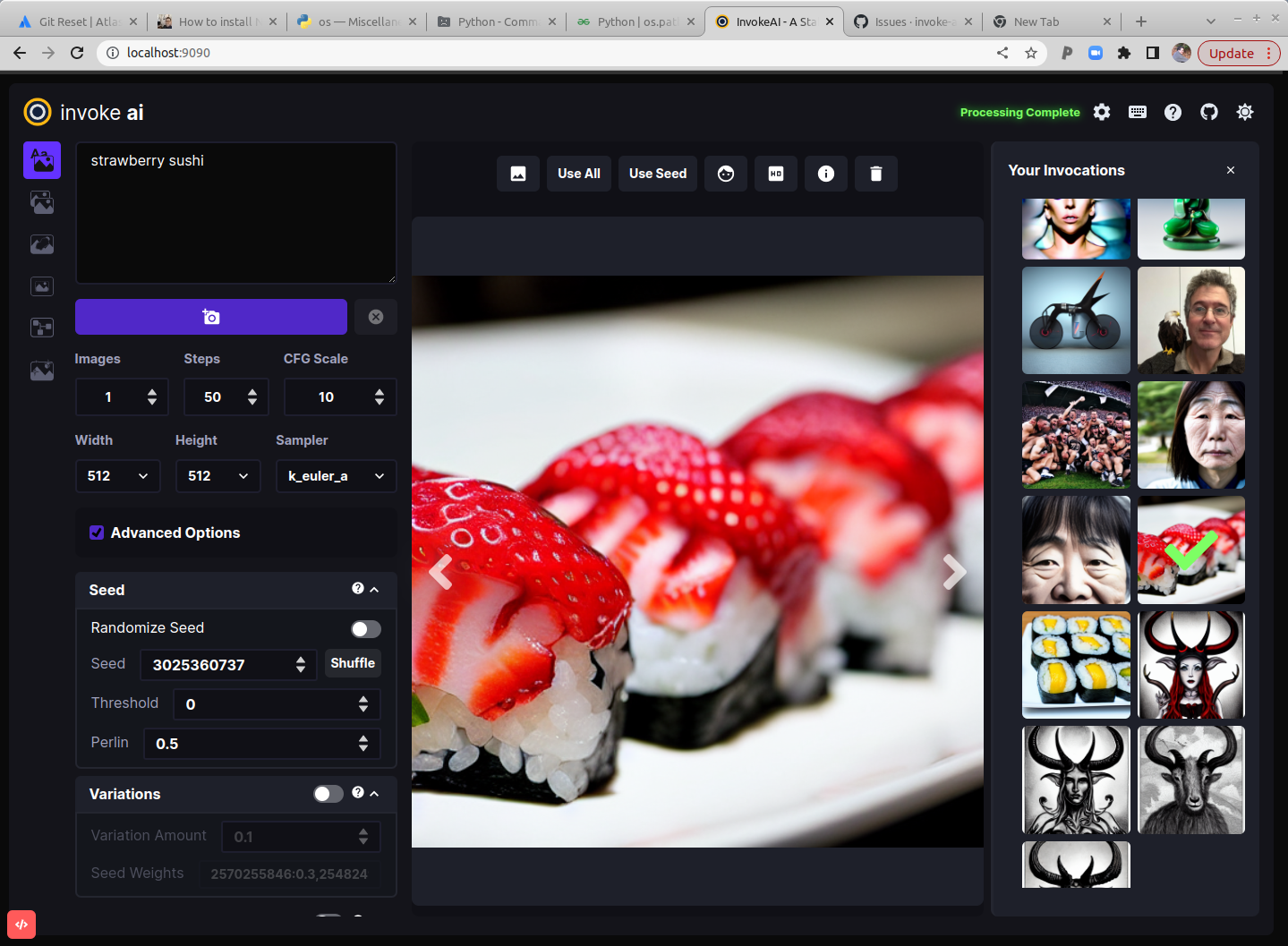
Điểm qua lyogavin/InvokeAI: 4 sao trên GitHub, viết chủ yếu bằng Jupyter Notebook. This version of Stable Diffusion features a slick WebGUI, an interactive command-line script that combines text2img and img2img functionality in a "dream bot" style interface, and multiple features and other enhancements. For more info, see the website link below.
Tóm tắt dựng từ metadata GitHub của chính dự án — chưa có bài review TopGit. Trang sẽ tự động cập nhật khi bài review đầy đủ được xuất bản.
VÌ SAO CHƯA CÓ REVIEW
TopGit viết bài đầy đủ cho repo có nhiều sao nhất và được yêu cầu nhiều nhất. Trang này là snapshot trong thời gian chờ — xem README gốc ở tab READ ME.
This is a fork of
CompVis/stable-diffusion,
the open source text-to-image generator. It provides a streamlined
process with various new features and options to aid the image
generation process. It runs on Windows, Mac and Linux machines, with
GPU cards with as little as 4 GB of RAM. It provides both a polished
Web interface (see below), and an easy-to-use command-line interface.
Quick links: [Discord Server] [Documentation and Tutorials] [Code and Downloads] [Bug Reports] [Discussion, Ideas & Q&A]
Note: This fork is rapidly evolving. Please use the
Issues tab to report bugs and make feature
requests. Be sure to use the provided templates. They will help aid diagnose issues faster.
Table of Contents
Installation
Hardware Requirements
Features
Latest Changes
Troubleshooting
Contributing
Contributors
Support
Further Reading
Installation
This fork is supported across Linux, Windows and Macintosh. Linux
users can use either an Nvidia-based card (with CUDA support) or an
AMD card (using the ROCm driver). For full installation and upgrade
instructions, please see:
InvokeAI Installation Overview
Hardware Requirements
System
You wil need one of the following:
An NVIDIA-based graphics card with 4 GB or more VRAM memory.
An Apple computer with an M1 chip.
Memory
At least 12 GB Main Memory RAM.
Disk
At least 12 GB of free disk space for the machine learning model, Python, and all its dependencies.
Note
If you have a Nvidia 10xx series card (e.g. the 1080ti), please
run the dream script in full-precision mode as shown below.
Similarly, specify full-precision mode on Apple M1 hardware.
Precision is auto configured based on the device. If however you encounter
errors like 'expected type Float but found Half' or 'not implemented for Half'
you can try starting invoke.py with the --precision=float32 flag:
Thresholding and Perlin Noise Initialization Options
Negative/Unconditioned Prompts
Variations
Personalizing Text-to-Image Generation
Simplified API for text to image generation
Other Features
Google Colab
Seamless Tiling
Shortcut: Reusing Seeds
Preload Models
Latest Changes
v2.0.1 (13 October 2022)
fix noisy images at high step count when using k* samplers
dream.py script now calls invoke.py module directly rather than
via a new python process (which could break the environment)
v2.0.0 (9 October 2022)
dream.py script renamed invoke.py. A dream.py script wrapper remains
for backward compatibility.
Completely new WebGUI - launch with python3 scripts/invoke.py --web
Support for inpainting and outpainting
img2img runs on all k* samplers
Support for negative prompts
Support for CodeFormer face reconstruction
Support for Textual Inversion on Macintoshes
Support in both WebGUI and CLI for post-processing of previously-generated images
using facial reconstruction, ESRGAN upscaling, outcropping (similar to DALL-E infinite canvas),
and "embiggen" upscaling. See the !fix command.
New --hires option on invoke> line allows larger images to be created without duplicating elements, at the cost of some performance.
New --perlin and --threshold options allow you to add and control variation
during image generation (see Thresholding and Perlin Noise Initialization
Extensive metadata now written into PNG files, allowing reliable regeneration of images
and tweaking of previous settings.
Command-line completion in invoke.py now works on Windows, Linux and Mac platforms.
Improved command-line completion behavior.
New commands added:
List command-line history with !history
Search command-line history with !search
Clear history with !clear
Deprecated --full_precision / -F. Simply omit it and invoke.py will auto
configure. To switch away from auto use the new flag like --precision=float32.
For older changelogs, please visit the CHANGELOG.
Troubleshooting
Please check out our Q&A to get solutions for common installation
problems and other issues.
Contributing
Anyone who wishes to contribute to this project, whether documentation, features, bug fixes, code
cleanup, testing, or code reviews, is very much encouraged to do so. If you are unfamiliar with how
to contribute to GitHub projects, here is a
Getting Started Guide.
A full set of contribution guidelines, along with templates, are in progress, but for now the most
important thing is to make your pull request against the "development" branch, and not against
"main". This will help keep public breakage to a minimum and will allow you to propose more radical
changes.
Contributors
This fork is a combined effort of various people from across the world.
Check out the list of all these amazing people. We thank them for
their time, hard work and effort.
Support
For support, please use this repository's GitHub Issues tracking service. Feel free to send me an
email if you use and like the script.
Original portions of the software are Copyright (c) 2020
Lincoln D. Stein
Further Reading
Please see the original README for more information on this software and underlying algorithm,
located in the file README-CompViz.md.
Trang TopGit này là một snapshot — tab "Readme" hiển thị nguyên văn README của repo (đã bỏ link, giữ ảnh). Repo GitHub ở github.com/lyogavin/InvokeAI là nguồn chính thức.
lyogavin/InvokeAI có bao nhiêu sao?
lyogavin/InvokeAI có 4 sao GitHub — tải lại trang để xem số mới nhất, hoặc xem trực tiếp github.com/lyogavin/InvokeAI. TopGit phản chiếu số sao của GitHub nhưng không cam kết đến từng phút.
lyogavin/InvokeAI có phải mã nguồn mở không?
Có — lyogavin/InvokeAI phát hành theo license MIT, nghĩa là mã nguồn mở để đọc, fork và (tùy license) tái sử dụng. Mã: github.com/lyogavin/InvokeAI.
lyogavin/InvokeAI có trang demo không?
Dự án có trang chủ ở https://invoke-ai.github.io/InvokeAI/. Tab "Readme" ở trang này thường có ảnh chụp và hướng dẫn bắt đầu nhanh.
lyogavin/InvokeAI là gì?
lyogavin/InvokeAI (lyogavin/InvokeAI) là dự án Jupyter Notebook trên GitHub. Theo mô tả gốc: This version of Stable Diffusion features a slick WebGUI, an interactive command-line script that combines text2img and img2img functionality in a "dream bot" style interface, and multiple features and other enhancements. For more info, see the website link below.
Đọc đầy đủ README ở tab phía trên.
Vẫn đang phân vân về InvokeAI?
Một cú bấm sẽ gửi câu hỏi kèm trang này cho AI — xem AI nói gì về InvokeAI.
 /InvokeAI