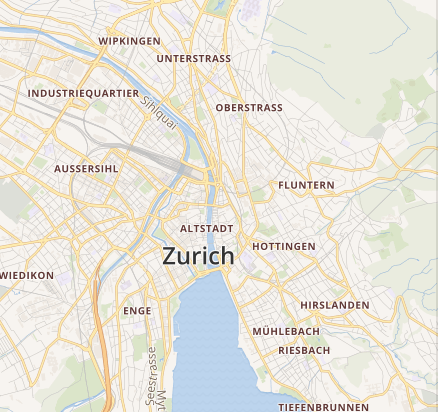
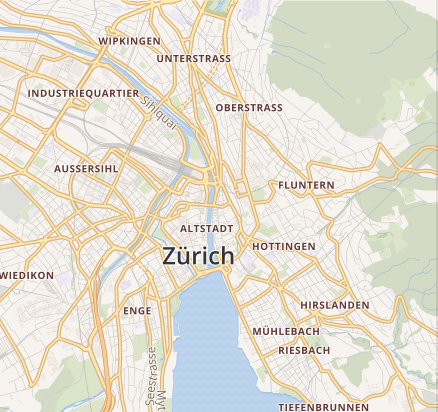
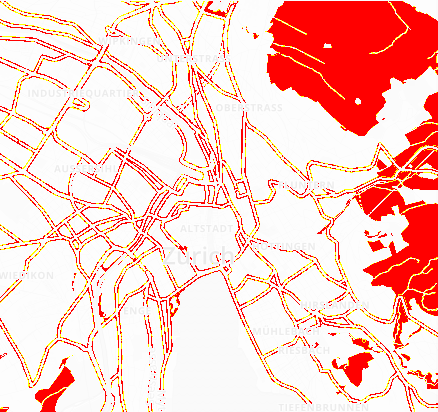
Là một dự án mã nguồn mở, mapbox/pixelmatch đã đạt 7.0k sao trên GitHub, ngôn ngữ JavaScript. The smallest, simplest and fastest JavaScript pixel-level image comparison library
Tóm tắt dựng từ metadata GitHub của chính dự án — chưa có bài review TopGit. Trang sẽ tự động cập nhật khi bài review đầy đủ được xuất bản.
VÌ SAO CHƯA CÓ REVIEW
TopGit viết bài đầy đủ cho repo có nhiều sao nhất và được yêu cầu nhiều nhất. Trang này là snapshot trong thời gian chờ — xem README gốc ở tab READ ME.
A small, simple and fast JavaScript pixel-level image comparison library,
originally created to compare screenshots in tests.
Features accurate anti-aliased pixel detection and a perceptual color difference metric.
It's just a few hundred lines of code, has no dependencies, and works on raw typed arrays
of image data, so it's very fast and runs in both Node and browsers.
There's also an official C++ port.
Compares colors using the OKLab color space (Björn Ottosson, 2020)
and the HyAB distance (Saeideh Abasi et al., 2019),
and detects anti-aliasing with the anti-aliased pixel and intensity slope detector
(Vytautas Vyšniauskas, 2009).
Compares two images, writes the output diff and returns the number of mismatched pixels (or the
highest count in any window with windowSize).
img1, img2 — Image data of the images to compare (Buffer, Uint8Array or Uint8ClampedArray).
output — Image data to write the diff to, or null if you don't need a diff image.
width, height — Width and height of the images. Note:all three images need to have the same dimensions.
options is an object literal with the following properties:
threshold — How different two colors must be for a pixel to count as mismatched, from 0 to 1. It's a per-pixel perceptual color difference, where 1 is the difference between black and white, not a share of the image; to allow some percentage of the image to differ, compare the returned count against width * height instead. Smaller values make the comparison more sensitive. 0.1 by default.
includeAA — If true, disables detecting and ignoring anti-aliased pixels. false by default.
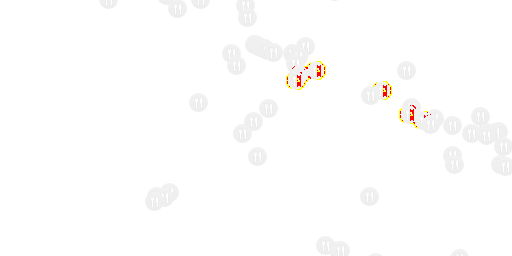
alpha — Blending factor of unchanged pixels in the diff output. Ranges from 0 for pure white to 1 for original brightness. 0.1 by default.
aaColor — The color of anti-aliased pixels in the diff output in [R, G, B] format. [255, 255, 0] by default.
diffColor — The color of differing pixels in the diff output in [R, G, B] format. [255, 0, 0] by default.
diffColorAlt — An alternative color to use for dark on light differences to differentiate between "added" and "removed" parts. If not provided, all differing pixels use the color specified by diffColor. null by default.
diffMask — Draw the diff over a transparent background (a mask), rather than over the original image. Will not draw anti-aliased pixels (if detected). false by default.
checkerboard — Blend semi-transparent pixels against a checkerboard pattern when comparing (true) rather than plain white (false), avoiding false matches between colors that only look alike over one background. true by default.
windowSize — If set to a finite number N, return the maximum number of differing pixels in any N×N sliding window instead of the total count (see below). Infinity by default.
ignoreMask — A Uint8Array, Uint8ClampedArray or Buffer with one value per pixel (width * height long); pixels with a non-zero value are excluded from the comparison and drawn as unchanged in the diff output. Not set by default.
Windowed diff counts
Normally the return value is the total number of differing pixels. With windowSize: N you get the
highest number of diff pixels in any N×N square instead. Anti-aliased pixels are only included
if includeAA is true.
This helps with noise. GPU dithering and sub-pixel anti-aliasing scatter stray pixels all over the
image, so they never fill up one small square, while a real regression usually changes a compact
area.
Compare the result against a pixel count: that number is how big a difference you let through, and
N is how closely packed it has to be.
if (pixelmatch(img1, img2, null, width, height, {windowSize: 16}) > 28) throw new Error('changed');
N never exceeds either image dimension, so on a 10×2 image windowSize: 32 gives you a 2×2
window. The default Infinity makes the window the whole image, which is the total count.
Command line
Pixelmatch comes with a binary that works with PNG images:
It prints the number of different pixels and exits with code 0 if the images match, 66 if they
differ, 65 if their dimensions don't match, and 64 on wrong usage.
Example usage
Node.js
import fs from 'fs';
import {PNG} from 'pngjs';
import pixelmatch from 'pixelmatch';

const img1 = PNG.sync.read(fs.readFileSync('img1.png'));
const img2 = PNG.sync.read(fs.readFileSync('img2.png'));
const {width, height} = img1;
const diff = new PNG({width, height});

pixelmatch(img1.data, img2.data, diff.data, width, height, {threshold: 0.1});

fs.writeFileSync('diff.png', PNG.sync.write(diff));
Trang TopGit này là một snapshot — tab "Readme" hiển thị nguyên văn README của repo (đã bỏ link, giữ ảnh). Repo GitHub ở github.com/mapbox/pixelmatch là nguồn chính thức.
mapbox/pixelmatch có bao nhiêu sao?
mapbox/pixelmatch có 7.0k sao GitHub — tải lại trang để xem số mới nhất, hoặc xem trực tiếp github.com/mapbox/pixelmatch. TopGit phản chiếu số sao của GitHub nhưng không cam kết đến từng phút.
mapbox/pixelmatch có phải mã nguồn mở không?
Có — mapbox/pixelmatch phát hành theo license ISC, nghĩa là mã nguồn mở để đọc, fork và (tùy license) tái sử dụng. Mã: github.com/mapbox/pixelmatch.
mapbox/pixelmatch còn đang phát triển không?
Commit gần nhất trên mapbox/pixelmatch là 1 tháng trước (theo timestamp GitHub). Repo có 333 fork — một chỉ báo về mức độ quan tâm của cộng đồng.
mapbox/pixelmatch dùng license gì?
mapbox/pixelmatch phát hành theo license ISC. Nên mở file LICENSE trên GitHub để xác nhận — license metadata đôi khi lệch với thực tế dự án.
mapbox/pixelmatch là gì?
mapbox/pixelmatch (mapbox/pixelmatch) là dự án JavaScript trên GitHub. Theo mô tả gốc: The smallest, simplest and fastest JavaScript pixel-level image comparison library
mapbox/pixelmatch viết bằng ngôn ngữ gì?
mapbox/pixelmatch chủ yếu viết bằng JavaScript. Trường "language" của GitHub dựa trên phần lớn byte ở nhánh mặc định.
Đọc đầy đủ README ở tab phía trên.
Muốn nghe thêm một ý kiến về pixelmatch?
Hỏi một AI đọc được trang này — một cú bấm là có ngay nhận định về pixelmatch.

 /pixelmatch