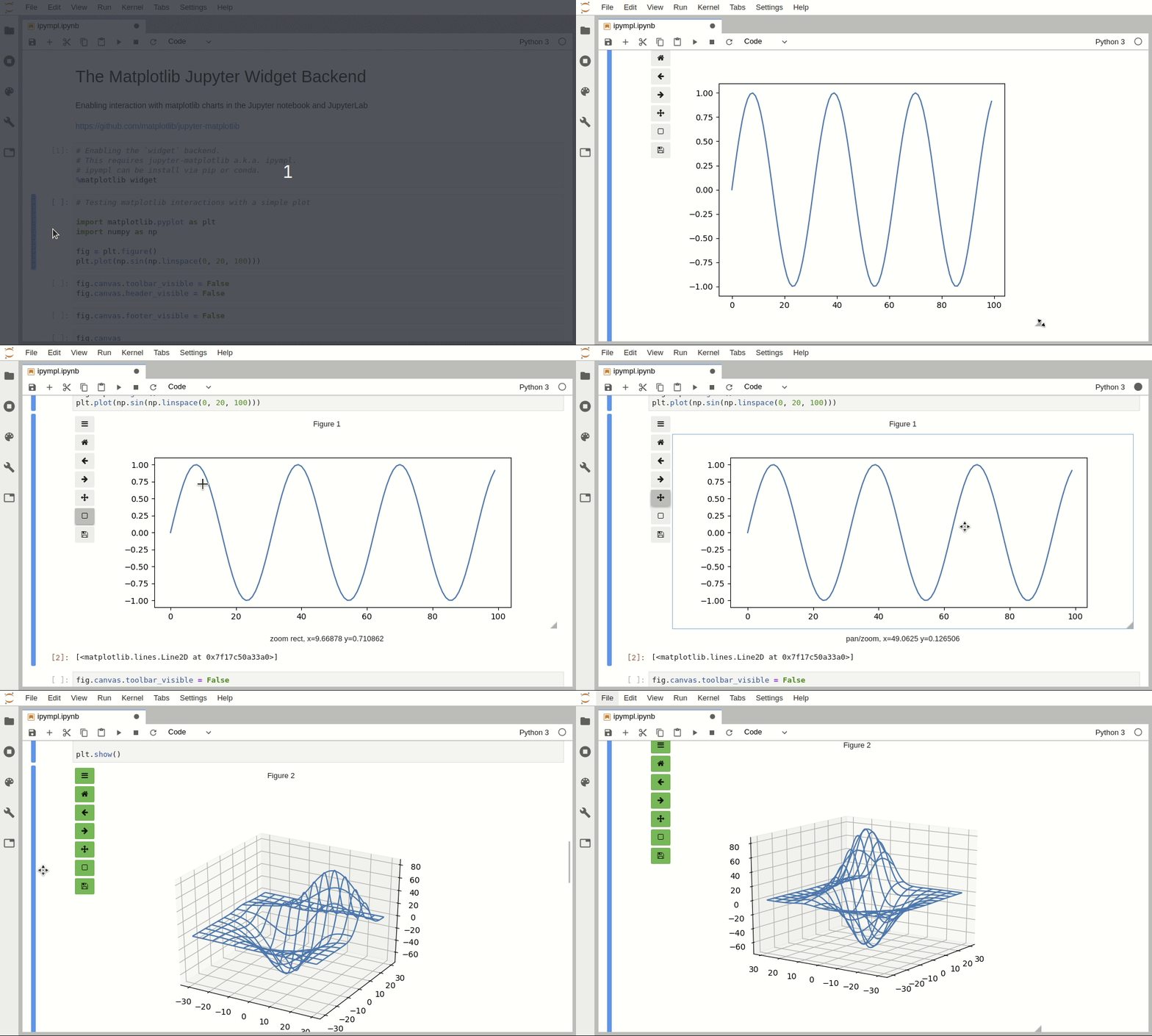
Snapshot của matplotlib/ipympl: 1.7k★ · Jupyter Notebook. Matplotlib Jupyter Integration
Tóm tắt dựng từ metadata GitHub của chính dự án — chưa có bài review TopGit. Trang sẽ tự động cập nhật khi bài review đầy đủ được xuất bản.
VÌ SAO CHƯA CÓ REVIEW
TopGit viết bài đầy đủ cho repo có nhiều sao nhất và được yêu cầu nhiều nhất. Trang này là snapshot trong thời gian chờ — xem README gốc ở tab READ ME.
If you are using JupyterLab 1 or 2, you will need to install the right jupyter-matplotlib version, according to the ipympl and jupyterlab versions you installed.
For example, if you installed ipympl 0.5.1, you need to install jupyter-matplotlib 0.7.0, and this version is only compatible with JupyterLab 1.
We recommend using pixi for development as it handles both Python and Node.js dependencies (matplotlib has compiled dependencies).
# Install dependencies and set up environment
pixi install

# Install the Python package in editable mode
pixi run pip install -e .

# Install JavaScript dependencies and build
pixi run jlpm install
pixi run jlpm build

# Set up JupyterLab extension in development mode
pixi run jupyter labextension develop --overwrite .

# Start development workflow (in separate terminals)
pixi run npm run watch    # Terminal 1: Auto-rebuild on changes
pixi run jupyter lab      # Terminal 2: Run JupyterLab
Alternative: Using conda/mamba
mamba env create --file dev-environment.yml
conda activate ipympl-dev

pip install -e .
jlpm install
jlpm build
jupyter labextension develop --overwrite .

# Start development workflow (in separate terminals)
npm run watch    # Terminal 1: Auto-rebuild on changes
jupyter lab      # Terminal 2: Run JupyterLab
How to see your changes
TypeScript/JavaScript: After a change, the watch command will automatically rebuild. Wait for the build to finish, then refresh your browser and the changes should take effect.
Python: If you make a change to the Python code, restart the notebook kernel to have it take effect.
Classic Jupyter Notebook
If you need to develop for classic Jupyter Notebook (not JupyterLab), also run:
# With pixi:
pixi run jupyter nbextension install --py --symlink --sys-prefix --overwrite ipympl
pixi run jupyter nbextension enable --py --sys-prefix ipympl

# Or with conda/mamba:
jupyter nbextension install --py --symlink --sys-prefix --overwrite ipympl
jupyter nbextension enable --py --sys-prefix ipympl
matplotlib/ipympl có 1.7k sao GitHub — tải lại trang để xem số mới nhất, hoặc xem trực tiếp github.com/matplotlib/ipympl. TopGit phản chiếu số sao của GitHub nhưng không cam kết đến từng phút.
matplotlib/ipympl có những chủ đề gì?
GitHub topics của matplotlib/ipympl: "interactive", "ipywidgets", "jupyter-widgets", "jupyterlab-extension", "matplotlib". TopGit xếp repo vào nhóm mã nguồn mở.
matplotlib/ipympl còn đang phát triển không?
Commit gần nhất trên matplotlib/ipympl là 3 tháng trước (theo timestamp GitHub). Repo có 235 fork — một chỉ báo về mức độ quan tâm của cộng đồng.
matplotlib/ipympl là gì?
matplotlib/ipympl (matplotlib/ipympl) là dự án Jupyter Notebook trên GitHub. Theo mô tả gốc: Matplotlib Jupyter Integration
matplotlib/ipympl viết bằng ngôn ngữ gì?
matplotlib/ipympl chủ yếu viết bằng Jupyter Notebook. Trường "language" của GitHub dựa trên phần lớn byte ở nhánh mặc định.
Đọc đầy đủ README ở tab phía trên.
ipympl có đáng để bạn bỏ thời gian?
ChatGPT, Claude và Perplexity đều đọc được trang này. Hỏi thử xem họ nghĩ gì về ipympl.

 /ipympl