Được TopGit lập chỉ mục từ metadata GitHub: navidrome/apple-music-plugin có 240 sao, viết chủ yếu bằng Go. Fetches artist metadata from Apple Music using free iTunes/Apple Music endpoints
Tóm tắt dựng từ metadata GitHub của chính dự án — chưa có bài review TopGit. Trang sẽ tự động cập nhật khi bài review đầy đủ được xuất bản.
VÌ SAO CHƯA CÓ REVIEW
TopGit viết bài đầy đủ cho repo có nhiều sao nhất và được yêu cầu nhiều nhất. Trang này là snapshot trong thời gian chờ — xem README gốc ở tab READ ME.
Attention: This plugin requires Navidrome 0.61.0 or later.
This plugin fetches artist and album metadata from Apple Music using free iTunes/Apple Music endpoints — no API key or authentication required.
It provides artist biographies, images, similar artists, top songs, album artwork, and album editorial notes by scraping Apple Music web pages and querying the iTunes Search/Lookup APIs.
Features
Fetches artist biographies from Apple Music pages
Retrieves artist images in multiple sizes (1500x1500, 600x600, 300x300)
Retrieves album artwork in multiple sizes (1500x1500, 600x600, 300x300)
Fetches album editorial notes and Apple Music album URLs
Discovers similar artists from Apple Music's artist pages
Fetches top songs via the iTunes Lookup API
Provides Apple Music artist page URLs
Multi-country fallback: tries multiple storefronts in order until content is found
Localized biographies based on country code (e.g., br for Portuguese, de for German)
Aggressive caching with negative caching (2-hour TTL for "not found" results) to minimize external requests
Installation
Download the apple-music.ndp file from the releases page
Copy it to your Navidrome plugins folder. Default location: <navidrome-data-directory>/plugins/
Add apple-music to the Agents configuration option. For example:
The order determines priority — agents are tried in the specified order until one succeeds.
Open Navidrome and go to Settings > Plugins > Apple Music Metadata Agent
Configure the plugin (see Configuration below)
Toggle the plugin to Enabled
Configuration
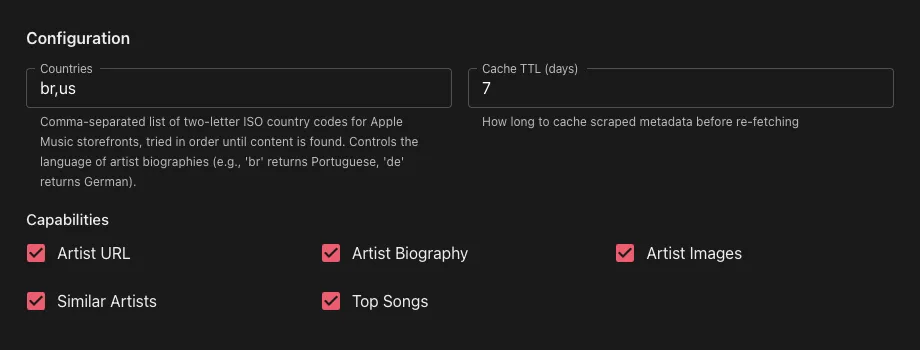
Access the plugin configuration in Navidrome: Settings > Plugins > Apple Music Metadata Agent
Configuration Fields
Countries
Default: us
What it is: Comma-separated list of two-letter ISO country codes for Apple Music storefronts
How it works: Storefronts are tried in order until content is found. This controls the language of artist biographies and which regional catalog is searched
Example: br,de,us — tries the Brazil (Portuguese) storefront first, then Germany (German), then the US (English) storefront
Supported language markers: English, Portuguese, German, French, Spanish (for similar artist detection)
Cache TTL (days)
Default: 7
What it is: How many days to cache scraped metadata (biographies, images, similar artists) before re-fetching from Apple Music
Note: Artist ID mappings are cached permanently since they don't change. "Not found" results (artists or albums with no match) are cached for 2 hours to avoid repeated API calls
Capabilities
Default: All enabled except Album Images
What it is: Each capability (Artist URL, Artist Biography, Artist Images, Similar Artists, Top Songs, Album Images, Album Info) can be individually toggled on or off. When disabled, the plugin will skip that capability and Navidrome will fall through to the next configured agent.
How It Works
Plugin Capabilities
The plugin implements seven metadata provider capabilities:
Capability
Purpose
GetArtistURL
Returns the Apple Music artist page URL
GetArtistBiography
Fetches artist biography text from Apple Music pages
GetArtistImages
Retrieves artist images in three sizes
GetSimilarArtists
Discovers similar artists from the Apple Music artist page
GetArtistTopSongs
Fetches popular tracks via the iTunes Lookup API
GetAlbumImages
Retrieves album artwork in three sizes via iTunes Lookup API
GetAlbumInfo
Returns album editorial notes and the Apple Music album URL
Host Services
Service
Usage
HTTP
iTunes API calls (search, lookup) and Apple Music web page fetching
KVStore
Cache artist ID mappings and scraped metadata to reduce external requests
Config
User-configurable cache TTL and country codes
Logging
Debug and error logging for troubleshooting
Flow
Artist lookup — Searches the iTunes API by artist name and caches the Apple Music artist ID
Page fetch — Fetches the Apple Music artist page for the configured country
Data extraction — Parses JSON-LD structured data and HTML for biography, images, and similar artists
Album lookup — Resolves the artist ID via iTunes Search, then fetches albums by artist ID via the iTunes Lookup API to find album artwork
Country fallback — If the requested field is empty, tries the next configured country
Caching — Stores results in KVStore with configurable TTL; caches "not found" results with a 2-hour TTL to avoid repeated lookups
Trang TopGit này là một snapshot — tab "Readme" hiển thị nguyên văn README của repo (đã bỏ link, giữ ảnh). Repo GitHub ở github.com/navidrome/apple-music-plugin là nguồn chính thức.
navidrome/apple-music-plugin có bao nhiêu sao?
navidrome/apple-music-plugin có 240 sao GitHub — tải lại trang để xem số mới nhất, hoặc xem trực tiếp github.com/navidrome/apple-music-plugin. TopGit phản chiếu số sao của GitHub nhưng không cam kết đến từng phút.
navidrome/apple-music-plugin có phải mã nguồn mở không?
Có — navidrome/apple-music-plugin phát hành theo license GPL-3.0, nghĩa là mã nguồn mở để đọc, fork và (tùy license) tái sử dụng. Mã: github.com/navidrome/apple-music-plugin.
navidrome/apple-music-plugin có website riêng không?
TopGit chưa ghi nhận URL trang chủ cho navidrome/apple-music-plugin. Phần README ở tab phía trên thường có link demo, hoặc xem mô tả GitHub của repo.
navidrome/apple-music-plugin là gì?
navidrome/apple-music-plugin (navidrome/apple-music-plugin) là dự án Go trên GitHub. Theo mô tả gốc: Fetches artist metadata from Apple Music using free iTunes/Apple Music endpoints
Đọc đầy đủ README ở tab phía trên.
Chưa chắc apple-music-plugin có hợp với bạn?
Để ChatGPT, Claude hoặc Perplexity tìm hiểu giúp — bấm bên dưới và xem AI nói gì về apple-music-plugin.
 /apple-music-plugin