Apple Music Metadata Plugin for Navidrome


Attention: This plugin requires Navidrome 0.61.0 or later.
This plugin fetches artist and album metadata from Apple Music using free iTunes/Apple Music endpoints — no API key or authentication required.
It provides artist biographies, images, similar artists, top songs, album artwork, and album editorial notes by scraping Apple Music web pages and querying the iTunes Search/Lookup APIs.
Features
- Fetches artist biographies from Apple Music pages
- Retrieves artist images in multiple sizes (1500x1500, 600x600, 300x300)
- Retrieves album artwork in multiple sizes (1500x1500, 600x600, 300x300)
- Fetches album editorial notes and Apple Music album URLs
- Discovers similar artists from Apple Music's artist pages
- Fetches top songs via the iTunes Lookup API
- Provides Apple Music artist page URLs
- Multi-country fallback: tries multiple storefronts in order until content is found
- Localized biographies based on country code (e.g.,
br for Portuguese, de for German)
- Aggressive caching with negative caching (2-hour TTL for "not found" results) to minimize external requests
Installation
- Download the
apple-music.ndp file from the releases page
- Copy it to your Navidrome plugins folder. Default location:
<navidrome-data-directory>/plugins/
- Add
apple-music to the Agents configuration option. For example:
# navidrome.toml
Agents = "apple-music,deezer,lastfm"
Or using an environment variable:
ND_AGENTS=apple-music,deezer,lastfm
The order determines priority — agents are tried in the specified order until one succeeds.
- Open Navidrome and go to Settings > Plugins > Apple Music Metadata Agent
- Configure the plugin (see Configuration below)
- Toggle the plugin to Enabled
Configuration
Access the plugin configuration in Navidrome: Settings > Plugins > Apple Music Metadata Agent
Configuration Fields
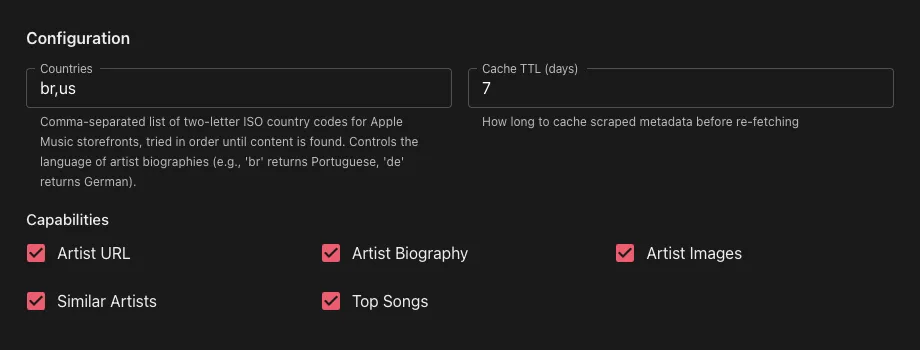
Countries
- Default:
us
- What it is: Comma-separated list of two-letter ISO country codes for Apple Music storefronts
- How it works: Storefronts are tried in order until content is found. This controls the language of artist biographies and which regional catalog is searched
- Example:
br,de,us — tries the Brazil (Portuguese) storefront first, then Germany (German), then the US (English) storefront
- Supported language markers: English, Portuguese, German, French, Spanish (for similar artist detection)
Cache TTL (days)
- Default:
7
- What it is: How many days to cache scraped metadata (biographies, images, similar artists) before re-fetching from Apple Music
- Note: Artist ID mappings are cached permanently since they don't change. "Not found" results (artists or albums with no match) are cached for 2 hours to avoid repeated API calls
Capabilities
- Default: All enabled except Album Images
- What it is: Each capability (Artist URL, Artist Biography, Artist Images, Similar Artists, Top Songs, Album Images, Album Info) can be individually toggled on or off. When disabled, the plugin will skip that capability and Navidrome will fall through to the next configured agent.
How It Works
Plugin Capabilities
The plugin implements seven metadata provider capabilities:
| Capability | Purpose |
|---|
| GetArtistURL | Returns the Apple Music artist page URL |
| GetArtistBiography | Fetches artist biography text from Apple Music pages |
| GetArtistImages | Retrieves artist images in three sizes |
| GetSimilarArtists | Discovers similar artists from the Apple Music artist page |
| GetArtistTopSongs | Fetches popular tracks via the iTunes Lookup API |
| GetAlbumImages | Retrieves album artwork in three sizes via iTunes Lookup API |
| GetAlbumInfo | Returns album editorial notes and the Apple Music album URL |
Host Services
| Service | Usage |
|---|
| HTTP | iTunes API calls (search, lookup) and Apple Music web page fetching |
| KVStore | Cache artist ID mappings and scraped metadata to reduce external requests |
| Config | User-configurable cache TTL and country codes |
| Logging | Debug and error logging for troubleshooting |
Flow
- Artist lookup — Searches the iTunes API by artist name and caches the Apple Music artist ID
- Page fetch — Fetches the Apple Music artist page for the configured country
- Data extraction — Parses JSON-LD structured data and HTML for biography, images, and similar artists
- Album lookup — Resolves the artist ID via iTunes Search, then fetches albums by artist ID via the iTunes Lookup API to find album artwork
- Country fallback — If the requested field is empty, tries the next configured country
- Caching — Stores results in KVStore with configurable TTL; caches "not found" results with a 2-hour TTL to avoid repeated lookups
Data Sources
| Source | URL | Data |
|---|
| iTunes Search API | itunes.apple.com/search | Artist ID resolution |
| iTunes Lookup API | itunes.apple.com/lookup | Top songs, album artwork, album URL |
| Apple Music Web | music.apple.com/{country}/artist/-/{id} | Biography, images, similar artists |
| Apple Music Web | music.apple.com/{country}/album/{slug}/{id} | Album editorial notes |
Files
| File | Description |
|---|
| main.go | Plugin implementation — all metadata capabilities |
| manifest.json | Plugin metadata and permission declarations |
| Makefile | Build automation |
Building
Prerequisites
- Recommended: TinyGo (produces smaller binary size)
- Alternative: Standard Go 1.25+ (larger binary but easier setup)
Quick Build (Using Makefile)
# Run tests
make test

# Build plugin.wasm
make build

# Create distributable plugin package
make package
The make package command creates apple-music.ndp containing the compiled WebAssembly module and manifest.
Manual Build Options
Using TinyGo (Recommended)
# Install TinyGo first: https://tinygo.org/getting-started/install/
tinygo build -opt=2 -scheduler=none -no-debug -o plugin.wasm -target wasip1 -buildmode=c-shared .
zip apple-music.ndp plugin.wasm manifest.json
Using Standard Go
GOOS=wasip1 GOARCH=wasm go build -buildmode=c-shared -o plugin.wasm .
zip apple-music.ndp plugin.wasm manifest.json
Output
plugin.wasm: The compiled WebAssembly moduleapple-music.ndp: The complete plugin package ready for installation
