Snapshot của openwrt/asu: 449★ · Python · Backend. An image on demand server for OpenWrt based distributions
Tóm tắt dựng từ metadata GitHub của chính dự án — chưa có bài review TopGit. Trang sẽ tự động cập nhật khi bài review đầy đủ được xuất bản.
VÌ SAO CHƯA CÓ REVIEW
TopGit viết bài đầy đủ cho repo có nhiều sao nhất và được yêu cầu nhiều nhất. Trang này là snapshot trong thời gian chờ — xem README gốc ở tab READ ME.
This project simplifies the sysupgrade process for upgrading the firmware of
devices running OpenWrt or distributions based on it. These tools offer an easy
way to reflash the router with a new firmware version (including all packages)
without the need to use opkg.
ASU is based on an API to request custom firmware images with any
selection of packages pre-installed. This avoids the need to set up a build
environment, and makes it possible to create a custom firmware image even using
a mobile device.
Clients of the Sysupgrade Server
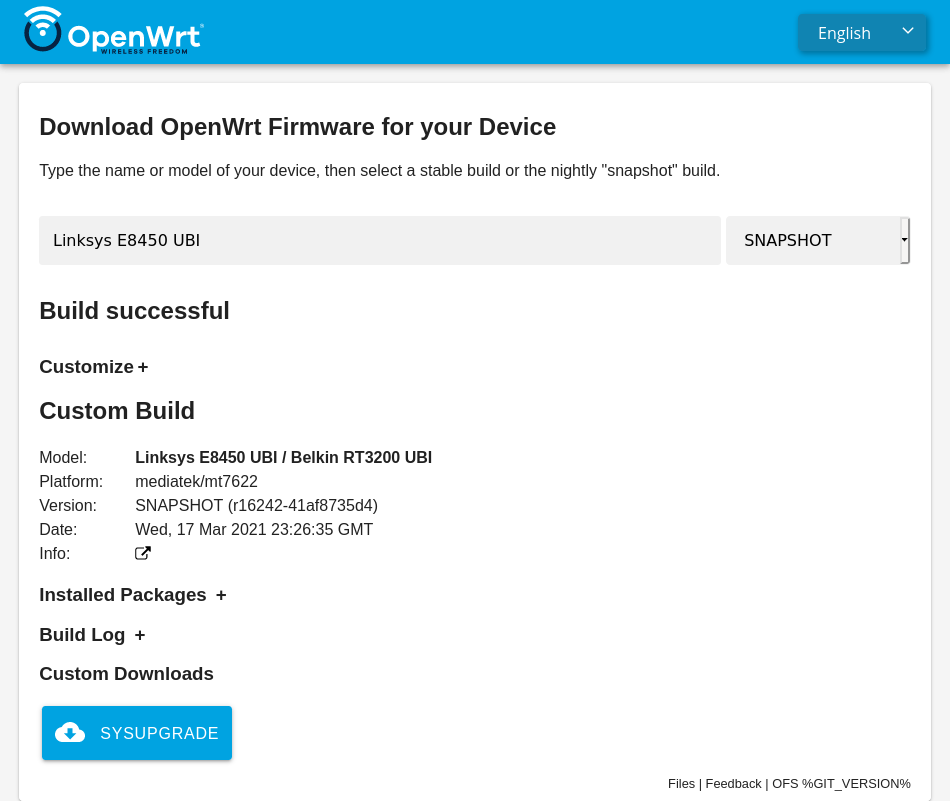
OpenWrt Firmware Selector
Simple web interface using vanilla JavaScript currently developed by @mwarning.
It offers a device search based on model names and shows links either to
official images or requests images via the
asu API. Please join in the development at the
GitHub repository.
https://firmware-selector.openwrt.org
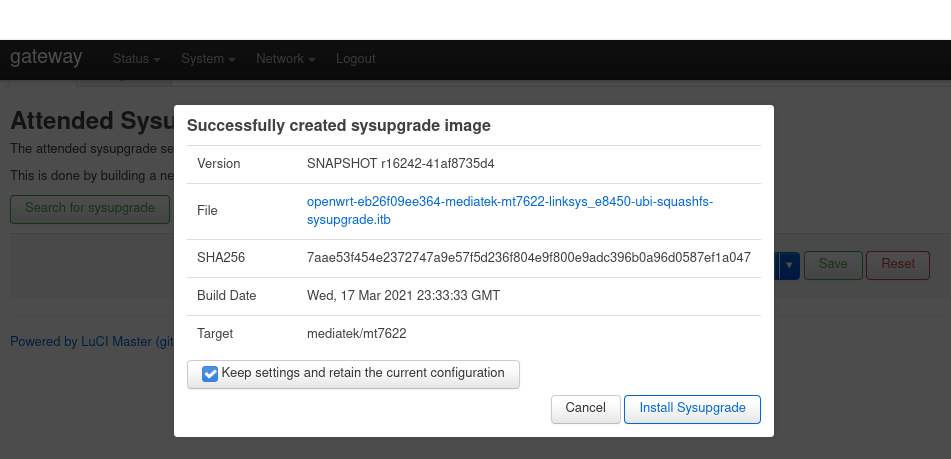
LuCI app
The package
luci-app-attendedsysupgrade
offers a simple tool under System > Attended Sysupgrade. It requests a new
firmware image that includes the current set of packages, waits until it's built
and flashes it. If "Keep Configuration" is checked in the GUI, the device
upgrades to the new firmware without any need to re-enter any configuration or
re-install any packages.
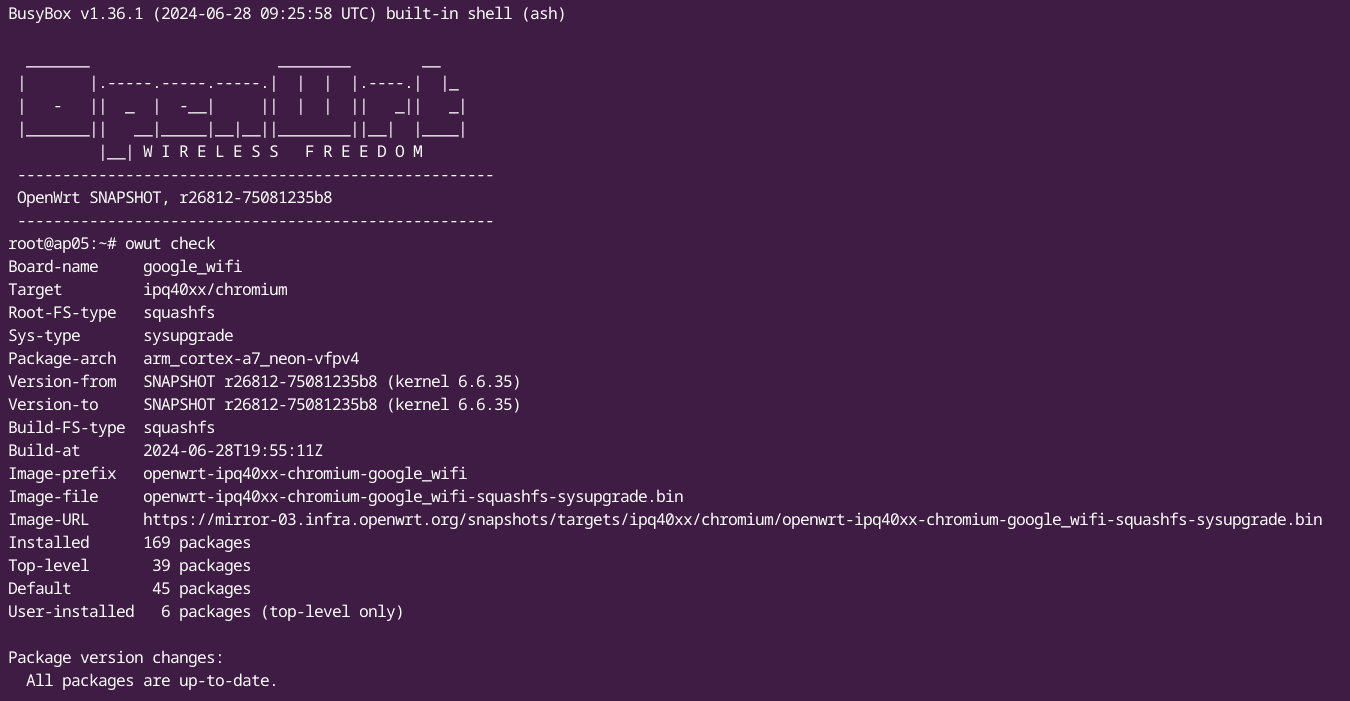
CLI
With OpenWrt SNAPSHOT-r26792 or newer (and in the 24.10 release) the CLI app
auc was replaced
with owut
as a more comprehensive CLI tool to provide an easy way to upgrade your device.
Server
The server listens for image requests and, if valid, automatically generates
them. It coordinates several OpenWrt ImageBuilders and caches the resulting
images in a Redis database. If an image is cached, the server can provide it
immediately without rebuilding.
Active servers
[!NOTE]
Official server using ImageBuilder published on OpenWrt
Downloads.
sysupgrade.openwrt.org
[!NOTE]
Unofficial servers, may run modified ImageBuilder
ImmortalWrt
LibreMesh
sysupgrade.guerra24.net
sysupgrade.antennine.org
Create a pull request to add your server here
Run your own server
For security reasons each build happens inside a container so that one build
can't affect another. A Podman socket is used so workers can execute builds
inside containers.
Installation
The server uses podman-compose to manage the containers. On a Debian based
system, install the following packages:
sudo apt install podman-compose
A Python library is used to
communicate with Podman over a socket. Symlink the socket into the project
directory:
This will start the server, a Redis instance and one worker. Once running,
the API is available at http://localhost:8000. Modify podman-compose.yml
to change the port.
Optional: caching proxy
To cache upstream package downloads between builds, enable the nginx caching
proxy:
podman-compose -f podman-compose.yml -f podman-compose.cache.yml up -d
Set cache_url = "http://cache" in asu.toml to route build container
package downloads through the cache.
Production
For production it's recommended to use a reverse proxy like nginx or caddy.
You can find a Caddy sample configuration in misc/Caddyfile.
If you want your server to remain active after you log out, enable "linger":
loginctl enable-linger
System requirements
2 GB RAM (4 GB recommended)
2 CPU cores (4 cores recommended)
50 GB disk space (200 GB recommended)
Development
After cloning this repository, install uv which manages the Python
dependencies.
# Install uv
curl -LsSf https://astral.sh/uv/install.sh | sh

# Install dependencies
uv sync --extra dev
Running Redis
podman run -d --name redis -p 6379:6379 redis:alpine
Running the server
uv run fastapi dev asu/main.py
Running a worker
uv run rq worker
API
The API is documented via OpenAPI and can be viewed interactively on the
server:
openwrt/asu thuộc nhóm Backend trên TopGit, cùng 8 topic GitHub. Trang Trending và Topics liệt kê các repo cùng số sao và cùng ngôn ngữ để so sánh.
Đọc thêm về openwrt/asu ở đâu?
Trang TopGit này là một snapshot — tab "Readme" hiển thị nguyên văn README của repo (đã bỏ link, giữ ảnh). Repo GitHub ở github.com/openwrt/asu là nguồn chính thức.
openwrt/asu có bao nhiêu sao?
openwrt/asu có 449 sao GitHub — tải lại trang để xem số mới nhất, hoặc xem trực tiếp github.com/openwrt/asu. TopGit phản chiếu số sao của GitHub nhưng không cam kết đến từng phút.
openwrt/asu có những chủ đề gì?
GitHub topics của openwrt/asu: "flask", "imagebuilder", "lede", "libremesh", "openwrt", "python", "python3", "sysupgrade". TopGit xếp repo vào nhóm Backend.
openwrt/asu có phải mã nguồn mở không?
Có — openwrt/asu phát hành theo license GPL-2.0, nghĩa là mã nguồn mở để đọc, fork và (tùy license) tái sử dụng. Mã: github.com/openwrt/asu.
openwrt/asu có trang demo không?
Dự án có trang chủ ở https://sysupgrade.openwrt.org. Tab "Readme" ở trang này thường có ảnh chụp và hướng dẫn bắt đầu nhanh.
openwrt/asu còn đang phát triển không?
Commit gần nhất trên openwrt/asu là 1 tháng trước (theo timestamp GitHub). Repo có 108 fork — một chỉ báo về mức độ quan tâm của cộng đồng.
Đọc đầy đủ README ở tab phía trên.
Chưa chắc asu có hợp với bạn?
Để ChatGPT, Claude hoặc Perplexity tìm hiểu giúp — bấm bên dưới và xem AI nói gì về asu.
 /asu
/asu