Được TopGit lập chỉ mục từ metadata GitHub: phiresky/ripgrep-all có 9.9k sao, viết chủ yếu bằng Rust. rga: ripgrep, but also search in PDFs, E-Books, Office documents, zip, tar.gz, etc.
Tóm tắt dựng từ metadata GitHub của chính dự án — chưa có bài review TopGit. Trang sẽ tự động cập nhật khi bài review đầy đủ được xuất bản.
VÌ SAO CHƯA CÓ REVIEW
TopGit viết bài đầy đủ cho repo có nhiều sao nhất và được yêu cầu nhiều nhất. Trang này là snapshot trong thời gian chờ — xem README gốc ở tab READ ME.
rga: ripgrep, but also search in PDFs, E-Books, Office documents, zip, tar.gz, etc.
rga is a line-oriented search tool that allows you to look for a regex in a multitude of file types. rga wraps the awesome ripgrep and enables it to search in pdf, docx, sqlite, jpg, movie subtitles (mkv, mp4), etc.
For more detail, see this introductory blogpost: https://phiresky.github.io/blog/2019/rga--ripgrep-for-zip-targz-docx-odt-epub-jpg/
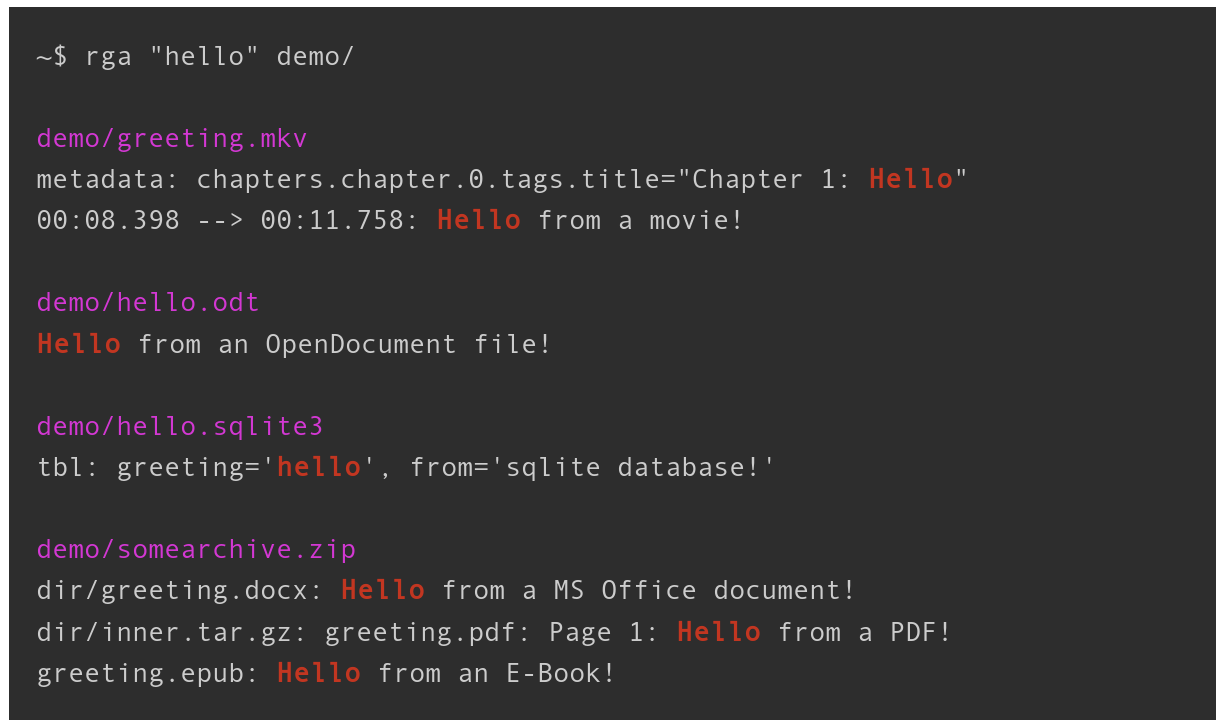
rga will recursively descend into archives and match text in every file type it knows.
Here is an example directory with different file types:
See the wiki for instructions of integrating rga with fzf.
INSTALLATION
Linux x64, macOS and Windows binaries are available in GitHub Releases.
Linux
Arch Linux
pacman -S ripgrep-all
Gentoo Linux
emerge sys-apps/ripgrep-all
Nix
nix-env -iA nixpkgs.ripgrep-all
Debian-based
download the rga binary and get the dependencies like this:
apt install ripgrep pandoc poppler-utils ffmpeg
If ripgrep is not included in your package sources, get it from here.
rga will search for all binaries it calls in $PATH and the directory itself is in.
Windows
Note that installing via chocolatey or scoop is the only supported download method. If you download the binary from releases manually, you will not get the dependencies (for example pdftotext from poppler).
If you get an error like VCRUNTIME140.DLL could not be found, you need to install vc_redist.x64.exe.
Chocolatey
choco install ripgrep-all
Scoop
scoop install rga
Homebrew/Linuxbrew
rga can be installed with Homebrew:
brew install rga
To install the dependencies that are each not strictly necessary but very useful:
brew install pandoc poppler ffmpeg
MacPorts
rga can also be installed on macOS via MacPorts:
sudo port install ripgrep-all
Compile from source
rga should compile with stable Rust (v1.75.0+, check with rustc --version). To build it, run the following (or the equivalent in your OS):
~$ apt install build-essential pandoc poppler-utils ffmpeg ripgrep cargo
~$ cargo install --locked ripgrep_all
~$ rga --version    # this should work now
Available Adapters
rga works with adapters that adapt various file formats. It comes with a few adapters integrated:
rga --rga-list-adapters
You can also add custom adapters. See the wiki for more information.
Adapters:
pandoc
Uses pandoc to convert binary/unreadable text documents to plain markdown-like text
Runs: pandoc --from= --to=plain --wrap=none --markdown-headings=atx
Extensions: .epub, .odt, .docx, .fb2, .ipynb, .html, .htm
poppler
Uses pdftotext (from poppler-utils) to extract plain text from PDF files
Runs: pdftotext - -
Extensions: .pdf
Mime Types: application/pdf
postprocpagebreaks
Adds the page number to each line for an input file that specifies page breaks as ascii page break character.
Mainly to be used internally by the poppler adapter.
Extensions: .asciipagebreaks
ffmpeg
Uses ffmpeg to extract video metadata/chapters, subtitles, lyrics, and other metadata
Extensions: .mkv, .mp4, .avi, .mp3, .ogg, .flac, .webm
zip
Reads a zip file as a stream and recurses down into its contents
Extensions: .zip, .jar
Mime Types: application/zip
decompress
Reads compressed file as a stream and runs a different extractor on the contents.
Extensions: .als, .bz2, .gz, .tbz, .tbz2, .tgz, .xz, .zst
Mime Types: application/gzip, application/x-bzip, application/x-xz, application/zstd
tar
Reads a tar file as a stream and recurses down into its contents
Extensions: .tar
sqlite
Uses sqlite bindings to convert sqlite databases into a simple plain text format
Extensions: .db, .db3, .sqlite, .sqlite3
Mime Types: application/x-sqlite3
The following adapters are disabled by default, and can be enabled using '--rga-adapters=+foo,bar':
mail
Reads mailbox/mail files and runs extractors on the contents and attachments.
Extensions: .mbox, .mbx, .eml
Mime Types: application/mbox, message/rfc822
USAGE:
rga [RGA OPTIONS] [RG OPTIONS] PATTERN [PATH ...]
FLAGS:
--rga-accurate
Use more accurate but slower matching by mime type
By default, rga will match files using file extensions. Some programs,
such as sqlite3, don't care about the file extension at all, so users
sometimes use any or no extension at all. With this flag, rga will try
to detect the mime type of input files using the magic bytes (similar
to the `file` utility), and use that to choose the adapter.
Detection is only done on the first 8KiB of the file, since we can't
always seek on the input (in archives).
--rga-no-cache
Disable caching of results
By default, rga caches the extracted text, if it is small enough, to a
database in ${XDG_CACHE_DIR-~/.cache}/ripgrep-all on Linux,
~/Library/Caches/ripgrep-all on macOS, or
C:\Users\username\AppData\Local\ripgrep-all on Windows. This way,
repeated searches on the same set of files will be much faster. If you
pass this flag, all caching will be disabled.
-h, --help
Prints help information
--rga-list-adapters
List all known adapters
--rga-print-config-schema
Print the JSON Schema of the configuration file
--rg-help
Show help for ripgrep itself
--rg-version
Show version of ripgrep itself
-V, --version
Prints version information
OPTIONS:
--rga-adapters=<adapters>...
Change which adapters to use and in which priority order (descending)
"foo,bar" means use only adapters foo and bar. "-bar,baz" means
use all default adapters except for bar and baz. "+bar,baz" means
use all default adapters and also bar and baz.
--rga-cache-compression-level=<compression-level>
ZSTD compression level to apply to adapter outputs before storing in
cache db
Maximum nestedness of archives to recurse into [default: 5]
--rga-cache-max-blob-len=<max-blob-len>
Max compressed size to cache
Longest byte length (after compression) to store in cache. Longer
adapter outputs will not be cached and recomputed every time.
Allowed suffixes on command line: k M G [default: 2000000]
--rga-cache-path=<path>
Path to store cache db [default: /home/phire/.cache/ripgrep-all]
-h shows a concise overview, --help shows more detail and
advanced options.
All other options not shown here are passed directly to rg, especially
[PATTERN] and [PATH ...]
Config
The config file location leverage the mechanisms defined by
the XDG base directory and
the XDG user directory specifications on Linux (ex: ~/.config/ripgrep-all/config.jsonc)
the Known Folder API on Windows (ex: C:\Users\Alice\AppData\Roaming\ripgrep-all/config.jsonc)
the Standard Directories
guidelines on macOS (ex: ~/Library/Application Support/ripgrep-all/config.jsonc)
Development
To enable debug logging:
export RUST_LOG=debug
export RUST_BACKTRACE=1
Also remember to disable caching with --rga-no-cache or clear the cache
(~/Library/Caches/rga on macOS, ~/.cache/rga on other Unixes,
or C:\Users\username\AppData\Local\rga on Windows)
to debug the adapters.
Nix and Direnv
You can use the provided flake.nix to setup all build- and
run-time dependencies:
Enable Flakes in your Nix configuration.
Add direnv to your profile:
nix profile install nixpkgs#direnv
cd into the directory where you have cloned this directory.
Allow use of .envrc: direnv allow
After the dependencies have been installed, your shell will now have all of
the necessary development dependencies.
Trang TopGit này là một snapshot — tab "Readme" hiển thị nguyên văn README của repo (đã bỏ link, giữ ảnh). Repo GitHub ở github.com/phiresky/ripgrep-all là nguồn chính thức.
phiresky/ripgrep-all có bao nhiêu sao?
phiresky/ripgrep-all có 9.9k sao GitHub — tải lại trang để xem số mới nhất, hoặc xem trực tiếp github.com/phiresky/ripgrep-all. TopGit phản chiếu số sao của GitHub nhưng không cam kết đến từng phút.
phiresky/ripgrep-all có phải mã nguồn mở không?
TopGit chưa ghi nhận license cho phiresky/ripgrep-all. Phần lớn repo public trên GitHub là mã nguồn mở, nhưng điều khoản khác nhau từng repo — mở file LICENSE để xác nhận.
phiresky/ripgrep-all có tag gì không?
Bản đồng bộ chưa ghi nhận topic GitHub nào cho phiresky/ripgrep-all. GitHub topics hiển thị ở thanh bên phải trang repo — đó là nơi đáng kiểm tra nhất.
phiresky/ripgrep-all có website riêng không?
TopGit chưa ghi nhận URL trang chủ cho phiresky/ripgrep-all. Phần README ở tab phía trên thường có link demo, hoặc xem mô tả GitHub của repo.
phiresky/ripgrep-all còn đang phát triển không?
Commit gần nhất trên phiresky/ripgrep-all là 2 tháng trước (theo timestamp GitHub). Repo có 226 fork — một chỉ báo về mức độ quan tâm của cộng đồng.
Đọc đầy đủ README ở tab phía trên.
ripgrep-all có đáng để bạn bỏ thời gian?
ChatGPT, Claude và Perplexity đều đọc được trang này. Hỏi thử xem họ nghĩ gì về ripgrep-all.

 /ripgrep-all