phiresky/ripgrep-all sits at 9.9k stars on GitHub, written primarily in Rust. rga: ripgrep, but also search in PDFs, E-Books, Office documents, zip, tar.gz, etc.
Snapshot summary built from the project's own GitHub metadata — there's no written TopGit review yet. The page will update automatically when a full review is published.
WHY NO REVIEW YET
TopGit writes full reviews for the most-starred, most-requested repositories. This page is a snapshot until then — see the READ ME tab for the original README in full.
rga: ripgrep, but also search in PDFs, E-Books, Office documents, zip, tar.gz, etc.
rga is a line-oriented search tool that allows you to look for a regex in a multitude of file types. rga wraps the awesome ripgrep and enables it to search in pdf, docx, sqlite, jpg, movie subtitles (mkv, mp4), etc.
For more detail, see this introductory blogpost: https://phiresky.github.io/blog/2019/rga--ripgrep-for-zip-targz-docx-odt-epub-jpg/
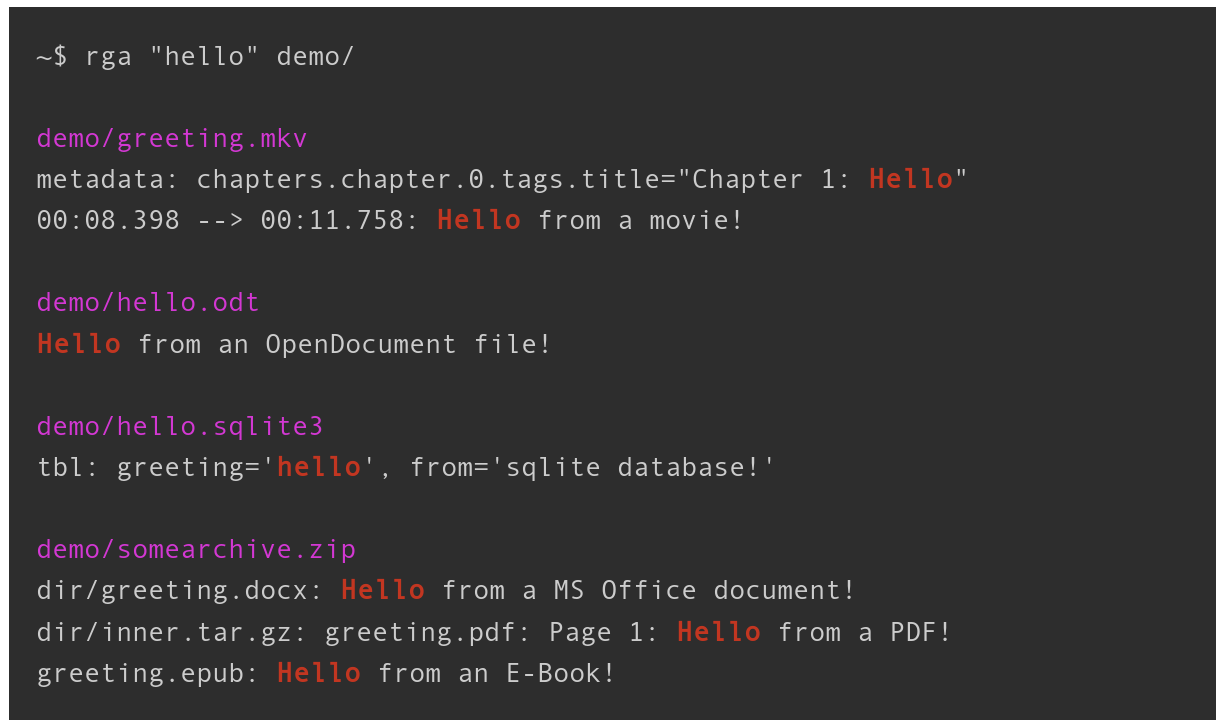
rga will recursively descend into archives and match text in every file type it knows.
Here is an example directory with different file types:
See the wiki for instructions of integrating rga with fzf.
INSTALLATION
Linux x64, macOS and Windows binaries are available in GitHub Releases.
Linux
Arch Linux
pacman -S ripgrep-all
Gentoo Linux
emerge sys-apps/ripgrep-all
Nix
nix-env -iA nixpkgs.ripgrep-all
Debian-based
download the rga binary and get the dependencies like this:
apt install ripgrep pandoc poppler-utils ffmpeg
If ripgrep is not included in your package sources, get it from here.
rga will search for all binaries it calls in $PATH and the directory itself is in.
Windows
Note that installing via chocolatey or scoop is the only supported download method. If you download the binary from releases manually, you will not get the dependencies (for example pdftotext from poppler).
If you get an error like VCRUNTIME140.DLL could not be found, you need to install vc_redist.x64.exe.
Chocolatey
choco install ripgrep-all
Scoop
scoop install rga
Homebrew/Linuxbrew
rga can be installed with Homebrew:
brew install rga
To install the dependencies that are each not strictly necessary but very useful:
brew install pandoc poppler ffmpeg
MacPorts
rga can also be installed on macOS via MacPorts:
sudo port install ripgrep-all
Compile from source
rga should compile with stable Rust (v1.75.0+, check with rustc --version). To build it, run the following (or the equivalent in your OS):
~$ apt install build-essential pandoc poppler-utils ffmpeg ripgrep cargo
~$ cargo install --locked ripgrep_all
~$ rga --version    # this should work now
Available Adapters
rga works with adapters that adapt various file formats. It comes with a few adapters integrated:
rga --rga-list-adapters
You can also add custom adapters. See the wiki for more information.
Adapters:
pandoc
Uses pandoc to convert binary/unreadable text documents to plain markdown-like text
Runs: pandoc --from= --to=plain --wrap=none --markdown-headings=atx
Extensions: .epub, .odt, .docx, .fb2, .ipynb, .html, .htm
poppler
Uses pdftotext (from poppler-utils) to extract plain text from PDF files
Runs: pdftotext - -
Extensions: .pdf
Mime Types: application/pdf
postprocpagebreaks
Adds the page number to each line for an input file that specifies page breaks as ascii page break character.
Mainly to be used internally by the poppler adapter.
Extensions: .asciipagebreaks
ffmpeg
Uses ffmpeg to extract video metadata/chapters, subtitles, lyrics, and other metadata
Extensions: .mkv, .mp4, .avi, .mp3, .ogg, .flac, .webm
zip
Reads a zip file as a stream and recurses down into its contents
Extensions: .zip, .jar
Mime Types: application/zip
decompress
Reads compressed file as a stream and runs a different extractor on the contents.
Extensions: .als, .bz2, .gz, .tbz, .tbz2, .tgz, .xz, .zst
Mime Types: application/gzip, application/x-bzip, application/x-xz, application/zstd
tar
Reads a tar file as a stream and recurses down into its contents
Extensions: .tar
sqlite
Uses sqlite bindings to convert sqlite databases into a simple plain text format
Extensions: .db, .db3, .sqlite, .sqlite3
Mime Types: application/x-sqlite3
The following adapters are disabled by default, and can be enabled using '--rga-adapters=+foo,bar':
mail
Reads mailbox/mail files and runs extractors on the contents and attachments.
Extensions: .mbox, .mbx, .eml
Mime Types: application/mbox, message/rfc822
USAGE:
rga [RGA OPTIONS] [RG OPTIONS] PATTERN [PATH ...]
FLAGS:
--rga-accurate
Use more accurate but slower matching by mime type
By default, rga will match files using file extensions. Some programs,
such as sqlite3, don't care about the file extension at all, so users
sometimes use any or no extension at all. With this flag, rga will try
to detect the mime type of input files using the magic bytes (similar
to the `file` utility), and use that to choose the adapter.
Detection is only done on the first 8KiB of the file, since we can't
always seek on the input (in archives).
--rga-no-cache
Disable caching of results
By default, rga caches the extracted text, if it is small enough, to a
database in ${XDG_CACHE_DIR-~/.cache}/ripgrep-all on Linux,
~/Library/Caches/ripgrep-all on macOS, or
C:\Users\username\AppData\Local\ripgrep-all on Windows. This way,
repeated searches on the same set of files will be much faster. If you
pass this flag, all caching will be disabled.
-h, --help
Prints help information
--rga-list-adapters
List all known adapters
--rga-print-config-schema
Print the JSON Schema of the configuration file
--rg-help
Show help for ripgrep itself
--rg-version
Show version of ripgrep itself
-V, --version
Prints version information
OPTIONS:
--rga-adapters=<adapters>...
Change which adapters to use and in which priority order (descending)
"foo,bar" means use only adapters foo and bar. "-bar,baz" means
use all default adapters except for bar and baz. "+bar,baz" means
use all default adapters and also bar and baz.
--rga-cache-compression-level=<compression-level>
ZSTD compression level to apply to adapter outputs before storing in
cache db
Maximum nestedness of archives to recurse into [default: 5]
--rga-cache-max-blob-len=<max-blob-len>
Max compressed size to cache
Longest byte length (after compression) to store in cache. Longer
adapter outputs will not be cached and recomputed every time.
Allowed suffixes on command line: k M G [default: 2000000]
--rga-cache-path=<path>
Path to store cache db [default: /home/phire/.cache/ripgrep-all]
-h shows a concise overview, --help shows more detail and
advanced options.
All other options not shown here are passed directly to rg, especially
[PATTERN] and [PATH ...]
Config
The config file location leverage the mechanisms defined by
the XDG base directory and
the XDG user directory specifications on Linux (ex: ~/.config/ripgrep-all/config.jsonc)
the Known Folder API on Windows (ex: C:\Users\Alice\AppData\Roaming\ripgrep-all/config.jsonc)
the Standard Directories
guidelines on macOS (ex: ~/Library/Application Support/ripgrep-all/config.jsonc)
Development
To enable debug logging:
export RUST_LOG=debug
export RUST_BACKTRACE=1
Also remember to disable caching with --rga-no-cache or clear the cache
(~/Library/Caches/rga on macOS, ~/.cache/rga on other Unixes,
or C:\Users\username\AppData\Local\rga on Windows)
to debug the adapters.
Nix and Direnv
You can use the provided flake.nix to setup all build- and
run-time dependencies:
Enable Flakes in your Nix configuration.
Add direnv to your profile:
nix profile install nixpkgs#direnv
cd into the directory where you have cloned this directory.
Allow use of .envrc: direnv allow
After the dependencies have been installed, your shell will now have all of
the necessary development dependencies.
No homepage URL was recorded for phiresky/ripgrep-all in TopGit's last sync. The README tab above frequently contains screenshots and demo links, or check the repository description on GitHub.
Does phiresky/ripgrep-all have any tags?
TopGit's last sync did not record any GitHub topics for phiresky/ripgrep-all. GitHub topics appear in the right sidebar of a repository page; that's the authoritative place to check.
How active is development on phiresky/ripgrep-all?
The most recent commit recorded on phiresky/ripgrep-all was 1 month ago, based on the GitHub push timestamp. The repository has 224 forks — one of the better signals of community interest.
How many stars does phiresky/ripgrep-all have?
phiresky/ripgrep-all has 9.9k GitHub stars — refresh the page for the live number, or check github.com/phiresky/ripgrep-all. TopGit mirrors GitHub's count but does not claim minute-by-minute accuracy.
Is phiresky/ripgrep-all open source?
TopGit's metadata for phiresky/ripgrep-all does not record a license. Most public repositories on GitHub ARE open source, but the exact terms vary — verify by opening the LICENSE file directly.
Where do I read more about phiresky/ripgrep-all?
This TopGit page is a snapshot — the READ ME tab shows the project's own README content (links stripped, images preserved). The GitHub repository at github.com/phiresky/ripgrep-all is the definitive source.
Read full README in the tab above.
Want a second opinion on ripgrep-all?
Ask an AI that can read this page — one click and you get its take on ripgrep-all.

 /ripgrep-all