
portainer/kubesolo

portainer/kubesolo là dự án mã nguồn mở trên GitHub, viết chủ yếu bằng Go, với 620 sao. Ultra-lightweight Kubernetes
Tóm tắt dựng từ metadata GitHub của chính dự án — chưa có bài review TopGit. Trang sẽ tự động cập nhật khi bài review đầy đủ được xuất bản.
TopGit viết bài đầy đủ cho repo có nhiều sao nhất và được yêu cầu nhiều nhất. Trang này là snapshot trong thời gian chờ — xem README gốc ở tab READ ME.
Snapshot
Cộng tác viên hàng đầu
Xem cộng tác viên hàng đầu
KubeSolo
Anywhere you'd run Docker or Podman, you can now run Kubernetes. Ultra-lightweight, OCI-compliant, single-node Kubernetes, under 200 MB RAM. No etcd. No clustering overhead.
Overview
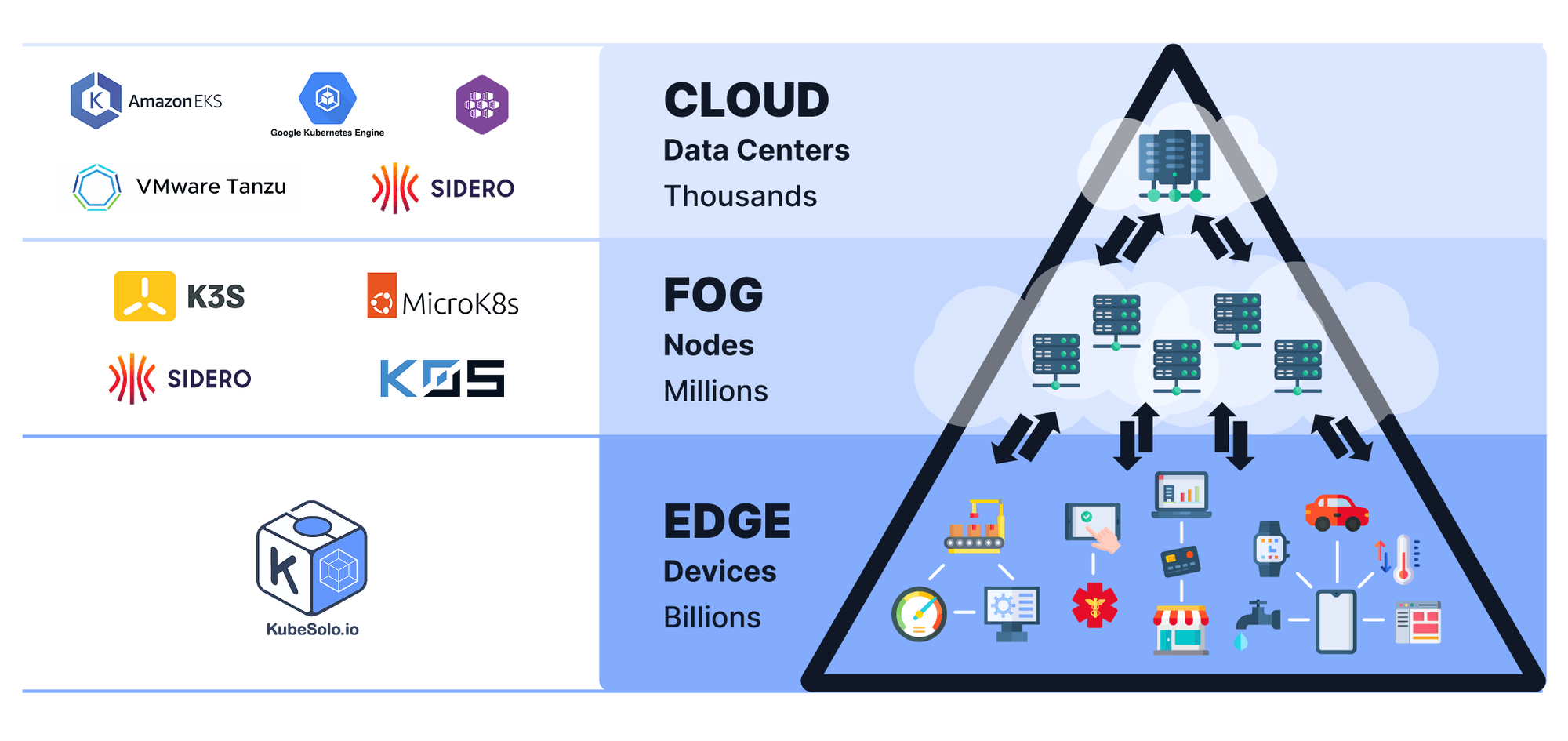
Standard Kubernetes is built for multi-node clusters, and a lot of the real world runs on single nodes. Edge devices. Factory gateways. Developer laptops. Remote site hardware. IoT controllers. The millions of machines that have been running Docker or Podman because standing up a full cluster was overhead that couldn't be justified for a single workload host.
That creates a gap. You either run Docker and give up the Kubernetes ecosystem entirely, or you run K3s or MicroK8s and accept that you're carrying clustering machinery you'll never use. KubeSolo closes the gap by taking a different starting position: remove the clustering code rather than disable it.
The result is full Kubernetes, complete API, full control loop, full ecosystem compatibility, with a RAM footprint under 200 MB, optimized for flash storage, and an install that takes under 60 seconds on hardware from a Raspberry Pi to an industrial gateway.
What is this?
KubeSolo takes Kubernetes and removes everything that only makes sense when there's more than one node: etcd quorum logic, leader election, multi-node networking overlays, control plane distribution. None of it is present, not disabled, removed.
What remains is a full Kubernetes control loop running in a single process. The API server, controller manager, and kubelet all run together. Your existing manifests, Helm charts, and CRDs work without modification.
The design target is anywhere you would have previously reached for Docker or Podman: edge devices, factory hardware, developer laptops, remote sites, IoT gateways, kiosk machines. Same OCI images, better runtime, full ecosystem.
KubeSolo bundles the following technologies together into a single cohesive distribution:
- containerd & crun for container runtime
- CoreDNS for DNS resolution
- Kine for SQLite-based storage (replacing etcd)
It is packaged as a single binary with minimal OS dependencies (a sane kernel and cgroup mounts), secure defaults tuned for lightweight environments, and all required components bundled for offline operation.
How is this lightweight or smaller than upstream Kubernetes?
KubeSolo's footprint sits under 200 MB RAM because clustering machinery is absent, not dormant. Most lightweight Kubernetes distributions slim down a full distribution; the multi-node code is still there, just inactive. KubeSolo starts from the other end: everything that requires more than one node has been removed.
Three specific design decisions contribute to the smaller footprint:
- No etcd; SQLite (via Kine) replaces it as the state store
- No Kubernetes Scheduler; replaced by
NodeSetter, a lightweight mutating admission webhook built into KubeSolo that setsspec.nodeNameon every new pod, without the full scheduling machinery - All components run inside a single process rather than as separate binaries
The practical result is a full Kubernetes control loop that runs comfortably on devices with 512 MB of RAM, on flash storage, and in air-gapped environments.
Why is the binary size big compared to other distributions?
KubeSolo ships in two variants to suit different deployment environments:
| Variant | Binary size | Internet required | Use when |
|---|---|---|---|
| Online (default) | Smaller | Yes | Devices with reliable internet access where binary size matters more than offline capability |
| Offline | Larger | No | Air-gapped environments, factory floors, edge devices with intermittent or no connectivity |
The offline variant bundles all required container images, CNI plugins, and runtime dependencies directly in the binary. Nothing needs to be fetched from the internet at install or runtime. The online variant pulls container images from public registries at startup, keeping the binary smaller at the cost of requiring internet access.
The default installer downloads the online variant. If your devices are air-gapped or have unreliable internet access, use the offline variant.
Getting Started
Quick Install
[!WARNING] Ensure that no container engine (e.g., Docker, Podman, containerd) is installed or active on the target system prior to proceeding. This includes any background services or residual installations that could interfere with KubeSolo networking. The installer refuses to continue if Docker is installed or running.
The one exception is deliberate: KubeSolo can attach to a host-managed containerd or CRI-O instead of running its own, by setting
runtime.endpoint(for exampleunix:///run/containerd/containerd.sock). The host then provides the runtime, the OCI runtime, the CNI plugin binaries and the sandbox image.
Supported platforms: ARM · ARM64 · x86_64 · RISC-V 64
Step 1, Install: Run the install script with sudo. KubeSolo starts as a systemd service.
The installer detects your architecture and libc automatically. Choose the variant that matches your environment:
Online (default, smaller binary, pulls container images from registries at startup):
curl -sfL https://get.kubesolo.io | sudo sh -
Offline (larger binary with all images bundled, no internet required at runtime):
curl -sfL https://get.kubesolo.io | KUBESOLO_OFFLINE=true sudo -E sh -
Air-gapped (no internet on the target machine at all):
# On a connected Linux machine with the same architecture and libc as the target, download the offline bundle
curl -sfL https://get.kubesolo.io | sh -s -- --offline --download-only=/tmp/kubesolo-bundle

# Transfer the files to the target machine, then install
sudo sh install.sh --offline-install=<archive.tar.gz>
The bundle matches the OS, architecture and libc of the machine that downloads it, so a bundle downloaded on macOS, or on a glibc host for an Alpine (musl) target, won't work. In that case download the matching -offline archive from the releases page.
The installer writes your settings to /etc/kubesolo/config.yaml. Every installer flag is listed in the install script flags reference. Unreleased changes from the develop branch are served from https://get-dev.kubesolo.io; don't use it in production.
The installer also detects your libc variant:
- glibc systems (Ubuntu, CentOS, Debian, etc.): Downloads standard binary
- musl systems (Alpine Linux): Downloads musl-compatible binary
Step 2, Set up kubectl: Copy the admin kubeconfig from /var/lib/kubesolo/pki/admin/admin.kubeconfig to the machine where kubectl is installed, then set the context:
kubectl config use-context kubernetes-admin@kubesolo
kubectl get nodes
# You should see a single node in Ready state
Step 3, Deploy your first workload:
kubectl apply -f https://raw.githubusercontent.com/portainer/kubesolo/develop/examples/mosquitto.yaml
kubectl get all -n mosquitto
Note: If you're running KubeSolo on a device with less than 512 MB of RAM, interact with the cluster using an externally installed kubectl.
kubesoloctl (CLI)
kubesoloctl is a single, dependency-free binary that manages the full KubeSolo lifecycle — install, upgrade, reset, uninstall, and kubeconfig wiring — and adds a container mode for running KubeSolo on macOS, Windows (WSL2), or any Linux host with a container engine. It's the recommended way to spin up KubeSolo for local development and CI.
Download the binary for your platform from the releases page (kubesoloctl-<os>-<arch>), put it on your PATH, then:
# Linux host (runs as a system service):
sudo kubesoloctl install

# Container mode — macOS / WSL2 / Linux dev (requires a container engine):
kubesoloctl install --run-mode=container

# Then, regardless of mode:
kubectl get nodes --watch
install runs pre-flight checks, starts KubeSolo, and merges the admin kubeconfig into ~/.kube/config automatically. In container mode you can publish workload ports just like Kind:
kubesoloctl install --run-mode=container --container-ports=9001,8080:80,9000-9100
For the full command reference, run modes, container-port syntax, multi-instance usage, and offline bundles, see the kubesoloctl guide.
Advanced Installation
For detailed installation instructions including support for industrial devices, embedded systems, different init systems, and custom configurations, see the Installation Guide.
The installation guide covers:
- Universal installer with automatic init system detection
- Minimal installer for constrained environments
- Service management across different platforms
- Industrial device considerations (read-only filesystems, limited storage, air-gapped installations)
- Corporate proxy support for environments behind firewalls
- Architecture-specific installations
Configuration
KubeSolo reads its settings from /etc/kubesolo/config.yaml:
apiVersion: kubesolo.io/v1alpha1
kind: Config

network:
  nodeIP: 10.0.0.5
portainer:
  edgeID: "..."
  edgeKey: "..."
d2k:
  enabled: true
Anything omitted falls back to its default. Settings are read at startup, so a change takes effect on restart.
kubesoloctl config get                              # show everything
sudo kubesoloctl config set network.nodeIP 10.0.0.5 # change one setting
sudo kubesoloctl config edit                        # open in $EDITOR
kubesoloctl config schema                           # every setting and its default (YAML)
KubeSolo can also serve the file over a unix socket, so it can be managed programmatically.
- Configuration file — every setting, precedence, migrating from flags
- Configuration API — managing it over a socket
- Grafana dashboards — pre-built dashboards, plus Grafana Alloy and OpenTelemetry Collector configs, for API server, kubelet, KubeSolo and Go runtime metrics
Migrating from flags
Run the binary with the flags your service currently passes, plus
--print-config, and save the result:
sudo kubesolo <current flags> --print-config | sudo tee /etc/kubesolo/config.yaml
kubesoloctl upgrade does this for you.
Flags
Deprecated. Command-line flags still work and still override the configuration file, so existing installs keep running, but no new flags will be added and new settings are configurable only through the file. Each flag and its
KUBESOLO_*environment variable is listed against its setting in the flag-to-setting table. Flags for the install script are in the installer flags reference.
Two flags are not settings and have no equivalent in the file: --config, which
names it, and --print-config, which prints the resolved document and exits.
Example:
To connect KubeSolo to Portainer as an Edge agent, pass the Edge ID and key to the installer. They are written to portainer.edgeID and portainer.edgeKey in the configuration file:
curl -sfL https://get.kubesolo.io | KUBESOLO_PORTAINER_EDGE_ID=your-portainer-edge-id KUBESOLO_PORTAINER_EDGE_KEY=your-portainer-edge-key sudo -E sh
On an existing install, set them in the file instead and restart:
sudo kubesoloctl config set portainer.edgeID your-portainer-edge-id
sudo kubesoloctl config set portainer.edgeKey your-portainer-edge-key
Documentation
Full documentation is at kubesolo.io. The guides in this repository:
Installing
- Installation guide: init systems, minimal installer, industrial devices, proxies, uninstalling
- Install script flags: every
install.shflag, install channels, air-gapped bundles - kubesoloctl: the CLI, including container mode for macOS, WSL2 and CI
Configuring
- Configuration file: every setting, its default, and the flag it replaces
- Configuration API: reading and changing settings over a unix socket
- Example configuration: every setting at its default, ready to copy
- Container mode: running KubeSolo itself in a container
- CPU pinning: exclusive cores for latency-sensitive workloads
- d2k: a Docker-compatible API endpoint on the node
- Registry configuration: mirrors, private registries and custom TLS
- containerd drop-ins and NVIDIA GPUs: extra runtimes, GPU workloads
- Kubelet drop-ins: eviction thresholds, image garbage collection and other kubelet settings
- Installing a CNI (Cilium): running an external CNI on a single KubeSolo node
Monitoring
- Metrics endpoint: set
metrics.enabled: trueto serve Prometheus metrics for the control plane at/metricson127.0.0.1:9105(change withmetrics.bindAddress). It is off by default. - Grafana dashboards: pre-built dashboards, plus Grafana Alloy and OpenTelemetry Collector configs, for API server, kubelet, KubeSolo and Go runtime metrics (scraped from the API server
/metrics, the kubelet cAdvisor endpoint via the API server node proxy, and the KubeSolo metrics endpoint, which needsmetrics.enabled: true). The cAdvisor scrape path contains the node name (defaultkubesolo), which must match your node's name.
Using a host container runtime
By default KubeSolo runs its own embedded containerd. Set runtime.endpoint (flag --container-runtime-endpoint) to a host-managed containerd or CRI-O socket, such as unix:///run/crio/crio.sock, and KubeSolo attaches to it instead. The host is then responsible for the runtime, the OCI runtime, the CNI plugin binaries and the sandbox image.
Building from Source
Prerequisites
- Go 1.26.10 or later (see
go.mod) - Docker (for ARM builds and dependency management)
- Cross-compilation toolchains (optional, for cross-platform builds)
Install Cross-Compilation Toolchains
To build for multiple architectures, install the required cross-compilation toolchains:
sudo make install-cross-compilers
This installs (on Debian/Ubuntu, via apt-get):
gcc-aarch64-linux-gnu(for ARM64)gcc-x86-64-linux-gnu(for AMD64)gcc-arm-linux-gnueabihf(for ARM/ARMHF)gcc-riscv64-linux-gnu(for RISCV64)
Basic Build
Build for your current platform (outputs to ./dist/kubesolo):
make build
Cross-Platform Builds
Build for specific architectures using environment variables:
# Build for ARM64
make build GOARCH=arm64

# Build for AMD64
make build GOARCH=amd64

# Build for ARM (ARMHF)
make build GOARCH=arm

# Build for RISCV64
make build GOARCH=riscv64
Alpine Linux / musl Builds
For Alpine Linux compatibility, build musl-compatible static binaries:
# Install musl cross-compilers (one-time setup)
sudo make install-musl-cross-compilers

# Build musl binary for specific architecture
make build-musl GOARCH=amd64
make build-musl GOARCH=arm64
make build-musl GOARCH=arm
make build-musl GOARCH=riscv64

# Build all supported musl architectures
make build-all-musl
install-musl-cross-compilers installs musl-tools and the musl.cc toolchains for amd64, arm64, arm (musleabihf) and riscv64.
Offline Builds
The offline variant embeds every container image. Build it with make build-offline (glibc) or make build-musl-offline (musl); both take the same GOARCH and OUTPUT variables.
kubesoloctl
kubesoloctl is pure Go (CGO_ENABLED=0), so it needs no cross-compiler and one binary per architecture runs on both glibc and musl:
# Linux, host architecture (outputs to ./dist/kubesoloctl-<os>-<arch>)
make build-kubesoloctl

# Another platform
make build-kubesoloctl GOOS=darwin GOARCH=arm64

# All released targets: linux amd64/arm64/arm/riscv64, darwin amd64/arm64
make build-kubesoloctl-all
Custom Output Path
Specify a custom output path using the OUTPUT variable:
# Custom filename
make build OUTPUT=./kubesolo-custom

# Platform-specific naming
make build GOARCH=arm OUTPUT=./dist/kubesolo-arm

# Different directory
make build OUTPUT=./bin/kubesolo
Combined Examples
# Build ARM binary with custom name
make build GOARCH=arm OUTPUT=./dist/kubesolo-linux-arm

# Build AMD64 binary for CI/CD
make build GOARCH=amd64 OUTPUT=./artifacts/kubesolo-linux-amd64
Development
For development and testing, you can run KubeSolo directly without building:
# Download dependencies first (only needed once)
make deps

# Run KubeSolo in development mode
make dev
Notes
- ARM builds: For ARM architecture, containerd binaries are built using Docker cross-compilation for optimal compatibility
- Dependencies: The build process automatically downloads required dependencies (containerd, runc, CNI plugins) for the target architecture
- CGO: All builds use CGO for better performance and compatibility with system libraries
Community
Getting involved
GitHub Issues, submit issues and feature requests.
GitHub, browse source, open pull requests, and contribute.
Security
Security issues in KubeSolo can be reported by sending an email to [email protected].
Trademark
KubeSolo and the KubeSolo logo are trademarks of Portainer.io Limited. Released under the MIT license.
Repo liên quan
Master programming by recreating your favorite technologies from scratch.
A curated meta-list of curated lists organized by technology domain. The repository acts as a directory pointing to hundreds of specialized awesome lists covering programming languages, platforms, frameworks, and tooling. All content is community-contributed under the CC0 public domain dedication.
Public APIs is a community-curated GitHub repository listing free, publicly accessible APIs across a wide range of categories, with auth type, HTTPS, and CORS noted for each entry. It's a browsable reference, not a library to install.
REA is an MCP server and CLI that gives AI coding agents the ability to reverse engineer binaries, JavaScript apps, .NET assemblies, and websites. It hooks into Hopper, Ghidra, or IDA Pro for native binary work, or runs static JavaScript analysis with just Node.js. Every investigation returns an Evidence bundle that includes what was found, what was not, and the reasoning path. Setup registers REA with supported agents and walks you through connecting an analysis engine. The CLI also works standalone for terminal-first workflows.
Trả lời nhanh
Đọc thêm về portainer/kubesolo ở đâu?
Trang TopGit này là một snapshot — tab "Readme" hiển thị nguyên văn README của repo (đã bỏ link, giữ ảnh). Repo GitHub ở github.com/portainer/kubesolo là nguồn chính thức.
portainer/kubesolo có bao nhiêu sao?
portainer/kubesolo có 620 sao GitHub — tải lại trang để xem số mới nhất, hoặc xem trực tiếp github.com/portainer/kubesolo. TopGit phản chiếu số sao của GitHub nhưng không cam kết đến từng phút.
portainer/kubesolo có phải mã nguồn mở không?
Có — portainer/kubesolo phát hành theo license MIT, nghĩa là mã nguồn mở để đọc, fork và (tùy license) tái sử dụng. Mã: github.com/portainer/kubesolo.
portainer/kubesolo còn đang phát triển không?
Commit gần nhất trên portainer/kubesolo là 4 ngày trước (theo timestamp GitHub). Repo có 38 fork — một chỉ báo về mức độ quan tâm của cộng đồng.
portainer/kubesolo dùng license gì?
portainer/kubesolo phát hành theo license MIT. Nên mở file LICENSE trên GitHub để xác nhận — license metadata đôi khi lệch với thực tế dự án.
portainer/kubesolo là gì?
portainer/kubesolo (portainer/kubesolo) là dự án Go trên GitHub. Theo mô tả gốc: Ultra-lightweight Kubernetes
portainer/kubesolo viết bằng ngôn ngữ gì?
portainer/kubesolo chủ yếu viết bằng Go. Trường "language" của GitHub dựa trên phần lớn byte ở nhánh mặc định.
Đọc đầy đủ README ở tab phía trên.
Vẫn đang phân vân về kubesolo?
Một cú bấm sẽ gửi câu hỏi kèm trang này cho AI — xem AI nói gì về kubesolo.