portainer/kubesolo is tracked by TopGit as an open-source project, with 543 stars on GitHub, written primarily in Go. Ultra-lightweight Kubernetes
Snapshot summary built from the project's own GitHub metadata — there's no written TopGit review yet. The page will update automatically when a full review is published.
WHY NO REVIEW YET
TopGit writes full reviews for the most-starred, most-requested repositories. This page is a snapshot until then — see the READ ME tab for the original README in full.
Anywhere you'd run Docker or Podman, you can now run Kubernetes. Ultra-lightweight, OCI-compliant, single-node Kubernetes, under 200 MB RAM. No etcd. No clustering overhead.
Overview
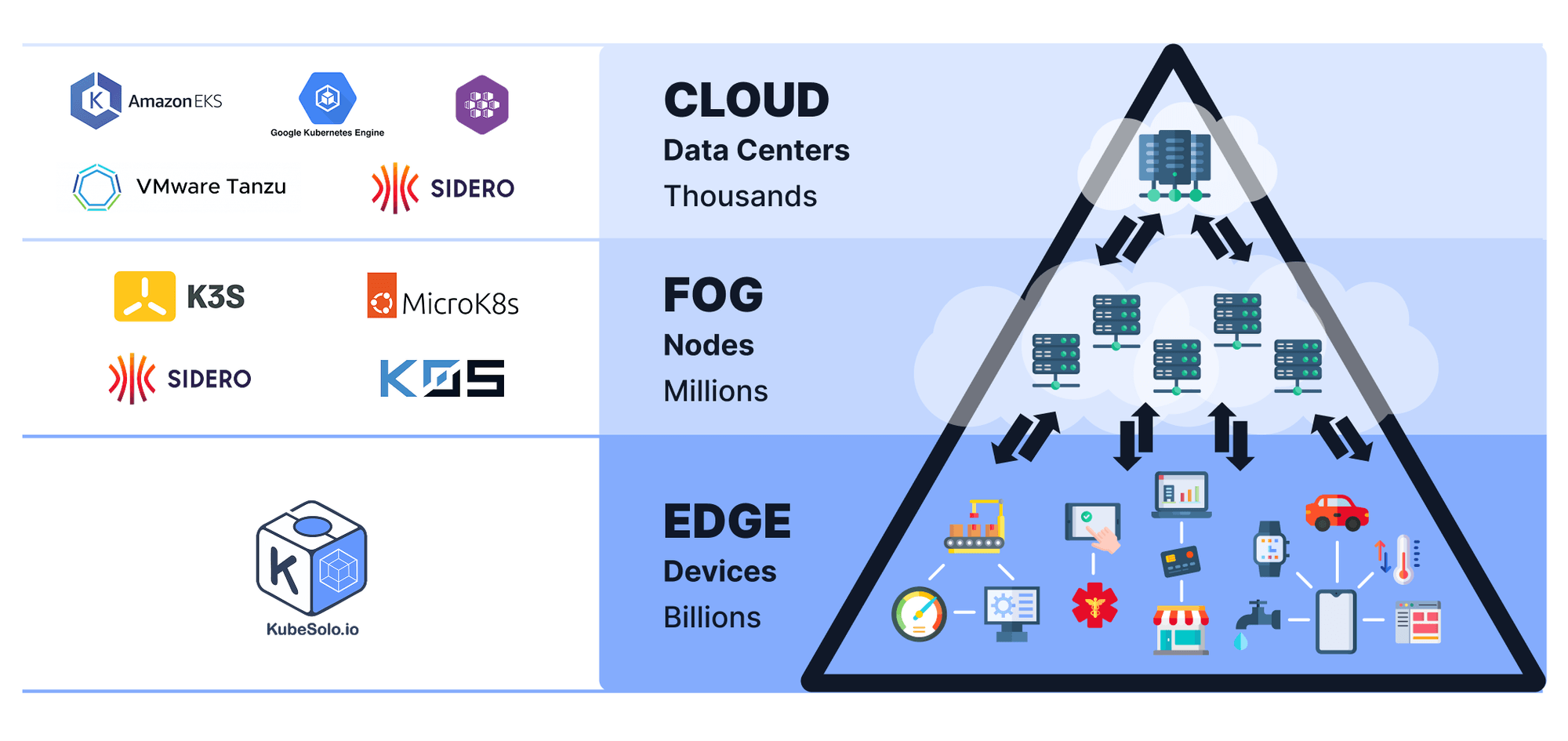
Standard Kubernetes is built for multi-node clusters, and a lot of the real world runs on single nodes. Edge devices. Factory gateways. Developer laptops. Remote site hardware. IoT controllers. The millions of machines that have been running Docker or Podman because standing up a full cluster was overhead that couldn't be justified for a single workload host.
That creates a gap. You either run Docker and give up the Kubernetes ecosystem entirely, or you run K3s or MicroK8s and accept that you're carrying clustering machinery you'll never use. KubeSolo closes the gap by taking a different starting position: remove the clustering code rather than disable it.
The result is full Kubernetes, complete API, full control loop, full ecosystem compatibility, with a RAM footprint under 200 MB, optimized for flash storage, and an install that takes under 60 seconds on hardware from a Raspberry Pi to an industrial gateway.
What is this?
KubeSolo takes Kubernetes and removes everything that only makes sense when there's more than one node: etcd quorum logic, leader election, multi-node networking overlays, control plane distribution. None of it is present, not disabled, removed.
What remains is a full Kubernetes control loop running in a single process. The API server, controller manager, and kubelet all run together. Your existing manifests, Helm charts, and CRDs work without modification.
The design target is anywhere you would have previously reached for Docker or Podman: edge devices, factory hardware, developer laptops, remote sites, IoT gateways, kiosk machines. Same OCI images, better runtime, full ecosystem.
KubeSolo bundles the following technologies together into a single cohesive distribution:
containerd & crun for container runtime
CoreDNS for DNS resolution
Kine for SQLite-based storage (replacing etcd)
It is packaged as a single binary with minimal OS dependencies (a sane kernel and cgroup mounts), secure defaults tuned for lightweight environments, and all required components bundled for offline operation.
How is this lightweight or smaller than upstream Kubernetes?
KubeSolo's footprint sits under 200 MB RAM because clustering machinery is absent, not dormant. Most lightweight Kubernetes distributions slim down a full distribution; the multi-node code is still there, just inactive. KubeSolo starts from the other end: everything that requires more than one node has been removed.
Three specific design decisions contribute to the smaller footprint:
No etcd; SQLite (via Kine) replaces it as the state store
No Kubernetes Scheduler; replaced by a lightweight custom webhook called NodeSetter that handles single-node scheduling without the full scheduling machinery
All components run inside a single process rather than as separate binaries
The practical result is a full Kubernetes control loop that runs comfortably on devices with 512 MB of RAM, on flash storage, and in air-gapped environments.
Why is the binary size big compared to other distributions?
KubeSolo ships in two variants to suit different deployment environments:
Variant
Binary size
Internet required
Use when
Online (default)
Smaller
Yes
Devices with reliable internet access where binary size matters more than offline capability
Offline
Larger
No
Air-gapped environments, factory floors, edge devices with intermittent or no connectivity
The offline variant bundles all required container images, CNI plugins, and runtime dependencies directly in the binary. Nothing needs to be fetched from the internet at install or runtime. The online variant pulls container images from public registries at startup, keeping the binary smaller at the cost of requiring internet access.
The default installer downloads the online variant. If your devices are air-gapped or have unreliable internet access, use the offline variant.
Getting Started
Quick Install
[!WARNING]
Ensure that no container engine (e.g., Docker, Podman, containerd) is installed or active on the target system prior to proceeding. This includes any background services or residual installations that could interfere with KubeSolo networking.
Supported platforms: ARM · ARM64 · x86_64 · RISC-V 64
Step 1, Install: Run the install script with sudo. KubeSolo starts as a systemd service.
The installer detects your architecture and libc automatically. Choose the variant that matches your environment:
Online (default, smaller binary, pulls container images from registries at startup):
curl -sfL https://get.kubesolo.io | sudo sh -
Offline (larger binary with all images bundled, no internet required at runtime):
curl -sfL https://get.kubesolo.io | KUBESOLO_OFFLINE=true sudo -E sh -
Air-gapped (no internet on the target machine at all):
# On a connected machine, download the bundle
curl -sfL https://get.kubesolo.io | KUBESOLO_OFFLINE=true sh - --download-only=/tmp/kubesolo-bundle

# Transfer the files to the target machine, then install
sudo sh install.sh --offline-install=<archive.tar.gz>
The installer also detects your libc variant:
glibc systems (Ubuntu, CentOS, Debian, etc.): Downloads standard binary
musl systems (Alpine Linux): Downloads musl-compatible binary
Step 2, Set up kubectl: Copy the admin kubeconfig from /var/lib/kubesolo/pki/admin/admin.kubeconfig to the machine where kubectl is installed, then set the context:
kubectl config use-context kubernetes-admin@kubesolo
kubectl get nodes
# You should see a single node in Ready state
Step 3, Deploy your first workload:
kubectl apply -f https://raw.githubusercontent.com/portainer/kubesolo/develop/examples/mosquitto.yaml
kubectl get all -n mosquitto
Note: If you're running KubeSolo on a device with less than 512 MB of RAM, interact with the cluster using an externally installed kubectl.
kubesoloctl (CLI)
kubesoloctl is a single, dependency-free binary that manages the full KubeSolo lifecycle — install, upgrade, reset, uninstall, and kubeconfig wiring — and adds a container mode for running KubeSolo on macOS, Windows (WSL2), or any Linux host with a container engine. It's the recommended way to spin up KubeSolo for local development and CI.
Download the binary for your platform from the releases page (kubesoloctl-<os>-<arch>), put it on your PATH, then:
# Linux host (runs as a system service):
sudo kubesoloctl install

# Container mode — macOS / WSL2 / Linux dev (requires a container engine):
kubesoloctl install --run-mode=container

# Then, regardless of mode:
kubectl get nodes --watch
install runs pre-flight checks, starts KubeSolo, and merges the admin kubeconfig into ~/.kube/config automatically. In container mode you can publish workload ports just like Kind:
For the full command reference, run modes, container-port syntax, multi-instance usage, and offline bundles, see the kubesoloctl guide.
Advanced Installation
For detailed installation instructions including support for industrial devices, embedded systems, different init systems, and custom configurations, see the Installation Guide.
The installation guide covers:
Universal installer with automatic init system detection
Corporate proxy support for environments behind firewalls
Architecture-specific installations
Flags
KubeSolo supports the following command-line flags:
Flag
Environment Variable
Description
Default
--version
N/A
Show the version and exit
N/A
--path
KUBESOLO_PATH
Path to the directory containing the kubesolo configuration files
/var/lib/kubesolo
--apiserver-extra-sans
KUBESOLO_APISERVER_EXTRA_SANS
A comma-separated list of additional Subject Alternative Names (SANs) to include in the API server's TLS certificate. These SANs can be IP addresses or DNS names (e.g., 10.0.0.4,kubesolo.local)
""
--portainer-edge-id
KUBESOLO_PORTAINER_EDGE_ID
Portainer Edge ID
""
--portainer-edge-key
KUBESOLO_PORTAINER_EDGE_KEY
Portainer Edge Key
""
--portainer-edge-async
KUBESOLO_PORTAINER_EDGE_ASYNC
Enable Portainer Edge Async Mode
false
--portainer-edge-image
KUBESOLO_PORTAINER_EDGE_IMAGE
Image deployed for the Portainer Edge Agent, including the tag. Any image other than the default is pulled from the registry rather than loaded from the embedded image
docker.io/portainer/agent:lts
--load-balancer
KUBESOLO_LOAD_BALANCER
Enable load balancer. With this enabled, kubesolo will update a newly deployed service with the load balancer type so that the EXTERNAL-IP is set to the node IP
true
--local-storage
KUBESOLO_LOCAL_STORAGE
Enable local storage
true
--local-storage-shared-path
KUBESOLO_LOCAL_STORAGE_SHARED_PATH
Path to the shared file system for the local storage
""
--debug
KUBESOLO_DEBUG
Enable debug logging
false
--pprof-server
KUBESOLO_PPROF_SERVER
Enable pprof server for profiling
false
--full
KUBESOLO_FULL
Deprecated: has no effect. KubeSolo always uses upstream Kubernetes defaults. Retained for backwards compatibility; will be removed in a future release
false
--container-mode
KUBESOLO_CONTAINER_MODE
Run KubeSolo inside a container, adjusting cgroups, mounts, DNS, and eviction thresholds. Auto-detected when running in a container. See docs/configuration/container-mode.md
(auto-detected)
--db-wal-repair
KUBESOLO_DB_WAL_REPAIR
Run SQLite integrity checks on startup and repair WAL/SHM artifacts if corruption is detected
false
--disable-ipv6
KUBESOLO_DISABLE_IPV6
Disable IPv6 support for CoreDNS reverse zones and kubelet node address registration
false
--startup-timeout
KUBESOLO_STARTUP_TIMEOUT
Maximum time in seconds to wait for each component to pass its health check during startup. Increase on slow storage such as SD cards
600
--d2k
KUBESOLO_D2K
Embed d2k and expose a Docker-compatible API endpoint over mTLS on port 2376. See docs/configuration/d2k.md
false
--d2k-namespace
KUBESOLO_D2K_NAMESPACE
Namespace into which d2k is deployed and against which it translates Docker API calls. Only honoured when --d2k is set
d2k
Example:
To config KubeSolo to use Portainer Edge, you can use the following command:
curl -sfL https://get.kubesolo.io | KUBESOLO_PORTAINER_EDGE_ID=your-portainer-edge-id KUBESOLO_PORTAINER_EDGE_KEY=your-portainer-edge-key sudo -E sh
Documentation
Please see the documentation for complete documentation.
Installing a CNI (Cilium) — running an external CNI such as Cilium on a single KubeSolo node.
Building from Source
Prerequisites
Go 1.24 or later
Docker (for ARM builds and dependency management)
Cross-compilation toolchains (optional, for cross-platform builds)
Install Cross-Compilation Toolchains
To build for multiple architectures, install the required cross-compilation toolchains:
sudo make install-cross-compilers
This installs:
gcc-aarch64-linux-gnu (for ARM64)
gcc-x86-64-linux-gnu (for AMD64)
gcc-arm-linux-gnueabihf (for ARM/ARMHF)
riscv64-linux-gnu-gcc(for RISCV64)
Basic Build
Build for your current platform (outputs to ./dist/kubesolo):
make build
Cross-Platform Builds
Build for specific architectures using environment variables:
# Build for ARM64
make build GOARCH=arm64

# Build for AMD64
make build GOARCH=amd64

# Build for ARM (ARMHF)
make build GOARCH=arm

# Build for RISCV64
make build GOARCH=riscv64
Alpine Linux / musl Builds
For Alpine Linux compatibility, build musl-compatible static binaries:
# Install musl cross-compilers (one-time setup)
sudo make install-musl-cross-compilers

# Build musl binary for specific architecture
make build-musl GOARCH=amd64
make build-musl GOARCH=arm64

# Build all supported musl architectures
make build-all-musl
Note: musl builds are currently supported for amd64 and arm64 architectures only.
Custom Output Path
Specify a custom output path using the OUTPUT variable:
# Custom filename
make build OUTPUT=./kubesolo-custom

# Platform-specific naming
make build GOARCH=arm OUTPUT=./dist/kubesolo-arm

# Different directory
make build OUTPUT=./bin/kubesolo
Combined Examples
# Build ARM binary with custom name
make build GOARCH=arm OUTPUT=./dist/kubesolo-linux-arm

# Build AMD64 binary for CI/CD
make build GOARCH=amd64 OUTPUT=./artifacts/kubesolo-linux-amd64
Development
For development and testing, you can run KubeSolo directly without building:
# Download dependencies first (only needed once)
make deps

# Run KubeSolo in development mode
make dev
Notes
ARM builds: For ARM architecture, containerd binaries are built using Docker cross-compilation for optimal compatibility
Dependencies: The build process automatically downloads required dependencies (containerd, runc, CNI plugins) for the target architecture
CGO: All builds use CGO for better performance and compatibility with system libraries
Community
Getting involved
GitHub Issues, submit issues and feature requests.
GitHub, browse source, open pull requests, and contribute.
Security
Security issues in KubeSolo can be reported by sending an email to [email protected].
Trademark
KubeSolo and the KubeSolo logo are trademarks of Portainer.io Limited. Released under the MIT license.
The most recent commit recorded on portainer/kubesolo was 5 days ago, based on the GitHub push timestamp. The repository has 30 forks — one of the better signals of community interest.
How many stars does portainer/kubesolo have?
portainer/kubesolo has 543 GitHub stars — refresh the page for the live number, or check github.com/portainer/kubesolo. TopGit mirrors GitHub's count but does not claim minute-by-minute accuracy.
Is portainer/kubesolo open source?
Yes — portainer/kubesolo ships under the MIT license, which makes its source code freely readable (and, depending on license terms, forkable and reusable). Source: github.com/portainer/kubesolo.
What is portainer/kubesolo?
portainer/kubesolo (portainer/kubesolo) is a Go project on GitHub. From the project's own README: Ultra-lightweight Kubernetes
What language is portainer/kubesolo written in?
portainer/kubesolo is written primarily in Go. GitHub's language field is based on the largest share of bytes in the default branch.
What license does portainer/kubesolo use?
portainer/kubesolo is released under the MIT license. Always verify the LICENSE file directly on GitHub for the authoritative terms — license strings can be edited out of sync with a project's actual stance.
Where do I read more about portainer/kubesolo?
This TopGit page is a snapshot — the READ ME tab shows the project's own README content (links stripped, images preserved). The GitHub repository at github.com/portainer/kubesolo is the definitive source.
Read full README in the tab above.
Is kubesolo worth your time?
ChatGPT, Claude and Perplexity can all read this page. Ask one of them what it makes of kubesolo.