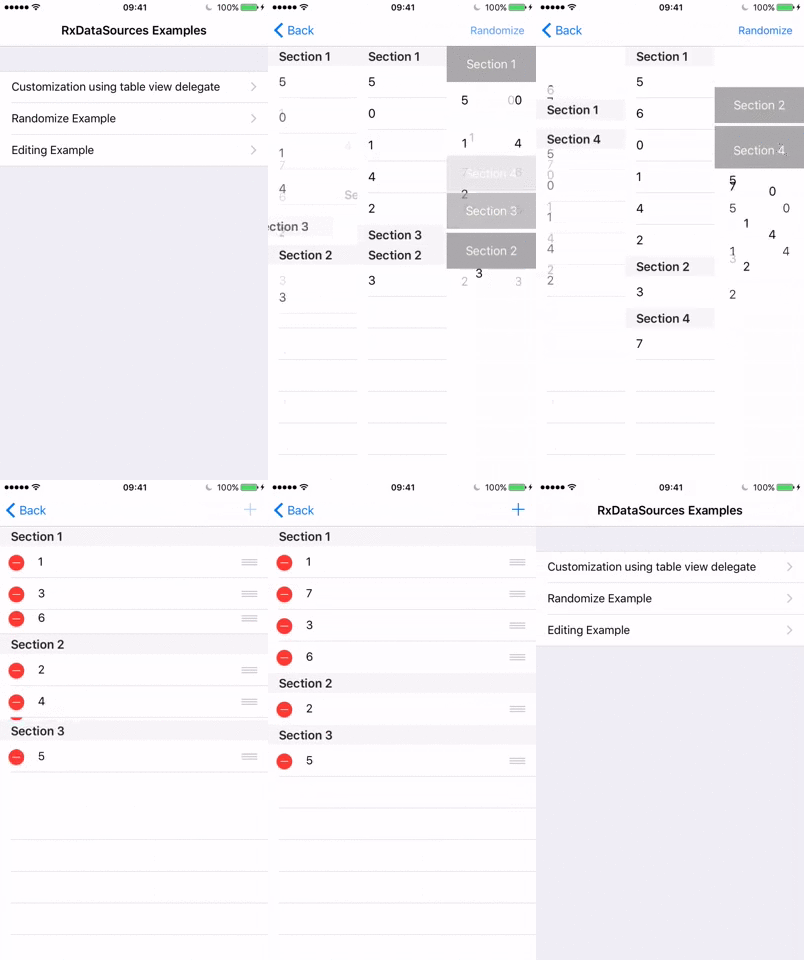
Snapshot của RxSwiftCommunity/RxDataSources: 3.1k★ · Swift · UI / UX. UITableView and UICollectionView Data Sources for RxSwift (sections, animated updates, editing ...)
Tóm tắt dựng từ metadata GitHub của chính dự án — chưa có bài review TopGit. Trang sẽ tự động cập nhật khi bài review đầy đủ được xuất bản.
VÌ SAO CHƯA CÓ REVIEW
TopGit viết bài đầy đủ cho repo có nhiều sao nhất và được yêu cầu nhiều nhất. Trang này là snapshot trong thời gian chờ — xem README gốc ở tab READ ME.
the algorithm has the assumption that all sections and items are unique so there is no ambiguity
in case there is ambiguity, fallbacks automagically on non animated refresh
it applies additional heuristics to send the least number of commands to sectioned view
even though the running time is linear, preferred number of sent commands is usually a lot less than linear
it is preferred (and possible) to cap the number of changes to some small number, and in case the number of changes grows towards linear, just do normal reload
Supports extending your item and section structures
just extend your item with IdentifiableType and Equatable, and your section with AnimatableSectionModelType
Supports all combinations of two level hierarchical animations for both sections and items
Section animations: Insert, Delete, Move
Item animations: Insert, Delete, Move, Reload (if old value is not equal to new value)
Configurable animation types for Insert, Reload and Delete (Automatic, Fade, ...)
Example app
Randomized stress tests (example app)
Supports editing out of the box (example app)
Works with UITableView and UICollectionView
Why
Writing table and collection view data sources is tedious. There is a large number of delegate methods that need to be implemented for the simplest case possible.
RxSwift helps alleviate some of the burden with a simple data binding mechanism:
Turn your data into an Observable sequence
Bind the data to the tableView/collectionView using one of:
let data = Observable<[String]>.just(["first element", "second element", "third element"])

data.bind(to: tableView.rx.items(cellIdentifier: "Cell")) { index, model, cell in
  cell.textLabel?.text = model
}
.disposed(by: disposeBag)
This works well with simple data sets but does not handle cases where you need to bind complex data sets with multiples sections, or when you need to perform animations when adding/modifying/deleting items.
These are precisely the use cases that RxDataSources helps solve.
With RxDataSources, it is super easy to just write
RxDataSources provides two special data source types that automatically take care of animating changes in the bound data source: RxTableViewSectionedAnimatedDataSource and RxCollectionViewSectionedAnimatedDataSource.
To use one of the two animated data sources, you must take a few extra steps on top of those outlined above:
SectionOfCustomData needs to conform to AnimatableSectionModelType
Your data model must conform to
IdentifiableType: The identity provided by the IdentifiableType protocol must be an immutable identifier representing an instance of the model. For example, in case of a Car model, you might want to use the car's plateNumber as its identity.
Equatable: Conforming to Equatable helps RxDataSources determine which cells have changed so it can animate only these specific cells. Meaning, changing any of the Car model's properties will trigger an animated reload of that cell.
Requirements
Xcode 10.2
Swift 5.0
For Swift 4.x version please use versions 3.0.0 ... 3.1.0
For Swift 3.x version please use versions 1.0 ... 2.0.2
For Swift 2.3 version please use versions 0.1 ... 0.9
Installation
We'll try to keep the API as stable as possible, but breaking API changes can occur.
If you are using Xcode 11 or higher, go to File / Swift Packages / Add Package Dependency... and enter package repository URL https://github.com/RxSwiftCommunity/RxDataSources.git, then follow the instructions.
RxSwiftCommunity/RxDataSources thuộc nhóm UI / UX trên TopGit, cùng 9 topic GitHub. Trang Trending và Topics liệt kê các repo cùng số sao và cùng ngôn ngữ để so sánh.
Đọc thêm về RxSwiftCommunity/RxDataSources ở đâu?
Trang TopGit này là một snapshot — tab "Readme" hiển thị nguyên văn README của repo (đã bỏ link, giữ ảnh). Repo GitHub ở github.com/RxSwiftCommunity/RxDataSources là nguồn chính thức.
RxSwiftCommunity/RxDataSources có bao nhiêu sao?
RxSwiftCommunity/RxDataSources có 3.1k sao GitHub — tải lại trang để xem số mới nhất, hoặc xem trực tiếp github.com/RxSwiftCommunity/RxDataSources. TopGit phản chiếu số sao của GitHub nhưng không cam kết đến từng phút.
RxSwiftCommunity/RxDataSources có phải mã nguồn mở không?
Có — RxSwiftCommunity/RxDataSources phát hành theo license MIT, nghĩa là mã nguồn mở để đọc, fork và (tùy license) tái sử dụng. Mã: github.com/RxSwiftCommunity/RxDataSources.
RxSwiftCommunity/RxDataSources còn đang phát triển không?
Commit gần nhất trên RxSwiftCommunity/RxDataSources là 2.1 năm trước (theo timestamp GitHub). Repo có 494 fork — một chỉ báo về mức độ quan tâm của cộng đồng.
RxSwiftCommunity/RxDataSources dùng license gì?
RxSwiftCommunity/RxDataSources phát hành theo license MIT. Nên mở file LICENSE trên GitHub để xác nhận — license metadata đôi khi lệch với thực tế dự án.
RxSwiftCommunity/RxDataSources là gì?
RxSwiftCommunity/RxDataSources (RxSwiftCommunity/RxDataSources) là dự án Swift trên GitHub. Theo mô tả gốc: UITableView and UICollectionView Data Sources for RxSwift (sections, animated updates, editing ...)
RxSwiftCommunity/RxDataSources viết bằng ngôn ngữ gì?
RxSwiftCommunity/RxDataSources chủ yếu viết bằng Swift. Trường "language" của GitHub dựa trên phần lớn byte ở nhánh mặc định.
Đọc đầy đủ README ở tab phía trên.
Vẫn đang phân vân về RxDataSources?
Một cú bấm sẽ gửi câu hỏi kèm trang này cho AI — xem AI nói gì về RxDataSources.
 /RxDataSources