Được TopGit lập chỉ mục từ metadata GitHub: sampotts/nativefier có 4 sao, viết chủ yếu bằng TypeScript. Make any web page a desktop application
Tóm tắt dựng từ metadata GitHub của chính dự án — chưa có bài review TopGit. Trang sẽ tự động cập nhật khi bài review đầy đủ được xuất bản.
VÌ SAO CHƯA CÓ REVIEW
TopGit viết bài đầy đủ cho repo có nhiều sao nhất và được yêu cầu nhiều nhất. Trang này là snapshot trong thời gian chờ — xem README gốc ở tab READ ME.
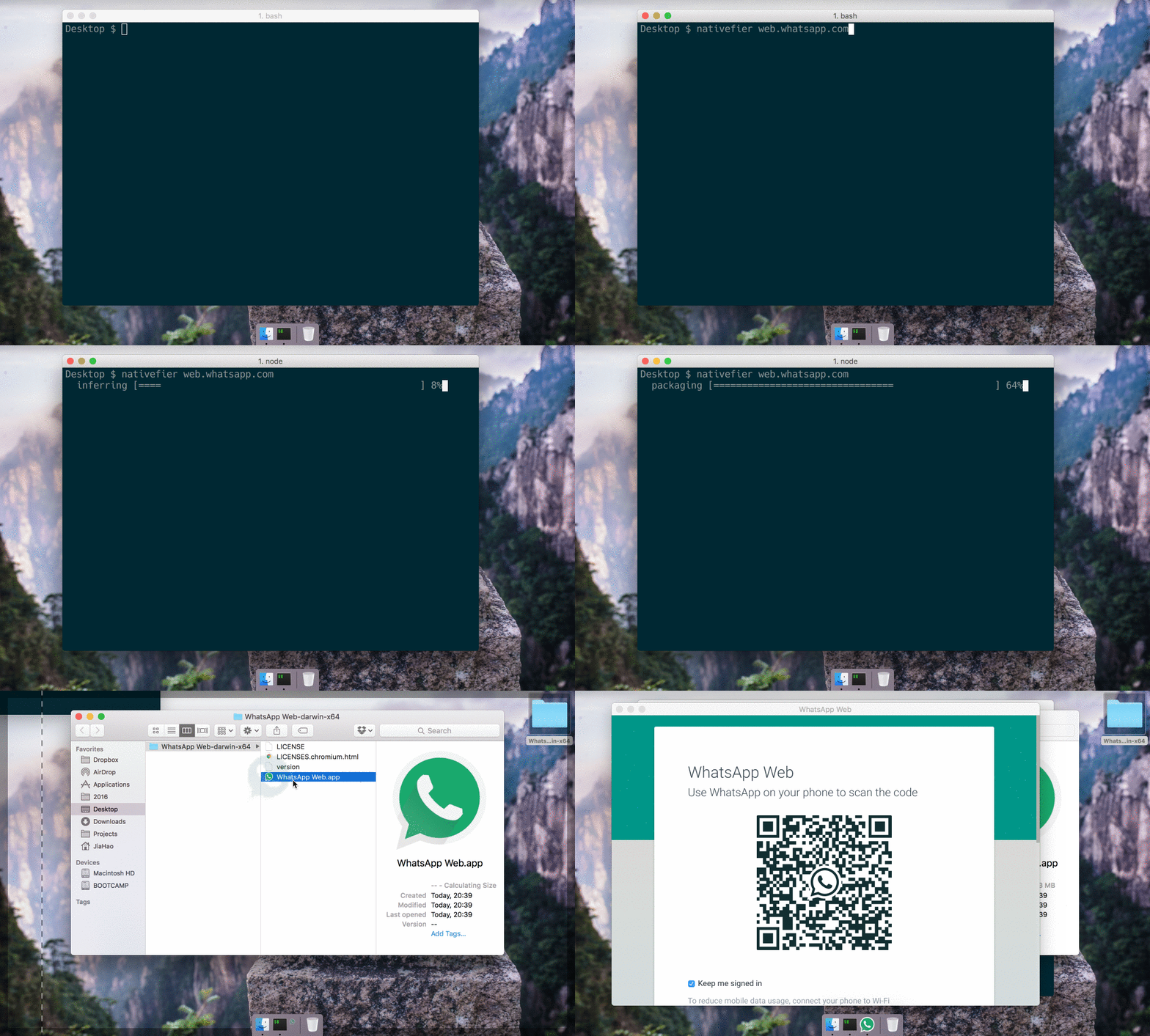
You want to make a native wrapper for WhatsApp Web (or any web page).
nativefier 'web.whatsapp.com'
You're done.
Introduction
Nativefier is a command-line tool to easily create a desktop app for any web site
with minimal configuration. Apps are wrapped by Electron
(which uses Chromium under the hood) in an OS executable (.app, .exe, etc)
for use on Windows, macOS and Linux.
I did this because I was tired of having to ⌘-tab or alt-tab to my browser and then search
through the numerous open tabs when I was using Facebook Messenger or
Whatsapp Web (HN thread). Nativefier features:
Automatically retrieval of app icon / name.
JavaScript and CSS injection.
Many more, see the API docs or nativefier --help
Installation
macOS 10.9+ / Windows / Linux
Node.js >= 12.9 and npm >= 6.9
Optional dependencies:
ImageMagick or GraphicsMagick to convert icons.
Make sure convert and identify or gm are in your system $PATH.
Wine to package Windows apps under non-Windows platforms.
Make sure wine is in your system $PATH.
Then, install Nativefier globally with npm install -g nativefier
Usage
To create a native desktop app for medium.com,
simply nativefier "medium.com"
Nativefier will try to determine the app name, and well as lots of other options.
If desired, these options can be overwritten. For example, to override the name,
nativefier --name 'My Medium App' 'medium.com'
Read the API documentation or run nativefier --help
to learn about other command-line flags usable to configure the packaged app.
To have high-resolution icons used by default for an app/domain, please
contribute to the icon repository!
Build Commands Catalog
For a list of build commands contributed by the nativefier community take a look at the CATALOG.md file
Usage with Docker
Nativefier is also usable from Docker.
Pull the latest stable image from Docker Hub: docker pull nativefier/nativefier
... or build the image yourself: docker build -t local/nativefier .
(in this case, replace nativefier/ in the below examples with local/)
By default, the command nativefier --help will be executed.
To build e.g. a Gmail nativefier app to a writable local ~/nativefier-apps,
docker run --rm -v ~/nativefier-apps:/target/ nativefier/nativefier https://mail.google.com/ /target/
You can pass Nativefier flags, and mount volumes to provide local files. For example, to use an icon,
docker run --rm -v ~/my-icons-folder/:/src -v $TARGET-PATH:/target nativefier/nativefier --icon /src/icon.png --name whatsApp -p linux -a x64 https://web.whatsapp.com/ /target/
Development
Help welcome on bugs and
feature requests.
Developer / build docs, API documentation,
Changelog.
License
MIT
Troubleshooting
Before submitting a question or bug report, please ensure you have read through these common issues and see if you can resolve the problem on your own. If you still encounter issues after trying these steps, or you don't see something similar to your issue listed, please submit a bug report.
Take a look a the Build Command Catalog as a working command for your application may already exist there.
I am trying to use Nativefier to build an app for a site that tells me I have an old/unsupported browser.
This issue comes up for sites that do not wish to support an app made with Nativefier or similar technologies (such as Google and WhatsApp)
Troubleshooting Steps
First try setting the --user-agent to something different. Try using the value you would get at [https://www.whatismybrowser.com/detect/what-is-my-user-agent] and use your current browser's user agent.
If this doesn't work, the site (such as WhatsApp) may be using a service worker to analyze the app and detect. You can disable the service worker cache by doing the following, which is a known fix for WhatsApp:
Create a javascript file containing the following snippet:
if ('serviceWorker' in navigator) {
    caches.keys().then(function (cacheNames) {
        cacheNames.forEach(function (cacheName) {
            caches.delete(cacheName);
        });
    });
}
Inject the javascript file into your app when generating it with the --inject argument.
I am trying to use Nativefier to build an app for a site with video, but the video won't play.
This issue comes up for certain sites like HBO Max and Udemy.
Troubleshooting Steps
First try using the --widevine argument when building the app. This uses the Castlabs version of Electron which allows the playback of DRM enabled video.
If this doesn't work, the site may require your app to be signed for --widevine to work. See the Castlabs documentation on using their application signing service to sign the application.
I am trying different options to Nativefier to experiment with, but noticing that sometimes things cache between rebuilds of my app.
This issue can occur because the cache of the app and the app itself are kept separate by default. You can try clearing out the cache.
Troubleshooting Steps
Delete your app's cache, which can be found under the folder <your_app_name_lower_case>-nativefier-<random_id> in your OS's app data directory
<your_app_name_lower_case> represents the lowercase version of your app's name. E.g., GitHub would be github.
<random_id> represents a randomly generated id for your app. Open the containing folder to see what it may be.
For Linux, the app data directory is $XDG_CONFIG_HOME or ~/.config
For MacOS, the app data directory is ~/Library/Application\ Support/
Trang TopGit này là một snapshot — tab "Readme" hiển thị nguyên văn README của repo (đã bỏ link, giữ ảnh). Repo GitHub ở github.com/sampotts/nativefier là nguồn chính thức.
sampotts/nativefier có phải mã nguồn mở không?
Có — sampotts/nativefier phát hành theo license MIT, nghĩa là mã nguồn mở để đọc, fork và (tùy license) tái sử dụng. Mã: github.com/sampotts/nativefier.
sampotts/nativefier có tag gì không?
Bản đồng bộ chưa ghi nhận topic GitHub nào cho sampotts/nativefier. GitHub topics hiển thị ở thanh bên phải trang repo — đó là nơi đáng kiểm tra nhất.
sampotts/nativefier có website riêng không?
TopGit chưa ghi nhận URL trang chủ cho sampotts/nativefier. Phần README ở tab phía trên thường có link demo, hoặc xem mô tả GitHub của repo.
sampotts/nativefier còn đang phát triển không?
Commit gần nhất trên sampotts/nativefier là 5.1 năm trước (theo timestamp GitHub). Repo có 0 fork — một chỉ báo về mức độ quan tâm của cộng đồng.
sampotts/nativefier dùng license gì?
sampotts/nativefier phát hành theo license MIT. Nên mở file LICENSE trên GitHub để xác nhận — license metadata đôi khi lệch với thực tế dự án.
Đọc đầy đủ README ở tab phía trên.
Vẫn đang phân vân về nativefier?
Một cú bấm sẽ gửi câu hỏi kèm trang này cho AI — xem AI nói gì về nativefier.
 /nativefier