Trên GitHub, santinic/audiblez đã đạt 8.9k sao, nhóm Backend, ngôn ngữ Python. Generate audiobooks from e-books
Tóm tắt dựng từ metadata GitHub của chính dự án — chưa có bài review TopGit. Trang sẽ tự động cập nhật khi bài review đầy đủ được xuất bản.
VÌ SAO CHƯA CÓ REVIEW
TopGit viết bài đầy đủ cho repo có nhiều sao nhất và được yêu cầu nhiều nhất. Trang này là snapshot trong thời gian chờ — xem README gốc ở tab READ ME.
v4 Now with Graphical interface, CUDA support, and many languages!
Audiblez generates .m4b audiobooks from regular .epub e-books,
using Kokoro's high-quality speech synthesis.
Kokoro-82M is a recently published text-to-speech model with just 82M params and very natural sounding output.
It's released under Apache licence and it was trained on < 100 hours of audio.
It currently supports these languages: 🇺🇸 🇬🇧 🇪🇸 🇫🇷 🇮🇳 🇮🇹 🇯🇵 🇧🇷 🇨🇳
On a Google Colab's T4 GPU via Cuda, it takes about 5 minutes to convert "Animal's Farm" by Orwell (which is about 160,000 characters) to audiobook, at a rate of about 600 characters per second.
On my M2 MacBook Pro, on CPU, it takes about 1 hour, at a rate of about 60 characters per second.
How to install the Command Line tool
If you have Python 3 on your computer, you can install it with pip.
You also need espeak-ng and ffmpeg installed on your machine:
brew install ffmpeg espeak-ng                       # on Mac 🍏
pip install audiblez
Then you can convert an .epub directly with:
audiblez book.epub -v af_sky
It will first create a bunch of book_chapter_1.wav, book_chapter_2.wav, etc. files in the same directory,
and at the end it will produce a book.m4b file with the whole book you can listen with VLC or any
audiobook player.
It will only produce the .m4b file if you have ffmpeg installed on your machine.
How to run the GUI
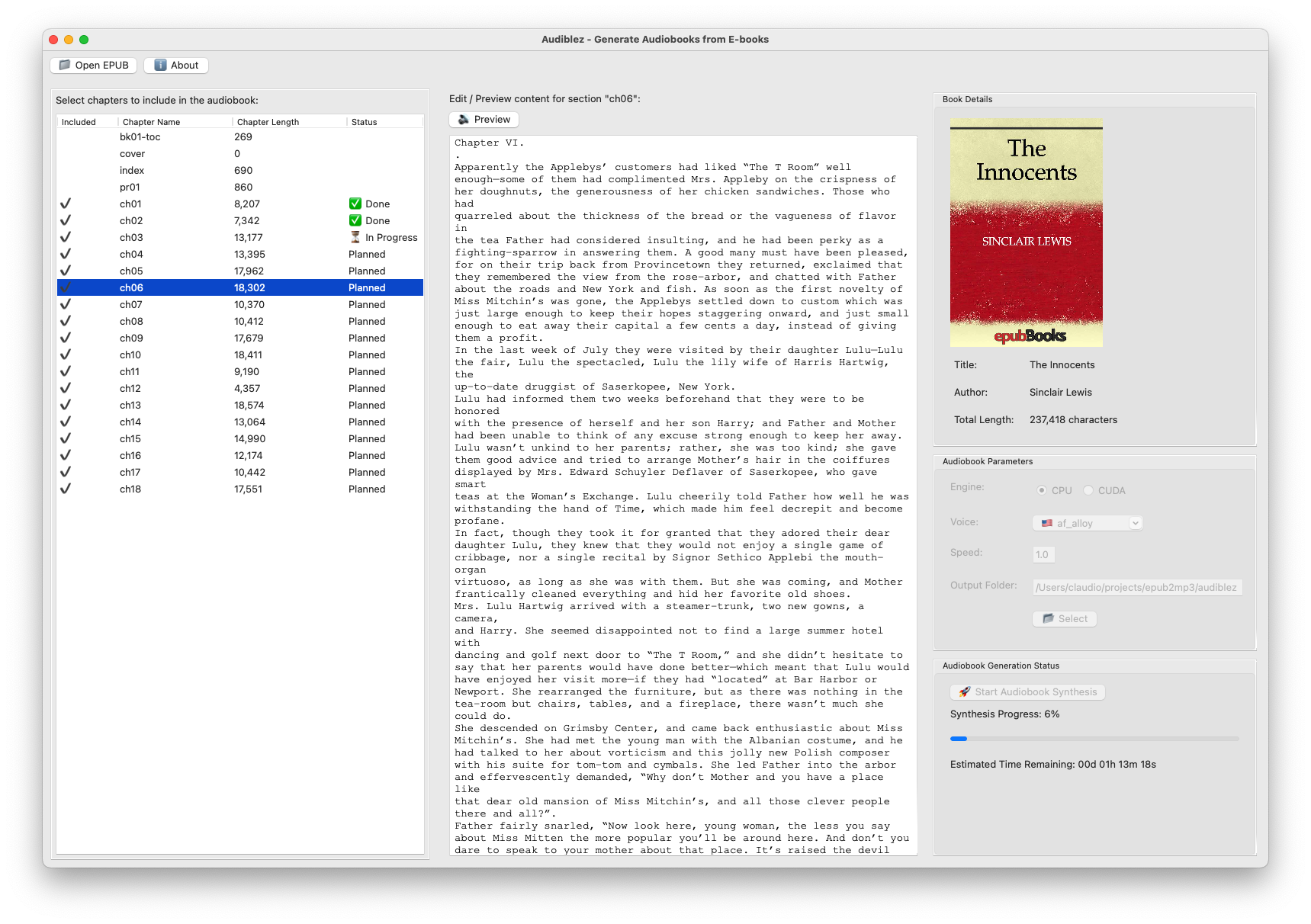
The GUI is a simple graphical interface to use audiblez.
You need some extra dependencies to run the GUI:
sudo apt install ffmpeg espeak-ng
sudo apt install libgtk-3-dev        # just for Ubuntu/Debian 🐧, Windows/Mac don't need this

pip install audiblez pillow wxpython
Then you can run the GUI with:
audiblez-ui
How to run on Windows
After many trials, on Windows we recommend to install audiblez in a Python venv:
Open a Windows terminal
Create anew folder: mkdir audiblez
Enter the folder: cd audiblez
Create a venv: python -m venv venv
Activate the venv: .\venv\Scripts\Activate.ps1
Install the dependencies: pip install audiblez pillow wxpython
Now you can run audiblez or audiblez-ui
For Cuda support, you need to install Pytorch accordingly: https://pytorch.org/get-started/locally/
Speed
By default the audio is generated using a normal speed, but you can make it up to twice slower or faster by specifying a speed argument between 0.5 to 2.0:
audiblez book.epub -v af_sky -s 1.5
Supported Voices
Use -v option to specify the voice to use. Available voices are listed here.
The first letter is the language code and the second is the gender of the speaker e.g. im_nicola is an italian male voice.
For more detaila about voice quality, check this document: Kokoro-82M voices
How to run on GPU
By default, audiblez runs on CPU. If you pass the option --cuda it will try to use the Cuda device via Torch.
Check out this example: Audiblez running on a Google Colab Notebook with Cuda .
We don't currently support Apple Silicon, as there is not yet a Kokoro implementation in MLX. As soon as it will be available, we will support it.
Manually pick chapters to convert
Sometimes you want to manually select which chapters/sections in the e-book to read out loud.
To do so, you can use --pick to interactively choose the chapters to convert (without running the GUI).
Help page
For all the options available, you can check the help page audiblez --help:
usage: audiblez [-h] [-v VOICE] [-p] [-s SPEED] [-c] [-o FOLDER] epub_file_path

positional arguments:
  epub_file_path        Path to the epub file

options:
  -h, --help            show this help message and exit
  -v VOICE, --voice VOICE
                        Choose narrating voice: a, b, e, f, h, i, j, p, z
  -p, --pick            Interactively select which chapters to read in the audiobook
  -s SPEED, --speed SPEED
                        Set speed from 0.5 to 2.0
  -c, --cuda            Use GPU via Cuda in Torch if available
  -o FOLDER, --output FOLDER
                        Output folder for the audiobook and temporary files

example:
  audiblez book.epub -l en-us -v af_sky

to use the GUI, run:
  audiblez-ui
Author
by Claudio Santini in 2025, distributed under MIT licence.
Related Article: Audiblez v4: Generate Audiobooks from E-books
santinic/audiblez thuộc nhóm Backend trên TopGit, cùng 5 topic GitHub. Trang Trending và Topics liệt kê các repo cùng số sao và cùng ngôn ngữ để so sánh.
Đọc thêm về santinic/audiblez ở đâu?
Trang TopGit này là một snapshot — tab "Readme" hiển thị nguyên văn README của repo (đã bỏ link, giữ ảnh). Repo GitHub ở github.com/santinic/audiblez là nguồn chính thức.
santinic/audiblez có phải mã nguồn mở không?
Có — santinic/audiblez phát hành theo license MIT, nghĩa là mã nguồn mở để đọc, fork và (tùy license) tái sử dụng. Mã: github.com/santinic/audiblez.
santinic/audiblez có website riêng không?
TopGit chưa ghi nhận URL trang chủ cho santinic/audiblez. Phần README ở tab phía trên thường có link demo, hoặc xem mô tả GitHub của repo.
santinic/audiblez dùng license gì?
santinic/audiblez phát hành theo license MIT. Nên mở file LICENSE trên GitHub để xác nhận — license metadata đôi khi lệch với thực tế dự án.
santinic/audiblez là gì?
santinic/audiblez (santinic/audiblez) là dự án Python trên GitHub. Theo mô tả gốc: Generate audiobooks from e-books
Vì sao santinic/audiblez được xếp vào nhóm Backend?
TopGit xếp santinic/audiblez vào nhóm Backend dựa trên GitHub topics và mô tả của repo (gắn thẻ: "audiobooks", "epub", "kokoro"). Việc phân loại dựa trên metadata thật của repo, không phải đoán theo cảm tính biên tập.
Đọc đầy đủ README ở tab phía trên.
Chưa chắc audiblez có hợp với bạn?
Để ChatGPT, Claude hoặc Perplexity tìm hiểu giúp — bấm bên dưới và xem AI nói gì về audiblez.

 /audiblez