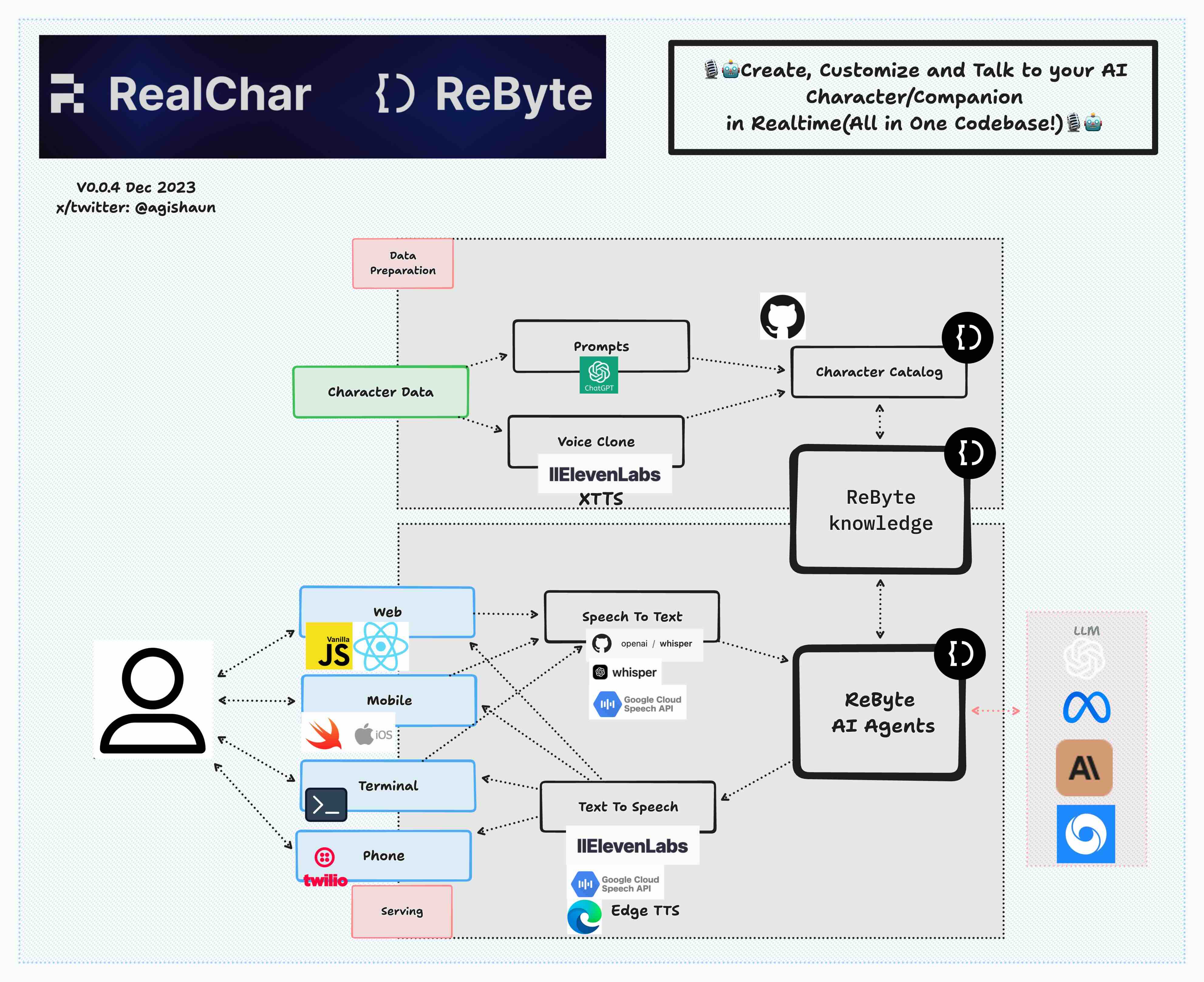
Shaunwei/RealChar là dự án JavaScript với 6.2k sao. 🎙️🤖Create, Customize and Talk to your AI Character/Companion in Realtime (All in One Codebase!). Have a natural seamless conversation with AI everywhere (mobile, web and terminal) using LLM OpenAI GPT3.5/4, Anthropic Claude2, Chroma Vector DB, Whisper Speech2Text, ElevenLabs Text2Speech🎙️🤖
Tóm tắt dựng từ metadata GitHub của chính dự án — chưa có bài review TopGit. Trang sẽ tự động cập nhật khi bài review đầy đủ được xuất bản.
VÌ SAO CHƯA CÓ REVIEW
TopGit viết bài đầy đủ cho repo có nhiều sao nhất và được yêu cầu nhiều nhất. Trang này là snapshot trong thời gian chờ — xem README gốc ở tab READ ME.
Demo settings: Web, GPT4, ElevenLabs with voice clone, Chroma, Google Speech to Text
🎯 Key Features
Easy to use: No coding required to create your own AI character.
Customizable: You can customize your AI character's personality, background, and even voice
Realtime: Talk to or message your AI character in realtime
Multi-Platform: You can talk to your AI character on web, terminal and mobile(Yes. we open source our mobile app)
Most up-to-date AI: We use the most up-to-date AI technology to power your AI character, including OpenAI, Anthropic Claude 2, Chroma, Whisper, ElevenLabs, etc.
Modular: You can easily swap out different modules to customize your flow. Less opinionated, more flexible. Great project to start your AI Engineering journey.
🔬 Tech stack
✅Web: React JS, Vanilla JS, WebSockets
✅Mobile: Swift, WebSockets
✅Backend: FastAPI, SQLite, Docker
✅Data Ingestion: LlamaIndex, Chroma
✅LLM Orchestration: LangChain, Chroma
✅LLM: ReByte, OpenAI GPT3.5/4, Anthropic Claude 2, Anyscale Llama2
✅Speech to Text: Local WhisperX, Local Whisper, OpenAI Whisper API, Google Speech to Text
✅Text to Speech: ElevenLabs, Edge TTS, Google Text to Speech
✅Voice Clone: ElevenLabs
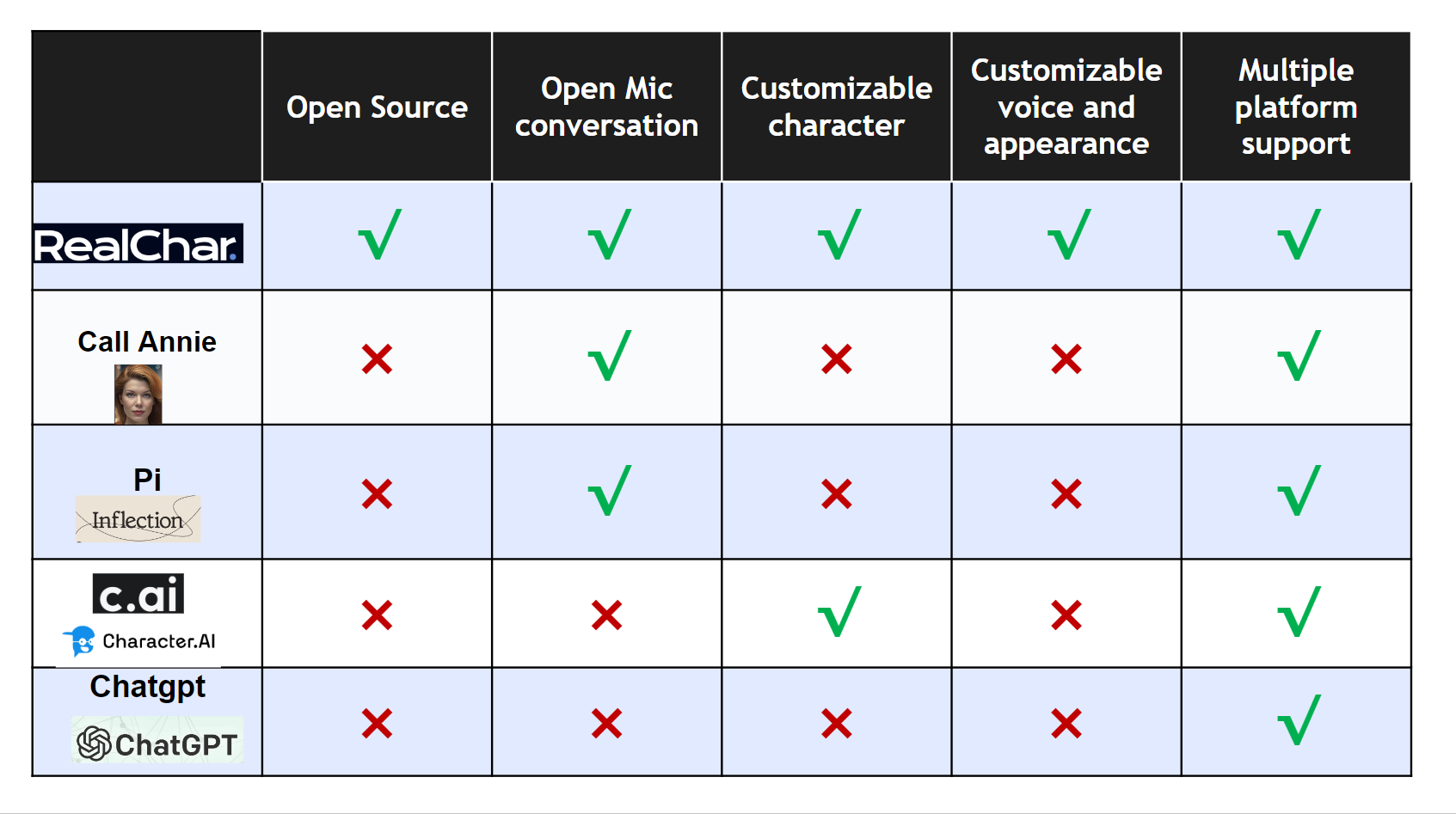
📚 Comparison with existing products
📀 Quick Start - Installation via Docker
Create a new .env file
cp .env.example .env
Paste your API keys in .env file. A single ReByte or OpenAI API key is enough to get started.
You can also configure other API keys if you have them.
Start the app with docker-compose.yaml
docker compose up
If you have issues with docker (especially on a non-Linux machine), please refer to https://docs.docker.com/get-docker/ (installation) and https://docs.docker.com/desktop/troubleshoot/overview/ (troubleshooting).
Open http://localhost:3000 and enjoy the app!
💿 Developers - Installation via Python
Step 1. Clone the repo
git clone https://github.com/Shaunwei/RealChar.git && cd RealChar
Step 2. Install requirements
Install portaudio and ffmpeg for audio
# for mac
brew install portaudio
brew install ffmpeg
Step 3. Create an empty sqlite database if you have not done so before
sqlite3 test.db "VACUUM;"
Step 4. Run db upgrade
alembic upgrade head
This ensures your database schema is up to date. Please run this after every time you pull the main branch.
Step 5. Setup .env:
cp .env.example .env
Update API keys and configs following the instructions in the .env file.
Note that some features require a working login system. You can get your own OAuth2 login for free with Firebase if needed. To enable, set USE_AUTH to true and fill in the FIREBASE_CONFIG_PATH field. Also fill in Firebase configs in client/next-web/.env.
Step 6. Run backend server with cli.py or use uvicorn directly
python cli.py run-uvicorn
# or
uvicorn realtime_ai_character.main:app
Adjust .env according to the instruction in client/next-web/README.md.
Start the frontend server:
python cli.py next-web-dev
# or
cd client/next-web && npm run dev
# or
cd client/next-web && npm run build && npm run start
After running these commands, a local development server will start, and your default web browser will open a new tab/window pointing to this server (usually http://localhost:3000).
(Optional) Terminal client:
Run the following command in your terminal
python client/cli.py
(Optional) mobile client:
open client/mobile/ios/rac/rac.xcodeproj/project.pbxproj in Xcode and run the app
Step 8. Select one character to talk to, then start talking. Use GPT4 for better conversation and Wear headphone for best audio(avoid echo)
Note if you want to remotely connect to a RealChar server, SSL set up is required to establish the audio connection.
👨🚀 API Keys and Configurations
1. LLMs
1.1 ReByte API Key
To get your ReByte API key, follow these steps:
Go to the ReByte website and sign up for an account if you haven't already.
Once you're logged in, go to Settings > API Keys.
Generate a new API key by clicking on the "Generate" button.
1.2 (Optional) OpenAI API Token
👇click me
This application utilizes the OpenAI API to access its powerful language model capabilities. In order to use the OpenAI API, you will need to obtain an API token.
To get your OpenAI API token, follow these steps:
Go to the OpenAI website and sign up for an account if you haven't already.
Once you're logged in, navigate to the API keys page.
Generate a new API key by clicking on the "Create API Key" button.
(Optional) To use Azure OpenAI API instead, refer to the following section:
Set API type in your .env file:
OPENAI_API_TYPE=azure
If you want to use the earlier version 2023-03-15-preview:
OPENAI_API_VERSION=2023-03-15-preview
To set the base URL for your Azure OpenAI resource.
You can find this in the Azure portal under your Azure OpenAI resource.
You'll also need to install torch and torchaudio to use Twilio.
Now, you can receive phone calls from your characters by typing /call YOURNUMBER in the text box when chatting with your character.
Note: only US phone numbers and Elevenlabs voiced characters are supported at the moment.
🆕! Anyscale and LangSmith integration
👇click me
Anyscale
You can now use Anyscale Endpoint to serve Llama-2 models in your RealChar easily! Simply register an account with Anyscale Endpoint. Once you get the API key, set this environment variable in your .env file:
ANYSCALE_ENDPOINT_API_KEY=<your API Key>
By default, we show the largest servable Llama-2 model (70B) in the Web UI. You can change the model name (meta-llama/Llama-2-70b-chat-hf) to other models, e.g. 13b or 7b versions.
LangSmith
If you have access to LangSmith, you can edit these environment variables to enable:
LANGCHAIN_TRACING_V2=false # default off
LANGCHAIN_ENDPOINT=https://api.smith.langchain.com
LANGCHAIN_API_KEY=YOUR_LANGCHAIN_API_KEY
LANGCHAIN_PROJECT=YOUR_LANGCHAIN_PROJECT
And it should work out of the box.
📍 Roadmap
Launch v0.0.4
Create a new character via web UI
Lower conversation latency
Support Twilio
Support ReByte
Persistent conversation*
Session management*
Support RAG*
Support Agents/GPTs*
Add additional TTS service*
$*$ These features are powered by ReByte platform.
Trang TopGit này là một snapshot — tab "Readme" hiển thị nguyên văn README của repo (đã bỏ link, giữ ảnh). Repo GitHub ở github.com/Shaunwei/RealChar là nguồn chính thức.
Shaunwei/RealChar có phải mã nguồn mở không?
Có — Shaunwei/RealChar phát hành theo license MIT, nghĩa là mã nguồn mở để đọc, fork và (tùy license) tái sử dụng. Mã: github.com/Shaunwei/RealChar.
Shaunwei/RealChar có tag gì không?
Bản đồng bộ chưa ghi nhận topic GitHub nào cho Shaunwei/RealChar. GitHub topics hiển thị ở thanh bên phải trang repo — đó là nơi đáng kiểm tra nhất.
Shaunwei/RealChar có trang demo không?
Dự án có trang chủ ở https://RealChar.ai/. Tab "Readme" ở trang này thường có ảnh chụp và hướng dẫn bắt đầu nhanh.
Shaunwei/RealChar còn đang phát triển không?
Commit gần nhất trên Shaunwei/RealChar là 10 tháng trước (theo timestamp GitHub). Repo có 770 fork — một chỉ báo về mức độ quan tâm của cộng đồng.
Shaunwei/RealChar dùng license gì?
Shaunwei/RealChar phát hành theo license MIT. Nên mở file LICENSE trên GitHub để xác nhận — license metadata đôi khi lệch với thực tế dự án.
Đọc đầy đủ README ở tab phía trên.
Chưa chắc RealChar có hợp với bạn?
Để ChatGPT, Claude hoặc Perplexity tìm hiểu giúp — bấm bên dưới và xem AI nói gì về RealChar.

 /RealChar
 RealChar. - Your Realtime AI Character